Skip to content

JAlbum42.1 for macOS

Free photo editor and album builder for Mac

JAlbum AB

Free · Proprietary

Download 42.1 · 282.6 MB
  • Age rating
    3+
  • Category
    Photo Utilities
  • Developer
    JAlbum AB
  • Languages
    8
    Chinese
  • Size
    282.6
    MB

Mac

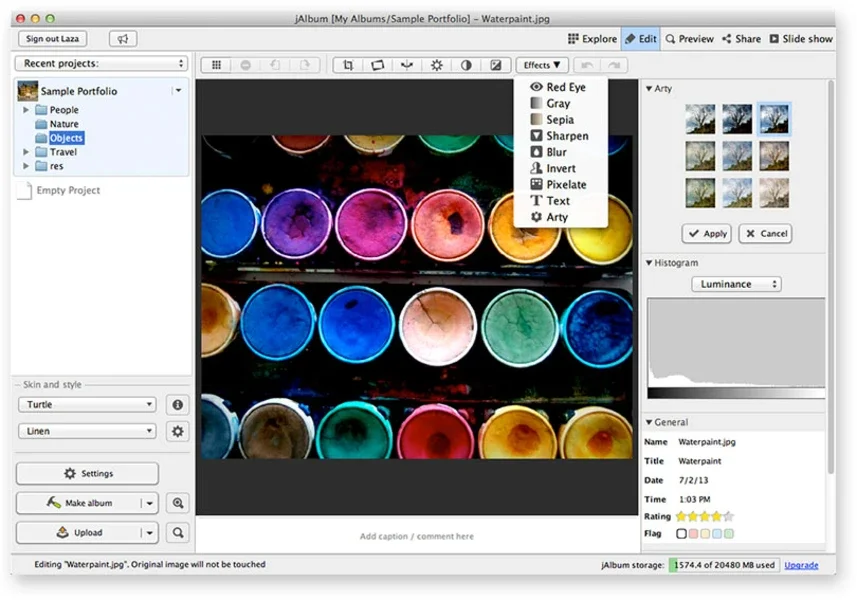
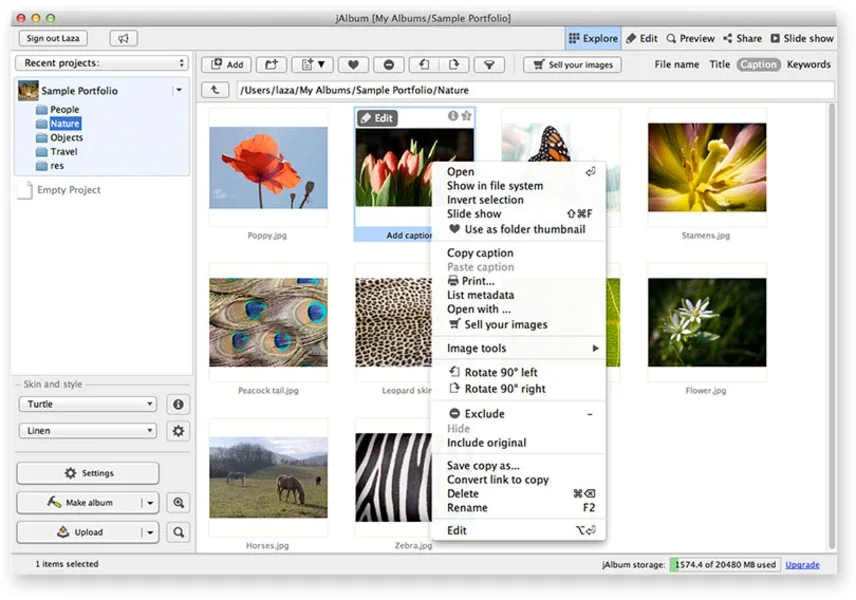
JAlbum is a free tool for editing photos and preparing albums. You browse folders for pictures, select the ones you want, and build an album from them; that is the program's strongest feature and it is easy to do. The interface is somewhat crowded but helps you find your way through folders. It includes editing tools such as red-eye removal, blurring, and sharpening.

Albums and publishing

Several built-in styles are included for starting an album, and more skins can be downloaded from the developer's website. A finished album can be uploaded to a JAlbum account or to another server using login details.

  • The Mac version is signed with a code certificate to avoid launch warnings on OS X Mountain Lion.
  • Several bug fixes were made so JAlbum runs properly on Java 1.7 for Mac.
  • A new "jAlbum core update" external tool was added to simplify ad-hoc patches.

[Release notes coming soon]

Version 42.1

Verify the file

Compare the SHA-256 of the file you downloaded with the value below. Files exactly as the publisher released them.

  • jalbum-42-1.dmg

    42.1 · DMG · 282.6 MB

    SHA-256

    63eb802becea392b358300a6eebb00b9c68da33f121728bea9a6833b240e67d8 Check on VirusTotal Get

Files exactly as the publisher released them.

Information

Seller
JAlbum AB
Size
282.6 MB
Compatibility
macOS 10.4 Tiger or later
Languages
Chinese and 7 more
Age rating
3+
License
Proprietary
Price
Free

Version history

  • [Release notes coming soon]

    42.1
  • [Release notes coming soon]

    42.0
  • [Release notes coming soon]

    41.0.0
  • [Release notes coming soon]

    40.0.2
  • [Release notes coming soon]

    39.10
  • [Release notes coming soon]

    39.9
  • [Release notes coming soon]

    39.8
  • [Release notes coming soon]

    39.7
  • [Release notes coming soon]

    39.6
  • [Release notes coming soon]

    39.5
  • [Release notes coming soon]

    39.4.1
  • [Release notes coming soon]

    39.3
  • [Release notes coming soon]

    39.2
  • [Release notes coming soon]

    39.1
  • [Release notes coming soon]

    39.0
  • [Release notes coming soon]

    38.2
  • [Release notes coming soon]

    38.1
  • [Release notes coming soon]

    38.0
  • [Release notes coming soon]

    37.7
  • [Release notes coming soon]

    37.6
  • [Release notes coming soon]

    37.5
  • [Release notes coming soon]

    37.5
  • [Release notes coming soon]

    37.4
  • [Release notes coming soon]

    37.3
  • [Release notes coming soon]

    37.2
  • [Release notes coming soon]

    37.1
  • [Release notes coming soon]

    37.0.6
  • [Release notes coming soon]

    37
  • [Release notes coming soon]

    36.1
  • [Release notes coming soon]

    36
  • [Release notes coming soon]

    35.1.3
  • [Release notes coming soon]

    35.1
  • [Release notes coming soon]

    35
  • [Release notes coming soon]

    34.3
  • [Release notes coming soon]

    34.2
  • [Release notes coming soon]

    34.1
  • [Release notes coming soon]

    34
  • [Release notes coming soon]

    33.3
  • [Release notes coming soon]

    33.1
  • [Release notes coming soon]

    33
  • [Release notes coming soon]

    32.1
  • [Release notes coming soon]

    31.1
  • [Release notes coming soon]

    31.0
  • [Release notes coming soon]

    30.3
  • [Release notes coming soon]

    30.1
  • [Release notes coming soon]

    30.0
  • [Release notes coming soon]

    29.3
  • [Release notes coming soon]

    29.2
  • [Release notes coming soon]

    29.1
  • [Release notes coming soon]

    28.1

All versions ›