Skip to content

Pandoc3.12 for macOS

Command-line Haskell library for converting files between formats

John MacFarlane

Free · GPL 2.0

Download 3.12 · 25.2 MB
  • Age rating
    0+
    All ages
  • Category
    Converters
  • Developer
    John MacFarlane
  • Languages
    1
    English
  • Size
    25.2
    MB

Mac

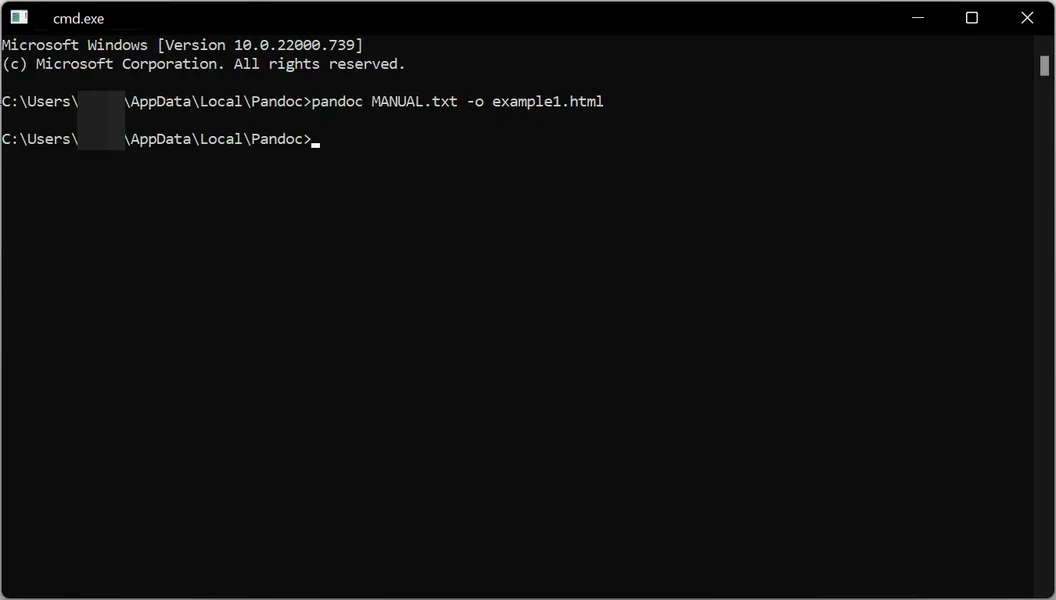
Pandoc runs from the command line, so you type a command rather than click through menus. It is a Haskell library for converting files between formats. To turn a .txt file into .html, for example, you run pandoc MANUAL.txt -o example1.html.

How conversion works

Readers parse the source text into a native document representation, and that text is then converted into the target format. Structure is preserved on the way, though things like formatting or margins may change. Large and complex tables may change too.

Input formats include markdown, docx, html, latex, epub, odt, rst, csv, json, and native. Output formats include docx, odt, pdf, pptx, epub, html, latex, rtf, plain, and json. It is free, runs on mac, and is developed by John MacFarlane.

[Release notes coming soon]

Version 3.12

Verify the file

Compare the SHA-256 of the file you downloaded with the value below. Files exactly as the publisher released them.

  • pandoc-3-12.zip

    3.12 · ZIP · 25.2 MB

    SHA-256

    18577f9460c3dc5d2651ad3bab37d513bc2034a5a777fbe18fa0a5acf2e936ea Check on VirusTotal Get

Files exactly as the publisher released them.

Information

Size
25.2 MB
Category
Converters
Compatibility
macOS 10.4 Tiger or later
Languages
English
Age rating
All ages
License
GPL 2.0
Price
Free

Version history

  • [Release notes coming soon]

    3.12
  • [Release notes coming soon]

    3.11
  • [Release notes coming soon]

    3.11
  • [Release notes coming soon]

    3.10.2
  • [Release notes coming soon]

    3.10.1
  • [Release notes coming soon]

    3.8.3
  • [Release notes coming soon]

    3.8.2.1
  • [Release notes coming soon]

    3.8.2
  • [Release notes coming soon]

    3.8.1
  • [Release notes coming soon]

    3.8
  • [Release notes coming soon]

    3.7
  • [Release notes coming soon]

    3.6.4
  • [Release notes coming soon]

    3.6.3
  • [Release notes coming soon]

    3.6.1
  • [Release notes coming soon]

    3.6
  • [Release notes coming soon]

    3.5
  • [Release notes coming soon]

    3.3
  • [Release notes coming soon]

    3.2.1
  • [Release notes coming soon]

    3.2
  • [Release notes coming soon]

    3.1.13
  • [Release notes coming soon]

    3.1.12.3
  • [Release notes coming soon]

    3.1.12.2
  • [Release notes coming soon]

    3.1.11
  • [Release notes coming soon]

    3.1.9
  • [Release notes coming soon]

    3.1.8
  • [Release notes coming soon]

    3.1.7
  • [Release notes coming soon]

    3.1.6.2
  • [Release notes coming soon]

    3.1.6.1
  • [Release notes coming soon]

    3.1.6
  • [Release notes coming soon]

    3.1.4
  • [Release notes coming soon]

    3.1.1
  • [Release notes coming soon]

    3.1
  • [Release notes coming soon]

    2.19
  • [Release notes coming soon]

    2.18
  • [Release notes coming soon]

    3.8.3
  • [Release notes coming soon]

    3.10.0
  • [Release notes coming soon]

    3.10.1

All versions ›