TuneUp2.4.2 for macOS
Automates metadata fixes and album art inside iTunes
Free · Proprietary
You are on Windows — this is the macOS version. See the Windows version
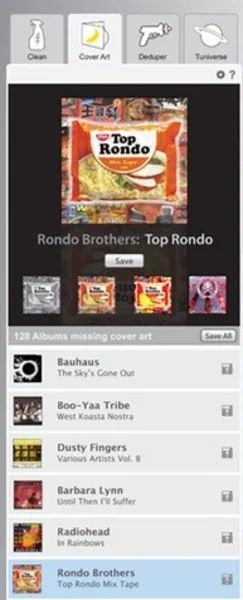
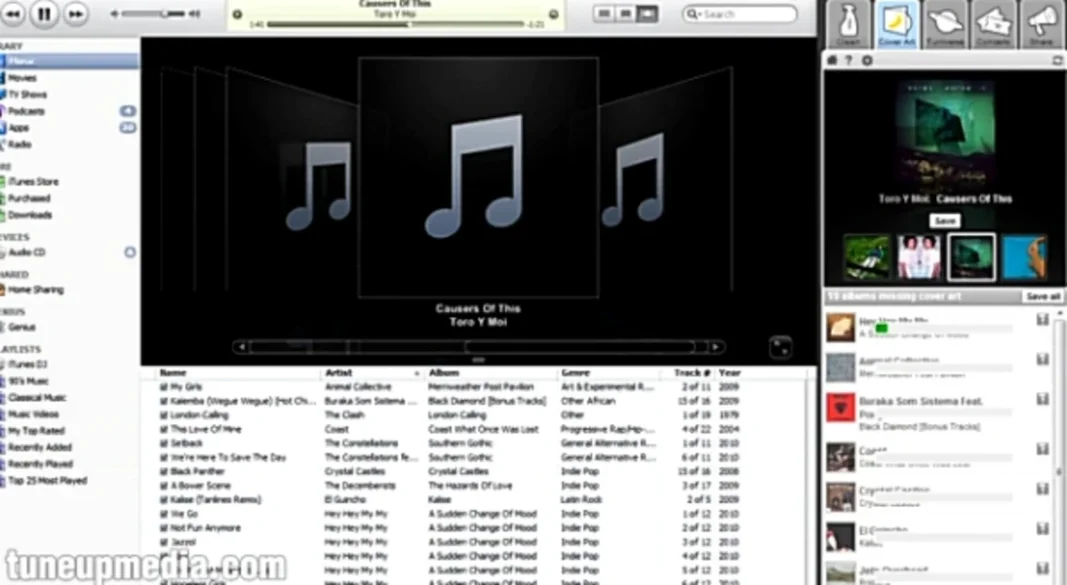
TuneUp runs alongside iTunes and repairs messy metadata, fills in missing album art, and finds duplicate recordings. You drag folders or selected tracks into a sidebar and work from there; the tool queues many albums at once, and you review the matches it suggests before anything is changed.
- Identifies tracks by acoustic fingerprinting, not by filename or tag text. Waveform characteristics are compared against the Gracenote Global Media Database.
- Supplies artist, album, and genre metadata, and can resolve files labeled "Track 01" or "Unknown Artist" by their content.
- Has an audio-based DeDuper that spots the same recording twice even when the filenames and tags don't line up.
- Shows artist content through a Tuniverse sidebar.
Everything happens in iTunes, so there's no exporting to another program; after you approve a match, you make the tag corrections or mark the duplicate for deletion yourself. TuneUp was built for collectors, DJs, and people with large iTunes libraries, and it reduces false matches caused by tags that were edited or never consistent. It needs iTunes 10.7 or later, works up to macOS Mojave, and won't run on Catalina or newer. The program depends on external servers, and several users report connectivity problems that keep the Clean and Cover Art features from working reliably.
[Release notes coming soon]
Verify the file
Compare the SHA-256 of the file you downloaded with the value below. Files exactly as the publisher released them.
-
2.4.2
2.4.2 · DMG · 24.6 MB
SHA-256
d6915fcb020fcde69f7fac05aa834a2ad797d696ed47416ced4e288bf91ad4d6Check on VirusTotal Get
Files exactly as the publisher released them.
Information
- Seller
- TuneUp Media
- Size
- 24.6 MB
- Category
- iPod & iTunes
- Compatibility
macOS
- Age rating
- All ages
- License
- Proprietary
- Price
- Free
- Platform
- Also available on Windows