CD Reader Watch Face
RazorSharp Design Studio- Classificação LivreClassificação etária
- PersonalizaçãoCategoria
- 11/11/2026Atualizado
- R$ 11,99Preço
Leva à página oficial de com.rzrdesign.cdreader na Google Play. Última verificação em 19/11/2026.
Sobre este app
Tradução automática do Google. Idioma original: Inglês (Estados Unidos).
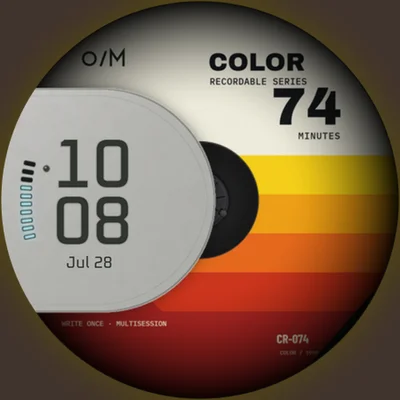
Seu jogo, CD ou foto favoritos em um leitor de CD de console retrô personalizável!
Um mostrador de relógio com um estilo animado de leitor de CD. Altamente personalizável, com diferentes capas, predefinições e imagem personalizada do seu dispositivo! A animação é incrivelmente fluida. Confie em mim.
Este é um mostrador de relógio nativo e independente para Wear OS. Isso significa que ele pode ser instalado em muitos smartwatches com este sistema operacional (como Samsung, Mobvoi Ticwatch, Fossil, Oppo, os mais recentes Xiaomi e outros).
Ele é totalmente feito à mão, para ser único.
O mostrador inclui:
◉ 30 esquemas de cores
◉ Modo vidro
◉ Muitas opções de personalização
◉ Suporte para formatos de 12/24 horas
◉ Formatação automática de data
◉ Escolha seu CD favorito!
◉ Rotação por minuto (RPM) variável dependendo do status do relógio
◉ Reage à bateria fraca, notificações e carregamento
◉ 3 complicações personalizáveis!
◉ Aplicativo complementar fácil de usar (e desinstalável)
A instalação é simples, não se preocupe!
Aqui está o procedimento e algumas perguntas e respostas rápidas:
◉ Instale este aplicativo no seu smartphone
◉ Abra-o e conecte seu smartwatch Wear OS ao seu dispositivo
◉ Se o relógio estiver conectado, você poderá tocar no botão "visualizar e instalar no smartwatch". (Caso contrário, consulte as perguntas e respostas abaixo)
◉ Verifique seu relógio. Você deverá ver meu mostrador e o botão de instalação (se vir o preço, consulte as perguntas e respostas abaixo).
◉ Instale-o em seu smartwatch.
◉ Pressione e segure o mostrador atual.
◉ Deslize para a esquerda até ver um botão "+", toque nele.
◉ Procure o novo mostrador e toque nele.
◉ Pronto. Se quiser, você pode desinstalar o aplicativo complementar agora!
Perguntas e Respostas
P - Estou sendo cobrado duas vezes! / O relógio está me pedindo para pagar novamente / Você é um [adjetivo pejorativo]
R - Mantenha a calma. Isso acontece quando a conta que você está usando no smartphone é diferente da conta usada no smartwatch. Você precisa usar a mesma conta (caso contrário, o Google não tem como saber que você já comprou o mostrador).
P - Não consigo pressionar o botão no aplicativo complementar, mas meu smartwatch está conectado. Por quê?
R - Muito provavelmente, você está usando um dispositivo incompatível, como um smartwatch Samsung antigo ou qualquer outro smartwatch/smartband que não seja Wear OS. Você pode verificar facilmente no Google se o seu dispositivo executa o Wear OS antes de instalar qualquer mostrador de relógio. Se você tem certeza de que possui um dispositivo Wear OS e ainda assim não consegue pressionar o botão, abra a Play Store no seu relógio e procure meu mostrador de relógio manualmente!
P - Tenho um dispositivo Wear OS, mas não está funcionando! Vou deixar uma avaliação de uma estrela 😏
R - Pare por aí! Definitivamente, há um problema do seu lado ao seguir o procedimento. Por favor, envie-me um e-mail (geralmente respondo nos fins de semana) e não me prejudique com uma avaliação ruim e enganosa!
P - O [nome de um recurso] não está funcionando!
A - Tente definir outro mostrador de relógio e depois defina o meu novamente, ou tente conceder as permissões manualmente (no relógio, obviamente). Se ainda não funcionar, há um prático "botão de e-mail" no aplicativo complementar!
Se precisar de ajuda ou tiver uma sugestão, sinta-se à vontade para me enviar um e-mail. Farei o possível para ajudar.
Normalmente respondo durante o fim de semana, pois sou apenas uma pessoa (não uma empresa) e trabalho, então tenha paciência!
Este aplicativo é atualizado e recebe suporte para corrigir erros e adicionar novos recursos. O design geral não mudará, mas certamente será aprimorado com o tempo!
Sei que o preço não é o mais baixo, mas trabalhei muitas horas em cada mostrador de relógio e o preço também inclui o suporte e as atualizações. E garanto que investirei todos os meus ganhos em coisas úteis e para ajudar minha família. Ah, e obrigado por ler a descrição completa! Ninguém faz isso!
Introdução
Este é um mostrador de relógio nativo e independente para Wear OS. Isso significa que ele pode ser instalado em muitos smartwatches com este sistema operacional (como Samsung, Mobvoi Ticwatch, Fossil, Oppo, os mais recentes Xiaomi e outros).
Ele é totalmente feito à mão, para ser único.
Recursos
O mostrador inclui:
◉ 30 esquemas de cores
◉ Modo vidro
◉ Muitas opções de personalização
◉ Suporte para formatos de 12/24 horas
◉ Formatação automática de data
◉ Escolha seu CD favorito!
◉ Rotação por minuto (RPM) variável dependendo do status do relógio
◉ Reage à bateria fraca, notificações e carregamento
◉ 3 complicações personalizáveis!
◉ Aplicativo complementar fácil de usar (e desinstalável)
Instalação
A instalação é simples, não se preocupe!
Aqui está o procedimento e algumas perguntas e respostas rápidas:
◉ Instale este aplicativo no seu smartphone
◉ Abra-o e conecte seu smartwatch Wear OS ao seu dispositivo
◉ Se o relógio estiver conectado, você poderá tocar no botão "visualizar e instalar no smartwatch". (Caso contrário, consulte as perguntas e respostas abaixo)
◉ Verifique seu relógio. Você deverá ver meu mostrador e o botão de instalação (se vir o preço, consulte as perguntas e respostas abaixo).
◉ Instale-o em seu smartwatch.
◉ Pressione e segure o mostrador atual.
◉ Deslize para a esquerda até ver um botão "+", toque nele.
◉ Procure o novo mostrador e toque nele.
◉ Pronto. Se quiser, você pode desinstalar o aplicativo complementar agora!
Perguntas e Respostas
P - Estou sendo cobrado duas vezes! / O relógio está me pedindo para pagar novamente / Você é um [adjetivo pejorativo]
R - Mantenha a calma. Isso acontece quando a conta que você está usando no smartphone é diferente da conta usada no smartwatch. Você precisa usar a mesma conta (caso contrário, o Google não tem como saber que você já comprou o mostrador).
P - Não consigo pressionar o botão no aplicativo complementar, mas meu smartwatch está conectado. Por quê?
R - Muito provavelmente, você está usando um dispositivo incompatível, como um smartwatch Samsung antigo ou qualquer outro smartwatch/smartband que não seja Wear OS. Você pode verificar facilmente no Google se o seu dispositivo executa o Wear OS antes de instalar qualquer mostrador de relógio. Se você tem certeza de que possui um dispositivo Wear OS e ainda assim não consegue pressionar o botão, abra a Play Store no seu relógio e procure meu mostrador de relógio manualmente!
P - Tenho um dispositivo Wear OS, mas não está funcionando! Vou deixar uma avaliação de uma estrela 😏
R - Pare por aí! Definitivamente, há um problema do seu lado ao seguir o procedimento. Por favor, envie-me um e-mail (geralmente respondo nos fins de semana) e não me prejudique com uma avaliação ruim e enganosa!
P - O [nome de um recurso] não está funcionando!
A - Tente definir outro mostrador de relógio e depois defina o meu novamente, ou tente conceder as permissões manualmente (no relógio, obviamente). Se ainda não funcionar, há um prático "botão de e-mail" no aplicativo complementar!
Suporte
Se precisar de ajuda ou tiver uma sugestão, sinta-se à vontade para me enviar um e-mail. Farei o possível para ajudar.
Normalmente respondo durante o fim de semana, pois sou apenas uma pessoa (não uma empresa) e trabalho, então tenha paciência!
Este aplicativo é atualizado e recebe suporte para corrigir erros e adicionar novos recursos. O design geral não mudará, mas certamente será aprimorado com o tempo!
Sei que o preço não é o mais baixo, mas trabalhei muitas horas em cada mostrador de relógio e o preço também inclui o suporte e as atualizações. E garanto que investirei todos os meus ganhos em coisas úteis e para ajudar minha família. Ah, e obrigado por ler a descrição completa! Ninguém faz isso!
Mostrar o texto original
A watch face with an animated CD reader style. Highly customizable, with different plates, presets and custom picture from your device! The animation is incredibly smooth. Trust me.
This is a native, standalone Wear OS watch face. This means that it can be installed on many smartwatches running this OS (like Samsung, Mobvoi Ticwatch, Fossil, Oppo, the latest Xiaomi and more).
It is completely handcrafted, to be unique.
The watch face includes:
◉ 30 color schemes
◉ Glass mode
◉ Many different customizations
◉ 12/24 hours format support
◉ Auto date format
◉ Choose your favorite CD!
◉ Different RPM depending on the watch status
◉ Reacts to low battery, notifications and charging
◉ 3 customizable complications!
◉ Easy to use (and uninstallable) companion app
The installation is straightforward, don't worry!
Here's the procedure and a quick Q&A:
◉ Install this app in your smartphone
◉ Open it, and connect your Wear OS smartwatch to your device
◉ If the watch is connected, you will be able to tap the "view and install on smartwatch" button. (if not, refer to the Q&A below)
◉ Check your watch, you should see my watch face and the install button (if you see the price instead, refer to the Q&A below)
◉ Install it in your smartwatch
◉ Long press on your current watch face
◉ Swipe left until you see a "+" button, tap on it
◉ Look for the new watch face, tap on it
◉ Done. If you want, you can uninstall the companion app now!
Q&A
Q - I'm being charged twice! / The watch is asking me to pay again / you're a [derogatory adjective]
A - Keep calm. This happens when the account you’re using on the smartphone is different from the account used on the smartwatch. You have to use the same account (else, Google has no way to know that you already bought the watch face).
Q - I can't press the button in the companion app but my smartwatch is connected, why?
A - Most probably, you're using an incompatible device, like an old Samsung smartwatch or any other non-Wear OS smartwatch/smartband. You can easily check on Google if your device runs Wear OS before installling any watch face. If you're sure you have a Wear OS device and still you can't press the button, open the Play Store on your watch and search for my watch face manually!
Q - I have a Wear OS device, but it's not working! I'm gonna leave a one star review 😏
A - Stop right there! Most definitely there's an issue on your side while following the procedure, so please just send me an email (i usually reply during the weekends) and don't damage me with a bad and misleading review!
Q - The [name of a feature] is not working!
A - Try setting another watch face and then set mine again, or try allowing the permissions manually (on the watch obviously). If it still doesn't work, there's an handy "email button" in the companion app!
If you need help or you have a suggestion, feel free to send me an email, I'll do my best to help.
I usually reply during the weekend because I'm just one person (not a company) and I have a job, so be patient!
This app is supported and updated to fix bugs and add new features. The overall design won't change, but it will surely be improved over time!
I know that the price isn't the lowest, but I worked a lot of hours on each watch face and the price also includes the support and the updates, if you think about it. And i assure you, I'll invest any earning on useful things and to help my family. Oh, and thanks for reading the full description! Nobody does it!
Introduction
This is a native, standalone Wear OS watch face. This means that it can be installed on many smartwatches running this OS (like Samsung, Mobvoi Ticwatch, Fossil, Oppo, the latest Xiaomi and more).
It is completely handcrafted, to be unique.
Features
The watch face includes:
◉ 30 color schemes
◉ Glass mode
◉ Many different customizations
◉ 12/24 hours format support
◉ Auto date format
◉ Choose your favorite CD!
◉ Different RPM depending on the watch status
◉ Reacts to low battery, notifications and charging
◉ 3 customizable complications!
◉ Easy to use (and uninstallable) companion app
Installation
The installation is straightforward, don't worry!
Here's the procedure and a quick Q&A:
◉ Install this app in your smartphone
◉ Open it, and connect your Wear OS smartwatch to your device
◉ If the watch is connected, you will be able to tap the "view and install on smartwatch" button. (if not, refer to the Q&A below)
◉ Check your watch, you should see my watch face and the install button (if you see the price instead, refer to the Q&A below)
◉ Install it in your smartwatch
◉ Long press on your current watch face
◉ Swipe left until you see a "+" button, tap on it
◉ Look for the new watch face, tap on it
◉ Done. If you want, you can uninstall the companion app now!
Q&A
Q - I'm being charged twice! / The watch is asking me to pay again / you're a [derogatory adjective]
A - Keep calm. This happens when the account you’re using on the smartphone is different from the account used on the smartwatch. You have to use the same account (else, Google has no way to know that you already bought the watch face).
Q - I can't press the button in the companion app but my smartwatch is connected, why?
A - Most probably, you're using an incompatible device, like an old Samsung smartwatch or any other non-Wear OS smartwatch/smartband. You can easily check on Google if your device runs Wear OS before installling any watch face. If you're sure you have a Wear OS device and still you can't press the button, open the Play Store on your watch and search for my watch face manually!
Q - I have a Wear OS device, but it's not working! I'm gonna leave a one star review 😏
A - Stop right there! Most definitely there's an issue on your side while following the procedure, so please just send me an email (i usually reply during the weekends) and don't damage me with a bad and misleading review!
Q - The [name of a feature] is not working!
A - Try setting another watch face and then set mine again, or try allowing the permissions manually (on the watch obviously). If it still doesn't work, there's an handy "email button" in the companion app!
Support
If you need help or you have a suggestion, feel free to send me an email, I'll do my best to help.
I usually reply during the weekend because I'm just one person (not a company) and I have a job, so be patient!
This app is supported and updated to fix bugs and add new features. The overall design won't change, but it will surely be improved over time!
I know that the price isn't the lowest, but I worked a lot of hours on each watch face and the price also includes the support and the updates, if you think about it. And i assure you, I'll invest any earning on useful things and to help my family. Oh, and thanks for reading the full description! Nobody does it!
Segurança dos dados
O que RazorSharp Design Studio declara na Google Play sobre os dados que este app coleta e compartilha.
- Os dados não são compartilhados com terceirosSaiba mais sobre como os desenvolvedores declaram o compartilhamento
- Nenhum dado foi coletadoSaiba mais sobre como os desenvolvedores declaram a coleta
- Compromisso com a Política para famílias do Google Play
Contato do desenvolvedor
- Sitem-i-n-a-r.github.io
- E-mailrzrshrpstudio@gmail.com
- Política de privacidadedoc-hosting.flycricket.io
- EndereçoVia Tommaso Albinoni, 114 00052 Valcanneto Italy
Informações
- Oferecido por
- RazorSharp Design Studio
- Categoria
- Personalização
- Atualizado
- 11/11/2026
- Lançamento
- 11/11/2026
- Classificação etária
- Classificação Livre
- Preço
- R$ 11,99
- Nome do pacote
- com.rzrdesign.cdreader