CNRcross
CNRwatch- Classificação LivreClassificação etária
- PersonalizaçãoCategoria
- 26/07/2024Atualizado
- R$ 4,89Preço
Leva à página oficial de com.watchfacestudio.cnrcross na Google Play. Última verificação em 25/11/2026.
Sobre este app
Tradução automática do Google. Idioma original: Inglês (Estados Unidos).
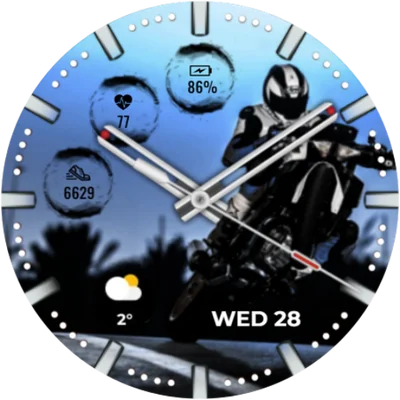
Mostrador de relógio projetado para Wear OS
Relógio analógico
Data
4 opções de cores diferentes
Atalho de etapas
Atalho de bateria
Atalho de coração
1 Complicação
MANUAL DE INSTALAÇÃO ↴
Você pode encontrar vários problemas ao tentar instalar um mostrador de relógio do aplicativo oficial do Google Play para Android.
Nos casos em que o mostrador do relógio está instalado no telefone, mas não no relógio, o desenvolvedor adicionou um aplicativo auxiliar para melhorar a visibilidade na Play Store. Você pode desinstalar o aplicativo auxiliar do seu telefone e procurar um ícone triangular próximo ao botão Instalar no aplicativo Play Store (https://i.imgur.com/OqWHNYf.png). Este símbolo indica um menu suspenso onde você pode selecionar seu relógio como destino de instalação.
Alternativamente, você pode tentar abrir a Play Store em um navegador da web em seu laptop, Mac ou PC. Isso permitirá que você selecione visualmente o dispositivo correto para instalação (https://i.imgur.com/Rq6NGAC.png).
[Se você seguiu as instruções mencionadas acima e o mostrador ainda não aparece no relógio, abra o aplicativo Galaxy Wearable. Vá para a seção Downloads do aplicativo e você encontrará o mostrador do relógio (https://i.imgur.com/mmNusLy.png). Basta clicar nele para iniciar a instalação.
Mostrar o texto original
Analog Clock
Date
4 Different color options
Steps shortcut
Battery shortcut
Heart shortcut
1 Complication
INSTALLATION MANUAL ↴
You may encounter various problems when trying to install a watch face from the official Google Play Android app.
In cases where the watch face is installed on your phone but not on your watch, the developer has added a helper app to improve visibility in the Play Store. You can uninstall the helper app from your phone and look for a triangular icon next to the Install button in the Play Store app (https://i.imgur.com/OqWHNYf.png). This symbol indicates a drop-down menu where you can select your watch as the installation destination.
Alternatively, you can try opening the Play Store in a web browser on your laptop, Mac or PC. This will allow you to visually select the correct device for installation (https://i.imgur.com/Rq6NGAC.png).
[If you have followed the instructions mentioned above and the watch face still does not appear on your watch, open the Galaxy Wearable app. Go to the Downloads section of the app and you will find the watch face there (https://i.imgur.com/mmNusLy.png). Simply click on it to start the installation.
Segurança dos dados
O que CNRwatch declara na Google Play sobre os dados que este app coleta e compartilha.
- Os dados não são compartilhados com terceirosSaiba mais sobre como os desenvolvedores declaram o compartilhamento
- Nenhum dado foi coletadoSaiba mais sobre como os desenvolvedores declaram a coleta
Novidades
Versão 1.0.0 · 26/07/2024
CNR WATCH FACES WearOS
Contato do desenvolvedor
- E-mailhircingokhan@gmail.com
- Política de privacidadefreeprivacypolicy.com
- EndereçoGoncalar Mh. 6029 sokak No : 22 35650 Izmir Türkiye
Informações
- Oferecido por
- CNRwatch
- Categoria
- Personalização
- Versão
- 1.0.0
- Atualizado
- 26/07/2024
- Lançamento
- 20/02/2024
- Requer
- Android 11 ou posterior
- Classificação etária
- Classificação Livre
- Preço
- R$ 4,89
- Nome do pacote
- com.watchfacestudio.cnrcross