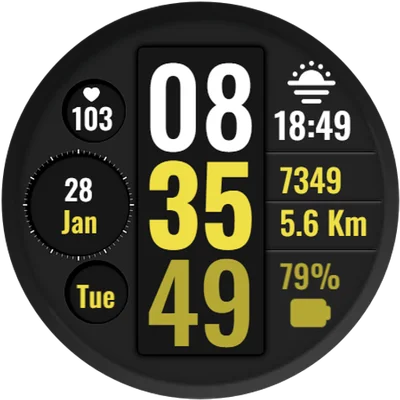
Column Watch Face
Cave Club- Classificação LivreClassificação etária
- PersonalizaçãoCategoria
- 10/09/2026Atualizado
- R$ 7,00Preço
Leva à página oficial de com.caveclub.column na Google Play. Última verificação em 13/11/2026.
Sobre este app
Tradução automática do Google. Idioma original: Inglês (Estados Unidos).
Mostrador de relógio digital para Wear OS com horas, minutos e segundos em coluna
Mostrador de relógio com números de cores editáveis.
Mostrador de relógio tipo coluna digital para Wear OS.
Observação antes de comprar:
Você não precisa se preocupar , o Google pode cobrar apenas uma vez pelo conteúdo comprado na mesma conta do Google (Play Store).
Às vezes, a Play Store demora um pouco mais para confirmar que você já comprou o aplicativo Face Watch. Qualquer pedido adicional será automaticamente reembolsado pelo Google e você receberá o dinheiro de volta.
Não há como pagar duas vezes pelo mesmo mostrador.
Este mostrador do relógio foi projetado para Wear OS
★ Recursos:
• Tempo (com segundos)
• Data e Dia
• Passos
• Km/ml
• Status da bateria
• Frequência cardíaca
• 6x locais editáveis, livres para edição (complicações)
• Mais de 10 opções de estilo de cores
• Opções de AOD
Personalização:
1. Toque e segure a tela do relógio
2. Toque na opção personalizar
★ NOTAS DE INSTALAÇÃO:
Certifique-se de que o Watch esteja conectado ao telefone via Bluetooth.
Você deve selecionar seu dispositivo de relógio no menu suspenso de instalação.
Selecione o dispositivo de destino no aplicativo Play Store no menu suspenso e toque em instalar. O status do download aparecerá no relógio, instale e selecione (ativar) o mostrador do relógio. Esta forma é a preferida, se você tiver algum problema, você pode instalá-lo de duas outras maneiras, listadas abaixo, por meio do aplicativo complementar do telefone ou do navegador da web.
1. Certifique-se de que o relógio esteja conectado corretamente ao telefone, abra o aplicativo Phone no telefone e siga as instruções do relógio.
Após alguns minutos, o mostrador do relógio estará instalado. Você pode escolher o mostrador do relógio instalado.
O aplicativo baixado para o seu telefone serve apenas como um espaço reservado para facilitar a instalação e a localização do mostrador do relógio no seu relógio Wear OS.
ou
2. Como alternativa, tente instalar o mostrador do relógio a partir de um navegador no seu PC.
- Abra o link do mostrador do relógio em um navegador da web (Chrome, Firefox, Safari...)
no PC ou Mac.
Este link:
https://play.google.com/store/apps/details?id=com.caveclub.column
Você pode pesquisar o mostrador do relógio em
play.google.com ou compartilhe um link do aplicativo Play Store.
- Clique em ‘Instalar em mais dispositivos’ e selecione seu relógio. Você deve estar logado com a mesma Conta do Google.
// Nota do LOOP //
Se você estiver preso no processo de pagamento (a Play Store solicita que você pague novamente), isso pode ser um problema de sincronização entre o relógio e o servidor do Google Play. Você pode tentar desconectar/reconectar o relógio do telefone e tentar novamente. Para fazer isso rapidamente, defina o "Modo Avião" no relógio por 10 segundos. Consulte "Observação antes de comprar" e "Notas de instalação".
Sinta-se à vontade para entrar em contato: clubnemanja@gmail.com
Mostrar o texto original
Editable Color Numbers Watch Face.
Digital column type watch face for Wear OS..
Note before purchasing:
You don't have to worry , Google can charge you only one time for the content purchased from the same Google (Play Store) Account.
Sometimes the Play Store takes a little longer to confirm that you already bought the face watch app. Any additional order will be automatically refunded by Google, you will receive the money back.
There is no way to pay twice for the same watch face.
This watch face is designed for Wear OS
★ Features:
• Time (With seconds)
• Date & Day
• Steps
• Km/Ml
• Battery status
• Heart rate
• 6x Editable place, free to edit (Complications)
• 10+ Color style options
• AOD options
Customization:
1. Touch and hold watch display
2. Tap on customize option
★ INSTALLATION NOTES:
Make sure that Watch is connected to the phone via Bluetooth.
You have to select your watch device from the install drop-down menu.
Select the target device in the Play Store app from the drop-down and tap on install. Download status will appear on watch, install and then select (activate) watch face. This way is preferred, if you have a problem, you can install it in two other ways, listed under, via phone companion app or web browser.
1. Make sure the watch is properly connected to the phone, open the Phone App on the phone and follow instructions on watch.
After a few minutes, the watch face will be installed. You can choose the installed watch face.
App downloaded to your phone serves only as a placeholder to make it easier to install & find the watch face on your Wear OS watch.
or
2. Alternatively, try installing the watch face from a web browser on your PC.
- Open watch face link in a web browser (Chrome, Firefox, Safari...)
on PC or Mac.
This Link:
https://play.google.com/store/apps/details?id=com.caveclub.column
You can search for the watch face in
play.google.com or share a link from the Play Store app.
- Click 'Install on more devices' and select your watch. You must be logged with the same Google Account.
// LOOP Note //
If you're stuck at the payment loop (Play Store asks you to pay again), this could be a sync problem between your watch and Google Play server. You can try disconnecting / reconnecting the watch from your phone and try again. To do this quickly, set the "Airplane mode" on watch for 10 seconds. Please see "Note before purchasing" and "Installation Notes".
Feel free to contact: clubnemanja@gmail.com
Segurança dos dados
O que Cave Club declara na Google Play sobre os dados que este app coleta e compartilha.
- Os dados não são compartilhados com terceirosSaiba mais sobre como os desenvolvedores declaram o compartilhamento
- Nenhum dado foi coletadoSaiba mais sobre como os desenvolvedores declaram a coleta
Contato do desenvolvedor
- E-mailclubnemanja@gmail.com
- Política de privacidadegithub.com
- EndereçoPrvomajska 4 11080 Beograd, Zemun Serbia
Informações
- Oferecido por
- Cave Club
- Categoria
- Personalização
- Atualizado
- 10/09/2026
- Lançamento
- 21/01/2025
- Classificação etária
- Classificação Livre
- Preço
- R$ 7,00
- Nome do pacote
- com.caveclub.column