Comic Stylish Digital
Pars Watch Faces- Classificação LivreClassificação etária
- PersonalizaçãoCategoria
- 04/10/2026Atualizado
- R$ 4,99Preço
Leva à página oficial de com.watchfacestudio.comicstylishdigital na Google Play. Última verificação em 14/11/2026.
Sobre este app
Tradução automática do Google. Idioma original: Inglês (Estados Unidos).
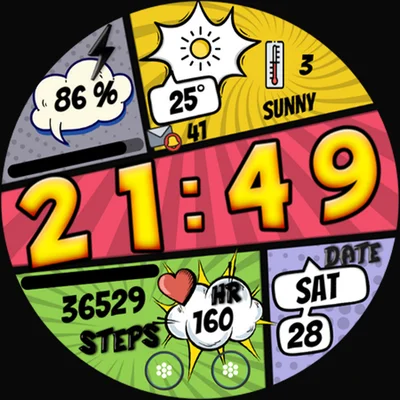
Seu pulso, seu mundo em quadrinhos — cheio de cor, diversão e estilo!
Liberte o artista que existe em você com o Comic Vibe, um mostrador digital divertido inspirado no mundo colorido dos quadrinhos!
⚙️ Principais Características:
🧩 5 fontes diferentes em estilo de quadrinhos
🌈 Dezenas de temas de cores e predefinições de estilo
🕒 Layout digital informativo e claro
🎭 Personalização completa — misture fontes, cores e widgets
💡 Projetado para diversão, energia e individualidade
O Comic Stylish Digital é compatível com todos os relógios que usam Wear OS SDK 34 e API 34+.
OBSERVAÇÃO IMPORTANTE: O aplicativo complementar instalado no seu telefone é apenas para fins informativos. O mostrador será instalado automaticamente no seu relógio. Tudo o que você precisa fazer é ativar a seção "Sempre Definir Mostrador" no menu de configurações do aplicativo Play Store do seu relógio. Isso levará automaticamente o mostrador para a tela inicial. Para mais informações, acesse o link abaixo.
https://www.parswatchfaces.com/set/
ATENÇÃO: Em algumas marcas e modelos de relógios, funções específicas da série Samsung Galaxy podem não funcionar.
* Verifique as imagens do mostrador do relógio para mais informações.
NOTAS:
- Certifique-se de ter permitido o acesso aos sensores.
- Meta de passos definida para 10k.
- Ativar o pedômetro clicando no texto "Pedômetro" pode não funcionar em alguns modelos de relógios que não sejam da Samsung.
- Este mostrador é compatível com Samsung Galaxy Watch 4, Watch 5, Watch 6, Watch 7, Pixel Watch etc. Ele é compatível com todos os dispositivos Wear OS com API Nível 30+.
NOTAS DE INSTALAÇÃO:
1 - Certifique-se de que o relógio esteja conectado corretamente ao celular.
O aplicativo para telefone funciona apenas como um espaço reservado para facilitar a configuração e a localização do mostrador do relógio no seu relógio Wear OS.
OBS: Se você ficar preso no ciclo de pagamento, não se preocupe, apenas um pagamento será feito, mesmo que seja solicitado um segundo pagamento. Aguarde 5 minutos ou reinicie o relógio e tente novamente.
Pode haver um problema de sincronização entre o seu dispositivo e os servidores do Google.
ou
2 - Como alternativa, tente instalar o mostrador do relógio a partir do navegador web no seu PC.
OBS: Ao instalar o mostrador do relógio, o desenvolvedor não tem nenhum controle sobre a instalação.
Antes de escrever um comentário negativo ou dar uma avaliação de 1 estrela, leia atentamente o Guia de Instalação no link abaixo e entre em contato conosco por e-mail se tiver qualquer outro problema.
https://www.parswatchfaces.com/installation-guide/
OBSERVAÇÃO: Se você receber a mensagem "Seus dispositivos não são compatíveis" em vez do aplicativo no telefone, use a Play Store no navegador WEB do PC ou laptop.
AVISO IMPORTANTE:
Após a instalação, o mostrador do relógio pode carregar o último resultado da medição da frequência cardíaca, mas isso não é necessário.
O mostrador do relógio não mede e não exibe automaticamente o resultado da frequência cardíaca.
Para visualizar sua pontuação atual de frequência cardíaca, você precisará fazer uma medição manual.
Para fazer isso, sente-se imóvel, aguarde alguns minutos e clique na área de exibição da frequência cardíaca.
Aguarde alguns segundos. O mostrador do relógio fará uma medição e exibirá o resultado atual.
Faça isso sempre que quiser ver sua frequência cardíaca atual.
MEU CATÁLOGO DE MOSTRADORES DE RELÓGIO
https://play.google.com/store/apps/dev?id=7655501335678734997
SIGA-NOS:
FACEBOOK
https://www.facebook.com/profile.php?id=100078915463662
INSTAGRAM
https://www.instagram.com/parswf/
TELEGRAM
https://t.me/parswatchfaces
Se tiver alguma dúvida, entre em contato comigo: info@parswatchfaces.com
Ficarei muito grato pela avaliação e avaliação na Loja.
Obrigado.
Mostrar o texto original
Unleash your inner artist with Comic Vibe, a playful digital watch face inspired by the colorful world of comic books!
⚙️ Main Features:
🧩 5 different comic-style fonts
🌈 Dozens of color themes & style presets
🕒 Informative and clear digital layout
🎭 Full customization — mix fonts, colors, and widgets
💡 Designed for fun, energy, and individuality
Comic Stylish Digital is compatible with all watches using Wear OS SDK 34 and Api 34+.
IMPORTANT NOTE: The companion application installed on your phone is for informational purposes only. The watch face will be automatically installed on your watch. All you need to do is activate the Always Set Watch Face section from the settings menu in the Play Store application on your watch. This will automatically bring the watch face to your home screen. For more information, please check the link below.
https://www.parswatchfaces.com/set/
PLEASE NOTE: In some watch brands and models, functions specific to Samsung Galaxy series watches may not work.
* Please check the pictures of the watch face for more information.
NOTES:
- Make sure you have allowed the access sensors.
- Step target set to 10k.
- Turning on the pedometer by clicking on the Pedometer text may not work on some watch models other than Samsung watch models.
- This watch face is compatible with Samsung Galaxy Watch 4,Watch 5, Watch 6, Watch 7, Pixel Watch etc.It supports all Wear OS devices with API Level 30+.
ISTALLING NOTES:
1 - Make sure the watch is properly connected to the phone.
The Phone app just acts as a placeholder to make it easy to set up and find the watch face on your Wear OS watch
PS: If you get stuck in the payment cycle, don't worry, only one payment will be made even if you are asked to pay a second time. Wait 5 minutes or restart your watch and try again.
There may be a synchronization issue between your device and Google servers.
or
2 - Alternatively, try to install the watch face from the web browser on your PC.
PS: While installing the watch face, the developer has no any control about the installation.
Before writing a negative comment or giving 1 star rating please read the Installation Guide carefully in the link below and please contact us via e-mail if you get any other problem.
https://www.parswatchfaces.com/installation-guide/
NOTE :If you get the message "Your devices are not compatible" instead of app on phone, please use Play Store in WEB browser from PC or Laptop.
IMPORTANT NOTICE :
After installation, the watch face can load the last heart rate measurement result, but it doesn't have to.
The watch face does not automatically measure and does not automatically display the heart rate result.
To view your current heart rate score, you'll need to take a manual measurement.
To do this, sit still, wait a few minutes and click on the heart rate display area.
Wait a few seconds. The watch face will take a measurement and display the current result.
Do this whenever you want to see your current heart rate.
MY WATCH FACES CATALOG
https://play.google.com/store/apps/dev?id=7655501335678734997
FOLLOW US :
FACEBOOK
https://www.facebook.com/profile.php?id=100078915463662
INSTAGRAM
https://www.instagram.com/parswf/
TELEGRAM
https://t.me/parswatchfaces
if you have any question, please contact with me: info@parswatchfaces.com
I would be very grateful for the rate and review in the Store.
Thanks.
Segurança dos dados
O que Pars Watch Faces declara na Google Play sobre os dados que este app coleta e compartilha.
- Os dados não são compartilhados com terceirosSaiba mais sobre como os desenvolvedores declaram o compartilhamento
- Nenhum dado foi coletadoSaiba mais sobre como os desenvolvedores declaram a coleta
Novidades
04/10/2026
First Release
Contato do desenvolvedor
- Siteparswatchfaces.com
- E-mailparswatchfaces@gmail.com
- Política de privacidadeparswatchfaces.com
- EndereçoEsentepe Mah.Tuna Caddesi̇.Di̇nlendi̇ Sok. İçsezgi̇ Apt.K:3 D:8, 16120 Nilüfer/Bursa Türkiye
Informações
- Oferecido por
- Pars Watch Faces
- Categoria
- Personalização
- Atualizado
- 04/10/2026
- Lançamento
- 05/10/2025
- Classificação etária
- Classificação Livre
- Preço
- R$ 4,99
- Nome do pacote
- com.watchfacestudio.comicstylishdigital