GRBL Core
Grubel- Classificação LivreClassificação etária
- PersonalizaçãoCategoria
- 06/10/2026Atualizado
- R$ 4,99Preço
Leva à página oficial de com.grubel.core na Google Play. Última verificação em 13/11/2026.
Sobre este app
Tradução automática do Google. Idioma original: Inglês (Estados Unidos).
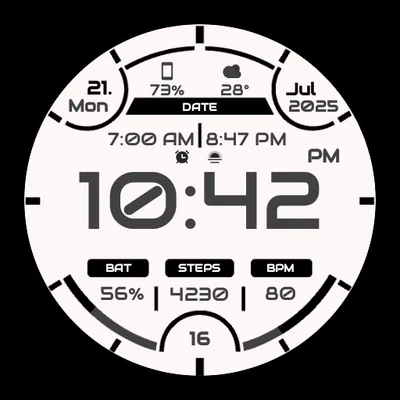
Uma estética retrodigital, futurista e simétrica para o seu pulso
✅ Suporta os formatos AM/PM e 12H/24H
✅ 4 complicações personalizadas
✅ Textos fixos de bateria, passos e frequência cardíaca
✅ 2 barras - meta de bateria e passos
✅ Compatível com bateria AOD e legível
✅ 30 temas
✅ 5 atalhos
Desenvolvido para Wear OS
Caso tenha algum problema, entre em contato comigo pelo e-mail grubel.watchfaces@gmail.com. Teremos prazer em fornecer capturas de tela e instruções passo a passo para ajudar você a instalar o mostrador.
📢Os mostradores não mudam automaticamente após a instalação. Para configurá-lo, volte para a tela inicial, toque e segure, deslize até o final e toque em "+" para adicionar o mostrador. Use a moldura para encontrá-lo.
Os desenvolvedores da Samsung oferecem um vídeo útil mostrando várias maneiras de instalar um mostrador de relógio Wear OS:
🎬 https://youtu.be/vMM4Q2-rqoM
📢O APLICATIVO COMPANHEIRO NÃO INSTALA O MOSTRADOR NO SEU RELÓGIO. ELE APENAS ABRE A LISTA DA PLAY STORE NO SEU RELÓGIO, ONDE VOCÊ PODE INSTALAR.
LEIA AS INSTRUÇÕES ABAIXO.
Há duas maneiras de instalar este mostrador no seu dispositivo WearOS:
Pelo APP PLAY STORE:
1. Use o menu suspenso e selecione o dispositivo
de destino no APP PLAY STORE:
após alguns minutos, o mostrador será transferido para o
relógio.
2- ATIVAR O MOSTRADOR:
Após a instalação, você precisa ativar o mostrador.
Pressione e segure a tela, deslize para a esquerda e toque em "ADICIONAR MOSTRADOR
DE RELÓGIO" para ativá-lo.
Do SITE DA PLAY STORE:
1 - Acesse o link do mostrador do relógio através de um navegador da web em
PC/Mac, como Chrome, Safari (etc.). Você pode pesquisar
o nome do mostrador na Play Store.
Clique em "Instalar em mais dispositivos" e selecione o dispositivo
de destino:
após alguns minutos, o mostrador será transferido para
o relógio.
2- ATIVAR O MOSTRADOR DO RELÓGIO:
Após a instalação, você precisa ativar o mostrador do relógio.
Pressione a tela longamente, deslize para a esquerda e toque em "ADICIONAR MOSTRADOR
DO RELÓGIO" para ativá-lo.
para API 34+
📢 Lembre-se: se quiser que seu relógio mostre o status da bateria do telefone, você deve instalar o aplicativo Phone Battery Complication.
AVISO LEGAL
📢 Cada dispositivo oferece diferentes complicações personalizadas, e a seleção varia de acordo com os aplicativos de terceiros. As complicações personalizadas mostradas nas capturas de tela da loja vêm de um aplicativo de terceiros - Phone Battery Complication
Mostrar o texto original
✅ Supports AM/PM and 12H/24H format
✅ 4 custom complications
✅ fixed battery, steps and heart rate texts
✅ 2 bars - battery & steps goal
✅ AOD battery friendly and readable
✅ 30 themes
✅ 5 shortcuts
Designed for Wear OS
If you face any problem, please reach out to me at grubel.watchfaces@gmail.com. We’ll gladly provide screenshots and step-by-step instructions to help you install the watch face.
📢Watch faces do not change automatically after installation. To set it up, return to the home display, tap and hold, swipe to the end, and tap ‘+’ to add the watch face. Use the bezel to find it.
Samsung Developers offer a helpful video showing multiple ways to install a Wear OS watch face:
🎬 https://youtu.be/vMM4Q2-rqoM
📢THE COMPANION APP DOES NOT INSTALL THE WATCH FACE ON YOUR WATCH. IT ONLY OPENS THE PLAY STORE LISTING ON YOUR WATCH, WHERE YOU CAN INSTALL IT YOURSELF.
PLEASE READ INSTRUCTIONS BELOW.
There are two ways to install this watchaface to your WearOS device:
From PLAY STORE APP:
1. Use the drop-down menu and select the target
device on the PLAY STORE APP:
after a few minutes the watch face will transferred on
watch.
2- ACTIVATE WATCH FACE:
Once installed, you need to activate the watch face.
Long press screen, swipe left and tap "ADD WATCH
FACE" to activate it.
From PLAY STORE WEBSITE:
1 - Go to the watch face link through a Web Browser on
PC / Mac such as Chrome, Safari (etc.). You can search
the watch face name on Play Store.
Click on "Install on more devices" and select the target
device:
after a few minutes the watch face will transferred on
watch.
2- ACTIVATE WATCH FACE:
Once installed, you need to activate the watch face.
Long press screen, swipe left and tap "ADD WATCH
FACE" to activate it.
for API 34+
📢 Remember , if you want your watch to show phone's battery status, you should install Phone Battery Complication app
DISCLAIMER
📢 Each device offers different custom complications, and selection varies by third-party apps. Custom complications shown in store screenshots come from third-party app - Phone Battery Complication
Segurança dos dados
O que Grubel declara na Google Play sobre os dados que este app coleta e compartilha.
- Os dados não são compartilhados com terceirosSaiba mais sobre como os desenvolvedores declaram o compartilhamento
- Nenhum dado foi coletadoSaiba mais sobre como os desenvolvedores declaram a coleta
Contato do desenvolvedor
- Sitegrubelwatchfaces.com
- E-mailgrubel.watchfaces@gmail.com
- Política de privacidadesites.google.com
- EndereçoJuliana Tuwima 20/8a 90-002 Łódź Poland
Informações
- Oferecido por
- Grubel
- Categoria
- Personalização
- Atualizado
- 06/10/2026
- Lançamento
- 22/07/2025
- Classificação etária
- Classificação Livre
- Preço
- R$ 4,99
- Nome do pacote
- com.grubel.core