Light Effect WatchFace
RADU GHEORGHE TURCU- Classificação LivreClassificação etária
- PersonalizaçãoCategoria
- 10/10/2025Atualizado
- R$ 6,99Preço
Leva à página oficial de com.turcuradu.lighteffectwatchface na Google Play. Última verificação em 23/11/2026.
Sobre este app
Tradução automática do Google. Idioma original: Inglês (Estados Unidos).
Mostrador de relógio com efeito de luz – potência e elegância no seu pulso
🔥 Mostrador de Relógio com Efeito de Luz – Potência e Elegância no Seu Pulso
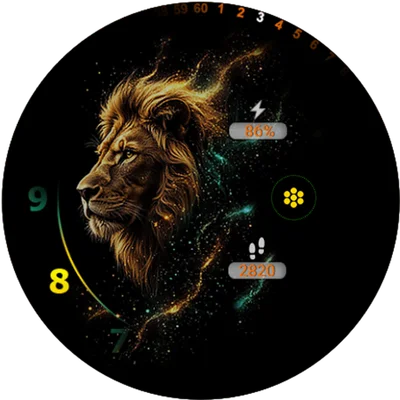
Dê vida ao seu smartwatch com o Mostrador de Relógio com Efeito de Luz — um design futurista deslumbrante com um leão majestoso cercado por efeitos de partículas brilhantes. Seja para estilo, desempenho ou funcionalidade, este mostrador tem tudo.
🌟 Principais Características:
🦁 Design de Arte Futurista – Apresentando um leão poderoso e detalhado com rastros de energia brilhantes para uma estética premium de ficção científica.
🔋 Indicador de Bateria – Saiba sempre o nível da sua bateria com um indicador de porcentagem claro e elegante.
👣 Contador de Passos – Acompanhe sua atividade diária diretamente do seu pulso.
📱 Suporte para Widget de Complicação – Adicione sua complicação favorita do Wear OS (clima, calendário, frequência cardíaca, etc.) para obter informações extras rapidamente.
⏱️ Exibição de Hora em Negrito – Fácil de ler tanto em ambientes com luz do dia quanto escuros.
💡 Por que escolher o Efeito de Luz?
Projetado para quem exige mais do mostrador do relógio — este não é apenas um utilitário, é uma afirmação. Equilibra perfeitamente beleza, minimalismo e dados em um piscar de olhos.
📌 Compatível com:
Wear OS 3.0+
Dispositivos como a série Samsung Galaxy Watch, Google Pixel Watch e outros
-----------------------------------------------------------------------------------------------------------------------
Notas de instalação do mostrador do relógio no relógio inteligente:
O aplicativo para celular serve apenas como um espaço reservado para facilitar a instalação e a localização do mostrador no seu relógio Wear OS. Você precisa selecionar o seu dispositivo no menu suspenso de instalação.
Se você baixar o assistente diretamente com o celular, precisará abrir o aplicativo e tocar na tela ou no botão de download. -> iniciará a instalação no relógio.
Um relógio Wear OS precisa estar conectado.
Se não funcionar dessa forma, você pode copiar o link para o navegador Chrome do seu celular e clicar na seta para baixo à direita para escolher o mostrador do relógio a ser instalado.
..............................................
Após a instalação, você precisa configurar o mostrador do relógio na sua tela. No aplicativo Wear OS, vá até os mostradores baixados e você o encontrará.
Se tiver problemas, entre em contato comigo pelo e-mail raduturcu03@gmail.com
xxxxxxxxxxxxxxxxxxxxxxxxxxxxxxxxxxxxxxxxxxxxxxxx
SIGA-NOS NO TELEGRAM: https://t.me/TRWatchfaces
SIGA-NOS NO SITE PARA RECEBER CUPONS GRÁTIS:
https://trwatches.odoo.com/
xxxxxxxxxxxxxxxxxxxxxxxxxxxxxxxxxxxxxxxxxxxxxxxxxxx
Tente ver outros designs no meu perfil do Google.
Mostrar o texto original
🔥 Light Effect Watch Face – Power & Elegance on Your Wrist
Bring your smartwatch to life with Light Effect Watch Face — a stunning futuristic design featuring a majestic lion surrounded by glowing particle effects. Whether you’re into style, performance, or functionality, this watch face has it all.
🌟 Key Features:
🦁 Futuristic Art Design – Featuring a detailed, powerful lion with glowing energy trails for a premium sci-fi aesthetic.
🔋 Battery Indicator – Always know your battery level with a clear, stylish percentage gauge.
👣 Step Counter – Track your daily activity directly from your wrist.
📱 Complication Widget Support – Add your favorite Wear OS complication (weather, calendar, heart rate, etc.) for extra info at a glance.
⏱️ Bold Time Display – Easy to read in both daylight and dark environments.
💡 Why Choose Light Effect?
Designed for those who demand more from their watch face — this is not just a utility, it's a statement. Perfectly balances beauty, minimalism, and data at a glance.
📌 Compatible with:
Wear OS 3.0+
Devices such as Samsung Galaxy Watch series, Google Pixel Watch, and others
--------------------------------------------------------------------------------------------------------
Watch face installation notes on smart watch:
Phone app serves only as a placeholder to make it easier to install & find the watch face on your Wear OS watch. You have to select your watch device from the install dropdown menu.
If you download the helper directly with the phone , you need to open application and touch on the display or the download button. -> will start to install on the watch.
A wear os watch need to be connected.
If not working in that way , you can copy that link into your phone chrome browser and click on arrow down from right , and you choose the watch face to install.
..............................................
After installation you need to set that watch face to your screen , from wear OS app , go down at downloaded watch faces and you will find it.
If you have problems , please contact me on raduturcu03@gmail.com
xxxxxxxxxxxxxxxxxxxxxxxxxxxxxxxxxxxxxxxxxxxxxxxx
FOLLOW US AT TELEGRAM : https://t.me/TRWatchfaces
FOLLOW US WEBSITE TO GET FREE COUPONS :
https://trwatches.odoo.com/
xxxxxxxxxxxxxxxxxxxxxxxxxxxxxxxxxxxxxxxxxxxxxxxxx
Try to see others designs in my google profile.
Segurança dos dados
O que RADU GHEORGHE TURCU declara na Google Play sobre os dados que este app coleta e compartilha.
- Os dados não são compartilhados com terceirosSaiba mais sobre como os desenvolvedores declaram o compartilhamento
- Nenhum dado foi coletadoSaiba mais sobre como os desenvolvedores declaram a coleta
Contato do desenvolvedor
- Sitetrwatches.odoo.com
- E-mailraduturcu03@gmail.com
- Política de privacidadetrwatches.odoo.com
- EndereçoStr. Eduard Albert Bielz, Nr. 89d, Bl. b1, Sc. f, et.1, Ap. 60 550031 Sibiu Romania
Informações
- Oferecido por
- RADU GHEORGHE TURCU
- Categoria
- Personalização
- Atualizado
- 10/10/2025
- Lançamento
- 10/10/2025
- Classificação etária
- Classificação Livre
- Preço
- R$ 6,99
- Nome do pacote
- com.turcuradu.lighteffectwatchface