SMZ Kingmaker2
SMZ™- Classificação LivreClassificação etária
- PersonalizaçãoCategoria
- 09/11/2025Atualizado
- R$ 5,49Preço
Leva à página oficial de com.smzjdh.kingmaker2 na Google Play. Última verificação em 27/11/2026.
Sobre este app
Tradução automática do Google. Idioma original: Inglês (Estados Unidos).
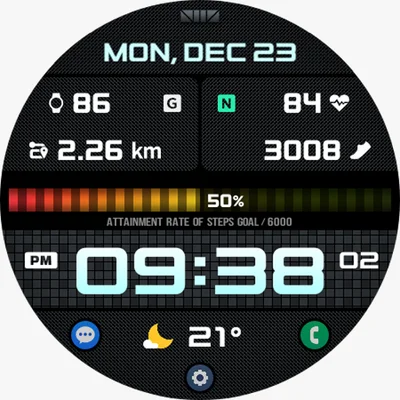
Relógio digital SMZ para Wear OS
Por favor, assista ao vídeo para decorar seu relógio como as fotos.
Por favor, assista ao VÍDEO para uso.
[Como usar o formato de 24 horas]
Se quiser alterar o formato da hora, você pode configurá-lo no caminho abaixo no telefone conectado ao relógio.
*O telefone conectado - Configurações - Gerenciamento geral - Data e hora - Use o formato de 24 horas.
Se marcada, o relógio também estará no formato de 24 horas e, se desmarcada, o relógio estará no formato de 12 horas.
[A ESCURIDÃO da tela AOD]
Na seção Personalizar, 'AOD Dim1' ajusta a escuridão de toda a tela AOD. E 'AOD Dim2' ajusta apenas a escuridão do fundo da tela AOD.
[PERSONALIZAR]
Para personalizar o mostrador do relógio, toque e segure a tela e toque no botão [Customizar].
*Edite essas seleções no campo de personalização.
[Instagram SMZ]
http://www.instagram.com/smz.watch.tech
[SMZFacebook]
https://www.facebook.com/smz.watchface
[Página inicial do SMZ]
https://www.smzwatch.com
[E-mail é sempre bem-vindo]
smz.watch.tech@gmail.com
Mostrar o texto original
Please Watch the video to decorate your watch like the photos.
Please Watch the VIDEO for usage.
[How to use 24-hour format]
If you want to change the time format, you can set it in the path below on the phone connected to the watch.
*The connected phone - Settings - General management - Date and time - Use 24-hour format.
If checked, the watch will also be in 24-hour format, and if unchecked, the watch will be in 12-hour format.
[The DARKNESS of the AOD screen]
In the Customize section, 'AOD Dim1' adjusts the darkness of all the AOD screen. And 'AOD Dim2' only adjusts the darkness of the background of AOD screen.
[CUSTOMIZE]
For customization of watchface, touch and hold the screen and touch on [Coustomize] button.
*Please edit these selections in coustomize field.
[SMZ Instagram]
http://www.instagram.com/smz.watch.tech
[SMZ Facebook]
https://www.facebook.com/smz.watchface
[SMZ Homepage]
https://www.smzwatch.com
[E-mail is always welcome]
smz.watch.tech@gmail.com
Segurança dos dados
O que SMZ™ declara na Google Play sobre os dados que este app coleta e compartilha.
- Os dados não são compartilhados com terceirosSaiba mais sobre como os desenvolvedores declaram o compartilhamento
- Nenhum dado foi coletadoSaiba mais sobre como os desenvolvedores declaram a coleta
Contato do desenvolvedor
- Siteinstagram.com
- E-mailsmz.watch.tech@gmail.com
- Política de privacidadeblog.naver.com
- Endereço거제대로 275 거제미소지움더퍼스트, 102동 1101호 연제구, 부산광역시 47512 South Korea
Informações
- Oferecido por
- SMZ™
- Categoria
- Personalização
- Atualizado
- 09/11/2025
- Lançamento
- 23/06/2023
- Classificação etária
- Classificação Livre
- Preço
- R$ 5,49
- Nome do pacote
- com.smzjdh.kingmaker2