WIN - Space Cat Animated
WinWatchfaces- Classificação LivreClassificação etária
- PersonalizaçãoCategoria
- 16/10/2026Atualizado
- R$ 6,49Preço
Leva à página oficial de com.watchfacestudio.SpaceCatAnimated na Google Play. Última verificação em 14/11/2026.
Sobre este app
Tradução automática do Google. Idioma original: Inglês (Estados Unidos).
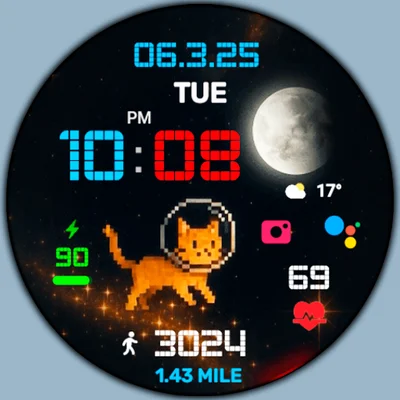
O mostrador de relógio animado espacial mais fofo para Wear OS
O mostrador de relógio espacial animado mais fofo para Wear OS
Conheça seu novo companheiro cósmico! Este adorável gatinho astronauta flutua pelo seu relógio com animações super suaves, trazendo alegria a cada olhar. Repleto de funcionalidades elegantes, é a combinação perfeita de charme e praticidade!
Recursos básicos:
- Horário digital de 12/24 horas (dependendo das configurações do smartphone)
- Alta resolução;
- Possibilidade de alterar a cor
- Complicações personalizadas
- Exibição da fase da lua - No modo Always On Display (AOD)
- Modo Always On Display (AOD)
Compatível com dispositivos Wear OS com API nível 30 ou superior, incluindo Samsung Galaxy Watch 4, 5, 6, 7, 8 e Pixel Watch.
**Instalação**
1. Instale o aplicativo do mostrador de relógio no seu telefone.
2. Certifique-se de que seu relógio Wear OS esteja conectado ao seu telefone e usando a mesma conta do Google.
3. Selecione seu relógio como dispositivo de instalação e conclua a instalação.
4. Após a instalação, selecione o mostrador do relógio na sua galeria.
Se a instalação demorar, verifique a conexão com a internet em ambos os dispositivos, aguarde um ou dois minutos ou reinicie o relógio e tente novamente.
**Personalização**
• Toque e segure o mostrador do relógio e, em seguida, toque em **Personalizar** para acessar as configurações disponíveis.
• Para uma melhor experiência, recomendamos configurar o mostrador diretamente no seu relógio. Guia em vídeo:
https://youtu.be/YPcpvbxABiA
**Suporte**
Se tiver alguma dúvida ou problema com a instalação, entre em contato: srt48rus@gmail.com
**Mais mostradores de relógio da WIN**
Explore outros mostradores de relógio:
https://play.google.com/store/apps/dev?id=6789054753742990227
Mostrar o texto original
The cutest space animated watchface for Wear OS
Meet your new cosmic companion! This adorable astronaut cat floats across your watch with buttery-smooth animations, bringing joy to every glance. Packed with sleek functionality, it’s the purr-fect blend of charm and practicality!
Basic moments:
- 12/24 hour digital time (Depending on smartphone settings)
- A high resolution;
- Ability to change color
- Custom complications
- Moon phase display - In Aod mode
- AOD mode
Compatible with Wear OS devices running API level 30 and above, including Samsung Galaxy Watch 4, 5, 6, 7, 8 and Pixel Watch.
**Installation**
1. Install the watch face app on your phone.
2. Make sure your Wear OS watch is connected to your phone and uses the same Google account.
3. Select your watch as the installation device and complete the installation.
4. After installation, select the watch face from your watch face gallery.
If installation is delayed, check the internet connection on both devices, wait a minute or two, or restart your watch and try again.
**Customization**
• Touch and hold the watch face, then tap **Customize** to access the available settings.
• For the best experience, we recommend configuring the watch face directly on your watch. Video guide:
https://youtu.be/YPcpvbxABiA
**Support**
If you have any questions or installation issues, please contact: srt48rus@gmail.com
**More watch faces by WIN**
Explore other watch faces:
https://play.google.com/store/apps/dev?id=6789054753742990227
Segurança dos dados
O que WinWatchfaces declara na Google Play sobre os dados que este app coleta e compartilha.
- Os dados não são compartilhados com terceirosSaiba mais sobre como os desenvolvedores declaram o compartilhamento
- Nenhum dado foi coletadoSaiba mais sobre como os desenvolvedores declaram a coleta
Contato do desenvolvedor
- E-mailsrt48rus@gmail.com
- Política de privacidadesites.google.com
- Endereçoул. Ескалиева, д. 148 кв. 21 090000 Уральск Kazakhstan
Informações
- Oferecido por
- WinWatchfaces
- Categoria
- Personalização
- Atualizado
- 16/10/2026
- Lançamento
- 04/06/2025
- Classificação etária
- Classificação Livre
- Preço
- R$ 6,49
- Nome do pacote
- com.watchfacestudio.SpaceCatAnimated