ProgressTimer - Bar Timer
Time, shown as a single bar.
Projetado para iPhone, iPad
Grátis
- Classificação etária4+
- CategoriaProdutividade
- DesenvolvedorTaniguchi Yota
- IdiomasInglês
- Tamanho4,5 MB
Leva à página oficial na App Store
O Download.org não hospeda nenhum arquivo de ProgressTimer - Bar Timer. O botão abre a página do app na App Store, onde Taniguchi Yota o publica. Página verificada pela última vez em 17/11/2026.
Capturas de tela

Sobre
O desenvolvedor não forneceu este texto no seu idioma.
Time, shown as a single bar.
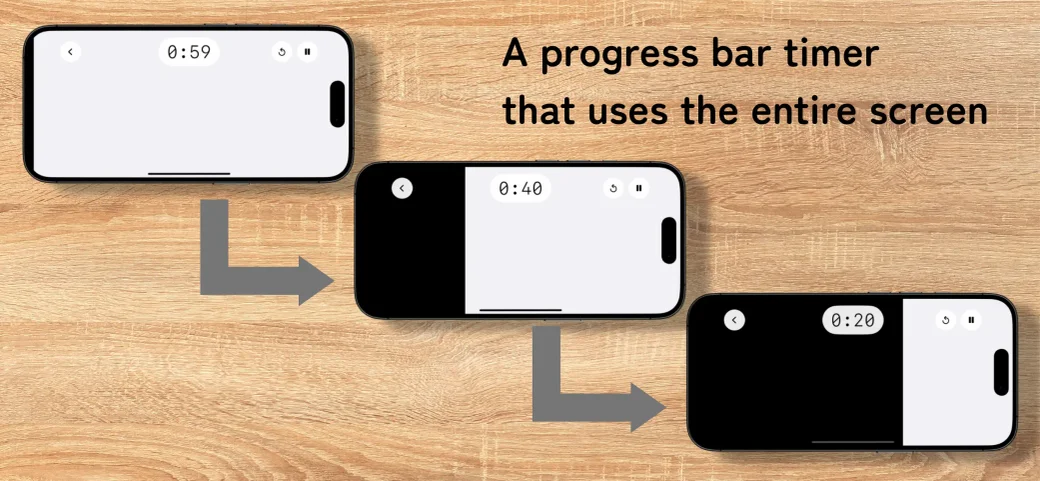
ProgressTimer is a minimal landscape timer that turns elapsed time into a full-screen progress bar. For pomodoro sessions, workouts, cooking, presentation rehearsals — anywhere you want to see time at a glance, even from across the room.
◆ Two modes
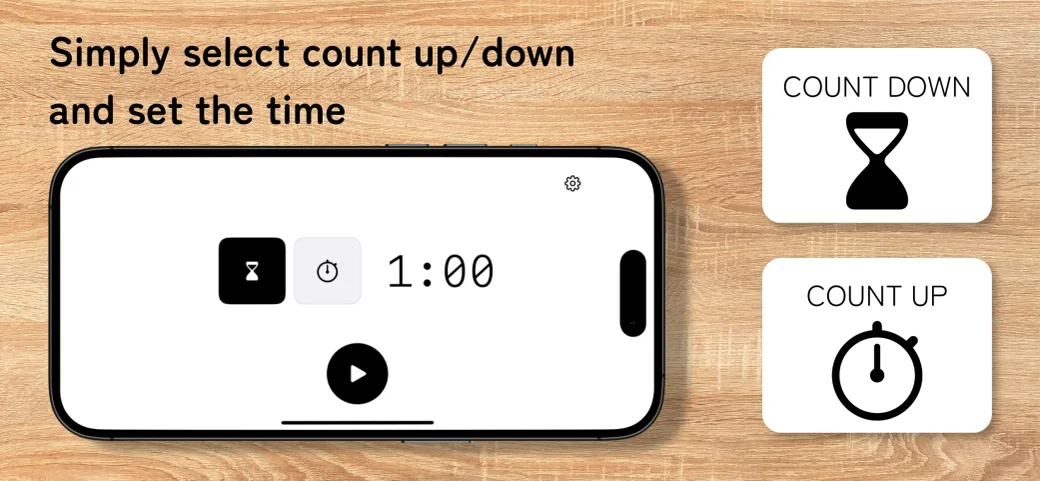
Count Down
Set a duration and watch the bar fill from empty to full as time elapses.
Count Up
Start from zero and let the bar grow toward your target duration.
Both modes auto-stop when the target is reached and play your selected alarm tone.
◆ Landscape × giant progress bar
Numbers are secondary — progress is the point. A monochrome bar fills the entire screen so you can read your status from a distance. The time is rendered in a large monospaced number at the center, optimized for legibility against the moving bar.
◆ Lock Screen & Dynamic Island
Full Live Activity support. The progress bar and remaining time appear on your Lock Screen and in the Dynamic Island. Play, pause, and restart the timer without ever opening the app.
◆ Keeps running in the background
Closing the app or locking your screen doesn't stop the timer. When time's up, a local notification fires with your chosen alarm tone — Beep, Chime, Bell, or Digital. Use the system volume or set an in-app volume independently.
◆ Icon-first interface
No text labels — every control is an icon. From mode selection to duration setup to start, you can begin a session in three taps. Designed to stay out of your way.
◆ Features
・Count Down / Count Up modes
・Hours / Minutes / Seconds wheel picker (up to 24 hours)
・Full-screen progress bar (landscape-only)
・Live Activity (Lock Screen / Dynamic Island)
・Pause / Resume / Restart from Lock Screen
・4 built-in alarm tones + none
・System volume or in-app volume slider
・Local notifications for background alarms
・In-app language switching (English / Japanese)
・Theme support (System / Light / Dark)
・Pure monochrome, distraction-free design
・Locked to landscape for fullscreen visibility
◆ Completely offline, completely private
ProgressTimer makes zero network requests. Your settings and timer state stay entirely on your device, never sent to any server. No ads, no tracking. Works anywhere, no signal needed.
◆ Who it's for
・Anyone using pomodoro or time-blocking for focus
・Workout and stretching timers
・Presentation and interview rehearsals
・Cooking timers
・People who want to glance at the timer from across the room
・Anyone looking for a simple, ad-free timer app
◆ How to use
1. Pick a mode (Count Down / Count Up)
2. Set the duration with the wheel picker
3. Tap play
4. Control from your Lock Screen or Dynamic Island anytime
That's it.
Novidades
Versão 1.2.0 · 14/10/2026
Bug fixes
Privacidade do app
O que Taniguchi Yota declara na App Store sobre como este app lida com os dados.
-
Dados não coletados
O desenvolvedor não coleta nenhum dado deste app.
As práticas de privacidade podem variar, por exemplo, com base nos recursos que você usa ou na sua idade.
Informações
- Vendedor
- Taniguchi Yota
- Categoria
- Produtividade
- Versão
- 1.2.0
- Atualizado
- 14/10/2026
- Lançamento
- 26/04/2026
- Tamanho
- 4,5 MB
- Requer
- iOS 17.0 ou posterior
- Classificação etária
- 4+
- Preço
- Grátis
- Idiomas
- Inglês
- Copyright
- © 2026 Yota Taniguchi
Você também pode gostar
-
 TimerBar: Presentation TimerProdutividade
-
 OneScreenTimerProdutividade
-
 Dr.Timer - Simple Preset TimerProdutividade
-
 Wane TimerProdutividade
-
 My Bedtime WidgetProdutividade
-
 Manifold TimerProdutividade
-
 Pour — Routine TimerProdutividade
-
 iPomodoros - Pomodoro & FocusProdutividade
-
 LeadFlip: Enneagram LeadershipProdutividade
-
 Till Simple: ContagemO tempo que falta, em barras