
- Classificação etária12+
- CategoriaSaúde e fitness
- DesenvolvedorAbir Hadar
- IdiomasInglês
- Tamanho69,3 MB
Leva à página oficial na App Store
O Download.org não hospeda nenhum arquivo de Zone6. O botão abre a página do app na App Store, onde Abir Hadar o publica. Página verificada pela última vez em 20/11/2026.
Capturas de tela

Sobre
O desenvolvedor não forneceu este texto no seu idioma.
Your training plan, alive. Built and changed with Claude.
You already have a plan, or you know what you're training for. Zone6 connects to Claude, so you can build your plan in a conversation and change it the same way. Every session lands on your Zone6 calendar, ready to follow.
HOW IT WORKS
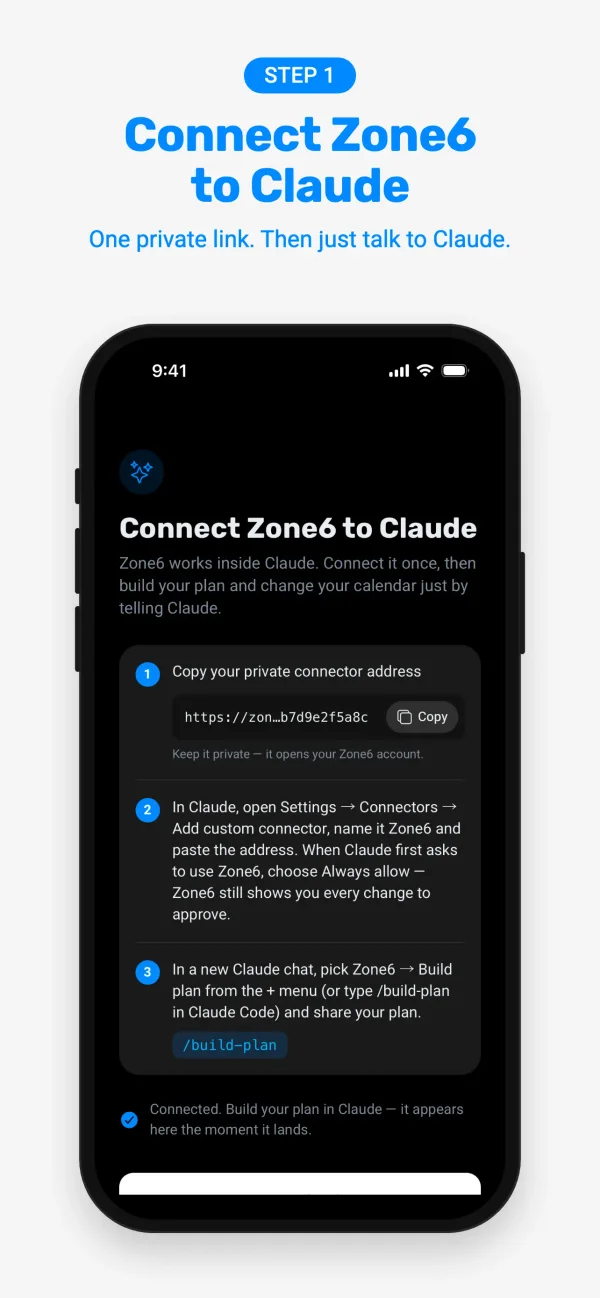
1. Connect Zone6 to Claude
Copy your private connector address from Zone6 and add it in Claude. It takes a minute, once.
2. Build your plan in Claude
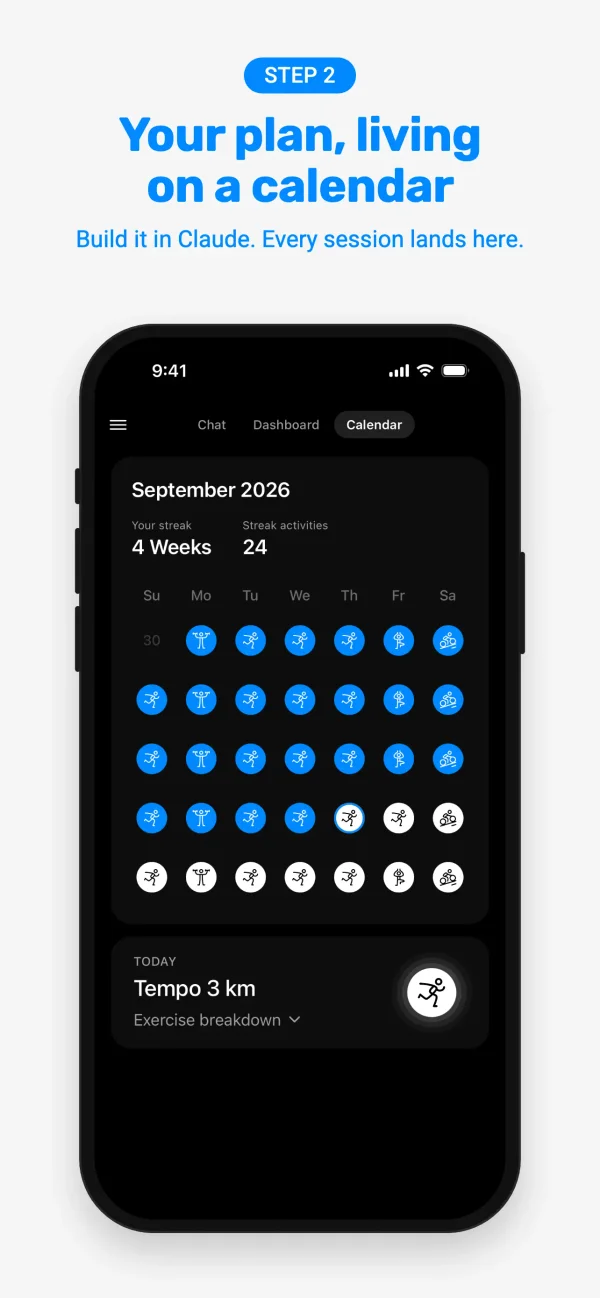
Share the plan from your coach, a PDF, a screenshot, or just describe your goal. Claude builds it with you, and Zone6 puts every session on your calendar: runs, rides, swims, strength, rest days.
3. Follow the road to your goal
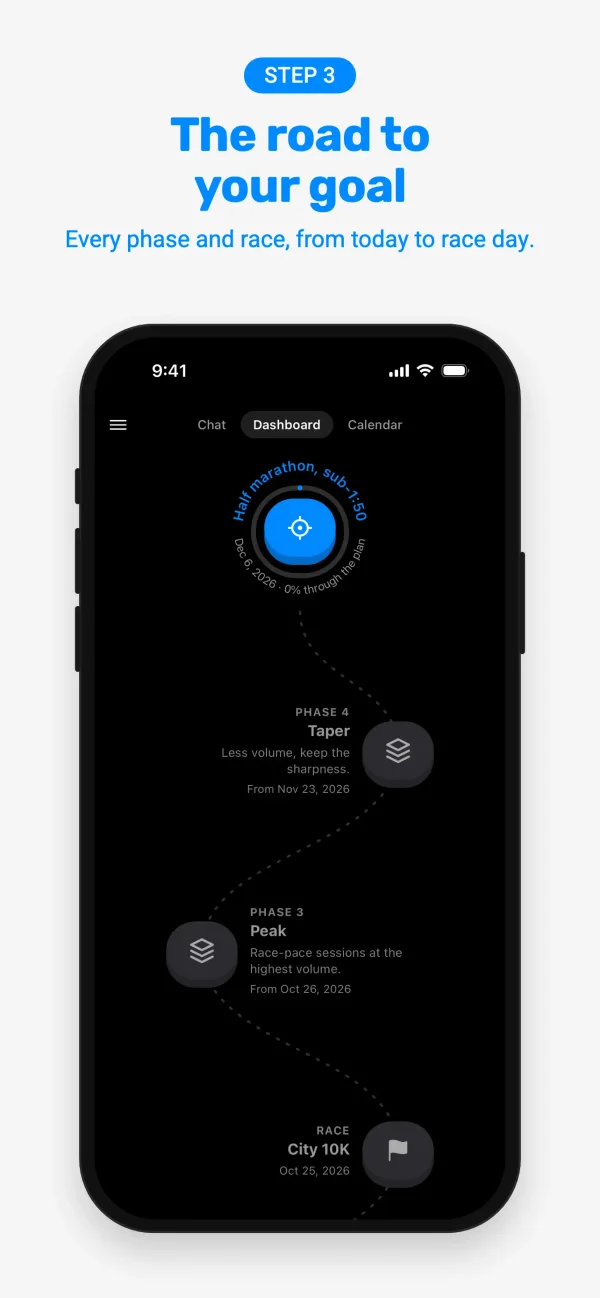
Your dashboard shows every phase of the plan and every race along the way, from today to race day.
4. Plans change? Just tell Claude
Work ran late, you're traveling, a race got added. Ask Claude to move things around. Claude shows you a short summary of the changes first; you approve it, and your Zone6 calendar updates.
NO CLAUDE? NO PROBLEM
Upload your plan straight into Zone6 instead: paste it, or add a PDF, photo or screenshot, and Zone6 reads it onto your calendar.
WHAT YOU GET
• A calendar with every session, clear activity icons and your weekly streak
• A dashboard with your goal, plan phases and race milestones
• Session details: distance, duration, pace or effort, and what to do
• Every change shown to you before it's saved
• Full English and Hebrew support
ZONE6 PRO
Chat with Z6, your coach, right inside the app. Ask anything about your plan and have Z6 reshape your week for you. Zone6 Pro is an optional auto-renewing subscription. Payment is charged to your Apple ID at confirmation of purchase. The subscription renews automatically unless canceled at least 24 hours before the end of the current period. Manage or cancel it in your App Store account settings.
Zone6 gives training guidance, not medical advice. Check with a doctor before starting a new training program.
Terms of Use (EULA): https://www.apple.com/legal/internet-services/itunes/dev/stdeula/
Zone6 Terms: https://zone6ai.vercel.app/terms.html
Privacy Policy: https://zone6ai.vercel.app/privacy.html
Novidades
Versão 1.1.2 · 15/10/2026
Connecting Claude
- No more connect page: after sign-up the app opens straight on the 5-step Claude setup guide.
- Can't skip: no close button and no way back out. "Done" stays locked until Claude is actually connected, and the "Upload your plan instead" option is gone. Older accounts that skipped without connecting are sent back to the guide.
- "Open Claude" opens the Claude app, not the browser. The browser is only the fallback when Claude isn't installed.
- Claude saves changes right away: it no longer stops to ask "approve this change?" before saving to Zone6.
Navigation
- Dashboard: tapping it shows a small row with Calendar and Road Map, and the top bar stays on every screen.
- Top left: your initials (opens Settings) on Today and Calendar. On Chat, the menu shows only for Pro users.
- Menu: the Today/Dashboard/Chat links are removed, "New chat" now really opens a new chat, and the dark background fades in smoothly.
- Top right: a Claude button on every screen opens "Ask Claude to change".
Today
- Short title: the big title names the type of session (Intervals, Long Run, Push, Swim, Brick…), in English and Hebrew.
- Workout Breakdown: opens a centred box with the full session name and steps, with a smooth open/close animation.
- Undo: swipe down to undo a session you marked done.
Calendar
- Opens on this week, Sunday to Saturday.
- Week / Month / Year switch. Year shows a dot per day; tap a month to open it.
Sign-in
- Email sign-in fixed: the link used to leave the app on an endless spinner if the app was already open.
- Clear messages for expired or used links and for too many emails sent, with a "Back to sign in" button.
Privacidade do app
O que Abir Hadar declara na App Store sobre como este app lida com os dados.
-
Dados vinculados a você
Podem ser coletados e vinculados à sua identidade.
- Saúde e fitness
- Compras
- Informações de contato
- Conteúdo do usuário
- Identificadores
As práticas de privacidade podem variar, por exemplo, com base nos recursos que você usa ou na sua idade.
Informações
- Vendedor
- Abir Hadar
- Categoria
- Saúde e fitness
- Versão
- 1.1.2
- Atualizado
- 15/10/2026
- Lançamento
- 24/09/2026
- Tamanho
- 69,3 MB
- Requer
- iOS 16.4 ou posterior
- Classificação etária
- 12+
- Preço
- Grátis
- Compras no app
- Sim
- Idiomas
- Inglês
- Copyright
- © 2026 Abir Hadar
Você também pode gostar
-
 Affirm AwaySaúde e fitness
-
 Nuavi: Running Form CoachSaúde e fitness
-
 RankedSleepSaúde e fitness
-
 H2O Breath Hold TrainerSaúde e fitness
-
 Runify: Monitore suas corridasGPS, ranking e desafios
-
 Medicine Tracker and SchedulerMedicina
-
 Rumble AppSaúde e fitness
-
 RestOrTrain: Treinador com IACiclismo, corrida e triathlon
-
 Intervals.icu CompanionSaúde e fitness
-
 CalcountiSaúde e fitness