Analog Informer
Cave Club- PEGI 3Yaş sınırı
- KişiselleştirmeKategori
- 10.09.2026Güncellendi
- ₺47,99Fiyat
com.caveclub.analoginfo için resmi Google Play sayfasına bağlanır. Son kontrol: 14.11.2026.
Bu uygulama hakkında
Google tarafından otomatik çeviri. Orijinal dil: İngilizce (Amerika Birleşik Devletleri).
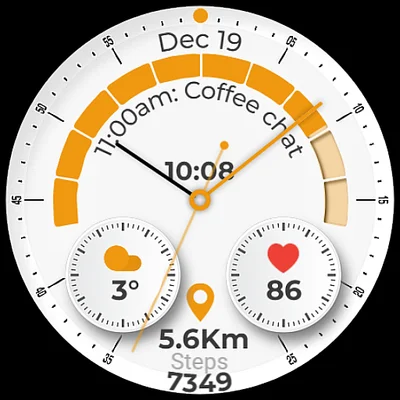
Wear OS için modern, bilgilendirici Analog ve dijital Saat Yüzü
Bilgilendirici Analog Saat Yüzü.
Temiz hibrit görünüm.
Bu saat yüzü Wear OS için tasarlanmıştır
★ Özellikler:
• Zaman (analog ve dijital)
• Gün tarihi
• Hava durumu
• Adımlar
• Km/Mil **
• Pil durumu
• Toplam 6 adet düzenlenebilir (karmaşık) yer, ücretsiz olarak düzenlenebilir
• 10 Renk stili seçeneği
• İsteğe bağlı analog saniye ibresi açma/kapama
+ AOD (Her Zaman Ekranda)
** // Km - Mil //
Saatin Bluetooth üzerinden telefona bağlanması gerekiyor, cep telefonunuzun bölgesel dil ayarlarını değiştirin, bir süre sonra saatte değişecek ve Km veya Mil görünecektir.
Örneğin - Km'nin görüntülenmesi için Eng USA'yı Eng CAN olarak değiştirin.
//
Özelleştirme:
1. Saat ekranına dokunup basılı tutun
2. Özelleştirme seçeneğine dokunun
Satın almadan önce not:
Endişelenmenize gerek yok , Google, aynı Google (Play Store) Hesabından satın alınan içerik için sizden yalnızca bir kez ücret alabilir.
Bazen Play Store'un yüz izleme uygulamasını zaten satın aldığınızı onaylaması biraz daha uzun sürebilir. Herhangi bir ek sipariş için Google tarafından otomatik olarak geri ödeme yapılır ve para size geri gönderilir.
Aynı saat görünümü için iki kez ödeme yapmanın yolu yoktur.
★ KURULUM NOTLARI:
Watch'un telefona Bluetooth aracılığıyla bağlandığından emin olun.
Kurulum açılır menüsünden izleme cihazınızı seçmelisiniz.
Play Store uygulamasında açılır menüden hedef cihazı seçin ve yükle'ye dokunun. İndirme durumu saatte görünecektir, yükleyin ve ardından saat yüzünü seçin (etkinleştirin). Bu yol tercih edilir, eğer sorun yaşarsanız aşağıda listelenen diğer iki yöntemle, telefon arkadaşı uygulaması veya web tarayıcısı üzerinden kurulum yapabilirsiniz.
1. Saatin telefona düzgün şekilde bağlandığından emin olun, telefonda Telefon Uygulamasını açın ve saatteki talimatları izleyin.
Birkaç dakika sonra saat yüzü kurulacaktır. Kurulu saat yüzünü seçebilirsiniz.
Telefonunuza indirilen uygulama, Wear OS saatinize saat yüzünü yüklemeyi ve bulmayı kolaylaştırmak için yalnızca yer tutucu görevi görür.
veya
2. Alternatif olarak, saat görünümünü PC'nizdeki bir web tarayıcısından yüklemeyi deneyin.
- Saat yüzü bağlantısını bir web tarayıcısında açın (Chrome, Firefox, Safari...)
PC veya Mac'te.
Bu Bağlantı:
https://play.google.com/store/apps/details?id=com.caveclub.analoginfo
Saat kadranını şurada arayabilirsiniz
play.google.com adresini ziyaret edin veya Play Store uygulamasından bir bağlantı paylaşın.
- 'Daha fazla cihaza yükle'yi tıklayın ve saatinizi seçin. Aynı Google Hesabıyla oturum açmış olmanız gerekir.
// DÖNGÜ Notu //
Ödeme döngüsünde takılıp kalırsanız (Play Store sizden tekrar ödeme yapmanızı ister), bu, saatiniz ile Google Play sunucusu arasında bir senkronizasyon sorunu olabilir. Saatin telefonunuzla olan bağlantısını kesmeyi/yeniden bağlamayı deneyebilir ve tekrar deneyebilirsiniz. Bunu hızlı bir şekilde yapmak için saatteki "Uçak modunu" 10 saniyeye ayarlayın. Lütfen "Satın almadan önce not" ve "Kurulum Notları"na bakın.
İletişim kurmaktan çekinmeyin: clubnemanja@gmail.com
Orijinal metni göster
Informative Analog Watch Face.
Clean hybrid look.
This watch face is designed for Wear OS
★ Features:
• Time (analog & digital)
• Day date
• Weather
• Steps
• Km/Miles **
• Battery status
• Total 6 editable (complication) places, free to edit
• 10 Color style options
• Optional analog sec hand on/off
+ AOD (Always On Display)
** // Km to Miles //
Watch has to be connected to the phone via Bluetooth, change the regional language settings on your mobile phone, , after a while it will change on the watch, and Km or Miles will be displayed.
For example - change Eng USA to Eng CAN to get Km displayed.
//
Customization:
1. Touch and hold watch display
2. Tap on customize option
Note before purchasing:
You don't have to worry , Google can charge you only one time for the content purchased from the same Google (Play Store) Account.
Sometimes the Play Store takes a little longer to confirm that you already bought the face watch app. Any additional order will be automatically refunded by Google, you will receive the money back.
There is no way to pay twice for the same watch face.
★ INSTALLATION NOTES:
Make sure that Watch is connected to the phone via Bluetooth.
You have to select your watch device from the install drop-down menu.
Select the target device in the Play Store app from the drop-down and tap on install. Download status will appear on watch, install and then select (activate) watch face. This way is preferred, if you have a problem, you can install it in two other ways, listed under, via phone companion app or web browser.
1. Make sure the watch is properly connected to the phone, open the Phone App on the phone and follow instructions on watch.
After a few minutes, the watch face will be installed. You can choose the installed watch face.
App downloaded to your phone serves only as a placeholder to make it easier to install & find the watch face on your Wear OS watch.
or
2. Alternatively, try installing the watch face from a web browser on your PC.
- Open watch face link in a web browser (Chrome, Firefox, Safari...)
on PC or Mac.
This Link:
https://play.google.com/store/apps/details?id=com.caveclub.analoginfo
You can search for the watch face in
play.google.com or share a link from the Play Store app.
- Click 'Install on more devices' and select your watch. You must be logged with the same Google Account.
// LOOP Note //
If you're stuck at the payment loop (Play Store asks you to pay again), this could be a sync problem between your watch and Google Play server. You can try disconnecting / reconnecting the watch from your phone and try again. To do this quickly, set the "Airplane mode" on watch for 10 seconds. Please see "Note before purchasing" and "Installation Notes".
Feel free to contact: clubnemanja@gmail.com
Veri güvenliği
Bu uygulamanın topladığı ve paylaştığı veriler hakkında Cave Club tarafından Google Play üzerinde yapılan beyan.
- Üçüncü taraflarla veri paylaşımı yokGeliştiricilerin, veri paylaşımını nasıl beyan ettikleri hakkında daha fazla bilgi edinin
- Veri toplanamadıGeliştiricilerin, veri toplamayı nasıl beyan ettikleri hakkında daha fazla bilgi edinin
Geliştirici iletişim bilgileri
- E-postaclubnemanja@gmail.com
- Gizlilik politikasıgithub.com
- AdresPrvomajska 4 11080 Beograd, Zemun Serbia
Bilgiler
- Sunan
- Cave Club
- Kategori
- Kişiselleştirme
- Güncellendi
- 10.09.2026
- Yayın tarihi
- 16.11.2024
- Yaş sınırı
- PEGI 3
- Fiyat
- ₺47,99
- Paket adı
- com.caveclub.analoginfo