Bloom in Grace 2
Bloomfield Watchfaces- PEGI 3Yaş sınırı
- KişiselleştirmeKategori
- 06.07.2023Güncellendi
- ₺34,99Fiyat
com.bloomfield.bloomingrace2 için resmi Google Play sayfasına bağlanır. Son kontrol: 24.11.2026.
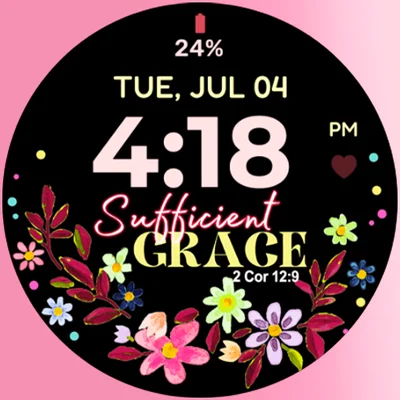
Bu uygulama hakkında
Google tarafından otomatik çeviri. Orijinal dil: İngilizce (Amerika Birleşik Devletleri).
Lütfen satın almadan önce okuyun.
📍SABIR ANAHTARDIR!
Lütfen sabırlı olun ve kurulum sorunu üzerinde kontrolümüzün olmadığını unutmayın. Saat yüzü uygulamalarımız, gerçek bir cihazda (Galaxy Watch 4) kapsamlı bir şekilde test edilir ve yayınlanmadan önce Google Play Store Ekibi tarafından "incelenir ve onaylanır". Kullanıcıların saat yüzlerimizi beğeneceğinden emin olmayı amaçlıyoruz.
⚠️⚠️⚠️ Kızıp bizi haksız yere değerlendirmeden önce, bize bloomfieldwatchfaces@gmail.com adresinden ulaşın, size ekran görüntülerini ve saat yüzünün nasıl kurulacağına ilişkin talimatları göndereceğiz. Size adım adım yardım etmeye fazlasıyla hazırız.
NOT ALIN❗️❗️❗️
1️⃣ Saat yüzleri, saate otomatik olarak yüklenir. (Kurulum sırasında ekranda bir indirme simgesi olacaktır)
2️⃣ SAATİNİZİN TELEFONUNUZA BLUETOOTH ÜZERİNDEN GÜÇLÜ BİR ŞEKİLDE BAĞLI OLDUĞUNDAN VE AYNI WIFI'YI KULLANDIĞINDAN EMİN OLUN. AYRICA KUSURSUZ KURULUM İÇİN GOOGLE HESABINIZDA "İZLEYİCİ" OLARAK OTURUM AÇMALISINIZ.
3️⃣ İndirdikten sonra, saat yüzünün saate aktarılması için birkaç dakika BEKLEYİN. (Saat yüzü başarıyla aktarıldıysa saatinizde bir bildirim olacaktır.)
4️⃣ Herhangi bir bildirim gelmemesi durumunda SAATİNİZDE PLAYSTORE'a gidin ve ARAMA KUTUSUNA "Bloom in Grace 2" yazın
5️⃣ Saat yüzü görünecek, ardından yükle düğmesine basın.
⬇️ İzleme yüzleri, başarılı kurulumdan sonra otomatik olarak değişmez. Ana ekrana geri dönün. Ekrana uzun dokunun, sonuna kadar kaydırın ve saat yüzünü eklemek için + öğesine dokunun. Saat yüzünü bulmak için Çerçeveyi döndürün.
📍Nasıl kurulacağına dair daha fazla ayrıntı için lütfen Özellik Grafiklerine bakın.
📍Samsung Developers, Wear OS saat yüzünün kurulumuyla ilgili pek çok açıdan yararlı bir video sağladı: https://youtu.be/vMM4Q2-rqoM
✅️ Ayarlar -> uygulamalar -> izinlerden tüm izinlere İZİN VER / ETKİNLEŞTİR.
⚠️ Geri ödemeye YALNIZCA 48 saat içinde izin verilir.
⌚️Bu saat yüzü, Samsung Galaxy Watch 4 gibi yeni Wear OS Google / One UI Samsung işletim sistemini temel alan cihazlar için Samsung'un "Watch Face Studio" aracıyla geliştirilmiştir.
📍WEAR OS API Seviye 30+ cihazlar desteklenir.
📍ÖZELLİKLER:
》12/24 saat Dijital Saat (otomatik senkronizasyon, telefon ayarlarına göre)
》Gün ve Tarih (Çoklu dil)
》Önceden Ayarlanmış Uygulama Kısayolları (Açmak için tek dokunuş/SABİT düzenlenemez) Alarm, Telefon, Mesaj, Takvim ve Ayarlar
📍Özelleştirilebilir Komplikasyonlar (DEĞİŞTİRİLEBİLİR)
Aralarından seçim yapabileceğiniz farklı komplikasyonlar; hava durumu, adımlar, gün batımı/gün doğumu, sonraki randevu, ayarlar kısayolu, telefon kısayolu, mesaj kısayolu ve daha fazlası.
📍Her Zaman Açık Modu (AOD)
📍Değiştirilebilir LCD stilleri ve yazı tipi renk paleti
Ekrana dokunun ve basılı tutun. Renkleri değiştirmek için özelleştirme seçeneğine dokunun. (LÜTFEN EĞİTİM İÇİN ÖZELLİK GRAFİKLERİNE BAKINIZ)
📍Bazı özellikler bazı saatlerde bulunmayabilir.
•Tam Koleksiyon: https://play.google.com/store/apps/developer?id=Bloomfield+Watchfaces
•Bize şu adresten ulaşın:
bloomfieldwatchfaces@gmail.com
•Facebook Sayfası:
https://www.facebook.com/bloomfieldwatchfaces
•İnternet sitesi:
https://bloomfieldwatchfaces.com
•Youtube Kurulum Eğitimi:
https://www.youtube.com/watch?v=vMM4Q2-rqoM
Orijinal metni göster
📍PATIENCE IS THE KEY!
Please be patient and be reminded that we don't have control over the installation issue. Our watch face apps are thoroughly tested in a real device (Galaxy Watch 4) and are "reviewed and approved" by the Google Play Store Team before publishing them. We aim to make sure users will enjoy our watch faces.
⚠️⚠️⚠️ Before you get angry and rate us unfairly, reach us out at bloomfieldwatchfaces@gmail.com and we will send you sceeenshots and instructions how to install the watchface. We are more than willing to help you step by step.
TAKE NOTE❗️❗️❗️
1️⃣ Watchfaces automatically install on watch. (There will be a download icon on screen while installing)
2️⃣ MAKE SURE THE WATCH IS STRONGLY CONNECTED TO YOUR PHONE VIA BLUETOOTH AND ARE USING THE SAME WIFI. MUST ALSO LOG IN TO YOUR GOOGLE ACCOUNT "ON WATCH" FOR SEAMLESS INSTALLATION.
3️⃣ After download, WAIT for a few minutes for the watchface to be transferred on watch. (There will be a notification on your watch if the watchface was successfully transferred.)
4️⃣ If incase there is no notification, Go to PLAYSTORE ON YOUR WATCH and type on the SEARCH BOX "Bloom in Grace 2"
5️⃣ The watchface will show up, then hit on install button.
⬇️ Watchfaces don't automatically change after successful installion. Go back to home display. Tap and hold display, swipe until the end and tap + to add the watchface. Rotate Bezel to find the watchface.
📍Please see Feature Graphics for more details how to install.
📍Samsung Developers provided a helpful video in installing Wear OS watch face in so many ways: https://youtu.be/vMM4Q2-rqoM
✅️ ALLOW / ENABLE all permissions from settings -> applications -> permissions.
⚠️ Refund is ONLY allowed within 48 hours.
⌚️This watch face was developed with Samsung's "Watch Face Studio" tool for devices based on the new Wear OS Google / One UI Samsung operating system like Samsung Galaxy Watch 4.
📍WEAR OS API Level 30+ devices are supported.
📍FEATURES:
》12/24hr Digital Time (auto-sync, based on phone settings)
》Day and Date (Multi-language)
》Preset App Shortcuts (Single tap to open/ FIXED not editable) Alarm, Phone, Message, Calendar & Settings
📍Customizable Complications (CHANGEABLE)
Different complications to choose from; weather, steps, sunset/sunrise, next appointment, settings shortcut, phone shortcut, message shortcut and more.
📍Always-On Mode (AOD)
📍Changeable LCD styles and font color palette
Touch and hold display. Tap on customize option to change colors. (PLEASE SEE FEATURE GRAPHICS FOR TUTORIAL)
📍Some features may not be available on some watches.
•Full Collection: https://play.google.com/store/apps/developer?id=Bloomfield+Watchfaces
•Contact us at:
bloomfieldwatchfaces@gmail.com
•Facebook Page:
https://www.facebook.com/bloomfieldwatchfaces
•Website:
https://bloomfieldwatchfaces.com
•Youtube Installation Tutorial:
https://www.youtube.com/watch?v=vMM4Q2-rqoM
Veri güvenliği
Bu uygulamanın topladığı ve paylaştığı veriler hakkında Bloomfield Watchfaces tarafından Google Play üzerinde yapılan beyan.
- Üçüncü taraflarla veri paylaşımı yokGeliştiricilerin, veri paylaşımını nasıl beyan ettikleri hakkında daha fazla bilgi edinin
- Veri toplanamadıGeliştiricilerin, veri toplamayı nasıl beyan ettikleri hakkında daha fazla bilgi edinin
Geliştirici iletişim bilgileri
- Web sitesibloomfieldwatchfaces.com
- E-postabloomfieldwatchfaces@gmail.com
- Gizlilik politikasısites.google.com
- Adres0015 BLOCK 5 BLK Beverly Homes Hugo Perez, Trece Martirez City 4109 Philippines
Bilgiler
- Sunan
- Bloomfield Watchfaces
- Kategori
- Kişiselleştirme
- Güncellendi
- 06.07.2023
- Yayın tarihi
- 04.07.2023
- Gereksinim
- Android 11 veya sonrası
- Yaş sınırı
- PEGI 3
- Fiyat
- ₺34,99
- Paket adı
- com.bloomfield.bloomingrace2