Electronic Digital Watch Face
DigitX Watchfaces- PEGI 3Yaş sınırı
- KişiselleştirmeKategori
- 07.09.2026Güncellendi
- ₺93,99Fiyat
watch.digitx.electronic için resmi Google Play sayfasına bağlanır. Son kontrol: 13.11.2026.
Bu uygulama hakkında
Google tarafından otomatik çeviri. Orijinal dil: İngilizce (Amerika Birleşik Devletleri).
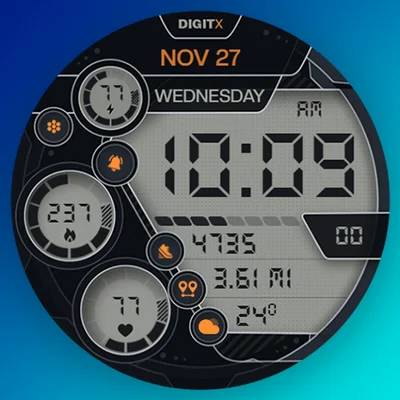
Wear OS için fütüristik dijital saat yüzü, zarif, birçok veriyle özelleştirilebilir.
⌚Yeni Saat Kadranı Formatı tarafından desteklenmektedir.
Uyumlu cihazlar arasında API seviyesi 30 veya üzeri cihazlar bulunur: Google Pixel, Galaxy Watch 4, 5, 6, 7, Ultra ve diğer Wear OS modelleri.
Wear OS için fütüristik dijital saat kadranı, şık, birçok veriyle özelleştirilebilir.
⌚ Bir Alana Bir Bedava:
https://digitx.watch/home/buy-one-get-one-free/
🚨 Galaxy Watch kullanıcılarına not:
Samsung Wearable uygulamasındaki saat kadranı düzenleyicisi, bu gibi karmaşık saat kadranlarını yüklemekte sık sık başarısız oluyor.
Bu, saat kadranının kendisiyle ilgili bir sorun değildir.
Samsung bu sorunu çözene kadar saat kadranınızı doğrudan saat üzerinde özelleştirmeniz önerilir.
✅ Özelliklere Genel Bakış:
- Fütüristik dijital saat kadranı
- 12/24 saat dijital zaman
- Özel renkler (29 renk)
- Özel komplikasyon (kullanıcı tanımlı veriler için)
- Favori uygulamanıza erişmek için özel kısayol.
- 4 standart kısayol: alarm, takvim, kalp atış hızı, pil durumu,
- 5 kademeli kadran parlaklığı
- AOD uyumlu
- Saat kadranı şunları gösterir: saat (dijital), öğleden önce/öğleden sonra, haftanın günü, ayın günü, ay, kalp atış hızı, adımlar, mesafe, kalori, pil seviyesi + 1 özel komplikasyon ve 1 özel kısayol
🎨 Özelleştirme Seçenekleri:
- Renk: 29 renk
- Kadran parlaklığı: 5 kademe
- Komplikasyonlar: 1 özel komplikasyon, 1 özel kısayol
📱 Telefon uygulaması özellikleri (yardımcı uygulama):
Telefon uygulaması, Wear OS saatinize bir saat kadranı yüklemenize ve bulmanıza yardımcı olan basit bir araçtır.
❤️ Kalp atış hızı ölçümü:
Kalp atış hızı ölçümü değiştirildi. (Önceden manueldi, şimdi otomatik). Ölçüm aralığını saat durumu ayarlarında (Saat ayarları > Sağlık) ayarlayın.
👟 KM/MI:
Milleri kilometreye çevirmek istiyorsanız, dili değiştirin (örneğin ABD İngilizcesinden Güney Afrika İngilizcesine).
⌚ AOD:
Saat kadranı sürekli açık ekrana sahiptir. Renkler normal görünümle senkronize edilmiştir.*
*AOD kullanımının, tam şarjlı bir akıllı saatin çalışma süresini önemli ölçüde azaltacağını unutmayın.
🎨 Renk Yapılandırması:
1. Parmağınızı saat ekranının ortasına basılı tutun.
2. Ayarlamalar yapmak için düğmeye basın.
3. Özelleştirilebilen farklı öğeler arasında geçiş yapmak için sola veya sağa kaydırın.
4. Öğelerin seçeneklerini/rengini değiştirmek için yukarı veya aşağı kaydırın.
🎨 Uygulama kısayolları ve özel komplikasyonlar ayarlama:
Kısayollar = widget bağlantıları
Özel komplikasyon = değerleri değiştirme
1. Saat ekranına basılı tutun.
2. Özelleştir düğmesine basın.
3. “Komplikasyonlar”a ulaşana kadar sağdan sola kaydırın.
4. Uygulama kısayollarınız ve/veya özel komplikasyonlarınız vurgulanır. Favori ayarınızı seçmek için bunlara tıklayın.
🚨 Uyumlu bir akıllı saatte bile kurulumda sorun mu yaşıyorsunuz?**
Şu adresi ziyaret edin: https://digitx.watch/home/about-digitx/help-faq/
veya benimle iletişime geçin: https://digitx.watch/home/about-digitx/contact-us/
** Saat kadranları kurulumdan sonra otomatik olarak saat ekranına yüklenmez. Bu nedenle, bu seçeneği saat ekranında ayarlamanız gerekir.
✅ Wear OS cihazlarda kullanılabilir – API 30+
Galaxy Watch Ultra / Galaxy Watch 7
Galaxy Watch 6 / 6 Classic
Galaxy Watch 5/5 Pro
Galaxy Watch 4 / 4 Classic
FOSSIL: Gen 7, Gen 6, Gen 6 Wellness, Gen 6 Hybrid, Gen 5e, Wear, Sport, Michael Kors Gen 6
MOBVOI: TicWatch Pro 5, Pro 3 GPS, Pro 3 LTE, E3, Pro 4G, C2, E2/S2, Pro
GOOGLE: Pixel Watch 2, Pixel Watch
XIAOMI: Watch 2 Pro, Watch 2
OPPO: Watch2, Watch X
MONTBLANC: Summit 3, 2, 2+, Lite, Summit
SUUNTO: Suunto 7
NEW BALANCE: RunIQ
POLAR: M600
TAG HEUER: Connected E4, Connected 2020
Ve diğer tüm Wear OS cihazları (API 30+)
ℹ️ Akıllı saatinizi test etmeye hazır benzersiz tarzda saat kadranı!
Desteğiniz için teşekkürler ve daha fazla gelecek saat kadranı için beni takip etmeyi unutmayın!
Ek sorularınız varsa veya desteğe ihtiyacınız varsa, lütfen benimle iletişime geçmekten çekinmeyin. Yardımcı olmak için buradayım!
💌 https://digitx.watch/home/about-digitx/contact-us/
_____________________
➡️ Güncel kalmak için takip edin:
🟢 Web sitesi: https://digitx.watch/
🔴 Instagram: https://www.instagram.com/digitxhwf/
🔵 Facebook: https://www.facebook.com/digitxxl
__________
DigitX Saat Kadranları
Orijinal metni göster
⌚Supported by the new Watch Face Format.
Compatible devices include API level 30 or later: Google Pixel, Galaxy Watch 4, 5, 6, 7, Ultra, and other Wear OS models.
Futuristic digital watch face for Wear OS, elegant, customizable with many data.
⌚ BOGO:
https://digitx.watch/home/buy-one-get-one-free/
🚨 Note to Galaxy Watch users:
The watch face editor in the Samsung Wearable app often fails to load complicated watch faces like this one.
This is not a problem with the watch face itself.
It is recommended that you customize your watch face directly on the watch until Samsung fixes this issue.
✅ Features Overview:
- Futuristic digital watch face
- 12/24 hours digital time
- Custom colors (29 colors)
- Custom complication (for user-defined data)
- Custom shortcut to access your favorite app.
- 4 standard shortcuts: alarm, calendar, heart rate, battery status,
- 5 levels of dial brightness
- AOD ready
- Watch face displays: time (digital), am/pm, day of the week, day of the month, month, heart rate, steps, distance, calories, battery level + 1 custom complication and 1 custom shortcut
🎨 Customization Options:
- Color: 29 colors
- Face brightness: 5 levels
- Complications: 1 custom complication, 1 custom shortcut
📱 Phone app features (companion app):
The phone app is simply a tool that helps you install and locate a watch face on your Wear OS watch.
❤️ Heart rate measurement:
Heart rate measurement has been changed. (Previously manual, now automatic). Set the measurement interval in the watch status settings (Watch settings > Health).
👟 KM/MI:
If you want to change miles to kilometers - change the language (from English USA to e.g. English South Africa)
⌚ AOD:
The watch face has an always-on display. The colors are synchronized with the normal view.*
*Keep in mind that using AOD will significantly reduce the operating time of a fully charged smartwatch.
🎨 Color Configuration:
1. Press and hold your finger in the middle of the watch display.
2. Press the button to make adjustments.
3. Swipe left or right to switch between different items that can be customized.
4. Swipe up or down to change the options/color of items.
🎨 Setting up app shortcuts and custom complications:
Shortcuts = widget links
Custom compl. = change values
1. Press and hold the watch display.
2. Press the customize button.
3. Swipe from right to left until you reach “complications.”
4. Your app shortcuts and/or custom complications are highlighted. Click them to choose your favorite setting.
🚨 Having trouble installing even on a compatible smartwatch?**
Visit: https://digitx.watch/home/about-digitx/help-faq/
or contact me: https://digitx.watch/home/about-digitx/contact-us/
** Watch faces are not automatically installed on the watch screen after installation. Therefore, you need to set this option on the watch screen.
✅ Available on Wear OS devices – API 30+
Galaxy Watch Ultra / Galaxy Watch 7
Galaxy Watch 6 / 6 Classic
Galaxy Watch 5/5 Pro
Galaxy Watch 4 / 4 Cassic
FOSSIL: Gen 7, Gen 6, Gen 6 Wellness, Gen 6 Hybrid, Gen 5e, Wear, Sport, Michael Kors Gen 6
MOBVOI: TicWatch Pro 5, Pro 3 GPS, Pro 3 LTE, E3, Pro 4G, C2, E2/S2, Pro
GOOGLE: Pixel Watch 2, Pixel Watch
XIAOMI: Watch 2 Pro, Watch 2
OPPO: Watch2, Watch X
MONTBLANC: Summit 3, 2, 2+, Lite, Summit
SUUNTO: Suunto 7
NEW BALANCE: RunIQ
POLAR: M600
TAG HEUER: Connected E4, Connected 2020
And every another Wear Os devices API 30+)
ℹ️ Unique style watch face ready to test your smartwatch!
Thanks for your support and don't forget to follow me for more upcoming watch faces!
If you have any additional questions or need support, please do not hesitate to contact me. I am here to help!
💌 https://digitx.watch/home/about-digitx/contact-us/
_____________________
➡️ Follow for being up to date:
🟢 Website: https://digitx.watch/
🔴 Instagram: https://www.instagram.com/digitxhwf/
🔵 Facebook: https://www.facebook.com/digitxxl
__________
DigitX Watch Faces
Veri güvenliği
Bu uygulamanın topladığı ve paylaştığı veriler hakkında DigitX Watchfaces tarafından Google Play üzerinde yapılan beyan.
- Üçüncü taraflarla veri paylaşımı yokGeliştiricilerin, veri paylaşımını nasıl beyan ettikleri hakkında daha fazla bilgi edinin
- Veri toplanamadıGeliştiricilerin, veri toplamayı nasıl beyan ettikleri hakkında daha fazla bilgi edinin
Geliştirici iletişim bilgileri
- Web sitesidigitx.watch
- E-postasupport@digitx.watch
- Gizlilik politikasıdigitx.watch
- Adres35 Ul. Nowa Wieś 42-160 Zajączki Drugie Poland
Bilgiler
- Sunan
- DigitX Watchfaces
- Kategori
- Kişiselleştirme
- Güncellendi
- 07.09.2026
- Yayın tarihi
- 04.10.2025
- Yaş sınırı
- PEGI 3
- Fiyat
- ₺93,99
- Paket adı
- watch.digitx.electronic