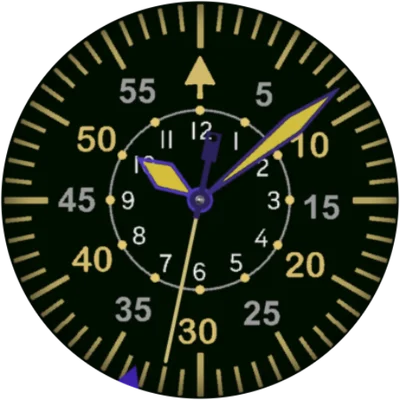
Flieger
Titanium Cyborg Systems (TCS) Services- PEGI 3Yaş sınırı
- KişiselleştirmeKategori
- 29.07.2023Güncellendi
- ÜcretsizFiyat
com.rajcolab.flieger için resmi Google Play sayfasına bağlanır. Son kontrol: 25.11.2026.
Bu uygulama hakkında
Google tarafından otomatik çeviri. Orijinal dil: İngilizce (Amerika Birleşik Devletleri).
Bir havacının favorisinin nostaljik rekreasyonu
Bileklerinden uçan pilotların günlerini yeniden yaşayın!
KURULUM:
1. Lütfen saatinizin Bluetooth ile telefonunuza bağlı olduğundan emin olun.
2. Bu saat kadranını, çifte ücretlendirmeyi önlemek için satın alma işlemini yaptığınız hesapla bir PC veya Dizüstü bilgisayardaki web tarayıcısından Google Play Store'a erişerek de yükleyebilirsiniz.
3. PC/dizüstü bilgisayar mevcut değilse, telefonun web tarayıcısını kullanabilirsiniz. Play Store uygulamasına, ardından saat yüzüne gidin. Sağ üst köşedeki 3 noktayı ve ardından Paylaş'ı tıklayın. Mevcut tarayıcıyı kullanın, Samsung Internet uygulamasını öneririm, satın alma işlemini yaptığınız hesaba giriş yapın ve orada kurun.
4. Wear OS saat kadranını yükleyen Samsung Developers videosunu birçok şekilde de kontrol edebilirsiniz: https://youtu.be/vMM4Q2-rqoM
Saat yüzü uygulamalarımız, gerçek bir cihazda (Galaxy Watch 4 Classic) kapsamlı bir şekilde test edilir ve yayınlanmadan önce Google Play Store ekibi tarafından incelenir ve onaylanır. Çalışmalarımızı paylaşmayı ve kullanıcıların saat yüzlerimizi beğeneceğinden emin olmayı seviyoruz.
ÖZELLİKLER:
- Analog saat
- 4 Düzenlenebilir görünmez Komplikasyon
Zevk alın!
WearOs için üretildi
ÖZELLEŞTİRME:
1. Ekranı basılı tutun ve ardından "Özelleştir"e basın.
2. Neyin özelleştirileceğini seçmek için sola ve sağa kaydırın.
3. Mevcut seçenekleri seçmek için yukarı ve aşağı kaydırın.
4. "Tamam"a basın.
RAJ CoLab güncellemelerine şu adresten göz atın:
İnternet sitesi:
http://www.rajcolab.com
Facebook Sayfası:
https://www.facebook.com/RAJCoLab/
Geliştirici sayfası:
https://play.google.com/web/store/apps/dev?id=5910798788508387665
Destek ve istek için bana TiBorg.iot@gmail.com adresinden e-posta gönderebilirsiniz.
Orijinal metni göster
Re-live to days of pilots flying by their wrists!
INSTALLATION:
1. Please make sure you watch is connected to your phone via Bluetooth
2. You can also install this watch face by accessing the Google Play Store in the web browser in a PC or Laptop with the same account you made the purchase from to avoid double charge.
3. If PC/laptop not available, you can use the phone web browser. Head over to the Play Store app, then to the watch face. Click the 3 dots in the upper right hand corner then Share. Use the available browser, I suggest Samsung Internet app, login the account you made the purchase from and install it there.
4. You can also check the Samsung Developers video installing Wear OS watch face in so many ways: https://youtu.be/vMM4Q2-rqoM
Our watch face apps are thoroughly tested in a real device (Galaxy Watch 4 Classic) and are reviewed and approved by the Google Play Store team before publishing them. We love to share our work and make sure users will enjoy our watch faces.
FEATURES:
- Analog clock
- 4 Editable invisible Complications
Please enjoy!
Made for WearOs
CUSTOMIZATION:
1. Press and hold display then hit "Customize".
2. Swipe left and right to choose what to customize.
3. Swipe up and down to choose options available.
4. Hit "OK".
Check out RAJ CoLab updates at:
WebSite:
http://www.rajcolab.com
Facebook page:
https://www.facebook.com/RAJCoLab/
Developer page:
https://play.google.com/web/store/apps/dev?id=5910798788508387665
For support and request, you can email me at TiBorg.iot@gmail.com
Veri güvenliği
Bu uygulamanın topladığı ve paylaştığı veriler hakkında Titanium Cyborg Systems (TCS) Services tarafından Google Play üzerinde yapılan beyan.
- Üçüncü taraflarla veri paylaşımı yokGeliştiricilerin, veri paylaşımını nasıl beyan ettikleri hakkında daha fazla bilgi edinin
- Veri toplanamadıGeliştiricilerin, veri toplamayı nasıl beyan ettikleri hakkında daha fazla bilgi edinin
Geliştirici iletişim bilgileri
- E-postatiborg.iot@gmail.com
- Gizlilik politikasıfreeprivacypolicy.com
- Adres2497 Highland Rd Roanoke, VA 24014-3911 United States
Bilgiler
- Sunan
- Titanium Cyborg Systems (TCS) Services
- Kategori
- Kişiselleştirme
- Sürüm
- 1.0.0
- Güncellendi
- 29.07.2023
- Yayın tarihi
- 29.07.2023
- Gereksinim
- Android 9 veya sonrası
- Yaş sınırı
- PEGI 3
- Fiyat
- Ücretsiz
- Paket adı
- com.rajcolab.flieger