Gradient dream Watch Face
SkyMax Watch Faces- PEGI 3Yaş sınırı
- KişiselleştirmeKategori
- 06.09.2026Güncellendi
- ₺25,99Fiyat
com.skymax.watchface.gradientdream için resmi Google Play sayfasına bağlanır. Son kontrol: 26.11.2026.
Bu uygulama hakkında
Google tarafından otomatik çeviri. Orijinal dil: İngilizce (Amerika Birleşik Devletleri).
Wear OS saatiniz için modern, özelleştirilebilir bir deneyim
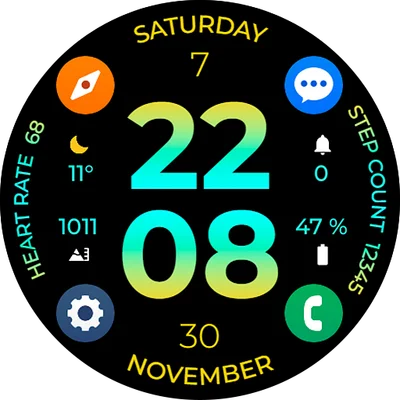
SkyMax «Gradient dream» Watch Face, Wear OS akıllı saatiniz için minimalist bir tasarıma ve birçok özelleştirilebilir eklentiye sahip dijital bir saat yüzüdür.
Bu uygulama çoğu Wear OS cihazı için tasarlanmıştır.
** Yükle > Yükle açılır menüsünden yalnızca saati seçin. "Cihazlarınız uyumlu değil" mesajını görürseniz veya başka kurulum sorunları yaşarsanız uygulamayı akıllı saatinize yüklemek için yardımcı uygulamamızı kullanmayı deneyin. Son çare olarak, yüklemek için tarayıcınızda Play Store'a gidin.
FONKSİYONLAR:
› Telefon ayarlarınıza + saniyeye bağlı olarak 12 veya 24 saatlik zaman biçimi
› Tarih ve haftanın günü
› Adım sayacı (hedef 10.000 adım olarak belirlendi)
› Kalp atış hızı ekranı
› Her Zaman Açık Ekran (AOD) desteklenir
KİŞİSELLEŞTİRME:
** Saat yüzünü özelleştirmek için saat ekranına dokunup basılı tutun.
› 10 ana renk seçeneği ve aynı renk paletinden 20 ek renk seçeneği
› 4 uygulama kısayolu
› 4 özel komplikasyon (eklenti), hava durumu, pil, takvim ve diğerleri
› 3 AOD ekran stili
› 6 AOD ekran parlaklık seçeneği
NOTLAR:
** Saat görünümünü güncelledikten, sistemi güncelledikten veya diğer durumlarda adım sayacı veya diğer göstergeler “0” gösteriyorsa aşağıdakileri deneyin. Saat yüzü seçim menüsüne ulaşmak için saat ekranına dokunup basılı tutun → mevcut herhangi bir saat yüzünü seçin → ardından saat yüzümüzü saat yüzü seçim menüsünden kaldırın (saatten değil) ve akıllı telefonunuzu kullanarak saatinize yeniden yükleyin. yeni yüklenen saat yüzleri seçim menüsü.
** Kalp atış hızı veya diğer göstergeler de “0” ise ayarlardan izinleri kontrol edin. “Ayarlar” → “Uygulamalar” → “İzinler”, bu saat görünümünü bulun ve gerekli izinleri yapılandırın. Ayrıca kalp atış hızınızı ölçerken saat ekranının açık olduğundan ve bileğinize doğru şekilde takıldığından emin olun.
EK UYGULAMALAR:
** Saatinizin ekranında "akıllı telefonunuzun kalan pil şarjını" ve saatinizde olmayan diğer eklemeleri (komplikasyonları) görmek istiyorsanız, bu uygulamaların geliştiricisinden ek uygulamalar yükleyin - amoledwatchfaces™ (tüm krediler) orijinal uygulamanın yaratıcısına aittir)
• Telefon Pil Komplikasyonu
https://play.google.com/store/apps/details?id=com.weartools.phonebattcomp
• Komplikasyonlar Paketi - Wear OS
https://play.google.com/store/apps/details?id=com.weartools.weekdayutccomp
• Kalp Hızı Komplikasyonu
https://play.google.com/store/apps/details?id=com.weartools.heartratecomp
• Sağlık Hizmetleri Komplikasyonları
https://play.google.com/store/apps/details?id=com.weartools.hscomplications
Canlı destek ve tartışma için bize katılın:
Telgraf https://t.me/skymaxwatchfaces
Instagram https://www.instagram.com/skymaxwatchfaces
Orijinal metni göster
SkyMax «Gradient dream» Watch Face is a digital watch face for your Wear OS smartwatch, with a minimalist design and many customizable additions.
This app is designed for most Wear OS devices.
** Install > Select only the clock from the Install drop-down menu. If you see a "Your devices are not compatible" message or have any other installation issues, try using our companion app to install the app on your smartwatch. As a last resort, go to the Play Store in your browser to install.
FUNCTIONS:
› 12 or 24 hour time format depending on your phone settings + seconds
› Date and day of week
› Step counter (goal set at 10,000 steps)
› Heart rate display
› Always On Display (AOD) supported
PERSONALIZATION:
** Touch and hold the watch display to customize the watch face.
› 10 main color options and 20 additional ones of the same color palette
› 4 application shortcuts
› 4 custom complications (add-ons) weather, battery, calendar and others
› 3 AOD screen styles
› 6 AOD screen brightness options
NOTES:
** If after updating the watch face, updating the system or other situations, the step counter or other indicators show “0”, try the following. Touch and hold the watch display to get to the watch face selection menu → select any other available watch face → then remove our watch face from the watch face selection menu (not from the watch) and reinstall it on your watch using your smartphone, from the recently installed watch faces selection menu.
** If the heart rate or other indicators are also “0”, check the permissions in the settings. “Settings” → “Applications” → “Permissions”, find this watch face and configure the necessary permissions. Also make sure that the watch screen is on and that it is worn correctly on your wrist when measuring your heart rate.
ADDITIONAL APPLICATIONS:
** If you want to see on the screen of your watch “the remaining battery charge of your smartphone” and other additions (complications) that are not on your watch, install additional applications from the developer of these applications - amoledwatchfaces™ (all credits belong to the creator of the original application)
• Phone Battery Complication
https://play.google.com/store/apps/details?id=com.weartools.phonebattcomp
• Complications Suite - Wear OS
https://play.google.com/store/apps/details?id=com.weartools.weekdayutccomp
• Heart Rate Complication
https://play.google.com/store/apps/details?id=com.weartools.heartratecomp
• Health Services Complications
https://play.google.com/store/apps/details?id=com.weartools.hscomplications
Join us for live support and discussion:
Telegram https://t.me/skymaxwatchfaces
Instagram https://www.instagram.com/skymaxwatchfaces
Veri güvenliği
Bu uygulamanın topladığı ve paylaştığı veriler hakkında SkyMax Watch Faces tarafından Google Play üzerinde yapılan beyan.
- Üçüncü taraflarla veri paylaşımı yokGeliştiricilerin, veri paylaşımını nasıl beyan ettikleri hakkında daha fazla bilgi edinin
- Veri toplanamadıGeliştiricilerin, veri toplamayı nasıl beyan ettikleri hakkında daha fazla bilgi edinin
Geliştirici iletişim bilgileri
- E-postaskymax.watchfaces@gmail.com
- Gizlilik politikasısites.google.com
- Adresул. Карла Маркса, дом 10, кв. 43 Хойники Гомельская область 247622 Belarus
Bilgiler
- Sunan
- SkyMax Watch Faces
- Kategori
- Kişiselleştirme
- Güncellendi
- 06.09.2026
- Yayın tarihi
- 13.09.2023
- Yaş sınırı
- PEGI 3
- Fiyat
- ₺25,99
- Paket adı
- com.skymax.watchface.gradientdream