KTrs
KocaTurk Watch Faces- PEGI 3Yaş sınırı
- KişiselleştirmeKategori
- 09.08.2026Güncellendi
- ₺49,99Fiyat
com.kocaturk.ktrs için resmi Google Play sayfasına bağlanır. Son kontrol: 14.11.2026.
Bu uygulama hakkında
Google tarafından otomatik çeviri. Orijinal dil: İngilizce (Amerika Birleşik Devletleri).
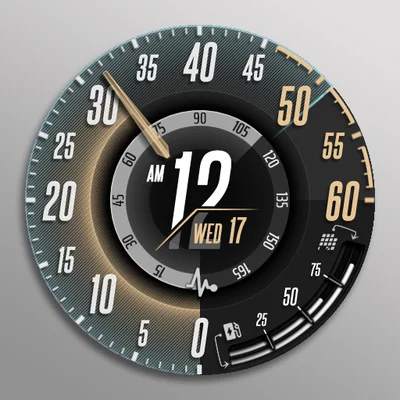
KTrs, Wear OS için sportif bir saat kadranıdır.
* Görüntülenen veriler:
- Saat (ÖÖ, ÖS)
- Tarih (saatte gecikmeli animasyonlu)
- Pil (ilerleme çubuğu)
- Günlük adım hedefi (ilerleme çubuğu)
- Kalp atış hızı
* Ön ayarlı kısayollar:
- Adımlar
- Kalp atış hızı
- Pil
- Takvim
* Komplikasyonlar ve kısayollar:
- 2 kısayol (simge yok)
- 3 komplikasyon (simge/metin/başlık)**
** Komplikasyonları kullanmak için önce "comp. area" bölümünden ilgili alanın boş olduğu seçeneği seçin ve ardından komplikasyonlar bölümünden istediğiniz komplikasyonu seçin.
* Özelleştirme seçenekleri:
- 21 renk paleti
- 4 renk seçeneğiyle saniye kolu (renk paletinde 1., 2., 3. ve beyaz)
- 2 dakika işareti
- Dakikanın son çeyreği için 2 endeks seçeneği
- Kalp atış hızı için 2 renk seçeneği (beyaz ve renkli)
- AOD kısma seçenekleri (%30/50/70/100)
* Özelleştirme notu:
Giyilebilir uygulama ile özelleştirme sırasında gecikmeler ve aksaklıklar meydana gelebilir.
Bu nedenle, saatinizin kişiselleştirme ayarlarını yapılandırın.
1. Saat ekranının ortasına basılı tutun.
2. Özelleştir düğmesine dokunun.
3. Özelleştirilebilir öğelere göz atmak için sola veya sağa kaydırın.
4. Her öğenin renklerini veya seçeneklerini değiştirmek için yukarı veya aşağı kaydırın.
NOT:
KARE SAAT MODELLERİ ŞU ANDA DESTEKLENMİYOR! Ayrıca, bazı özellikler tüm saat modellerinde mevcut olmayabilir.
KURULUM NOTLARI:
1. Satın Al düğmesinin sağındaki oka tıklayın ve açılır menüde listelenen cihazlardan saatinizin seçili olduğundan emin olun.
İndirme işlemi tamamlandıktan sonra:
2. Kurulum sırasında saatinizi seçmediyseniz, telefonunuza ikinci bir kurulum seçeneği olan "Companion Uygulaması" yüklenecektir. Bu uygulamayı açın ve görsele dokunun. Ardından, saatinizde Play Store indirme ekranını göreceksiniz. İndirme işleminin başladığını kontrol edin.
İndirme işlemi tamamlandıktan sonra:
Saatinizin ana ekranına dönün ve ekrana uzun basın. Saat kadranı seçim ekranında, en sağdaki "Ekle"ye tıklayın ve satın aldığınız saat kadranını bulup etkinleştirin.
Not: Ödeme döngüsünde takılırsanız endişelenmeyin; ikinci bir ödeme istense bile yalnızca tek bir ödeme işlenecektir. 5 dakika bekleyin veya saatinizi yeniden başlatıp tekrar deneyin.
Cihazınız ile Google sunucuları arasında bir senkronizasyon sorunu olabilir.
Lütfen bu sorunların geliştiriciden kaynaklanmadığını unutmayın. Geliştiricinin bu tarafta Play Store üzerinde hiçbir kontrolü yoktur.
Teşekkürler!
İndirimler ve promosyonlar için bizi sosyal medyada takip edin.
Facebook: https://www.facebook.com/koca.turk.940
Instagram: https://www.instagram.com/kocaturk.wf/
Telegram: https://t.me/kocaturk_wf
Orijinal metni göster
* Displayed data:
- Time (AM, PM)
- Date (animated with a delay on the watch)
- Battery (progress bar)
- Daily step goal (progress bar)
- Heart rate
* Preset shortcuts:
- Steps
- Heart rate
- Battery
- Calendar
* Complications and shortcuts:
- 2 shortcuts (no icon)
- 3 complications (icon/text/title)**
** To use complications, first select the option where the relevant field is empty from the "comp. area" and then select the complication you want from the complications section.
* Customization options:
- 21 color palette
- Second hand with 4 color options (1st, 2nd, 3rd, and white in the color palette)
- 2 minute marks
- 2 index options for the last quarter of the minute
- 2 color options for heart rate (white and color)
- AOD dimming options (30/50/70/100%)
* Customization note:
Delays and glitches may occur during customization with the wearable app.
Therefore, configure your watch's personalization settings.
1. Press and hold the center of the watch screen.
2. Tap the Customize button.
3. Swipe left or right to browse customizable items.
4. Swipe up or down to change the colors or options for each item.
NOTE:
SQUARE WATCH MODELS ARE NOT CURRENTLY SUPPORTED! Also, some features may not be available on all watch models.
INSTALLATION NOTES:
1. Click the arrow to the right of the Buy button and make sure your watch is selected from the devices listed in the drop-down menu.
After the download is complete:
2. If you didn't select your watch during the installation, a second installation option, the "Companion App," will be installed on your phone. Open this app and tap the image. Then, you'll see the Play Store download screen on your watch. Check that the download has started.
After the download is complete:
Return to your watch's home screen and long-press the screen. On the watch face selection screen, click "Add" on the far right and find and activate the watch face you purchased.
Note: Don't worry if you get stuck in the payment loop; even if you're asked for a second payment, only one payment will be processed. Wait 5 minutes or restart your watch and try again.
There may be a synchronization issue between your device and Google servers.
Please note that these issues are not caused by the developer. The developer has no control over the Play Store on this side.
Thank you!
Follow us on social media for discounts and promotions.
Facebook: https://www.facebook.com/koca.turk.940
Instagram: https://www.instagram.com/kocaturk.wf/
Telegram: https://t.me/kocaturk_wf
Veri güvenliği
Bu uygulamanın topladığı ve paylaştığı veriler hakkında KocaTurk Watch Faces tarafından Google Play üzerinde yapılan beyan.
- Üçüncü taraflarla veri paylaşımı yokGeliştiricilerin, veri paylaşımını nasıl beyan ettikleri hakkında daha fazla bilgi edinin
- Veri toplanamadıGeliştiricilerin, veri toplamayı nasıl beyan ettikleri hakkında daha fazla bilgi edinin
Yenilikler
09.08.2026
The target has been updated to SDK 36.
Geliştirici iletişim bilgileri
- E-postakocaturk.wf@gmail.com
- Gizlilik politikasısites.google.com
- AdresBÜYÜKKARIŞTIRAN BELDESİ FATİH MAH. GÜNDOĞU SK. NO: 11 İÇ KAPI NO: 2 39780 Lüleburgaz/Kırklareli Türkiye
Bilgiler
- Sunan
- KocaTurk Watch Faces
- Kategori
- Kişiselleştirme
- Güncellendi
- 09.08.2026
- Yayın tarihi
- 18.11.2025
- Yaş sınırı
- PEGI 3
- Fiyat
- ₺49,99
- Paket adı
- com.kocaturk.ktrs