2Pass: Password Authenticator
2FA Codes, Vault & Autofill
iPhone, iPad için tasarlandı
Ücretsiz · Uygulama içi satın alma
- Yaş sınırı4+
- KategoriYardımcılar
- GeliştiriciBoris Spiro
- Dillerİngilizce+ 9 dil daha
- Boyut7,2 MB
Resmi App Store sayfasına bağlanır
Download.org, 2Pass: Password Authenticator için hiçbir dosya barındırmaz. Düğme, uygulamanın App Store üzerindeki sayfasını açar; uygulamayı orada Boris Spiro yayınlar. Sayfanın son kontrolü: 11.11.2026.
Ekran görüntüleri


Hakkında
Geliştirici bu metni dilinizde sunmamış.
2Pass is a private password manager and 2FA authenticator built for iPhone and iPad. One app replaces both your password manager and Google Authenticator — with Face ID, iCloud Sync and a Recovery Key.
=== Passwords + 2FA in one place ===
Every login has its 2FA code right next to the password. Tap once to copy and autofill — no more switching between apps. Add codes by scanning a QR code, importing from photo, or entering a setup key.
=== What you can store ===
Passwords and logins with one-tap autofill in Safari and every app.
2FA codes (TOTP) — built-in authenticator that refreshes every 30 seconds.
Credit cards with secure card view and clipboard auto-clear.
Secure notes: recovery codes, Wi-Fi passwords, PIN codes.
Identities for faster signup forms.
=== Generator ===
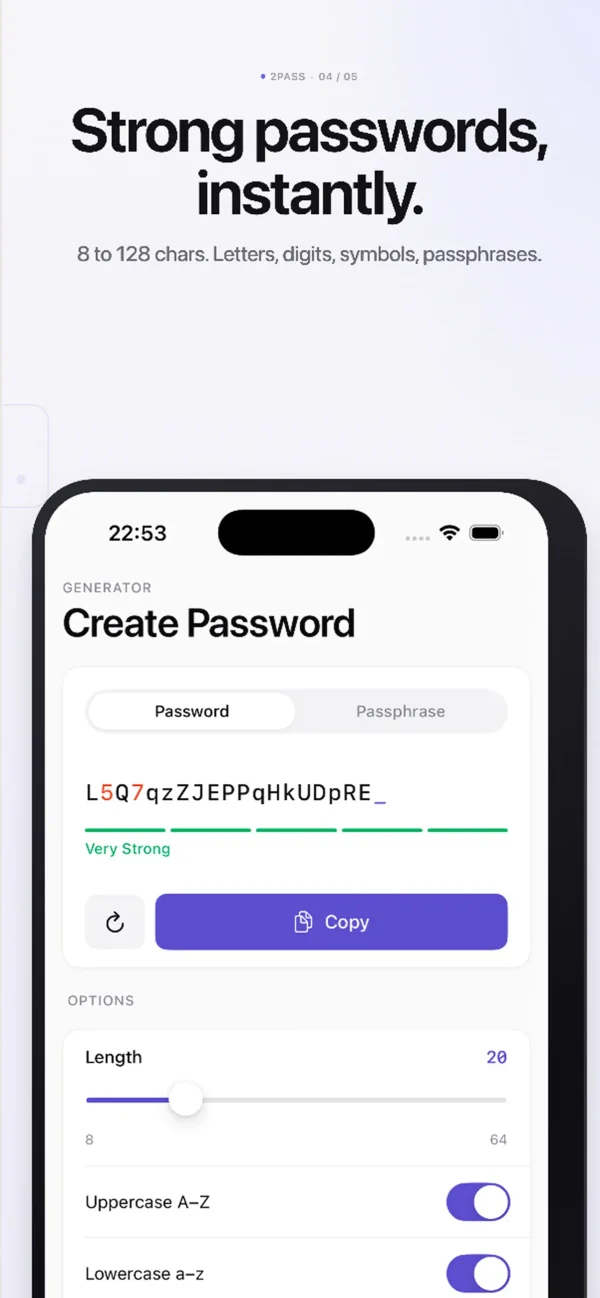
Create strong passwords from 8 to 128 characters — letters, digits, symbols or passphrases. Exclude look-alike characters in one tap.
=== Autofill everywhere ===
2Pass plugs into the iOS system Password AutoFill API. On iOS 18, your 2FA codes autofill too — one tap and done. No browser extension required.
=== Watchtower ===
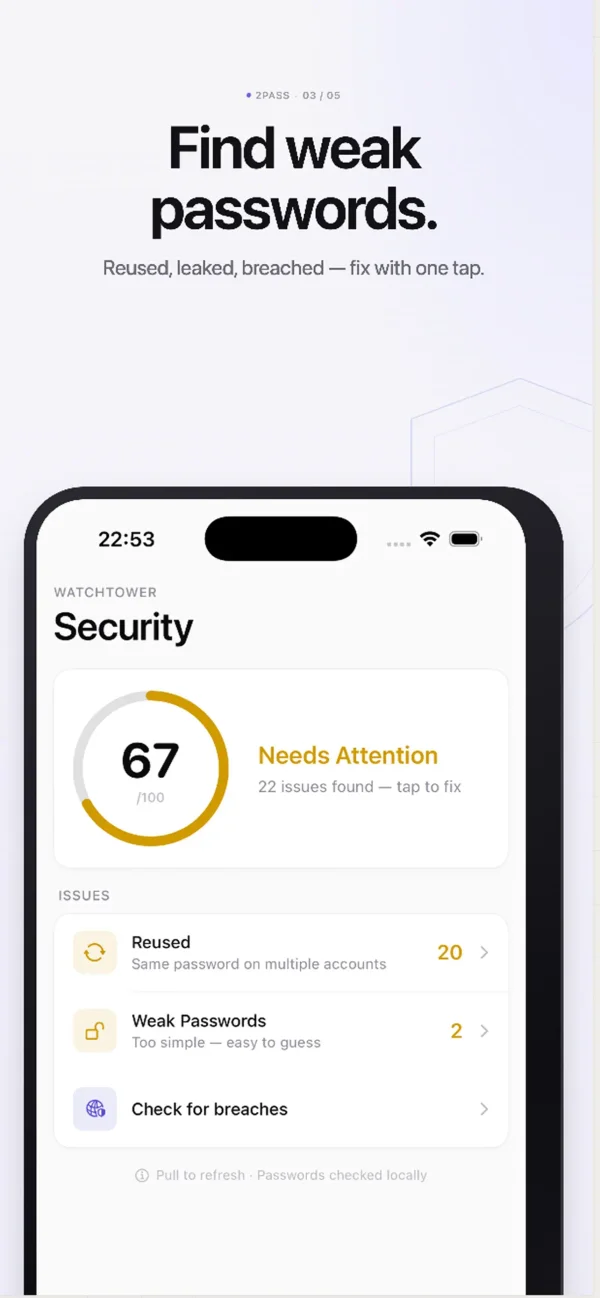
See which passwords are weak, reused or appeared in public data breaches. Powered by Have I Been Pwned k-anonymity — your actual password never leaves your device.
=== Why switch from Google Authenticator? ===
Google Authenticator stores only codes — no passwords, no autofill, no recovery option if you lose your phone. 2Pass keeps codes and passwords together, protected by AES-256 encryption and a Recovery Key you control.
=== Built for Apple ===
— Native iPhone and iPad app with adaptive split-view on iPad.
— Face ID and Touch ID unlock.
— Optional iCloud Sync, end-to-end encrypted.
— Keyboard shortcuts on iPad: new item, search, copy password, lock vault.
— Spotlight search for item titles.
— Offline-first: works without a network connection.
=== Recovery Key ===
2Pass gives you a Recovery Key during setup. Lose your phone? Use the key to restore full access — passwords and 2FA codes alike. The key is generated on your device and never stored on our servers.
=== Import ===
Move from 1Password, Bitwarden, Chrome or Keychain in minutes. Import CSV or JSON and 2Pass encrypts everything locally.
=== Privacy first ===
— Zero-knowledge: only you can decrypt your vault.
— AES-256 encryption with a unique key per item.
— No tracking, no analytics, no ads.
— Your data never leaves your device unless you enable iCloud Sync.
=== Subscription ===
2Pass is free to try for 3 days. After the trial:
— 2Pass Premium Monthly — $4.99 / month
— 2Pass Premium Yearly — $49.99 / year (Save 16%, about $4.17 / month)
Payment will be charged to your Apple ID at confirmation of purchase. Subscription automatically renews unless canceled at least 24 hours before the end of the current period.
Privacy Policy: https://github.com/spiroba/2pass/blob/main/privacy-policy.md
Terms of Use: https://github.com/spiroba/2pass/blob/main/terms-of-use.md
Yenilikler
Sürüm 2.3 · 05.09.2026
— Free plan: tap “Continue with free plan” at start and keep one login, one card, one note, one identity and one 2FA token at no cost. Premium unlocks unlimited items, Watchtower and export.
— Spotlight search: find vault items from the iOS home screen and open them with a tap. Titles and usernames only — never passwords.
— Reinstalling the app no longer loses your vault: your data comes back from iCloud and unlocks with your master password.
— Fixed a crash caused by malformed 2FA QR codes, and a launch crash after an interrupted master-password change.
— Auto-lock now honours the interval you picked in Settings.
— Security hardening: password recovery enforces the same strength rules as setup, and the recovery-key PDF is protected and removed after export.
— Refined translations in all 10 languages.
Questions? Write to spiro.boris@yandex.ru — we read every message.
Uygulama gizliliği
Bu uygulamanın verileri nasıl işlediği hakkında Boris Spiro tarafından App Store üzerinde yapılan beyan.
-
Veri toplanmıyor
Geliştirici bu uygulamadan hiçbir veri toplamıyor.
Gizlilik uygulamaları, örneğin kullandığınız özelliklere veya yaşınıza göre değişiklik gösterebilir.
Bilgiler
- Satıcı
- Boris Spiro
- Kategori
- Yardımcılar
- Sürüm
- 2.3
- Güncellendi
- 05.09.2026
- Yayın tarihi
- 16.04.2026
- Boyut
- 7,2 MB
- Gereksinim
- iOS 17.6 veya sonrası
- Yaş sınırı
- 4+
- Fiyat
- Ücretsiz
- Uygulama içi satın alma
- Evet
- Diller
- İngilizce, Arapça, Fransızca, Almanca, Japonca, Korece, Portekizce, Rusça, Basitleştirilmiş Çince, İspanyolca
- Telif hakkı
- © 2025 App by Spiro. Все права защищены.