
Chefstr Kiosk
Clock in and out on site
iPhone, iPad, iPod touch için tasarlandı
Ücretsiz
- Yaş sınırı4+
- Kategoriİş
- GeliştiriciAlexander Pot
- Dillerİngilizce+ 1 dil daha
- Boyut3,4 MB
Resmi App Store sayfasına bağlanır
Download.org, Chefstr Kiosk için hiçbir dosya barındırmaz. Düğme, uygulamanın App Store üzerindeki sayfasını açar; uygulamayı orada Alexander Pot yayınlar. Sayfanın son kontrolü: 12.11.2026.
Ekran görüntüleri


Hakkında
Geliştirici bu metni dilinizde sunmamış.
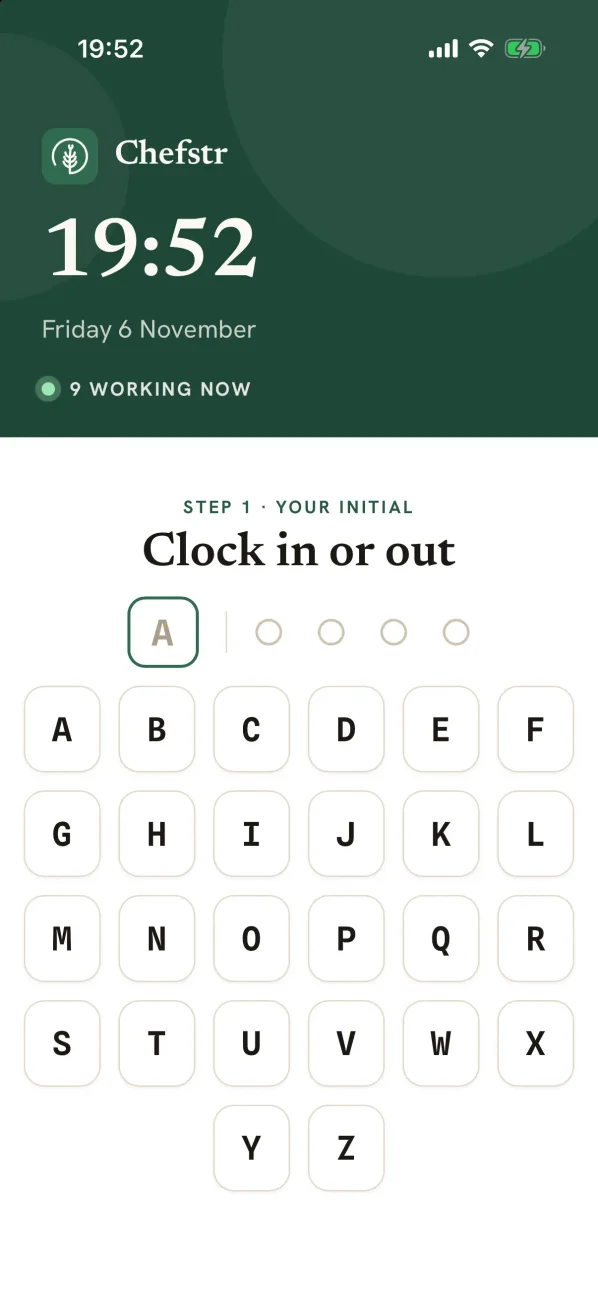
Chefstr Kiosk turns a tablet into your restaurant's clock-in screen. Employees clock in and out with their own PIN, and their hours go straight into Chefstr.
Clock in with a PIN
Employees tap the first letter of their first name, enter their four-digit PIN and see their name come up. One more tap clocks them in or out; Chefstr already knows which.
Their shift at a glance
After clocking out, employees see how long they have worked today and their total hours for the week.
Who is working
The screen can show who is clocked in right now: by name on a tablet, as a count on a phone. This can be turned on or off in Chefstr.
Paired once
The tablet is added in Chefstr and paired in one of three ways: scan the QR code in the app, open the pairing link with the tablet's camera, or type or paste the pairing code. Nobody signs in on the tablet and there is no personal account on it: the tablet belongs to the workplace, not to one person.
Stays paired
The tablet stays paired until it is unpaired, even after a restart or when the internet drops out for a while. Without a connection, the screen says so and tries again by itself; clocking in works again as soon as the connection is back.
Tablets and phones
Chefstr Kiosk runs on tablets and phones, in portrait and landscape, and keeps the screen on while it is paired. Tip: keep the app on screen with Guided Access.
In your language
The clock-in screen is available in English and in Dutch; the language is set per device in Chefstr.
Please note: Chefstr Kiosk only works with a Chefstr workspace. The tablet is paired from Chefstr; there is no sign-up in the app.
Questions? Email support@chefstr.com
Uygulama gizliliği
Bu uygulamanın verileri nasıl işlediği hakkında Alexander Pot tarafından App Store üzerinde yapılan beyan.
-
Veri toplanmıyor
Geliştirici bu uygulamadan hiçbir veri toplamıyor.
Gizlilik uygulamaları, örneğin kullandığınız özelliklere veya yaşınıza göre değişiklik gösterebilir.
Bilgiler
- Satıcı
- Alexander Pot
- Kategori
- İş
- Sürüm
- 1.0.0
- Güncellendi
- 07.11.2026
- Yayın tarihi
- 07.11.2026
- Boyut
- 3,4 MB
- Gereksinim
- iOS 15.0 veya sonrası
- Yaş sınırı
- 4+
- Fiyat
- Ücretsiz
- Diller
- İngilizce, Hollandaca
- Telif hakkı
- © 2026 ASD Solutions