- Yaş sınırı4+
- Kategoriİş
- GeliştiriciPANASONIC ENTERTAINMENT & COMMUNICATION CO., LTD.
- Boyut30,8 MB
Resmi App Store sayfasına bağlanır
Download.org, CX ROP için hiçbir dosya barındırmaz. Düğme, uygulamanın App Store üzerindeki sayfasını açar; uygulamayı orada PANASONIC ENTERTAINMENT & COMMUNICATION CO., LTD. yayınlar. Sayfanın son kontrolü: 12.11.2026.
Ekran görüntüleri


Hakkında
Geliştirici bu metni dilinizde sunmamış.
=== Name of App ===
CX ROP (CX series memory camera recorder Remote Operation Panel)
=== Description ===
CX ROP is a control program that enables the wireless remote control of the memory camera recorder "Panasonic CX series".
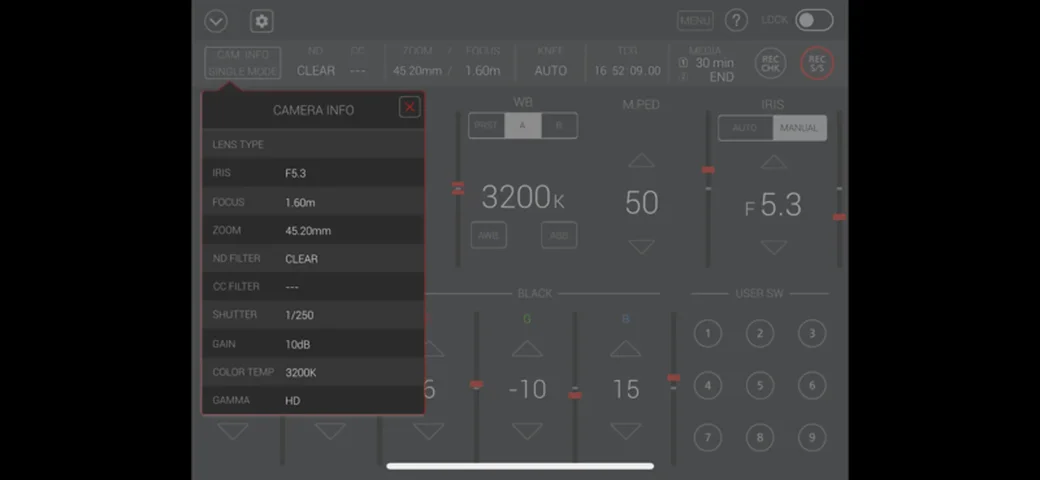
It provides a GUI that displays status information, settings and user switch status in a single screen and the ability to change camera settings intuitively using a screen touch.
Buttons such as user buttons and REC S/S button in screen can manipulate camera recorder.
CX ROP cam manipulate one memory camera reorder by switching up to eight memory camera reorders. Please tap a "?" button to see a hint for usage of this app.
[NOTE]
For wireless LAN connection with the camera, a wireless module needs to be purchased separately.
https://pro-av.panasonic.net/en/
=== Applicable Model ===
AG-CX350 series.
(AG-CX350 / CX350P / CX350PJ / CX350EJ / CX350ED /
CX350EN / CX350AN / CX350PX, AJ-UPX360MC,
AG-CX200MC)
AG-CX4000 series.
(AJ-CX4000G, AJ-UPX900MC)
=== Supported OS ===
iOS12 or later
=== Features ===
1. Camera status display
- List of camera information
- ND/CC FILTER
- ZOOM/FOCUS
- KNEE
- TCG
- Remaining time of recording media
2. CONTROLLABLE FUNCTIONS
- SHUTTER (OFF/FIX/SS)
- GAIN
- WHITE BALANCE(PRE/A/B, AWB, ABB)
- MASTER PEDESTAL
- IRIS(AUTO/MANUAL)
- Painting GAIN(R/B)
- Painting BLACK(R/G/B)
- USER SW (1-9) *AG-CX350 series
(1-5) *AJ-CX4000 series
- MENU display and setting
- HELP
- LOCK (disable operation on CX ROP)
- Switching CAM/BARS Output image
- ZOOM (i.ZOOM / i.ZOOM OFF) *AG-CX350 series Only.
- FOCUS(AUTO/MANUAL) *AG-CX350 series Only.
- KNEE(AUTO/MANUAL/OFF)
- TCG(TC/UB display and setting)
- REC CHECK
- REC Start/Stop
- REC META DATA setting
3. Settings and switching of a connected camera
You can set or switch connected cameras in a connect setting panel by tapping a connect manipulation button in the screen. Please refer to "CONNECTION" item by tapping "?" for details.
4. Automatic Connected Camera Search Function
Easy IP protocol automatically searches for cameras on the same network.
It is effective when [Easy IP] is [20 MIN.] or [UNLIMITED] on the camera side.
=== NOTE ===
1) With iOS14, permission is required for local network communication.
Select [Settings]-[Privacy]-[Local Network] and enable the [CX ROP] switch.
2)In iOS, camera information may not be displayed correctly on the app screen.
This can be fixed by turning on airplane mode and then turning off again.
・SETTINGS
1. Close "CX ROP".
2. Select "Settings" on the device home screen
3. Turn on "Airplane mode"
4. Turn off "Airplane mode"
5. Launch "CX ROP"
*These settings need to be repeated after turning off or restarting the device.
Yenilikler
Sürüm 1.3.1 · 25.04.2024
Minor bug fixes.
Uygulama gizliliği
Bu uygulamanın verileri nasıl işlediği hakkında PANASONIC ENTERTAINMENT & COMMUNICATION CO., LTD. tarafından App Store üzerinde yapılan beyan.
-
Veri toplanmıyor
Geliştirici bu uygulamadan hiçbir veri toplamıyor.
Gizlilik uygulamaları, örneğin kullandığınız özelliklere veya yaşınıza göre değişiklik gösterebilir.
Bilgiler
- Satıcı
- PANASONIC ENTERTAINMENT & COMMUNICATION CO., LTD.
- Kategori
- İş
- Sürüm
- 1.3.1
- Güncellendi
- 25.04.2024
- Yayın tarihi
- 13.02.2019
- Boyut
- 30,8 MB
- Gereksinim
- iOS 12.0 veya sonrası
- Yaş sınırı
- 4+
- Fiyat
- Ücretsiz
- Telif hakkı
- © Panasonic Connect Co., Ltd.