- Yaş sınırı17+
- KategoriÜretkenlik
- GeliştiriciMazen Al-Ashbi
- Dillerİngilizce
- Boyut75,2 MB
Resmi App Store sayfasına bağlanır
Download.org, DeskOS için hiçbir dosya barındırmaz. Düğme, uygulamanın App Store üzerindeki sayfasını açar; uygulamayı orada Mazen Al-Ashbi yayınlar. Sayfanın son kontrolü: 22.11.2026.
Ekran görüntüleri



Hakkında
Geliştirici bu metni dilinizde sunmamış.
Unfold your next big idea. DeskOS brings files, a browser and creative tools together in a flexible desktop workspace.
MADE FOR A FLEXIBLE SCREEN
On iPhone Duo, partially open the device for a desktop above the fold and a laptop-style keyboard and trackpad below. Open fully for a full-screen desktop with movable keyboard and trackpad panels. On other phones, adjust the desktop preview and trackpad balance, or use landscape Desktop mode. Connect a compatible external display for a larger workspace.
CREATE IN ONE PLACE
• Editly Pro: choose Simplified for familiar multitrack editing, captions, color, sound and MP4 export. Choose Advanced for a fuller timeline workspace, effects, audio mixing and supported interchange formats. The two workspaces use separate project formats.
• EditlyPhotos: combine photos and text, edit layers, open supported PSD projects, and save or export your work. Standard PSD imports support up to 512 MB, subject to decoded-layer memory limits. PSB is not supported.
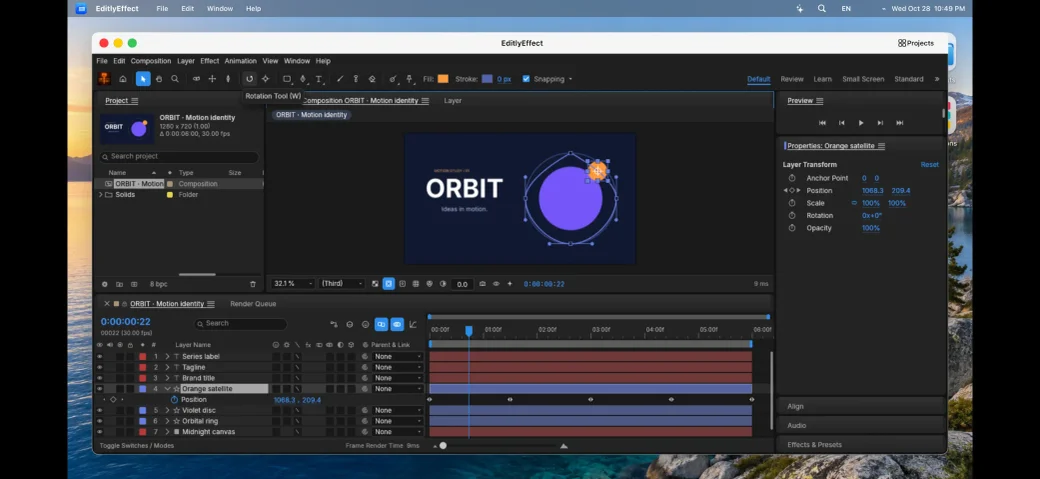
• EditlyEffect: build motion compositions with layers, shapes, text, effects and keyframes. Export supported compositions as MP4 or transparent MOV on your device.
• EditlyRoom: import supported photos and camera RAW files for editing. RAW support and performance depend on format and device memory.
• EditlyVector: create vector artwork with paths, shapes, type, layers and illustration tools. Save editable projects and export supported vector or image formats.
Find saved creative projects in each editor and in Files. Projects and exports have their own app folders.
A PERSONAL AI ASSISTANT
Connect a supported personal OpenAI or Anthropic API account for help in the selected app. Choose a model, follow up with instructions, and use supported creative actions, file organization and browser form controls. Email sending requires your review. Available actions vary by app; direct vector-editing actions are not included.
Interrupted requests can reconnect without repeating completed edits. iOS may suspend work when you leave DeskOS; return to continue. Force-quitting stops local execution. There is no cloud execution service.
FILES AND DOCUMENTS
Browse local documents and folders you choose to link. Preview images, video, audio, PDFs and supported Office files. Edit UTF-8 text and code. Add text and signatures to PDFs, print, and save a separate copy. Extract supported ZIP and RAR archives. Copy Gallery items into folders and save compatible media to Photos.
BROWSE AND MULTITASK
Arrange windows side by side, minimize to the Dock, use desktop search, bookmarks and browser tabs. See download progress and history, reveal downloads in Files, and use compatible upload controls. Adjust Dock size or toggle automatic hiding from its contextual menu. Open built-in tools and website shortcuts from Applications.
WORK YOUR WAY
Move, click, scroll, drag and resize from the trackpad. Use two-finger secondary clicks, a keyboard, and supported Command shortcuts. The Duo laptop deck includes F1–F12 and a wider trackpad with side controls. USB-C, HDMI and system screen mirroring require compatible hardware.
GOOD TO KNOW
DeskOS contains its own tools and website shortcuts; it cannot run arbitrary installed apps in its windows. Keep DeskOS active for an external display. Mouse input depends on iOS events; AssistiveTouch may be required. Website sign-in, uploads, media, DRM and editing support vary by provider.
AI is optional and requires internet, consent to share selected content and a supported personal API account. Provider charges apply. Consumer chat subscriptions do not include API access. AI can make mistakes; review results. Conversation and recovery data are stored locally and may be summarized.
Projects use local storage; referenced media must remain available. Complexity is limited by device memory. Effect movie exports support up to a 1920-pixel longest edge and 60 fps. Caption models download on first use.
Yenilikler
Sürüm 1.1.7 · 15.11.2026
Rotate your iPhone sideways to use floating desktop controls. Typing on an external display is easier, with a Hide keyboard control in Google Docs and Slides. The DeskOS Assistant can build editable presentations with photos and source credits, and save a PowerPoint copy in Downloads.
Right-clicking now opens a website’s own menu when available. In EditlyPhotos on iPad, use your mouse to set a document’s width and height and draw curves with the Pen tool.
Uygulama gizliliği
Bu uygulamanın verileri nasıl işlediği hakkında Mazen Al-Ashbi tarafından App Store üzerinde yapılan beyan.
-
Sizinle ilişkilendirilen veriler
Toplanabilir ve kimliğinizle ilişkilendirilebilir.
- Kullanıcı içeriği
- Tarama geçmişi
Gizlilik uygulamaları, örneğin kullandığınız özelliklere veya yaşınıza göre değişiklik gösterebilir.
Bilgiler
- Satıcı
- Mazen Al-Ashbi
- Kategori
- Üretkenlik
- Sürüm
- 1.1.7
- Güncellendi
- 15.11.2026
- Yayın tarihi
- 28.09.2026
- Boyut
- 75,2 MB
- Gereksinim
- iOS 17.0 veya sonrası
- Yaş sınırı
- 17+
- Fiyat
- ₺599,99
- Diller
- İngilizce
- Telif hakkı
- © 2026 DeskOS
Bunları da beğenebilirsiniz
-
 InfiniteX2P Pro — Desktop ModeÜretkenlik
-
 Side Link for SafariÜretkenlik
-
 OptegrityÜretkenlik
-
 Agency - AI Agent Team ChatÜretkenlik
-
 Notina NÜretkenlik
-
 TimeAtlas: Time Zone ConverterÜretkenlik
-
 Tapix: AI Keyboard & TranslateÜretkenlik
-
 Pocket Mac LabÜretkenlik
-
 Qrafter Pro: QR Kod OkuyucuKarekod Oluştur ve Tasarla
-
 SteelCodedÜretkenlik