Document Scanner: OCR, PDF
Sign Pages & Copy Text
iPhone, iPad için tasarlandı
Ücretsiz · Uygulama içi satın alma
- Yaş sınırı4+
- KategoriÜretkenlik
- GeliştiriciDolair Alali
- Dillerİngilizce
- Boyut1,1 MB
Resmi App Store sayfasına bağlanır
Download.org, Document Scanner: OCR, PDF için hiçbir dosya barındırmaz. Düğme, uygulamanın App Store üzerindeki sayfasını açar; uygulamayı orada Dolair Alali yayınlar. Sayfanın son kontrolü: 20.11.2026.
Ekran görüntüleri

Hakkında
Geliştirici bu metni dilinizde sunmamış.
Turn paper into PDFs, extract text without retyping, and add your signature before sharing.
Document Scanner helps you handle receipts, invoices, contracts, and notes from your iPhone or iPad. Capture a document or import photos, improve each page, and export the result.
SCAN AND IMPORT
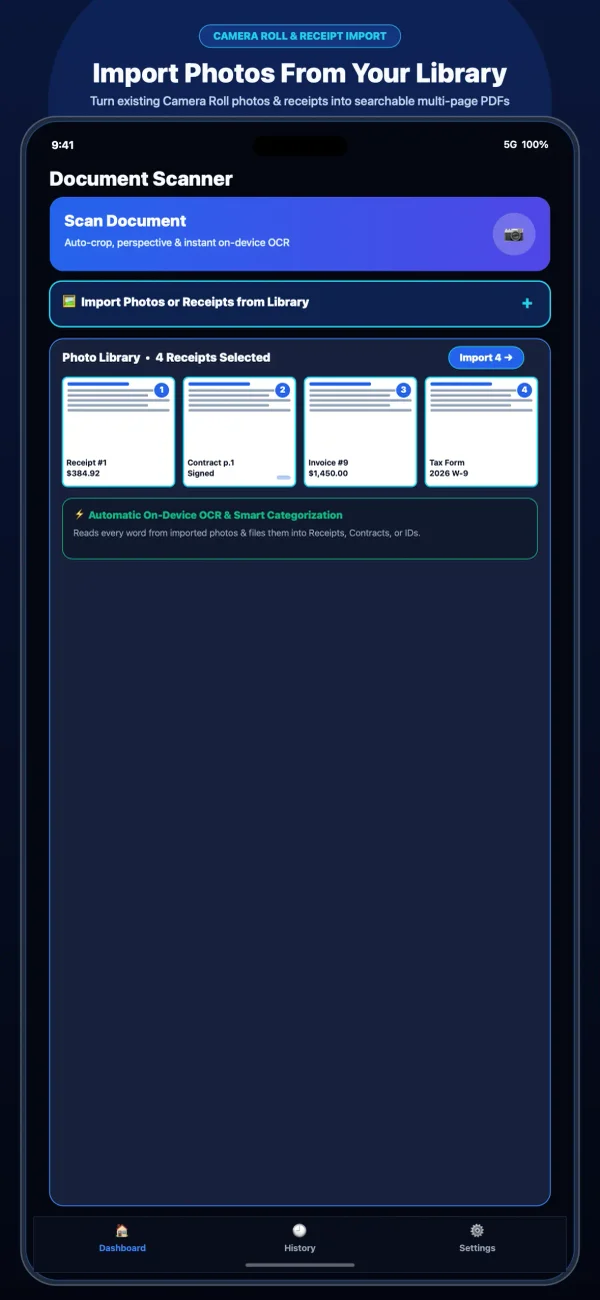
Capture paperwork with your camera or import multiple images from your Photo Library to build a multipage document.
EXTRACT TEXT AND USEFUL DETAILS
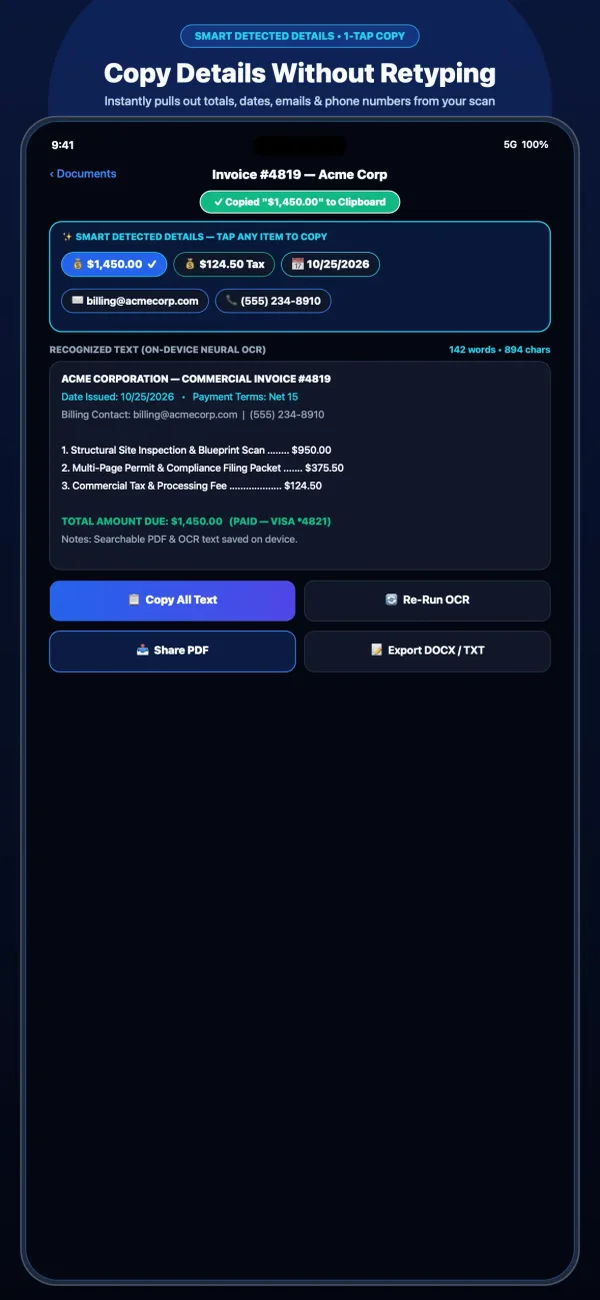
Recognize text automatically with on-device OCR. Smart Detected Details lets you copy dollar amounts, dates, email addresses, and phone numbers with one tap.
SIGN BEFORE YOU EXPORT
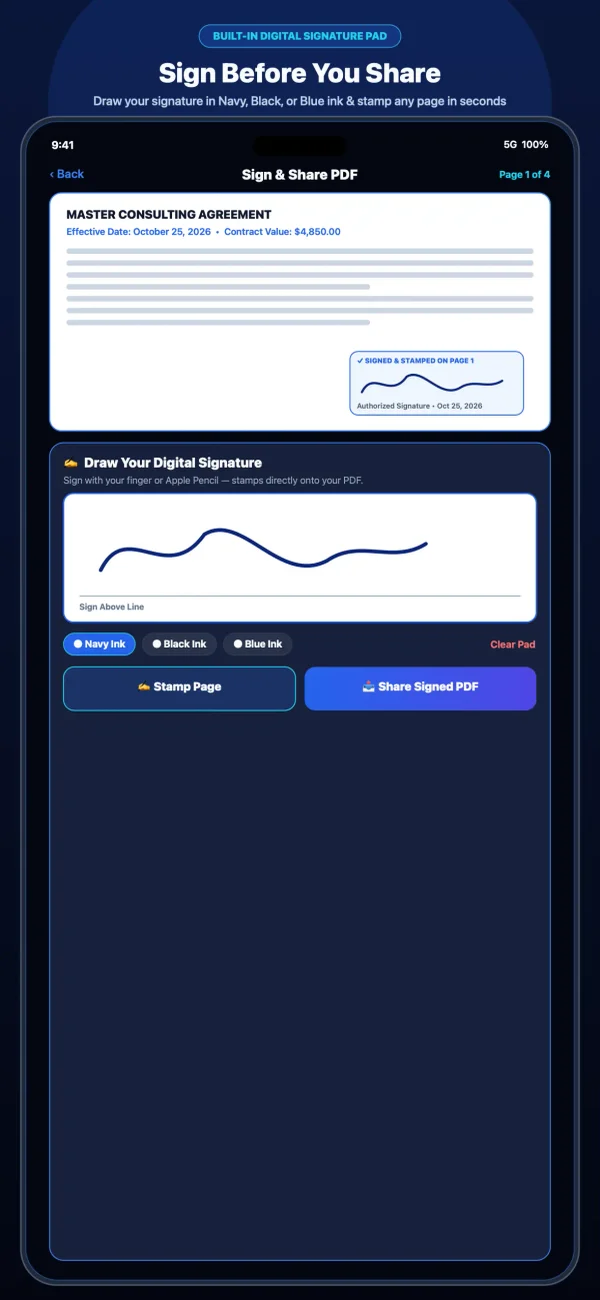
With Pro, draw your signature in Sign Page and place it onto a scanned page before exporting your PDF.
MAKE PAGES EASIER TO READ
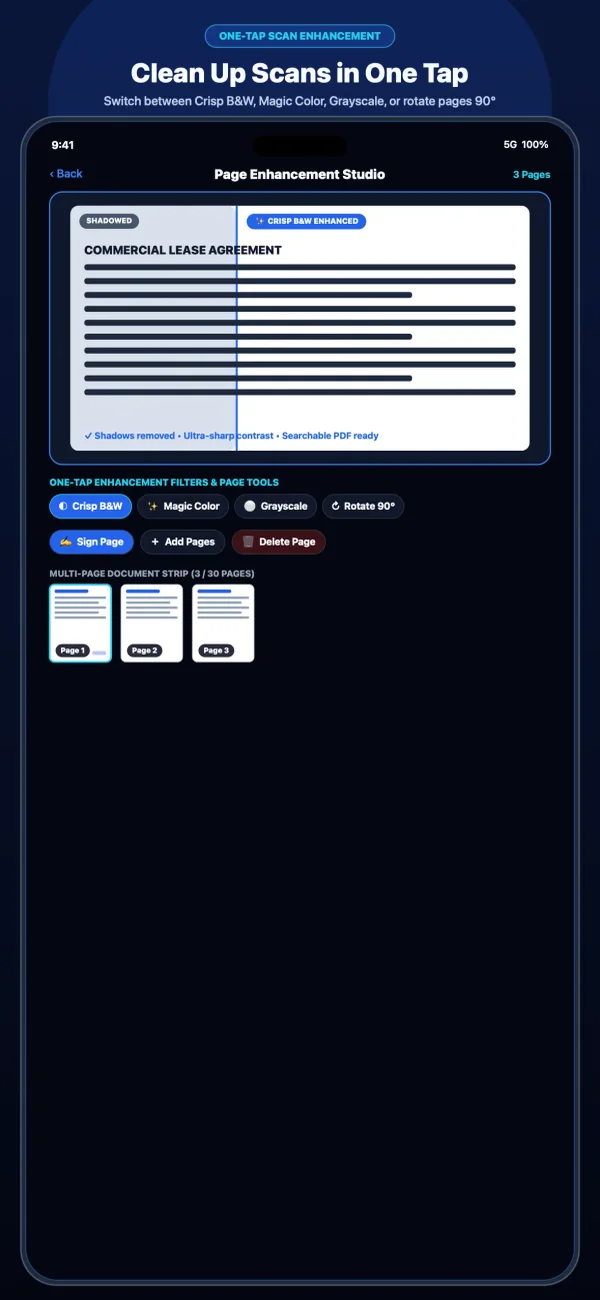
Apply Crisp B&W, Magic Color, or Grayscale filters. Rotate pages in 90-degree steps to get them facing the right way.
KEEP DOCUMENTS ORGANIZED
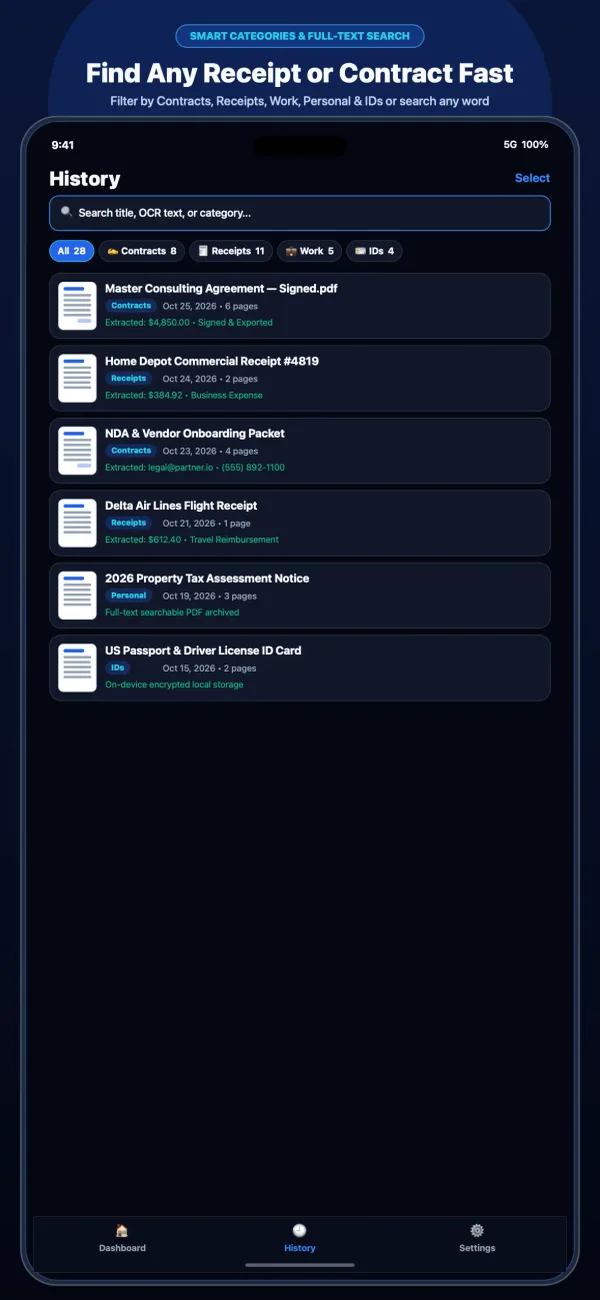
Use folders, categories, and smart category classification to bring order to your scans.
PROCESS SCANS ON YOUR DEVICE
Document scanning, image enhancement, and OCR text recognition run entirely on your device.
SET UP YOUR WORKFLOW
A guided five-step setup helps you choose scanning preferences, OCR settings, and a default enhancement filter.
EXPORT AND SHARE
Export documents as PDF, PNG, JPEG, plain text, or HTML.
DOCUMENT SCANNER PRO
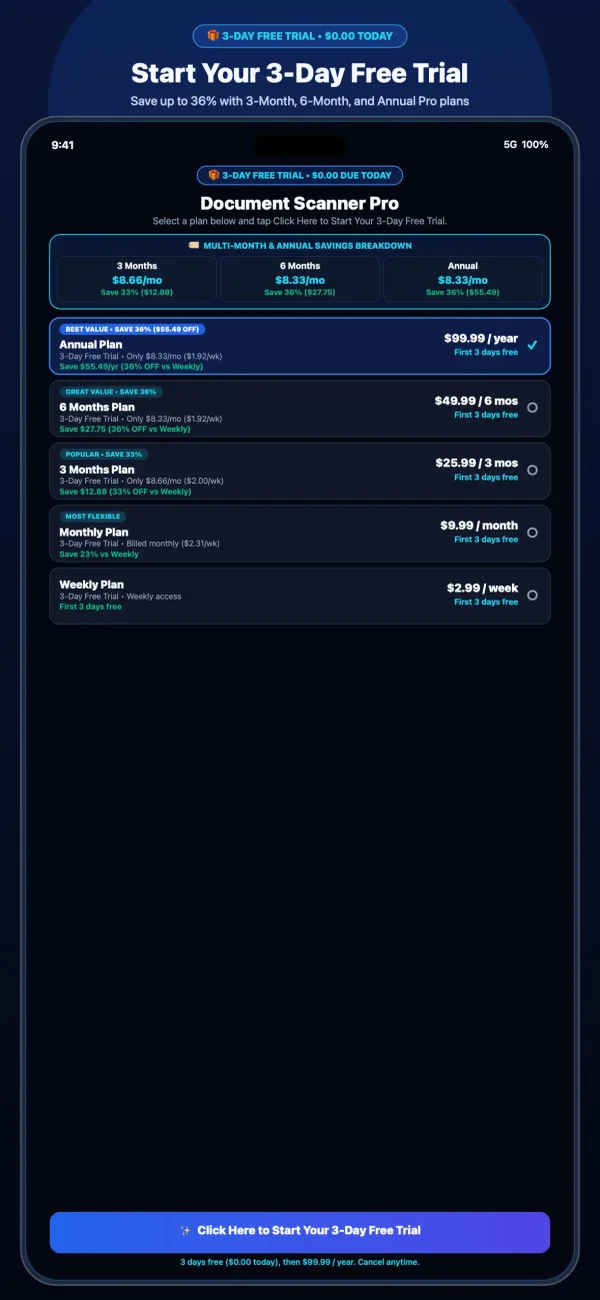
Unlock Pro tools with an auto-renewable subscription. Weekly, monthly, three-month, six-month, and annual options are available, with a 3-day free trial for eligible subscribers. See the app for pricing and subscription details.
Scan it. Extract what matters. Sign and share.
SUBSCRIPTION PRICING & TERMS
Document Scanner Pro offers auto-renewable subscription options, each starting with a 3-day free trial ($0.00 due today):
• Weekly Premium: $2.99 / week
• Document Scanner Pro Monthly: $9.99 / month
• Three Month Subscription: $25.99 / 3 months
• 6-Month Subscription: $49.99 / 6 months
• Document Scanner Pro Yearly: $99.99 / year
Payment will be charged to your Apple ID account at confirmation of purchase after the 3-day free trial ends. Subscriptions automatically renew unless auto-renew is turned off at least 24 hours before the end of the current period. Your account will be charged for renewal within 24 hours prior to the end of the current period. You can manage and cancel your subscriptions in your App Store Account Settings after purchase.
Terms of Use (EULA): https://www.apple.com/legal/internet-services/itunes/dev/stdeula/
Privacy Policy: https://www.apple.com/legal/privacy/
Yenilikler
Sürüm 3.3 · 27.10.2026
Thank you for reviewing Document Scanner Pro!
What's Updated in This Submission:
1. Interactive 5-Step Onboarding & Scanner Calibration Flow: Guides new users through their document workflow, scan volume, OCR preferences, and default enhancement filter.
2. Updated Auto-Renewable Subscription Options (with 3-Day Free Trial):
- Weekly (docscanner.pro.weekly): $2.99/week
- Monthly (docscanner.pro.monthly): $9.99/month
- 3 Months (docscanner.pro.threemonth): $25.99 / 3 months
- 6 Months (docscanner.pro.sixmonth): $49.99 / 6 months
- Annual (docscanner.pro.yearly): $99.99/year
3. New Pro Features Added:
- Digital Signature Pad ("Sign Page") to draw and stamp signatures onto scanned pages before PDF export.
- Photo Library multi-page import with automatic on-device Vision OCR and smart category classification.
- Smart Detected Details (one-tap copy for extracted dollar amounts, dates, emails, and phone numbers).
- In-place page enhancement filters (Crisp B&W, Magic Color, Grayscale) and 90° page rotation.
How to Test:
• You can test any subscription plan directly using StoreKit sandbox ("Click Here to Start Your 3-Day Free Trial"), OR
• To bypass the paywall immediately without a sandbox purchase, tap "Have an access code?" at the bottom of the paywall and enter reviewer code: DOCSCAN2026
• All document scanning, image enhancement, and OCR text recognition run 100% on-device using Apple VisionKit and Vision frameworks.
Uygulama gizliliği
Bu uygulamanın verileri nasıl işlediği hakkında Dolair Alali tarafından App Store üzerinde yapılan beyan.
-
Veri toplanmıyor
Geliştirici bu uygulamadan hiçbir veri toplamıyor.
Gizlilik uygulamaları, örneğin kullandığınız özelliklere veya yaşınıza göre değişiklik gösterebilir.
Bilgiler
- Satıcı
- Dolair Alali
- Kategori
- Üretkenlik
- Sürüm
- 3.3
- Güncellendi
- 27.10.2026
- Yayın tarihi
- 31.08.2026
- Boyut
- 1,1 MB
- Gereksinim
- iOS 17.0 veya sonrası
- Yaş sınırı
- 4+
- Fiyat
- Ücretsiz
- Uygulama içi satın alma
- Evet
- Diller
- İngilizce
- Telif hakkı
- © 2026 Dolair Alali
Bunları da beğenebilirsiniz
-
 Mesaj kara listesiİstenmeyen mesajları engelle
-
 Quick Notes - SupasendÜretkenlik
-
 Calendar Widget - Schedule AppÜretkenlik
-
 iHP48Üretkenlik
-
 Scanner App for iPhoneÜretkenlik
-
 Notesnook: Private notepadÜretkenlik
-
 Proactor – Note TakingÜretkenlik
-
 Bluetooth BLE Device FinderÜretkenlik
-
 Lovable: Build Apps With AIÜretkenlik