PatternPlot: Trace & Grade
Sewing pattern grading
iPad için tasarlandı
Ücretsiz · Uygulama içi satın alma
- Yaş sınırı4+
- KategoriGrafik ve Tasarım
- GeliştiriciAndrey Tyurin
- Dillerİngilizce
- Boyut3,0 MB
Resmi App Store sayfasına bağlanır
Download.org, PatternPlot: Trace & Grade için hiçbir dosya barındırmaz. Düğme, uygulamanın App Store üzerindeki sayfasını açar; uygulamayı orada Andrey Tyurin yayınlar. Sayfanın son kontrolü: 13.11.2026.
Ekran görüntüleri
Hakkında
Geliştirici bu metni dilinizde sunmamış.
PatternPlot turns a paper sewing pattern into an editable, true-scale vector on your iPad — then grades it into a full size run you define, deterministically.
Tracing a pattern got easy years ago. Grading — turning one size into a trustworthy run of sizes — is still the hard, trust-sensitive job. PatternPlot is built around that job, on device, with geometry you can audit.
FREE — real work, no subscription
• Photograph or import a paper pattern and trace it with Apple Pencil (or finger + numeric entry).
• Import your own vector artwork (SVG) at true scale — free, because it is how you get your work in.
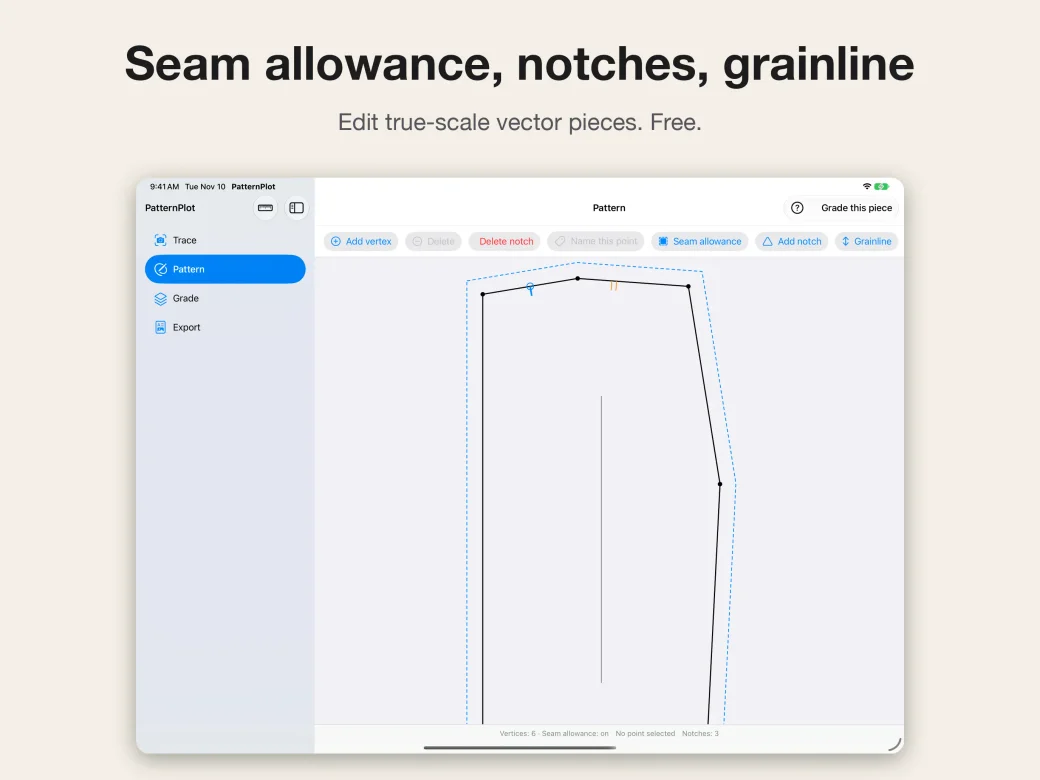
• Edit true-scale vector pieces: add seam allowance per edge, notches, and grainlines.
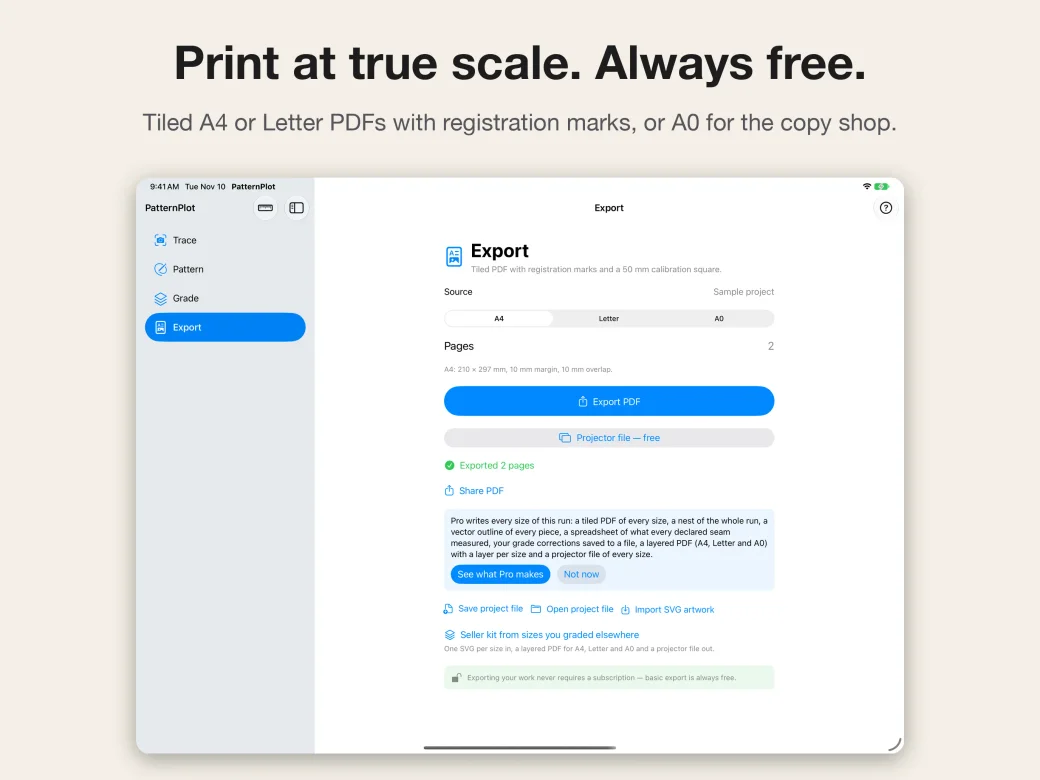
• Export true-scale tiled PDFs and A0 — with a 50 mm calibration square and registration marks so your print is exactly to scale.
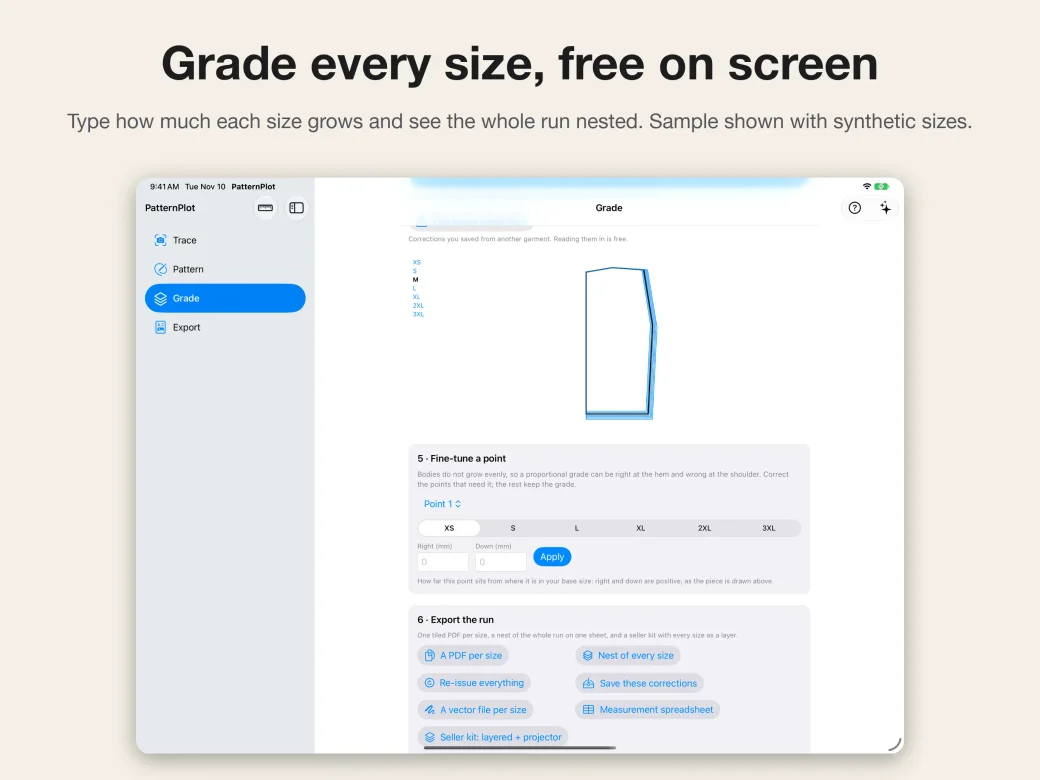
• Grade YOUR piece: mark a reference point and an axis, type how much each size grows, and see the whole run nested on screen.
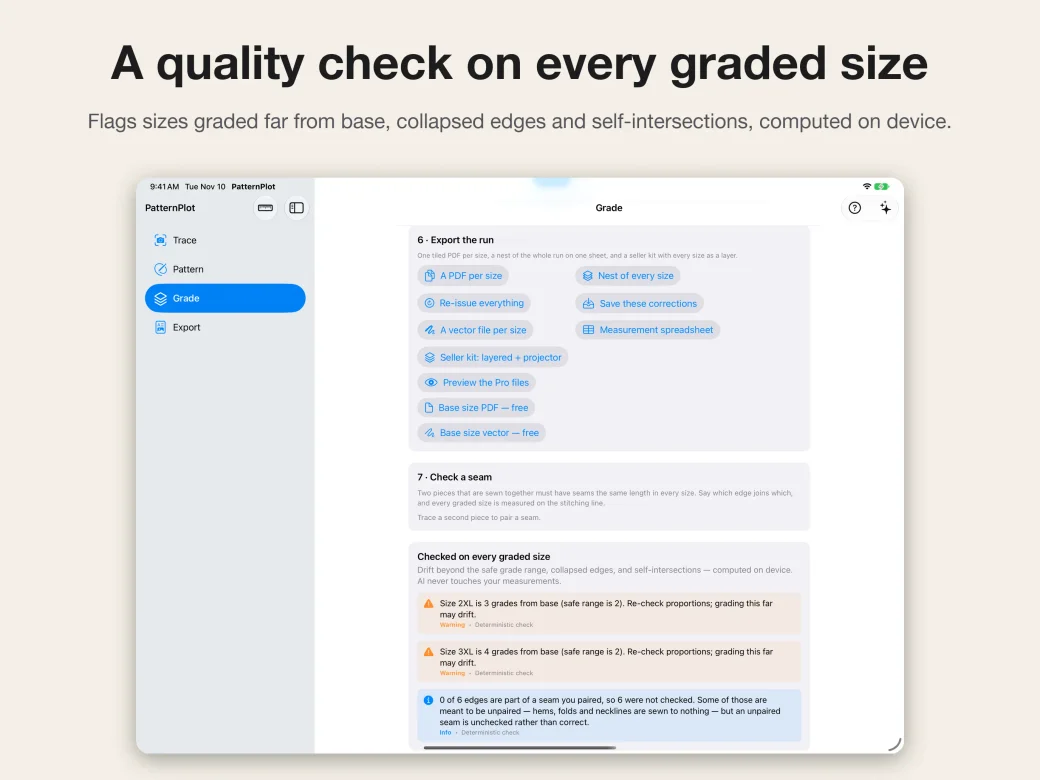
• A quality report on every graded size: drift beyond the safe grade range, collapsed edges, and self-intersections.
• Export the base size — the size you drafted — at any time.
No purchase is required to do any of this. Basic export is never locked behind a paywall.
PRO GRADING — the paid tier
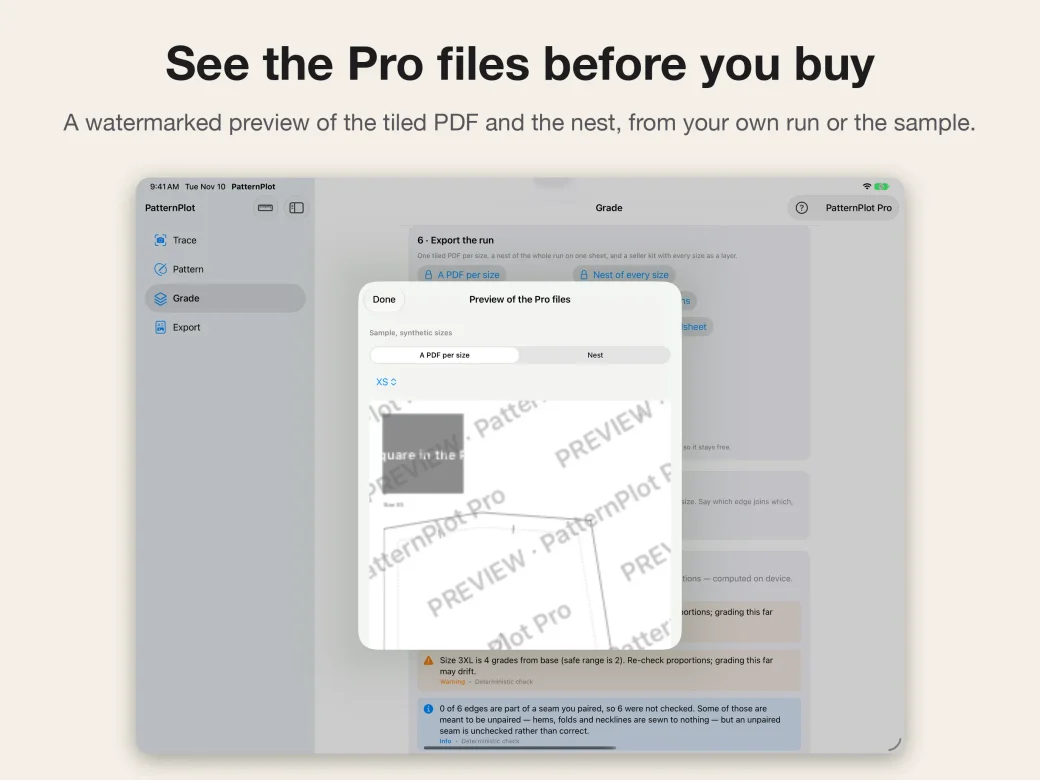
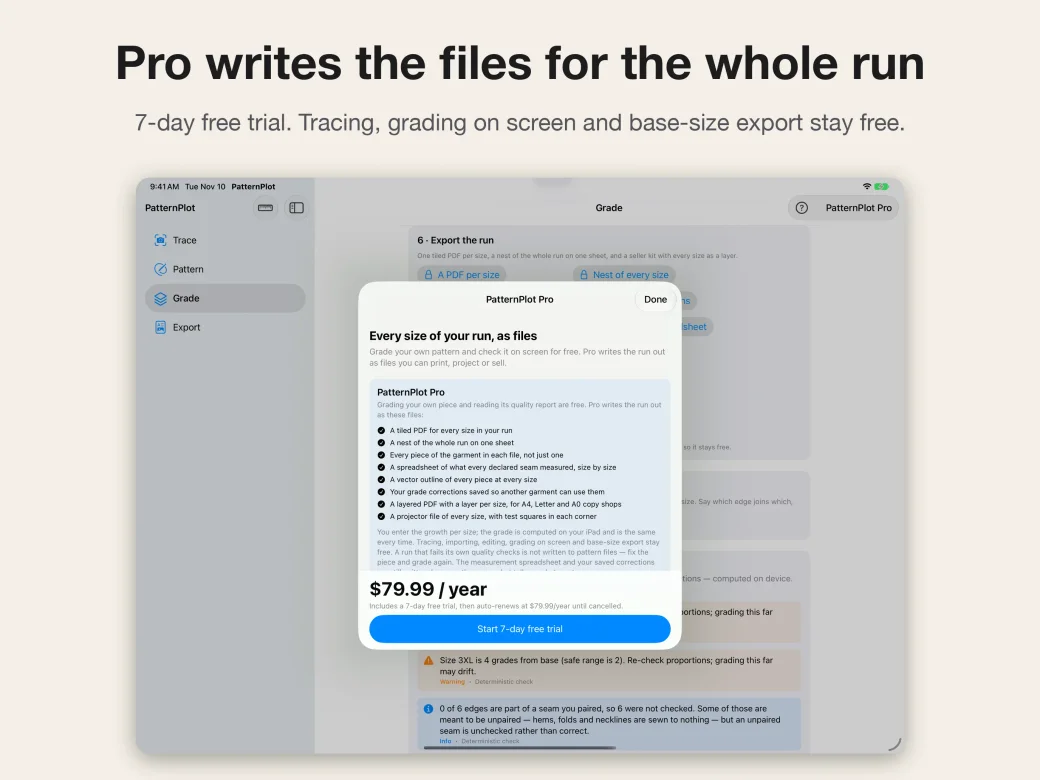
• A tiled PDF for every size in your run.
• A vector outline of every piece at every size.
• A nest of the whole run on one sheet.
• Every piece of the garment in each file, not just one.
• A spreadsheet of what every declared seam measured, size by size.
• Your grade corrections saved to a file, so another garment can use them.
The vector files carry the stitching outline only — no seam allowance, notches or grainline.
Reading a saved corrections file back into a pattern is free; only writing one is Pro.
HONEST BY DESIGN
The grade is deterministic geometry computed on your device. AI never touches your measurements: no coordinate, seam allowance, notch position, or graded measurement is ever produced by a model.
PatternPlot also tells you when a size drifts beyond a safe grade range, so you can re-check proportions before cutting fabric. We describe this as garment-aware grading — not a fit guarantee.
REQUIRES: iPad on iPadOS 17 or later. Apple Pencil recommended but not required.
—
Pro Grading subscription: $79.99/year after a 7-day free trial. Payment is charged to your Apple ID at confirmation of purchase. It renews automatically unless turned off at least 24 hours before the end of the period; manage or cancel anytime in your Apple ID Account Settings. Trace, vector edit, seam allowance, notches, grainline, and tiled/A0 PDF export are free and do not require a subscription.
Privacy Policy: https://amtyurin.github.io/patternplot/privacy-policy.html
Terms of Use: https://amtyurin.github.io/patternplot/terms-of-use.html
Yenilikler
Sürüm 1.3.1 · 11.11.2026
WHAT'S NEW IN THIS VERSION (1.3.1)
See a graded sample in one tap. The introduction now leads with it, and the Trace screen offers it whenever you have not started a pattern. Its sizes are synthetic examples.
Pinch to zoom while you trace. Zoom in on each corner of your reference rectangle before you tap it, drag to move around, and tap Fit to see the whole photo again.
A next step on every screen. After you build a piece, Grade this piece and Edit this piece are right there, so you do not need the sidebar to move on.
The Pro screen shows the price and the purchase button at once, without scrolling, and closes by itself when a purchase completes.
The summary of what Pro adds now appears under your first free export, tiled or projector. Not now hides it.
Rate PatternPlot is in the Help menu.
On the Trace screen, the camera button now reads Scan with camera.
Uygulama gizliliği
Bu uygulamanın verileri nasıl işlediği hakkında Andrey Tyurin tarafından App Store üzerinde yapılan beyan.
-
Sizinle ilişkilendirilmeyen veriler
Toplanabilir ancak kimliğinizle ilişkilendirilmez.
- Kullanıcı içeriği
Gizlilik uygulamaları, örneğin kullandığınız özelliklere veya yaşınıza göre değişiklik gösterebilir.
Bilgiler
- Satıcı
- Andrey Tyurin
- Kategori
- Grafik ve Tasarım
- Sürüm
- 1.3.1
- Güncellendi
- 11.11.2026
- Yayın tarihi
- 13.07.2026
- Boyut
- 3,0 MB
- Gereksinim
- iOS 17.0 veya sonrası
- Yaş sınırı
- 4+
- Fiyat
- Ücretsiz
- Uygulama içi satın alma
- Evet
- Diller
- İngilizce
- Telif hakkı
- © 2026 Andrey Tyurin
Bunları da beğenebilirsiniz
-
 Garment Pattern MakerGrafik ve Tasarım
-
 SewGrader: kalıp hazırlamaÖlçüye göre kalıp, serili
-
 patanQGrafik ve Tasarım
-
 Action Figure AI Art: ToyziGrafik ve Tasarım
-
 Motaz Pattern DesignGrafik ve Tasarım
-
 TextileStudio.aiGrafik ve Tasarım
-
 Toy TailorGrafik ve Tasarım
-
 DrafterPro 2D CAD & DWG EditorGrafik ve Tasarım
-
 TechDraw AI: Technical DrawingGrafik ve Tasarım
-
 DartSide Pattern DraftingGrafik ve Tasarım