Phonoria
Local Music Player • A-B Loop
iPhone, iPad için tasarlandı
Ücretsiz · Uygulama içi satın alma
- Yaş sınırı4+
- KategoriMüzik
- Geliştiriciakira kawakami
- Dillerİngilizce+ 1 dil daha
- Boyut16,4 MB
Resmi App Store sayfasına bağlanır
Download.org, Phonoria için hiçbir dosya barındırmaz. Düğme, uygulamanın App Store üzerindeki sayfasını açar; uygulamayı orada akira kawakami yayınlar. Sayfanın son kontrolü: 22.11.2026.
Ekran görüntüleri

Hakkında
Geliştirici bu metni dilinizde sunmamış.
Phonoria brings local folders, iCloud Drive files, your Apple Music library, and purchased or imported songs on your iPhone into one music player. Set A-B markers to repeat only the part you need — great for practice, transcribing, language learning, or savoring a favorite section.
[Good for]
· Musicians, singers, and language learners who need to repeat a phrase or chorus
· Anyone who wants to endlessly loop a favorite line of a favorite song
· People who manage their own audio folders and want to play them directly
· Listeners who prefer keeping music files local instead of streaming
· iCloud Drive users who want their cloud audio as a real library
· Anyone who wants Apple Music library songs and purchased music next to local files
[Standard Features]
· Folder selection — pick a folder in iCloud Drive or local storage and Phonoria scans it into a library
· Apple Music library — show and play songs you have added to your library alongside local files (Apple Music subscription required)
· Purchased or imported songs — play DRM-free music stored on your iPhone without a subscription
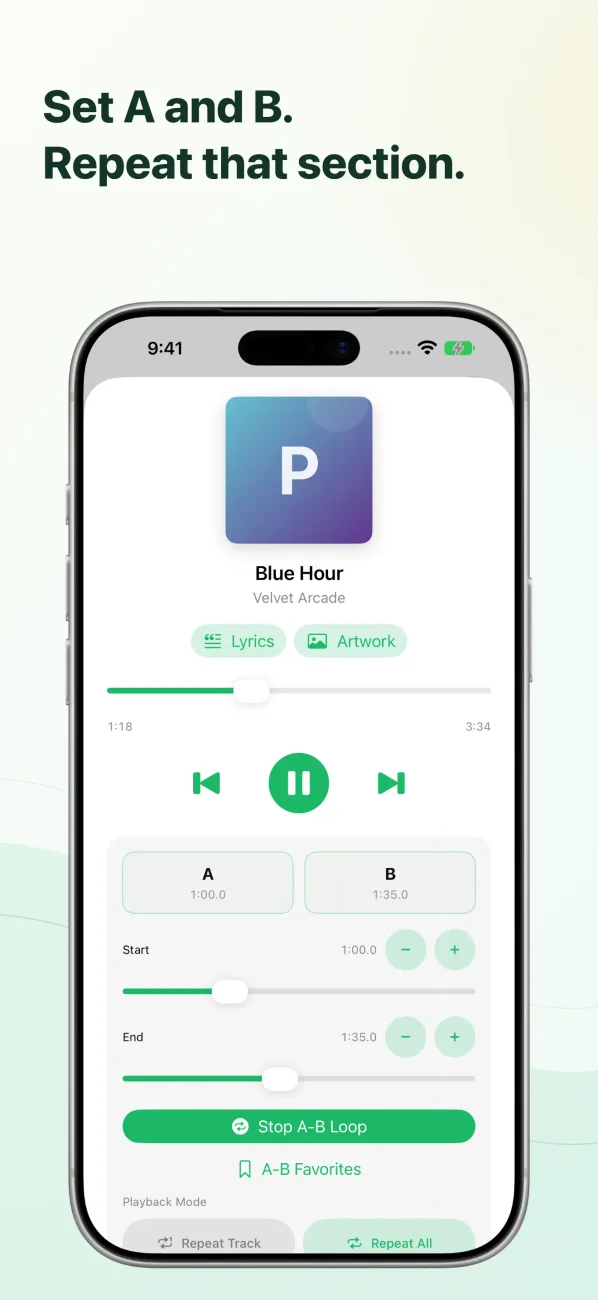
· A-B Loop — set start point A and end point B, repeat any section with a smooth crossfade
· Playback modes: Repeat Track / Repeat All / Shuffle / Single Track
· Rename local songs in Phonoria without changing the audio files; keep custom names after rescanning
· Start Shuffle or Repeat All directly from the Songs list
· Browse by Songs, Albums, Artists, and Playlists
· Search across songs, albums, and artists
· Embedded album artwork
· One-tap download for cloud-only files in iCloud Drive
· Lock Screen and Control Center playback controls
· A new default icon plus 10 classic alternate icons; choose the icon/accent and Light/Dark appearance independently
· Output volume limit for loud files on CarPlay or external speakers
· Supports m4a, mp3, wav, flac, and aac
[Phonoria Plus — Upgrade Pass Features]
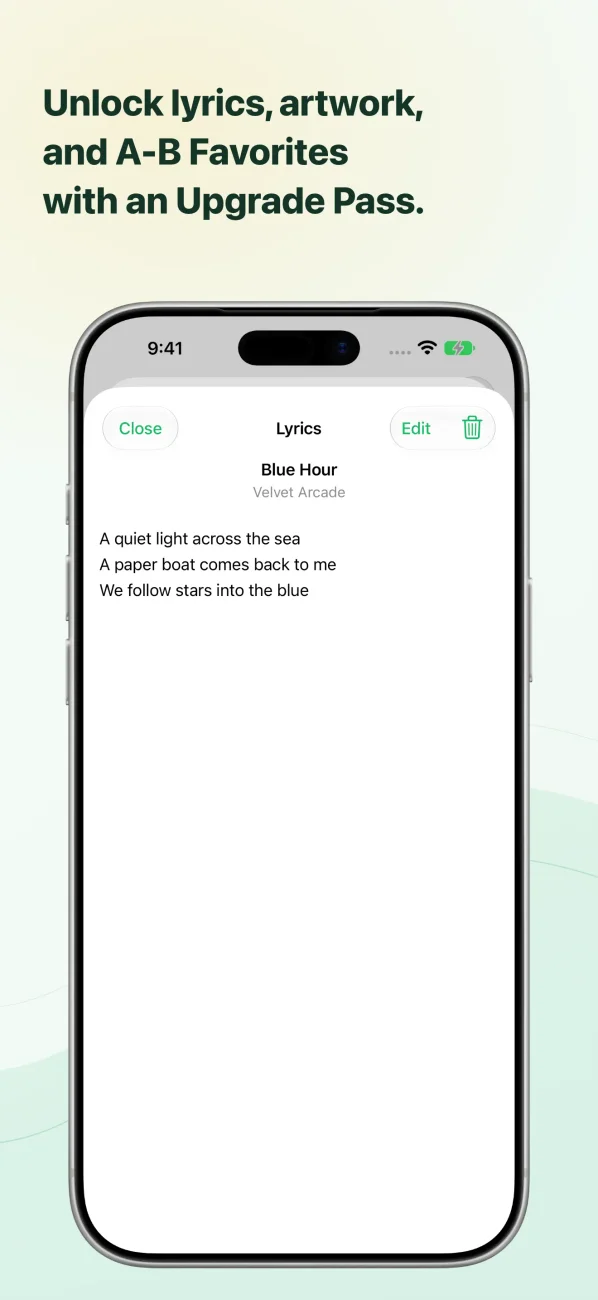
· Save and edit lyrics you enter for each song. Open saved lyrics directly from a dedicated button while a song is playing.
· Save multiple named A-B ranges and recall them from the A-B Favorites list in Playlists.
· Choose artwork for local songs from Photos or an image file. Apply it to songs in the same album or restore the original artwork.
The annual Upgrade Pass renews automatically. You can stop renewal in your App Store subscription settings. It includes the paid features available when you purchase and those released during your pass. If you stop renewal and the pass expires, acquired features remain available, including creating and editing content.
If you first obtained Phonoria in version 2.2.0 or earlier, the three features introduced in 2.3.0 are included at no additional cost. Later paid features require an Upgrade Pass. Bug fixes and improvements to basic features remain free.
Future tip purchases do not unlock paid features.
[Privacy]
Music files are read from the folder you choose and are not uploaded. No Phonoria account is required. Local-file playback works offline. Cloud and Apple Music access, purchases, and purchase restoration may require an internet connection.
DRM-protected songs, unsupported formats, files not downloaded to the device, or Apple Music catalog songs not added to your library may not be playable.
Terms of Use: https://www.apple.com/legal/internet-services/itunes/dev/stdeula/
Privacy Policy: https://akkyapps.github.io/akkyapps-legal/privacy-policy
Yenilikler
Sürüm 2.3.0 · 21.11.2026
[Upgrade Pass Features]
· Added lyrics you can enter and edit for each song, with a dedicated button to open saved lyrics during playback.
· Save and recall named A-B Favorites.
· Set custom artwork for local songs.
These three features are included at no additional cost if you first obtained Phonoria in version 2.2.0 or earlier.
Features acquired through the annual Upgrade Pass remain available after the pass expires.
[Standard Features and Improvements]
· Added Next to the mini player.
· Start typing as soon as Search opens. Tap the selected Search tab again to resume typing.
· Dismiss the keyboard with a button or a downward drag in Search and the lyrics editor.
Uygulama gizliliği
Bu uygulamanın verileri nasıl işlediği hakkında akira kawakami tarafından App Store üzerinde yapılan beyan.
-
Veri toplanmıyor
Geliştirici bu uygulamadan hiçbir veri toplamıyor.
Gizlilik uygulamaları, örneğin kullandığınız özelliklere veya yaşınıza göre değişiklik gösterebilir.
Bilgiler
- Satıcı
- akira kawakami
- Kategori
- Müzik
- Sürüm
- 2.3.0
- Güncellendi
- 21.11.2026
- Yayın tarihi
- 21.05.2026
- Boyut
- 16,4 MB
- Gereksinim
- iOS 26.1 veya sonrası
- Yaş sınırı
- 4+
- Fiyat
- Ücretsiz
- Uygulama içi satın alma
- Evet
- Diller
- İngilizce, Japonca
- Telif hakkı
- © 2026 AkkyApps