
ShootBinder
Scripts, plans & scout photos
iPhone, iPad için tasarlandı
Ücretsiz · Uygulama içi satın alma
- Yaş sınırı4+
- KategoriFotoğraf ve Video
- GeliştiriciYuya Kawai
- Dillerİngilizce+ 1 dil daha
- Boyut12,5 MB
Resmi App Store sayfasına bağlanır
Download.org, ShootBinder için hiçbir dosya barındırmaz. Düğme, uygulamanın App Store üzerindeki sayfasını açar; uygulamayı orada Yuya Kawai yayınlar. Sayfanın son kontrolü: 24.11.2026.
Ekran görüntüleri
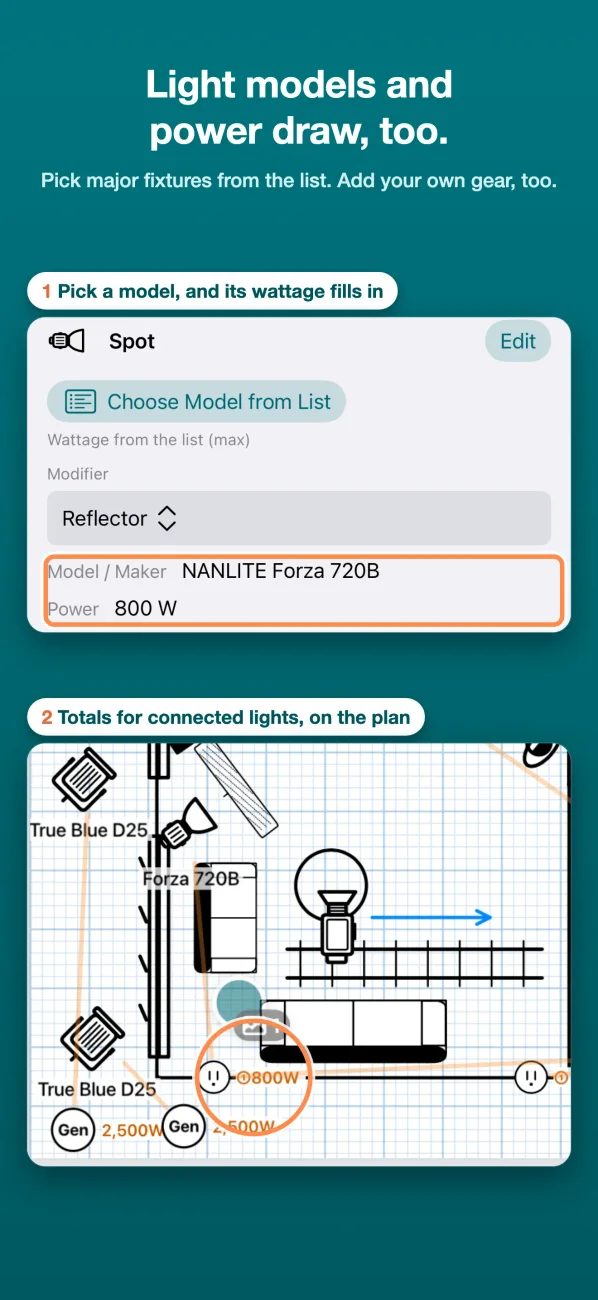

Hakkında
Geliştirici bu metni dilinizde sunmamış.
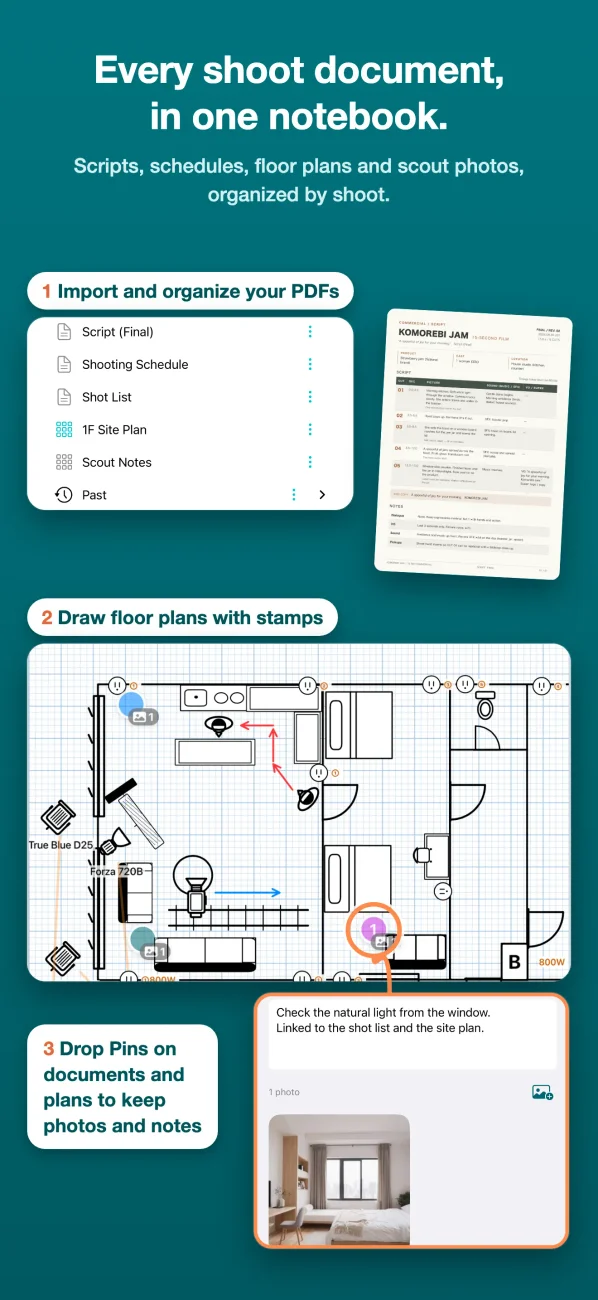
Scripts and shot lists stay as PDFs.
Draw the floor plan with stamps, right on the scout.
ShootBinder is a production notebook for iPad and iPhone, built by a working gaffer on real scouts and shoot days. Import the PDFs you already receive, mark them up, and link photos and related documents together, from prep through the shoot.
MARK UP THE DOCUMENTS YOU ALREADY USE
Import scripts, schedules, shot lists and floor plans as PDFs and organize them into projects and folders. On iPad, write directly on the page with Apple Pencil. Add shapes and text boxes for notes and reminders. Invert the screen on dark sets.
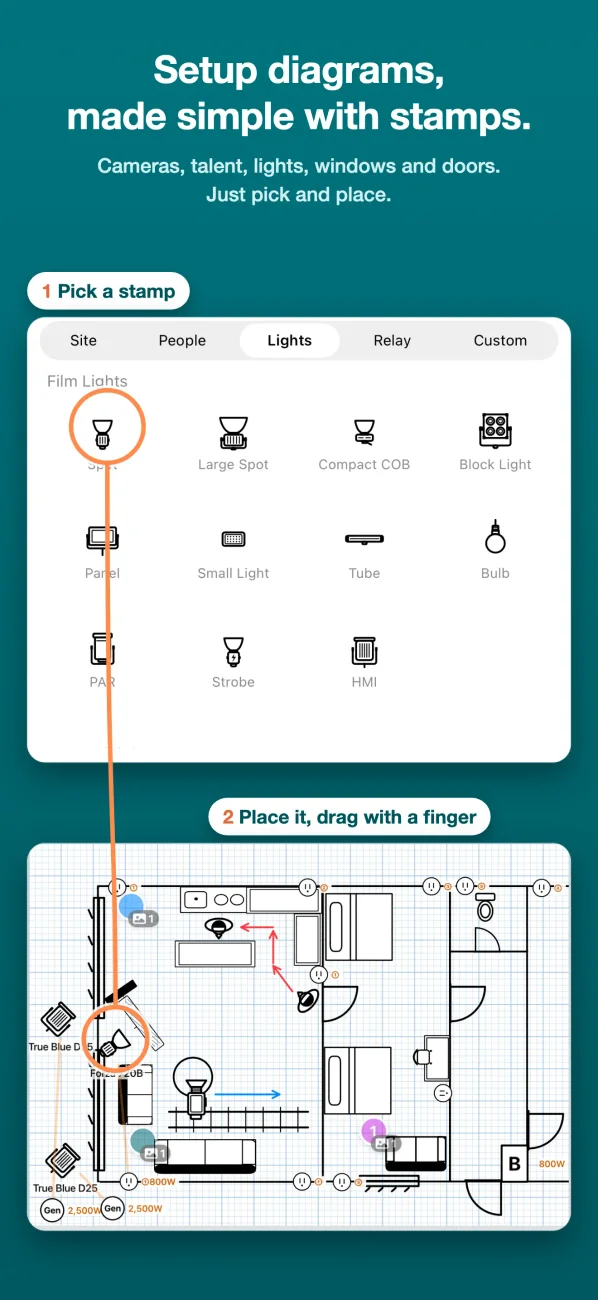
PUT CAMERAS AND PEOPLE ON THE PLAN
Place stamps for cameras, dollies, people, lights, stands, flags, windows, doors and outlets. Add freehand lines, straight lines and polylines with curves to draw the setup. Each stamp can carry gear details, notes and photos. On iPad, circle anything you draw often to save it as a custom stamp for any project.
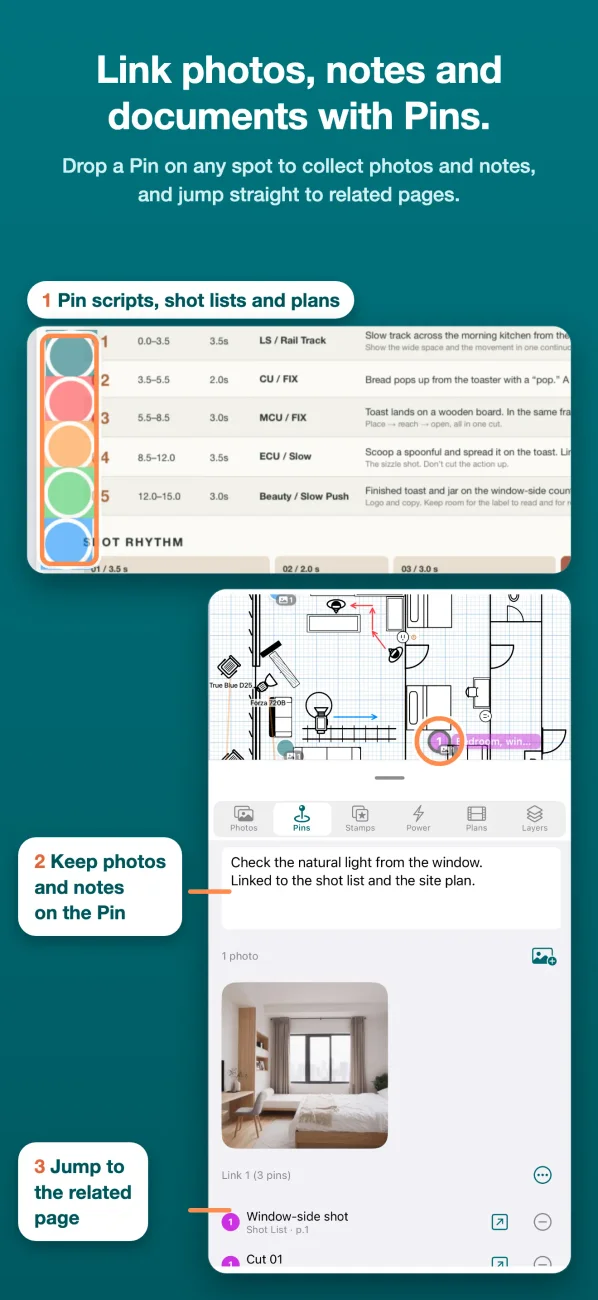
CONNECT PLACES AND DOCUMENTS WITH PINS
Drop a Pin on a floor plan or shot list and attach photos and notes. Draw a line from Pin to Pin to link them; linked Pins share one number in every document. Jump from a spot on the plan to the matching shot, and from the shot to the scout photos.
SWITCH SETUPS WITH SHOOTING PLANS
Keep the room's layout as is and switch camera, talent and lighting positions for each setup. Link Pins on the shot list to the setup they belong to.
WORK WITH TWO DOCUMENTS SIDE BY SIDE
On iPad, view a floor plan next to a shot list in split view. When a document is revised, view old and new side by side and drag your notes and placed items across.
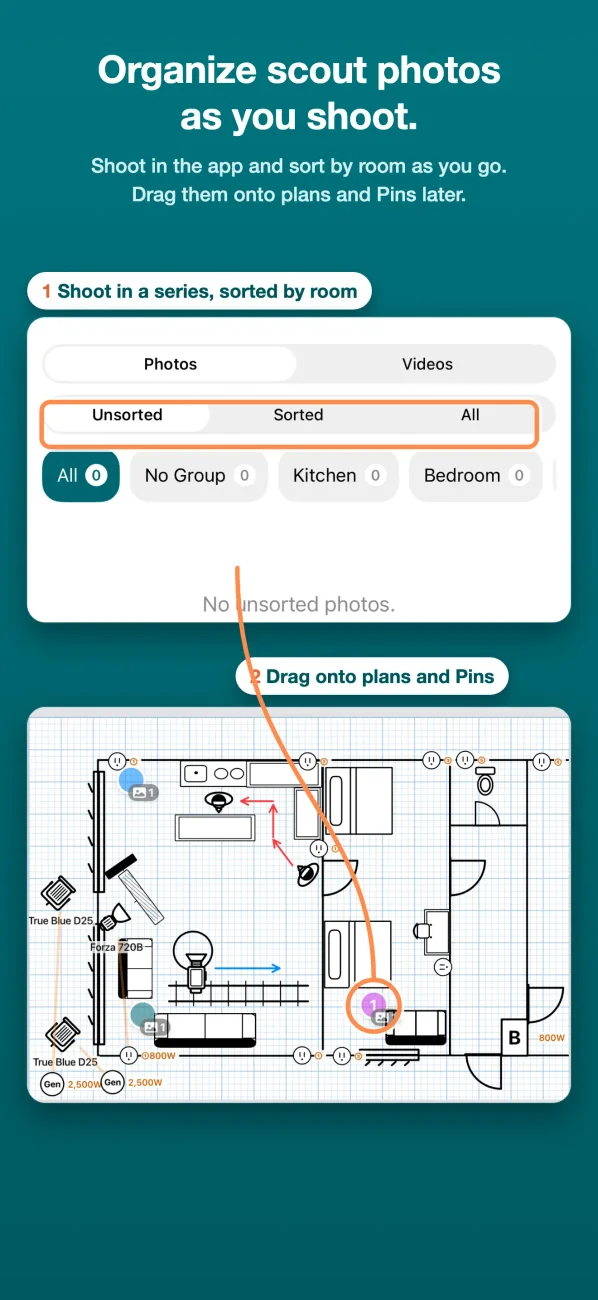
SHOOT ON SET, ORGANIZE IN THE PROJECT
With the iPad or iPhone camera, shoot a series of photos straight into the project, grouped as you go. Place photos on a plan or attach them to Pins and stamps. Add videos to Pins or to the page, too. On iPhone you can also read documents and edit stamps, shapes and text.
PLAN LIGHTING GEAR AND POWER
Choose fixtures and modifiers, then draw a line from each light to an outlet to total the wattage you've entered. Lay out breaker panel circuits and switches, too.
SEE THE SUN'S PATH ON YOUR PLAN
Set the location on the compass stamp and the shoot date on the sun stamp to see that day's sun path and times on the plan, plus an estimate of when the sun hits the windows.
SHARE WITH YOUR CREW, EACH WITH THEIR OWN NOTES
With ShootBinder Pro, share a project view-only, with people you invite or anyone with the link. Recipients open it for free and can write "My notes" in handwriting or text. Their notes are shown only to them and never change the original.
USE IT ON YOUR OWN DEVICES, HAND IT TO THE CREW
Projects sync between your iPad and iPhone on the same Apple Account. Documents stored on the device work without a signal. Export documents with their photos and notes as a PDF for crew who don't use ShootBinder, or send a project, document or folder as a package to those who do.
Try markup, photos, links and shooting plans with the sample project and guided tour.
- Your first project is free, with every feature. More projects and sharing your own projects require ShootBinder Pro (one-time purchase). Opening a project shared with you is free.
- Handwriting with Apple Pencil and split view are available on iPad. iPhone shows handwriting.
- Sync between your devices and sharing use your own iCloud storage (not the developer's servers). If your iCloud storage is full, sync stops. Your data on the device stays usable, and unsent changes are sent once space is available.
- A shared project uses the owner's iCloud storage, not the recipients'. If the owner's iCloud storage is full, updates stop reaching recipients.
- Sharing is view-only; real-time collaboration is not supported. A package gives the recipient an independent copy.
- Power totals are a planning estimate based on the values you enter. They do not guarantee electrical safety or that a breaker will not trip.
Yenilikler
Sürüm 1.0.10 · 23.11.2026
- New pen type: Felt Tip. It draws bold, solid lines at twice the width on the same scale. Great for notes that need to stand out.
- The red in the pen's four colors is now a deeper red that stands out more.
- The partial eraser's width slider has been reworked, so the width now changes across the whole range.
Uygulama gizliliği
Bu uygulamanın verileri nasıl işlediği hakkında Yuya Kawai tarafından App Store üzerinde yapılan beyan.
-
Veri toplanmıyor
Geliştirici bu uygulamadan hiçbir veri toplamıyor.
Gizlilik uygulamaları, örneğin kullandığınız özelliklere veya yaşınıza göre değişiklik gösterebilir.
Bilgiler
- Satıcı
- Yuya Kawai
- Kategori
- Fotoğraf ve Video
- Sürüm
- 1.0.10
- Güncellendi
- 23.11.2026
- Yayın tarihi
- 20.10.2026
- Boyut
- 12,5 MB
- Gereksinim
- iOS 17.0 veya sonrası
- Yaş sınırı
- 4+
- Fiyat
- Ücretsiz
- Uygulama içi satın alma
- Evet
- Diller
- İngilizce, Japonca
- Telif hakkı
- © 2026 LGV Lab.
Bunları da beğenebilirsiniz
-
 CineLoupeFotoğraf ve Video
-
 Softbox Atlas: Light PlannerFotoğraf ve Video
-
 毎日お題Fotoğraf ve Video
-
 PointImageBlurFotoğraf ve Video
-
 PhotoField SimulatorFotoğraf ve Video
-
 LightplanFotoğraf ve Video
-
 Raccord LightingFotoğraf ve Video
-
 撮メモLiteFotoğraf ve Video
-
 FocalFrame - 画角計算・ロケハンFotoğraf ve Video
-
 CHXLST: Gear+Camera ChecklistFotoğraf ve Video