
ShuMag
Family pickup & drop-off board
iPhone, iPad, iPod touch için tasarlandı
Ücretsiz · Uygulama içi satın alma
- Yaş sınırı4+
- KategoriÜretkenlik
- GeliştiriciDELIAL.DESIGN
- DillerJaponca+ 1 dil daha
- Boyut49,8 MB
Resmi App Store sayfasına bağlanır
Download.org, ShuMag için hiçbir dosya barındırmaz. Düğme, uygulamanın App Store üzerindeki sayfasını açar; uygulamayı orada DELIAL.DESIGN yayınlar. Sayfanın son kontrolü: 24.11.2026.
Ekran görüntüleri



Hakkında
Geliştirici bu metni dilinizde sunmamış.
Ready to retire the fridge magnet board?
After-school care, day camp, swim lessons, tutoring. The more kids and places you have, the harder it gets to answer "Who's driving where this week?"
ShuMag puts that "who goes where" on one board the whole family can see.
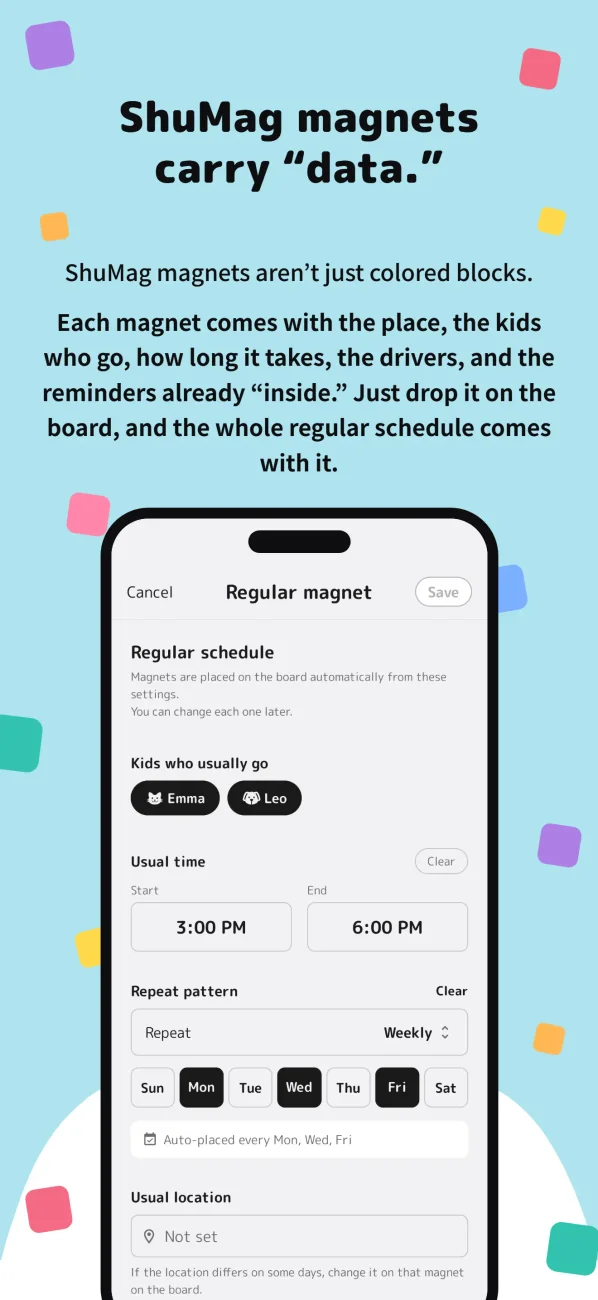
■ ShuMag magnets carry "data."
ShuMag is an app where you place magnets on a Sunday-to-Saturday weekly board. But they aren't just colored blocks.
Each magnet comes with the place, the kids who go, how long it takes, the drivers, and the reminders already "inside." Just drop it on the board, and the whole regular schedule comes with it.
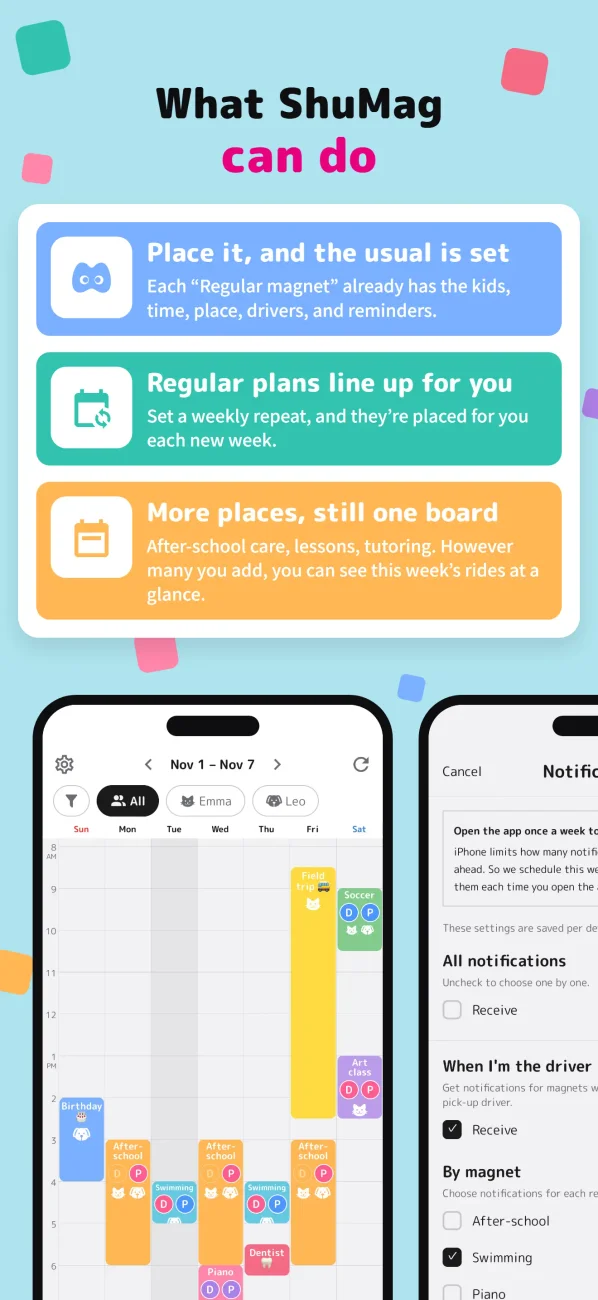
■ What ShuMag can do
• Place it, and the usual is set
Each "Regular magnet" already has the kids, time, place, drivers, and reminders.
• Regular plans line up for you
Set a weekly repeat, and they're placed for you each new week.
• More places, still one board
After-school care, lessons, tutoring. However many you add, you can see this week's rides at a glance.
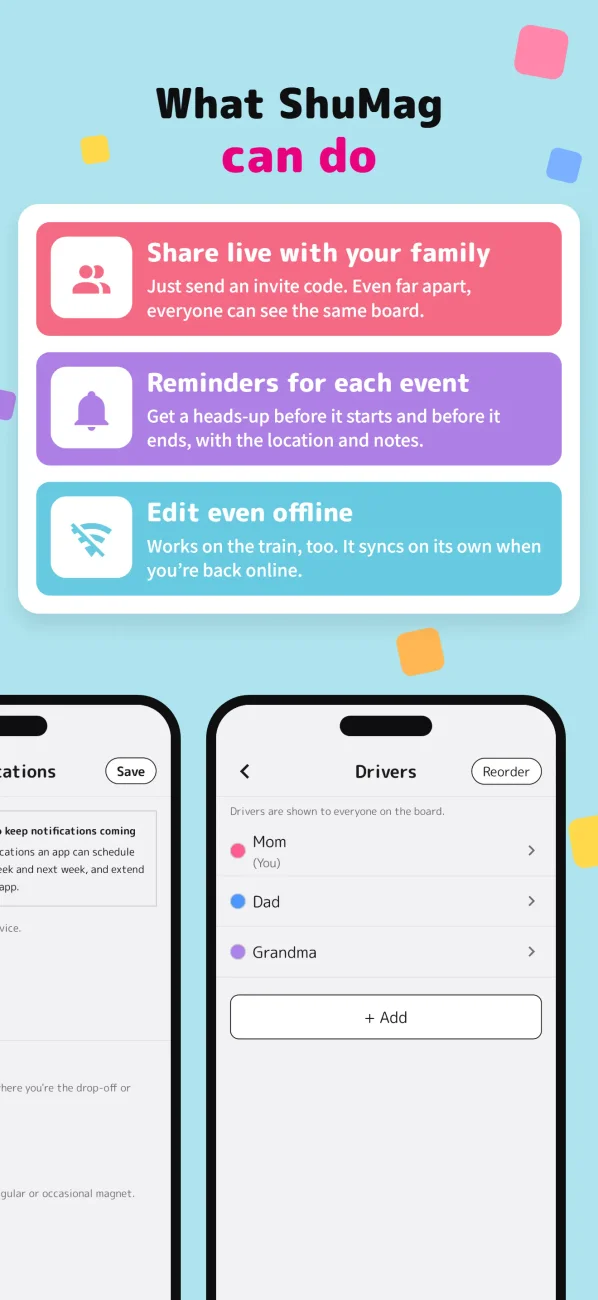
• Share live with your family
Just send an invite code. Even far apart, everyone can see the same board.
• Reminders for each event
Get a heads-up before it starts and before it ends, with the location and notes.
• Edit even offline
Works on the train, too. It syncs on its own when you're back online.
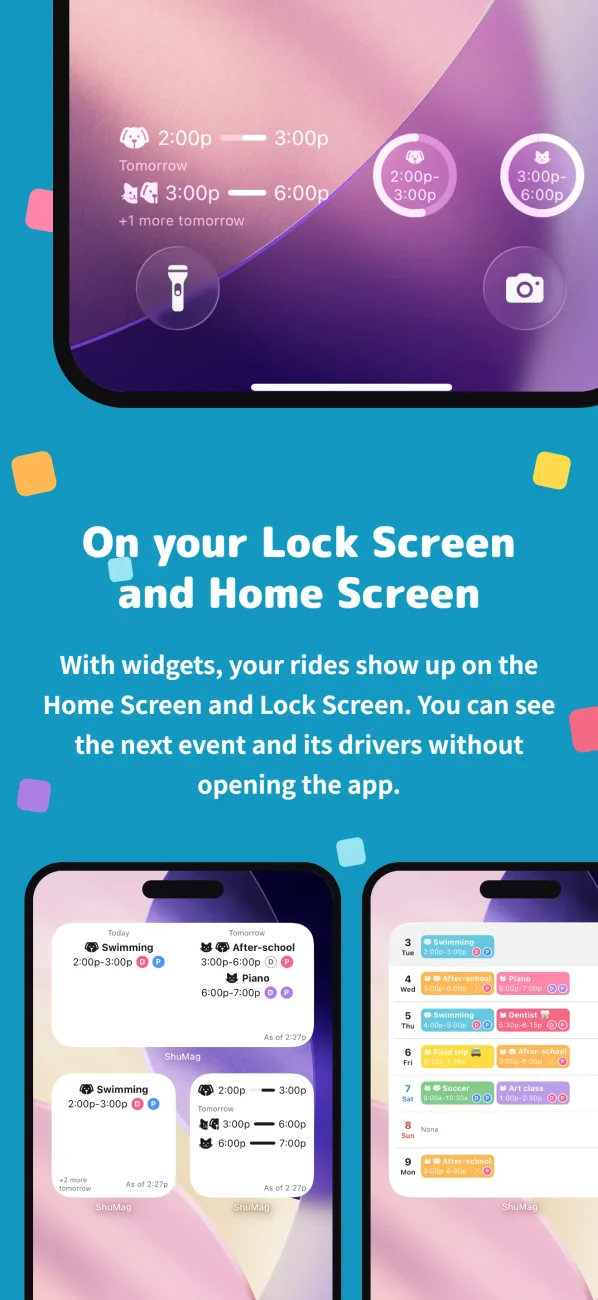
■ Rides on your Home Screen
With widgets, your rides show up on the Home Screen and Lock Screen. You can see the next event and its drivers without opening the app. A large widget shows the next 7 days at a glance.
*Widgets require iOS or iPadOS 17 or later.
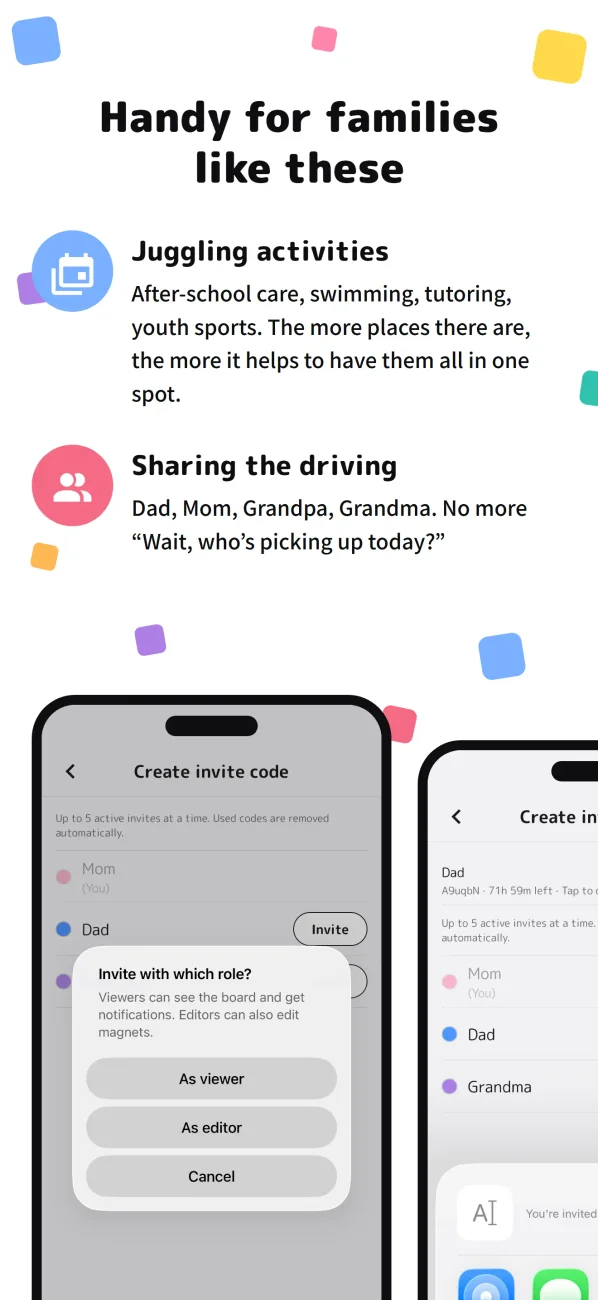
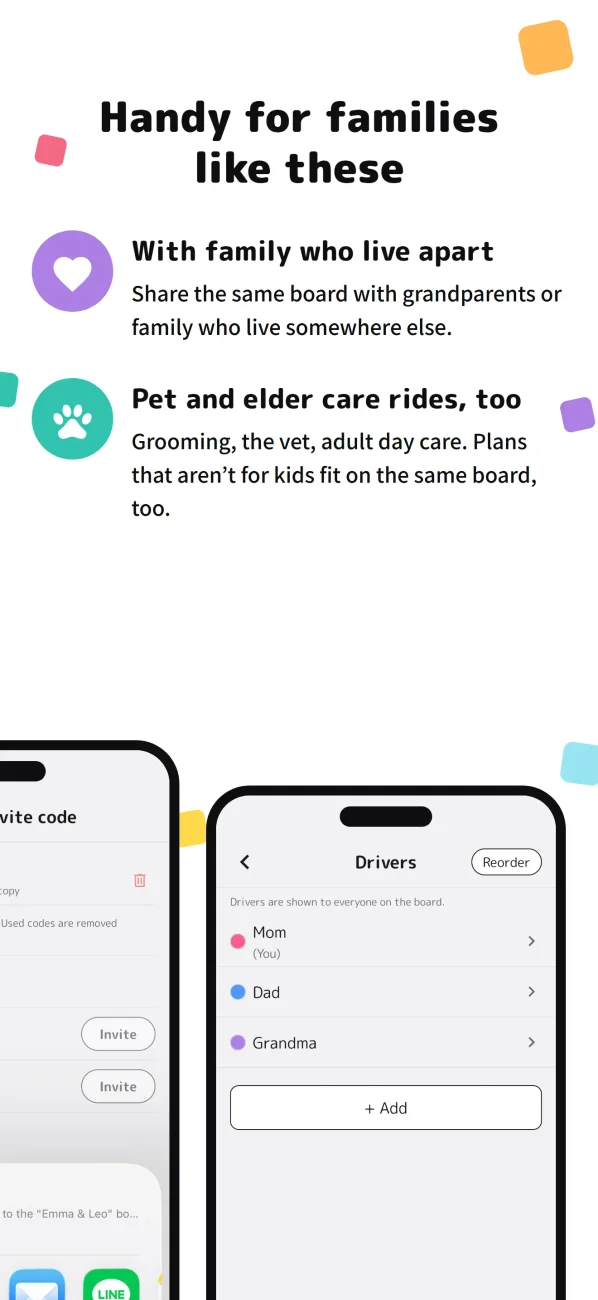
■ Handy for families like these
• Juggling activities
After-school care, swimming, tutoring, youth sports. The more places there are, the more it helps to have them all in one spot.
• Sharing the driving
Dad, Mom, Grandpa, Grandma. No more "Wait, who's picking up today?"
• With family who live apart
Share the same board with grandparents or family who live somewhere else.
• Pet and elder care rides, too
Grooming, the vet, adult day care. Plans that aren't for kids fit on the same board, too.
■ Pin school handouts, too (Standard plan and up)
Field trip info, packing lists, open house notices. Take a photo of the papers you used to stick on the fridge door, and attach it to that day's magnet. Everyone in the family can check the photos on their own phone, anytime. No more "Where did that handout go?"
■ Plans
Only the board owner subscribes. Invited family members don't pay anything.
[Free]
• 1 kid, 2 Regular magnets, 3 Occasional magnets, 2 drivers
• Share with 1 family member (view only)
• See 2 weeks back through the week after next
[Standard] Monthly or yearly
• Unlimited kids, Regular magnets, Occasional magnets, and drivers
• Share with 1 family member (can edit)
• Attach photos to event notes
• Look back 13 months and plan as far ahead as you like
• First month free for new subscribers
[Family] Monthly or yearly
• Everything in Standard
• Up to 10 people: share and edit with grandparents and more
[Lifetime] One-time payment
• Standard features, yours to use forever
• Lifetime owners can add Family monthly, only when needed
Prices are shown in the App Store and vary by country.
■ About subscriptions
• Subscriptions: Standard (monthly / yearly), Family (monthly / yearly), Family upgrade for Lifetime owners (monthly)
• Payment is charged to your Apple Account when you confirm your purchase.
• Subscriptions renew automatically for the same period and price unless canceled at least 24 hours before the end of the current period.
• Your account is charged for renewal within 24 hours before the end of the current period.
• You can cancel or change anytime in iOS Settings > [your name] > Subscriptions.
• Any unused part of a free trial ends when you buy a subscription.
• The Lifetime plan is a one-time payment with no auto-renewal.
Terms of Use (EULA): https://shumag.online/en/terms.html
Privacy Policy: https://shumag.online/en/privacy.html
Contact: https://shumag.online/en/contact.html
Yenilikler
Sürüm 3.4.0 · 23.11.2026
• You can now delete several plans at once. When after-school care closes for the holidays, tap the checkmark icon at the top right, select the plans you want to remove, and delete them in one go. Tap a date to select every plan on that day.
Uygulama gizliliği
Bu uygulamanın verileri nasıl işlediği hakkında DELIAL.DESIGN tarafından App Store üzerinde yapılan beyan.
-
Sizinle ilişkilendirilen veriler
Toplanabilir ve kimliğinizle ilişkilendirilebilir.
- Satın alımlar
- İletişim bilgileri
- Kullanıcı içeriği
- Tanımlayıcılar
- Kullanım verileri
Gizlilik uygulamaları, örneğin kullandığınız özelliklere veya yaşınıza göre değişiklik gösterebilir.
Bilgiler
- Satıcı
- DELIAL.DESIGN
- Kategori
- Üretkenlik
- Sürüm
- 3.4.0
- Güncellendi
- 23.11.2026
- Yayın tarihi
- 30.08.2026
- Boyut
- 49,8 MB
- Gereksinim
- iOS 15.1 veya sonrası
- Yaş sınırı
- 4+
- Fiyat
- Ücretsiz
- Uygulama içi satın alma
- Evet
- Diller
- Japonca, İngilizce
- Telif hakkı
- © 2026 Delial.design
Bunları da beğenebilirsiniz
-
 のぼる|三日坊主で山頂へ 目標達成・習慣化Üretkenlik
-
 デブログ-DevLogÜretkenlik
-
 CleanNaviÜretkenlik
-
 コピペ手帳 - 定型文キーボードÜretkenlik
-
 RepGate: Exercise to UnlockÜretkenlik
-
 利益計算Pro - 業者間取引フリマ出品の利益シミュレーターÜretkenlik
-
 シフトも予定も忘れないカレンダー&アラーム|NarukaÜretkenlik
-
 Totonoe - 曜日で分けるタスク管理Üretkenlik
-
 Calendoc: Paralel TakvimlerEn fazla 4 sütunlu takvim
-
 TimePlan - Schedule & RoutineÜretkenlik