Vidarium
Your local video library
iPhone, iPad, Mac için tasarlandı
Ücretsiz · Uygulama içi satın alma
- Yaş sınırı4+
- KategoriFotoğraf ve Video
- GeliştiriciCharlie Monroe Software, s.r.o.
- Dillerİngilizce+ 7 dil daha
- Boyut31,5 MB
Resmi App Store sayfasına bağlanır
Download.org, Vidarium için hiçbir dosya barındırmaz. Düğme, uygulamanın App Store üzerindeki sayfasını açar; uygulamayı orada Charlie Monroe Software, s.r.o. yayınlar. Sayfanın son kontrolü: 14.11.2026.
Ekran görüntüleri


Hakkında
Geliştirici bu metni dilinizde sunmamış.
Vidarium is Lightroom for your videos — a local-first library manager for people with large video collections who don't want a media server or a cloud lock-in.
Your files stay exactly where you put them. Vidarium adds a fast, native layer on top: thumbnails, hover-scrub previews, folders, tags, people, collections, and smart searches.
THUMBNAILS AND HOVER-SCRUB PREVIEWS
See a poster frame for every clip, then hover over one to scrub through it frame by frame and find the right moment instantly — no need to open a player. Works with the video formats your Apple devices play, like MOV, MP4, and M4V.
ORGANIZE THE WAY YOU THINK
• Hierarchical folders that can mirror the folders on your disk, or stay purely in-app
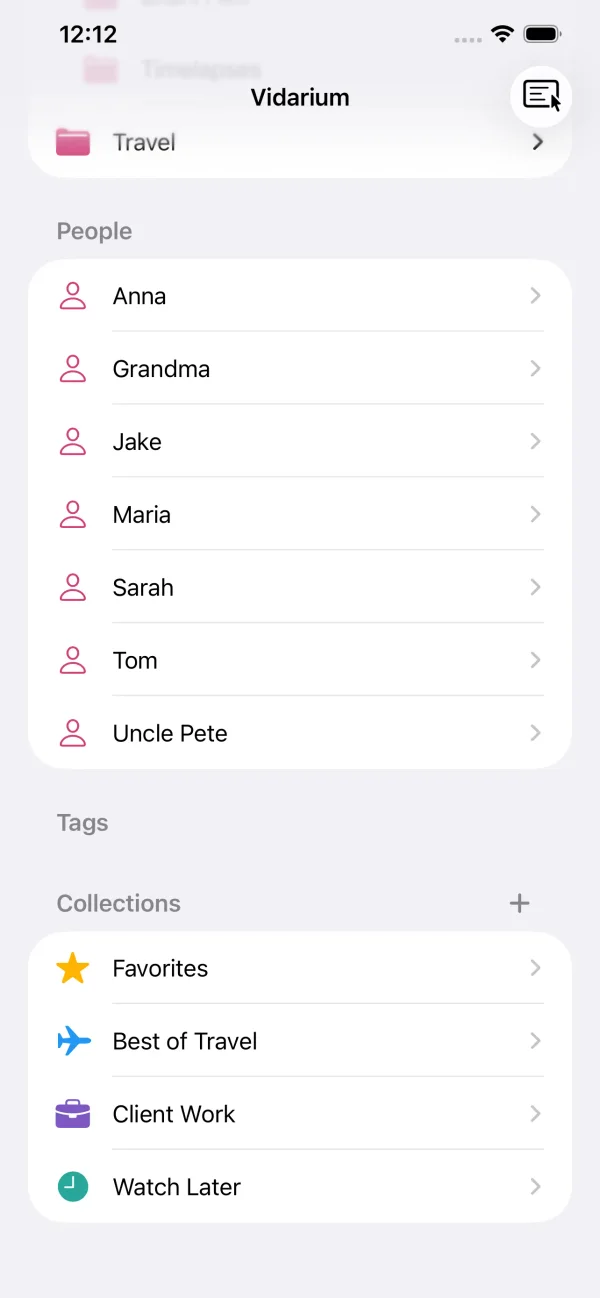
• Tags, people, and collections to cross-cut your library however you like
• Saved and advanced searches with a rule editor
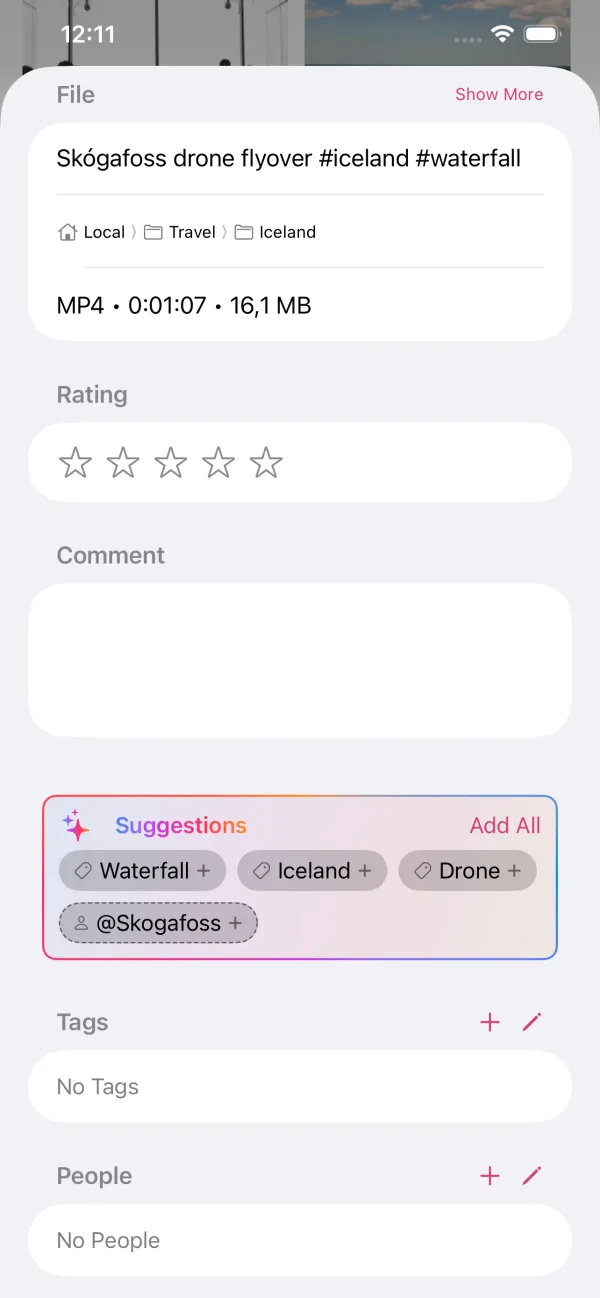
• Star ratings and rich per-file details
• Drag and drop to import from Finder and to rearrange
YOUR FILES, UNTOUCHED
Vidarium points at the folders you already have. It never copies your originals into a hidden database and never moves them without asking. No server, no required account, no tracking. Delete the app and your videos are exactly as they were.
EVERY APPLE DEVICE
Native on Mac, iPad, iPhone. Keep multiple libraries, open them in their own windows on Mac and iPad, and play videos right in the grid or full-screen — with play-all and shuffle.
A PLAYER THAT GETS OUT OF THE WAY
Play videos right in the grid on Mac, or full screen on iPad and iPhone. The custom player has elegant glass controls that appear when you need them, on-the-fly scrub previews, playback speed, AirPlay — and a Related Videos bar that suggests what to watch next based on shared people and tags.
ON-DEVICE AI SUGGESTIONS
Vidarium reads a video's file name and metadata and suggests matching tags and people — including brand-new ones spotted in the name. On devices with Apple Intelligence, suggestions run through the on-device model; everywhere else a fast text matcher steps in. Nothing ever leaves your device.
ONE iCLOUD LIBRARY THAT JUST WORKS (PRO)
Sync a single library across all your devices. Your organization syncs instantly; the actual video files download from iCloud Drive on demand — tap to pull a clip down with live progress, or let it fetch automatically when you play. Clips you haven't downloaded yet are clearly marked, never mistaken for missing, and never silently deleted.
VIDARIUM PRO — ONE PURCHASE, EVERY DEVICE
The Local library and all core features are free. Vidarium PRO is a single one-time purchase — no subscription — that unlocks the power features: the iCloud library, libraries in any folder you choose, automatic AI tagging (including Auto-Tag for the whole library), fixing names from a video's source web page, and, on the Mac, downsizing single videos or your entire library and a full metadata editor. One purchase unlocks every current and future PRO feature on all your devices.
Subscribed to Setapp? The Setapp version of Vidarium comes with everything unlocked, and on iPhone and iPad you can sign in with Setapp instead of buying.
Vidarium — a place for your videos.
Yenilikler
Sürüm 1.1.1 · 11.11.2026
New: Resume where you left off: videos continue from where you stopped watching, with a Start Over button for a few seconds. A bar on the thumbnail shows how far you got, and once you reach the last 10% the video counts as seen. Turn it off in Settings › Playback or for a single library in Library Settings. In the iCloud library, the position syncs across your devices.
New: Keep track of watched videos: turn on Track Watched Videos in Library Settings, or when you create a library. Unwatched videos show a dot and watched ones a checkmark. Videos are marked when you finish them, or by hand with Mark as Watched from the context menu or the inspector.
New: Videos with several audio tracks get an Audio menu in the player. Choose a preferred audio language in Settings › Playback, or for a single library in Library Settings, and the matching track plays from the start.
New: Advanced and saved searches can find watched, unwatched and partly watched videos, and videos with or without bookmarks.
Fixed: A video that can’t be played now closes the player with an explanation, instead of showing a crossed-out video.
Note: Libraries opened with this version can’t be opened by Vidarium 1.1 or earlier. Update Vidarium on all your devices.
Uygulama gizliliği
Bu uygulamanın verileri nasıl işlediği hakkında Charlie Monroe Software, s.r.o. tarafından App Store üzerinde yapılan beyan.
-
Sizinle ilişkilendirilmeyen veriler
Toplanabilir ancak kimliğinizle ilişkilendirilmez.
- Kullanım verileri
Gizlilik uygulamaları, örneğin kullandığınız özelliklere veya yaşınıza göre değişiklik gösterebilir.
Bilgiler
- Satıcı
- Charlie Monroe Software, s.r.o.
- Kategori
- Fotoğraf ve Video
- Sürüm
- 1.1.1
- Güncellendi
- 11.11.2026
- Yayın tarihi
- 03.09.2026
- Boyut
- 31,5 MB
- Gereksinim
- iOS 26.0 veya sonrası
- Yaş sınırı
- 4+
- Fiyat
- Ücretsiz
- Uygulama içi satın alma
- Evet
- Diller
- İngilizce, Hollandaca, Fransızca, Almanca, İtalyanca, Japonca, Basitleştirilmiş Çince, İspanyolca
- Telif hakkı
- © 2026, Charlie Monroe Software, s.r.o.
Bunları da beğenebilirsiniz
-
 Private Play: Video VaultFotoğraf ve Video
-
 ArhivphotoFotoğraf ve Video
-
 RSSTube: RSS Video FeedFotoğraf ve Video
-
 CocoPlayer — Loop & PrivacyFotoğraf ve Video
-
 Curator SenseFotoğraf ve Video
-
 Slim: Photo & Video CompressFotoğraf ve Video
-
 Rivian Cam ViewerFotoğraf ve Video
-
 Raw To HEICFotoğraf ve Video
-
 ReelVault – Footage CatalogFotoğraf ve Video
-
 MyLooper: Video ve ListeVideoları düzenle ve izle