- Yaş sınırı4+
- KategoriEğlence
- GeliştiriciPrimecraft LLC
- Dillerİngilizce+ 1 dil daha
- Boyut12,4 MB
Vybands şu anda App Store üzerinde mevcut olmayabilir
Son kontrolümüzde mağaza sayfasına ulaşılamadı. Bağlantı yine de resmi App Store sayfasına gider.
Ekran görüntüleri

Hakkında
Geliştirici bu metni dilinizde sunmamış.
Vybands is where reactions are the main event.
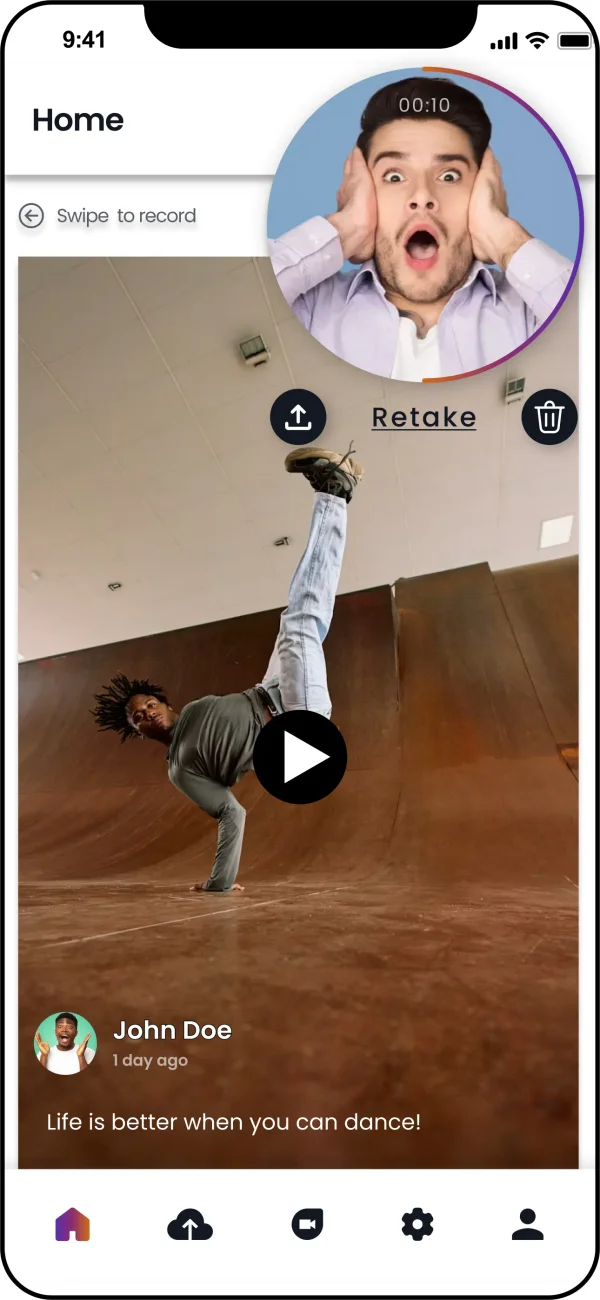
Watch a short video, then record your reaction with the front camera — your face, your voice, your real first impression. Your reaction plays right next to the original, so everyone sees exactly what made you laugh, gasp or cringe.
WATCH REACTIONS, NOT JUST VIDEOS
Every reel comes with the faces of people watching it. Browse them in a carousel, keep one floating in a bubble you can drag anywhere, or tuck them away and just watch. Tap any reaction to see it full screen, side by side with the moment it reacts to.
RECORD IN ONE SWIPE
Swipe right on any reel and the camera is ready. Record, then fine-tune before you post: move and resize your reaction circle, choose where in the reel it starts, and balance the reel's sound with your own.
REACT TO REACTIONS
Conversations go deeper than comments. Reply to a reaction with a reaction of your own and follow the whole thread.
SHARE AND INVITE
Share any reel or reaction with a link. Friends who open it land right on that moment — and see that you invited them to react.
FOLLOW THE PEOPLE YOU LIKE
Open anyone's profile to see their reels and the reactions they've recorded. Swipe through them like your feed, and swipe left to see everyone who reacted.
KNOW WHEN SOMEONE REACTS
Get notified when someone reacts to your reel, and see who liked and watched it.
TRY IT FIRST
Not ready to sign up? Continue as a guest and watch a few reels first. When you want to react, signing in with Apple takes one tap.
Your reactions, your call: you choose what to post, and you can report content or delete your account at any time from the app.
Yenilikler
Sürüm 2.0 · 25.11.2026
SIGNING IN
Sign in with Apple works with any Apple ID; an account is created on first sign in.
You can also tap "Continue as guest" on the sign-in screen. Guests can watch a few reels; liking, reacting, sharing and opening profiles ask them to sign in first.
HOW TO TEST THE MAIN FEATURE
1. Sign in and watch the feed (swipe up/down between reels).
2. Swipe right on a reel (or tap React) to open the camera and record a reaction.
3. Before posting you can move/resize the reaction circle and adjust the sound, then post.
4. The reaction appears next to the reel; swipe left on a reel to see all reactions to it, tap any reaction to watch it full screen.
USER-GENERATED CONTENT AND SAFETY
Videos and reactions are uploaded to and served from our servers.
Report: any reel or reaction can be reported from its share menu. Reports are reviewed within 24 hours and objectionable content is removed.
Block: users can be blocked from the same share menu; blocked users no longer see each other's content. The list is in Settings > Blocked users.
ACCOUNT DELETION
Profile > Settings (gear icon) > Delete account. This deletes the account and its content and revokes Sign in with Apple.
PERMISSIONS
Camera and microphone: requested when recording a reaction for the first time.
Photo library: requested only when saving or choosing a video.
Notifications: used to tell users when someone reacts to their reel.
Uygulama gizliliği
Bu uygulamanın verileri nasıl işlediği hakkında Primecraft LLC tarafından App Store üzerinde yapılan beyan.
-
Sizinle ilişkilendirilen veriler
Toplanabilir ve kimliğinizle ilişkilendirilebilir.
- İletişim bilgileri
- Kullanıcı içeriği
- Tanımlayıcılar
- Kullanım verileri
Gizlilik uygulamaları, örneğin kullandığınız özelliklere veya yaşınıza göre değişiklik gösterebilir.
Bilgiler
- Satıcı
- Primecraft LLC
- Kategori
- Eğlence
- Sürüm
- 2.0
- Güncellendi
- 25.11.2026
- Yayın tarihi
- 30.05.2025
- Boyut
- 12,4 MB
- Gereksinim
- iOS 17.0 veya sonrası
- Yaş sınırı
- 4+
- Diller
- İngilizce, Romence
- Telif hakkı
- © 2025 Primecraft LLC