SD144
Speedydesign- 3 tuổi trở lênĐộ tuổi
- Cá nhân hóaDanh mục
- 19/08/2026Cập nhật
- 22.000 ₫Giá
Dẫn đến trang Google Play chính thức của com.watchfacestudio.sd144. Kiểm tra lần cuối: 21/11/2026.
Thông tin về ứng dụng này
Bản dịch tự động của Google. Ngôn ngữ gốc: Tiếng Anh (Hoa Kỳ).
Theo dõi WearOS
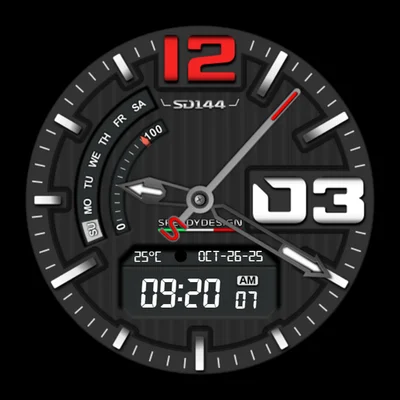
Mặt đồng hồ đơn giản, giống như những chiếc đồng hồ kim ngày xưa. Phong cách đơn giản và trực quan cho phép bạn theo dõi nhiệt độ, ngày trong tuần, tháng và năm, thậm chí cả thời lượng pin. Với tùy chọn màu sắc có thể tùy chỉnh duy nhất.
LƯU Ý CÀI ĐẶT:
Vui lòng kiểm tra liên kết này để xem hướng dẫn cài đặt và khắc phục sự cố: https://speedydesign.it/installazione
Mặt đồng hồ này hỗ trợ tất cả các thiết bị Wear OS.
Mô tả:
• Thời gian kim & kỹ thuật số (12/24 giờ tùy thuộc vào cài đặt điện thoại)
• Ngày trong tuần
• Tháng trong năm
• Năm
• Mức pin
• Thời tiết + Nhiệt độ
• Màn hình luôn bật (AOD)
Có thể tùy chỉnh:
8 màu
Tùy chỉnh mặt đồng hồ:
1 - Chạm và giữ màn hình
2 - Chạm vào tùy chọn Tùy chỉnh
Các chức năng bổ sung trên mặt đồng hồ:
Bạn có thể tùy chỉnh mặt đồng hồ với tất cả dữ liệu bạn muốn.
Ví dụ, bạn có thể chọn thời tiết, nhịp tim, áp suất khí quyển, v.v.
Lưu ý về nhịp tim:
Mặt đồng hồ không tự động đo và không tự động hiển thị kết quả nhịp tim khi được cài đặt.
Để xem dữ liệu nhịp tim hiện tại trên mặt đồng hồ, bạn cần đo thủ công.
Để làm điều này, hãy chạm vào vùng hiển thị nhịp tim.
Chờ vài giây. Mặt đồng hồ sẽ đo và hiển thị kết quả hiện tại.
Hãy đảm bảo bạn đã bật sử dụng cảm biến khi cài đặt mặt đồng hồ, nếu không, hãy đổi sang mặt đồng hồ khác rồi quay lại mặt đồng hồ này để bật cảm biến.
Sau lần đo thủ công đầu tiên, mặt đồng hồ có thể tự động đo nhịp tim của bạn sau mỗi 10 phút. Bạn cũng có thể đo thủ công.
(Một số tính năng có thể không khả dụng trên một số đồng hồ).
ĐỂ THEO DÕI:
newsletter@speedydesign.it
SPEEDYDESIGN:
https://www.speedydesign.it
FACEBOOK:
https://www.facebook.com/Speedy-Design-117708058358665
INSTAGRAM:
https://www.instagram.com/speedydesign.ita/
Cảm ơn!
Hiện văn bản gốc
A simple dial, just like the analog watches of the past. Its simple and intuitive style allows you to keep track of the temperature, days of the week, month and year, and even battery life. With the only customizable color options.
INSTALLATION NOTES:
Please check this link for installation and troubleshooting guide: https://speedydesign.it/installazione
This watch face supports all Wear OS devices.
Description:
• Analog & Digital time (12/24 hours based on phone settings)
• Day of the week
• Month of the year
• Year
• Battery level
• Weather + Temperature
• AOD
Customizable:
x8 Colors
Dial customization:
1 - Touch and hold the display
2 - Tap on the Customize option
Dial Complications:
you can customize the dial with all the data you want.
For example, you can select weather, heart rate, barometer etc.
Notes on heart rate:
The watch face does not automatically measure and does not automatically display the heart rate result when installed.
To see current heart rate data on the dials, you will need to take a manual measurement.
To do this, tap the heart rate display area.
Wait a few seconds. The dial will take a measurement and display the current result.
Make sure you enabled the use of sensors when you installed the watch face, otherwise swap it with another watch face and then go back to this one to enable the sensors.
After the first manual measurement, the dial can automatically measure your heart rate every 10 minutes. Manual measurement will also be possible.
(Some features may not be available on some watches).
STAY TUNED:
newsletter@speedydesign.it
SPEEDYDESIGN:
https://www.speedydesign.it
FACEBOOK:
https://www.facebook.com/Speedy-Design-117708058358665
INSTAGRAM:
https://www.instagram.com/speedydesign.ita/
Thank you !
An toàn dữ liệu
Những gì Speedydesign khai báo trên Google Play về dữ liệu mà ứng dụng này thu thập và chia sẻ.
- Không chia sẻ dữ liệu với bên thứ baTìm hiểu thêm về cách nhà phát triển khai báo thông tin về hoạt động chia sẻ dữ liệu
- Không thu thập dữ liệu nàoTìm hiểu thêm về cách nhà phát triển khai báo thông tin về hoạt động thu thập dữ liệu
Có gì mới
Phiên bản 1.0.0 · 19/08/2026
- Initial release
Liên hệ nhà phát triển
- Trang webspeedydesign.it
- E-mailsupport@speedydesign.it
- Chính sách quyền riêng tưspeedydesign.it
- Địa chỉVia dell'Alpino, 33 33047 Remanzacco Italy
Thông tin
- Cung cấp bởi
- Speedydesign
- Danh mục
- Cá nhân hóa
- Phiên bản
- 1.0.0
- Cập nhật
- 19/08/2026
- Phát hành
- 27/10/2025
- Độ tuổi
- 3 tuổi trở lên
- Giá
- 22.000 ₫
- Tên gói
- com.watchfacestudio.sd144