AmbientCast
Live view for Bambu printers
Được thiết kế cho iPhone, iPad
Miễn phí · Mua hàng trong ứng dụng
- Độ tuổi4+
- Danh mụcTiện Ích
- Nhà phát triểnKevin McMahon
- Ngôn ngữTiếng Anh
- Kích thước6,0 MB
Liên kết đến trang App Store chính thức
Download.org không lưu trữ tệp nào của AmbientCast. Nút này mở trang ứng dụng trên App Store, nơi Kevin McMahon phát hành ứng dụng. Trang được kiểm tra lần cuối: 25/11/2026.
Ảnh chụp màn hình

Giới thiệu
Nhà phát triển chưa cung cấp nội dung này bằng ngôn ngữ của bạn.
Keep an eye on your Bambu Lab 3D printer without being tied to it.
AmbientCast puts your printer's live camera feed and real-time status right on your iPhone or iPad. Add your printer once -- AmbientCast finds most of them on your network by itself -- and the dashboard comes right up. No account, no browser, no separate login.
LIVE CAMERA, LIVE STATUS
See exactly what your printer sees, plus everything you'd want to know at a glance: print progress, current layer, estimated time remaining and finish time, and every alert the printer raises, in Bambu's own words. Give the picture a look if you like -- Vivid, Warm, Cool, Cinematic or Noir.
WATCH ALL YOUR PRINTERS AT ONCE
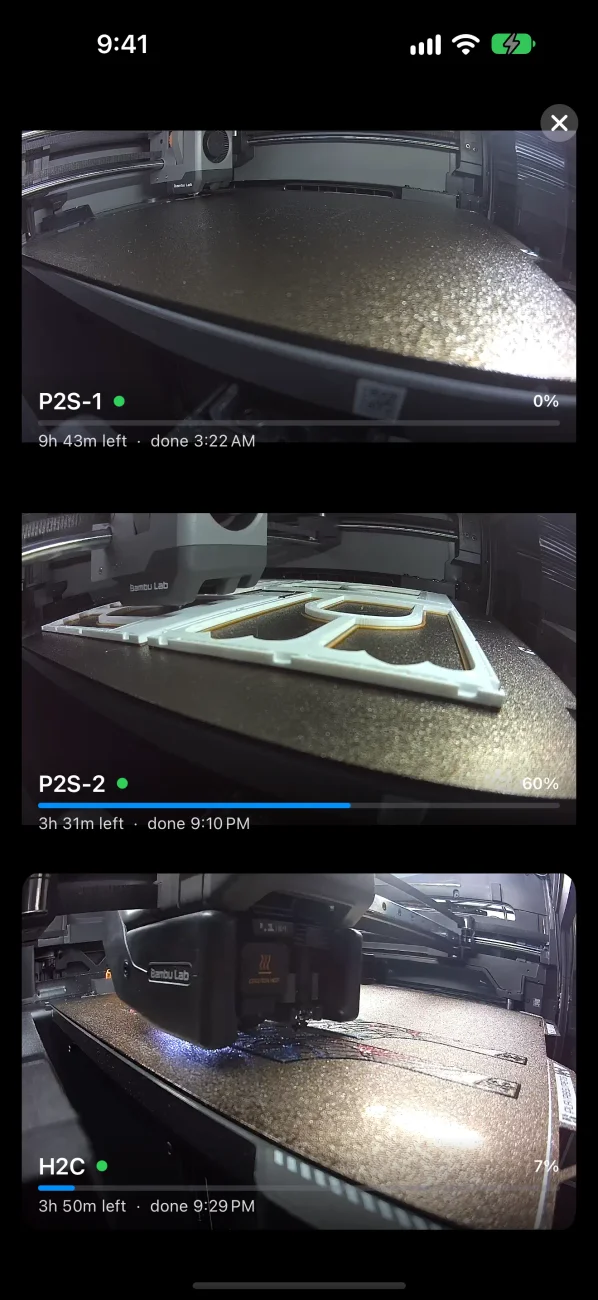
Running more than one printer? Multiview puts every live camera on one screen, each tile showing its progress and when the print will finish. A printer with a warning or an error flags its tile in red; tap it to see what's wrong.
TURN IT SIDEWAYS
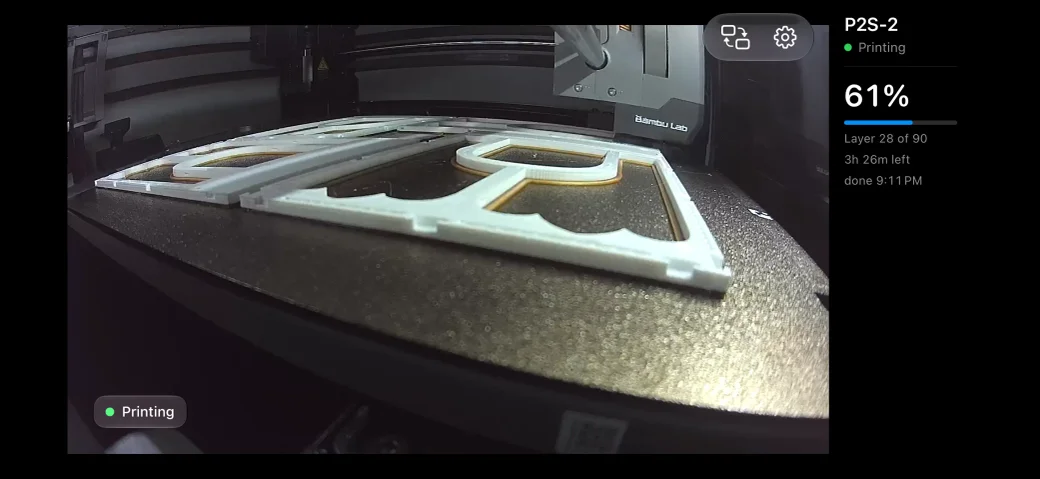
Landscape has a layout of its own: the video fills the height, with progress, layer and finish time in a rail beside it. Pinch to zoom in on the nozzle -- the camera has more detail than a phone-sized picture shows -- and drag to look around.
KEEP WATCHING WHILE YOU DO SOMETHING ELSE
Native Picture-in-Picture keeps your print floating in a corner of the screen while you use other apps -- check email or browse the web -- and still catch the moment your print finishes (or the moment something goes wrong).
ON YOUR APPLE TV, TOO
AmbientCast is on Apple TV as well, from this same listing -- a print up on the big screen, or in a corner of it while you watch something else, plus its status on the tvOS home screen. Your printers and cameras carry over, so there's nothing to set up twice.
NOTHING GOES THROUGH ANYONE ELSE'S SERVERS
No account to create and no cloud in the middle: AmbientCast talks to your printer directly over your own network, so your camera feed and print status stay in the house. You'll need the printer's access code, which is on its own screen, and "LAN Only Liveview" switched on -- not LAN Only Mode, so Bambu Handy keeps working. One catch: the printer sends no video here while Bambu Handy or Bambu Studio is showing its camera, or while Go Live is switched on.
YOUR DEVICES AGREE WITH EACH OTHER
Printers and cameras you set up on one device show up on the others, so you don't rebuild the same list everywhere.
TYPE THE ACCESS CODE ONCE, NOT ON EVERY DEVICE
Turn on Sync Credentials and a printer's access code -- and a camera's username and password -- become available on your other devices. It is off until you switch it on. Each one is encrypted on your device before it is sent and kept in your own private iCloud storage, where the developer can't read it. Switch it off and the copies are removed; delete a printer or camera and its credentials go with it.
NOTHING IS BEHIND A PAYWALL
Everything in AmbientCast is free. If the app has been useful there's a tip jar in Settings, and it unlocks nothing, because there's nothing left to unlock.
Also works with any generic RTSP camera, if you'd rather point one at the bed yourself.
Tested on the P2S and the H2C, and seen working on an H3C. The rest of the X1 family (X1, X1C, X1E) and H2 family work the same way, and the H2D and H2S are found automatically too. Automatic discovery doesn't find the A series yet (A1, A1 mini, A2L) -- you can still add those by typing the printer's address.
AmbientCast is an independent app and isn't affiliated with or endorsed by Bambu Lab.
Có gì mới
Phiên bản 1.13 · 23/11/2026
AmbientCast 1.13 is a focused update: everything in the app is now about watching your printers.
- Streamlined: YouTube Live streaming, timelapse Shorts and the video watermark have been retired, so the app concentrates on the live camera, print status and alerts people use every day. Anything you already posted to YouTube stays on your channel. If you were using YouTube streaming and miss it, email support@mcmizzle.com and it can come back.
- Picture in Picture is cleaner: just your print and its progress, with no watermark.
- More private: AmbientCast no longer signs in to Google. It talks only to your printers and, if you turn on sync, your own iCloud. Updating clears out the old sign-in and settings for you.
Quyền riêng tư của ứng dụng
Những gì Kevin McMahon khai báo trên App Store về cách ứng dụng này xử lý dữ liệu.
-
Dữ liệu không được thu thập
Nhà phát triển không thu thập bất kỳ dữ liệu nào từ ứng dụng này.
Phương thức đảm bảo quyền riêng tư có thể khác nhau, chẳng hạn như tuỳ theo các tính năng bạn sử dụng hoặc độ tuổi của bạn.
Thông tin
- Người bán
- Kevin McMahon
- Danh mục
- Tiện Ích
- Phiên bản
- 1.13
- Cập nhật
- 23/11/2026
- Phát hành
- 23/08/2026
- Kích thước
- 6,0 MB
- Yêu cầu
- iOS 17.0 trở lên
- Độ tuổi
- 4+
- Giá
- Miễn phí
- Mua hàng trong ứng dụng
- Có
- Ngôn ngữ
- Tiếng Anh
- Bản quyền
- © 2026 Kevin McMahon
Có thể bạn cũng thích
-
 BamBuddyTiện Ích
-
 BambuFarm - 3D Printer MonitorTiện Ích
-
 Screens 5: VNC Remote DesktopTiện Ích
-
 glinetTiện Ích
-
 Thingiverse MakerWorld | 3DropTiện Ích
-
 3D GO | In ấn 3D | ThingiverseMô hình 3D Makerworld Cults3d
-
 UGREEN NASTiện Ích
-
 Bambu HandyTiện Ích
-
 3d Scanner App™Tiện Ích
-
 Creality Cloud - 3D PrintingTiện Ích