AppBlock Screen Time Control
App Blocker & Push Up Unlock
Được thiết kế cho iPhone, iPad
Miễn phí · Mua hàng trong ứng dụng
- Độ tuổi4+
- Danh mụcHiệu Suất
- Nhà phát triểnSaif Ur Rehman
- Ngôn ngữTiếng Anh+ 9 ngôn ngữ khác
- Kích thước42,7 MB
Liên kết đến trang App Store chính thức
Download.org không lưu trữ tệp nào của AppBlock Screen Time Control. Nút này mở trang ứng dụng trên App Store, nơi Saif Ur Rehman phát hành ứng dụng. Trang được kiểm tra lần cuối: 16/11/2026.
Ảnh chụp màn hình

Giới thiệu
Nhà phát triển chưa cung cấp nội dung này bằng ngôn ngữ của bạn.
AppBlock is the app blocker that lets you earn your screen time. When your minutes run out, do push-ups or squats in front of your camera and your apps unlock. It is a strict blocker too, so you can stop doomscrolling.
AppBlock uses Apple's Screen Time system, so a blocked app shows a shield screen when you try to open it.
EARN YOUR SCREEN TIME
• Get a small daily allowance for the apps you pick
• When it runs out, the apps are blocked
• Do push-ups or squats to earn more time. The camera counts your reps on your iPhone
• Minutes you do not use carry over to the next day, up to a limit
• Free users can watch a short video to earn 5 minutes, up to 3 times a day
WAYS TO BLOCK
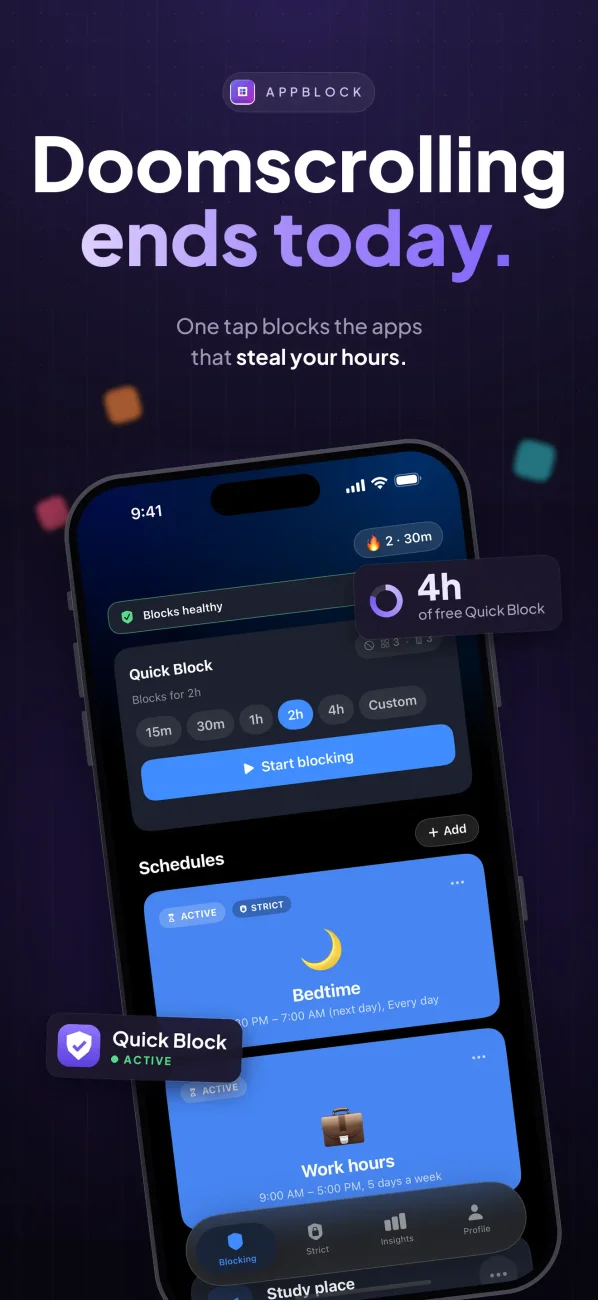
• Quick Block: start a focus session in one tap, from 15 minutes to 4 hours, with a live countdown.
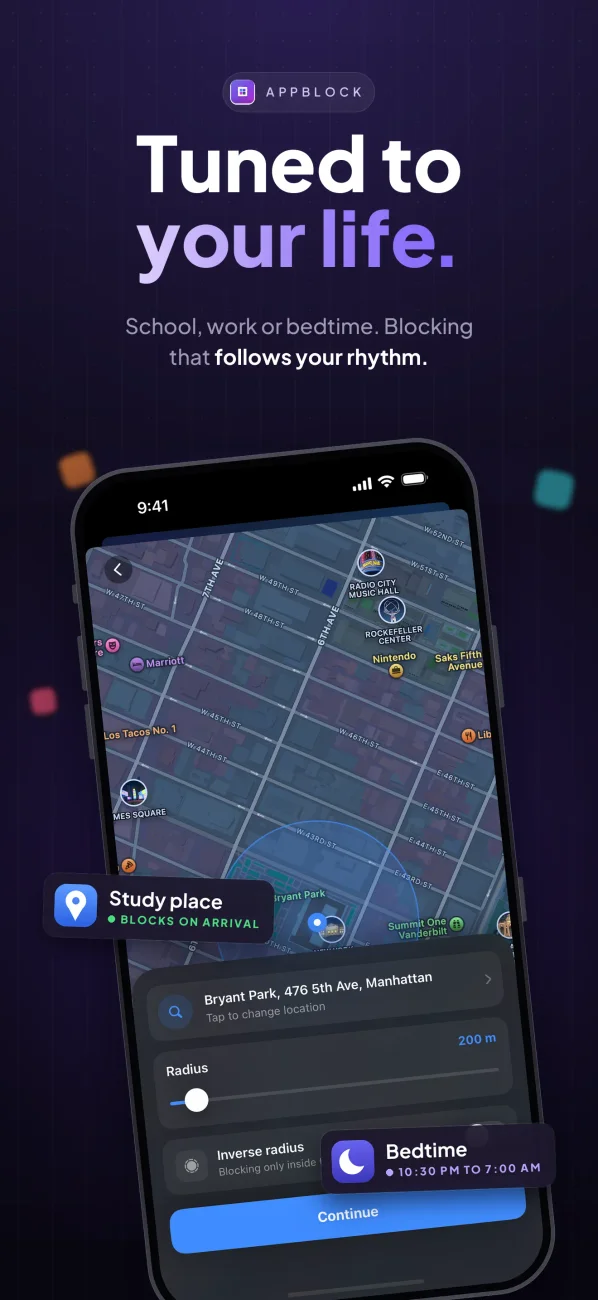
• Schedules: block apps during work, study, dinner or bedtime. Pick any days and times, even overnight.
• Daily limits: set how long you can use an app each day. When the time is up, the app is blocked.
• Open limits: allow only a few opens a day. The blocked screen shows how many you have left.
• Messages only: give a social app a few short opens a day, for example 6 opens of 2 minutes. Check your messages, then it locks again.
• Location blocking: block apps at school, the library or the office, or away from a place you choose.
• Start from anywhere: Shortcuts, Siri, a Control Center toggle or the Home Screen widget.
STRICT MODE, HARD TO QUIT
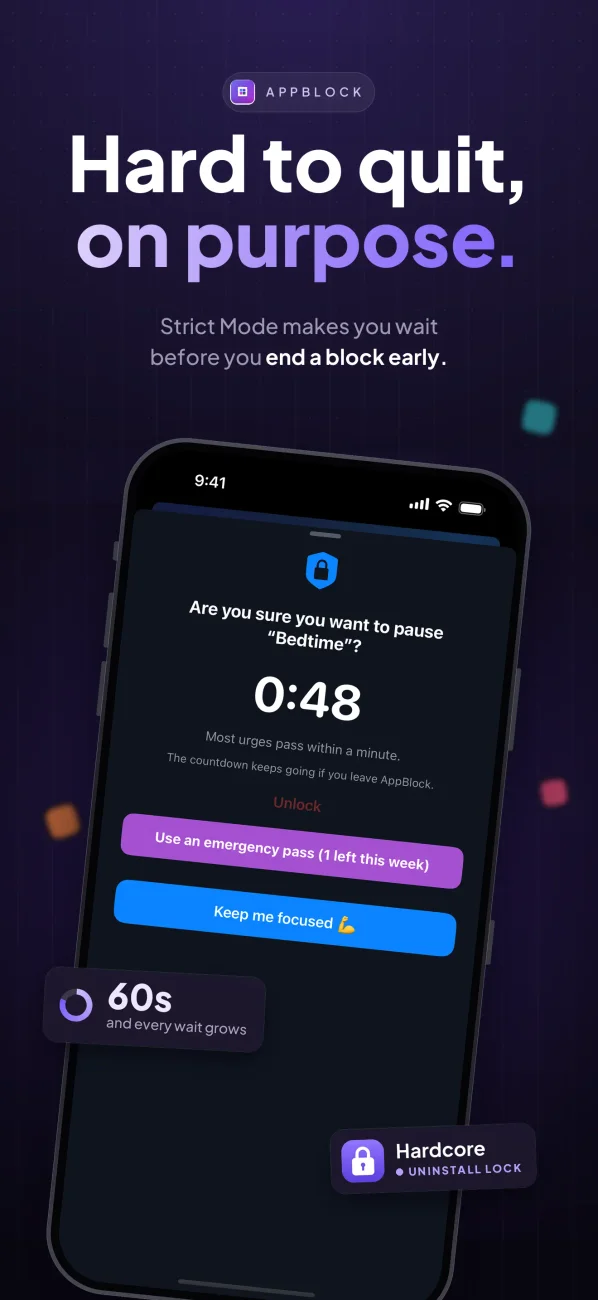
Strict Mode makes you wait before you end a block early. The wait grows each time you quit early in a day: 60 seconds, then 2, 5, 10 and 15 minutes.
• Earn a 10 minute break with a workout: push-ups, squats, diamond push-ups or a plank
• A daily limit on breaks, and 0 to 3 emergency passes a week
• Unlock with a QR code or barcode that you choose
• Hardcore (Premium) removes the Stop button and keeps AppBlock installed while a block runs
• Partner lock (Premium): a friend holds a code that you need to leave Hardcore
• Every lock has a way out, so you are never stuck
BLOCKS YOU CAN TRUST
A "Blocks healthy" line tells you when something needs a fix.
SEE YOUR SCREEN TIME
Insights show your day hour by hour and your most used apps for free. Weekly and monthly views come with Premium.
PRIVACY
Apple's Screen Time system keeps the apps you pick hidden from us, and your schedules and limits stay on your device. The camera counts your reps and scans your unlock code on your iPhone, and the video is never saved. An account is optional.
FREE AND PREMIUM
AppBlock is free to start, with no paywall during setup. Use the free plan as long as you like.
FREE
• 3 schedules on any days, 2 daily limits, 2 open limits and 1 location rule
• A daily Earn allowance of up to 15 minutes
• Quick Block up to 4 hours
• Strict Mode with growing waits, workout breaks and QR unlock
• Daily Insights, your own blocked screen message and Gentle mode
PREMIUM
• More rules: 16 active time ranges and limits, 10 open limits and 10 places
• A bigger Earn allowance and a larger carry-over
• Hardcore mode, the uninstall lock and Partner lock
• Quick Blocks up to 24 hours, or a custom length
• Weekly and monthly Insights
• Typing challenge, preset messages and a photo for the blocked screen
Try Premium free for 7 days, then choose monthly or yearly.
SUBSCRIPTION DETAILS
• Premium is an auto-renewing subscription, billed monthly or yearly
• Payment is charged to your Apple Account at confirmation of purchase
• The subscription renews automatically unless you turn it off at least 24 hours before the end of the current period
• Your account is charged for renewal within 24 hours before the end of the current period
• Manage or cancel in your Apple Account settings
• Any unused part of a free trial is lost when you buy a subscription
Privacy Policy: https://o9tech.com/appblocker/privacypolicy.html
Terms of Use: https://www.apple.com/legal/internet-services/itunes/dev/stdeula/
Support: support@o9tech.com
Có gì mới
Phiên bản 1.1.0 · 14/11/2026
Earn your screen time, and quitting early is harder now, on purpose. What is new:
• Earn Minutes: get a daily allowance for the apps you pick, then do push-ups or squats to earn more. Your camera counts your reps on your iPhone and never saves the video
• Strict Mode: waits that grow each time you quit early, a daily limit on breaks and emergency passes you set
• Earn a 10 minute break from a Strict block with push-ups, squats, diamond push-ups or a plank
• Hardcore (Premium): no Stop button, and AppBlock stays installed while a block runs
• Partner lock (Premium): a friend holds the code that lets you leave Hardcore
• Unlock with a QR code or barcode you choose
• Messages only: give a social app a few short opens a day, then it locks again
• Schedules on any days are now free, and Quick Blocks run from 15 minutes to 4 hours
• Start a Quick Block from Shortcuts, Siri, Control Center or the Home Screen widget
• A "Blocks healthy" line tells you when a block needs a fix
• Always allowed: keep chosen apps open even when a whole category is blocked
• Write your own message for the blocked screen, or switch on Gentle mode
• Insights show your day hour by hour. Weekly and monthly views are in Premium
• 11 languages
Quyền riêng tư của ứng dụng
Những gì Saif Ur Rehman khai báo trên App Store về cách ứng dụng này xử lý dữ liệu.
-
Dữ liệu liên kết với bạn
Có thể được thu thập và liên kết với danh tính của bạn.
- Mục mua
- Thông tin liên hệ
- Mã định danh
- Dữ liệu sử dụng
- Chẩn đoán
Phương thức đảm bảo quyền riêng tư có thể khác nhau, chẳng hạn như tuỳ theo các tính năng bạn sử dụng hoặc độ tuổi của bạn.
Thông tin
- Người bán
- Saif Ur Rehman
- Danh mục
- Hiệu Suất
- Phiên bản
- 1.1.0
- Cập nhật
- 14/11/2026
- Phát hành
- 02/06/2026
- Kích thước
- 42,7 MB
- Yêu cầu
- iOS 18.0 trở lên
- Độ tuổi
- 4+
- Giá
- Miễn phí
- Mua hàng trong ứng dụng
- Có
- Ngôn ngữ
- Tiếng Anh, Tiếng Hà Lan, Tiếng Pháp, Tiếng Đức, Tiếng Ý, Tiếng Nhật, Tiếng Hàn, Tiếng Bồ Đào Nha, Tiếng Trung Giản thể, Tiếng Tây Ban Nha
- Bản quyền
- © 2026 O9Tech
Có thể bạn cũng thích
-
 PomoLock: AppBlockerHiệu Suất
-
 App Blocker: Block Apps & SiteHiệu Suất
-
 Blocker: Limit Screen TimeHiệu Suất
-
 MindFence: App & Site BlockerHiệu Suất
-
 Kept: Screen Time LimitsHiệu Suất
-
 AppKeeper -Screen Time ControlHiệu Suất
-
 App Blocker - GeoBlockrHiệu Suất
-
 Lockscreen: Chặn Ứng DụngHoàn Thành Nhiệm Vụ Trước
-
 FrictionBlock: App BlockerHiệu Suất
-
 Nightlock: Bedtime App BlockerHiệu Suất