
- Độ tuổi4+
- Danh mụcGiáo Dục
- Nhà phát triểnSentient Music Technologies, LLC
- Ngôn ngữTiếng Anh
- Kích thước40,5 MB
Liên kết đến trang App Store chính thức
Download.org không lưu trữ tệp nào của BrioMoto. Nút này mở trang ứng dụng trên App Store, nơi Sentient Music Technologies, LLC phát hành ứng dụng. Trang được kiểm tra lần cuối: 18/11/2026.
Ảnh chụp màn hình



Giới thiệu
Nhà phát triển chưa cung cấp nội dung này bằng ngôn ngữ của bạn.
Plan. Persist. Perform.
BrioMoto is a comprehensive practice app built for serious musicians. Whether you're a working professional, a student, or a dedicated amateur, BrioMoto gives you the tools to practice smarter and more efficiently with less friction.
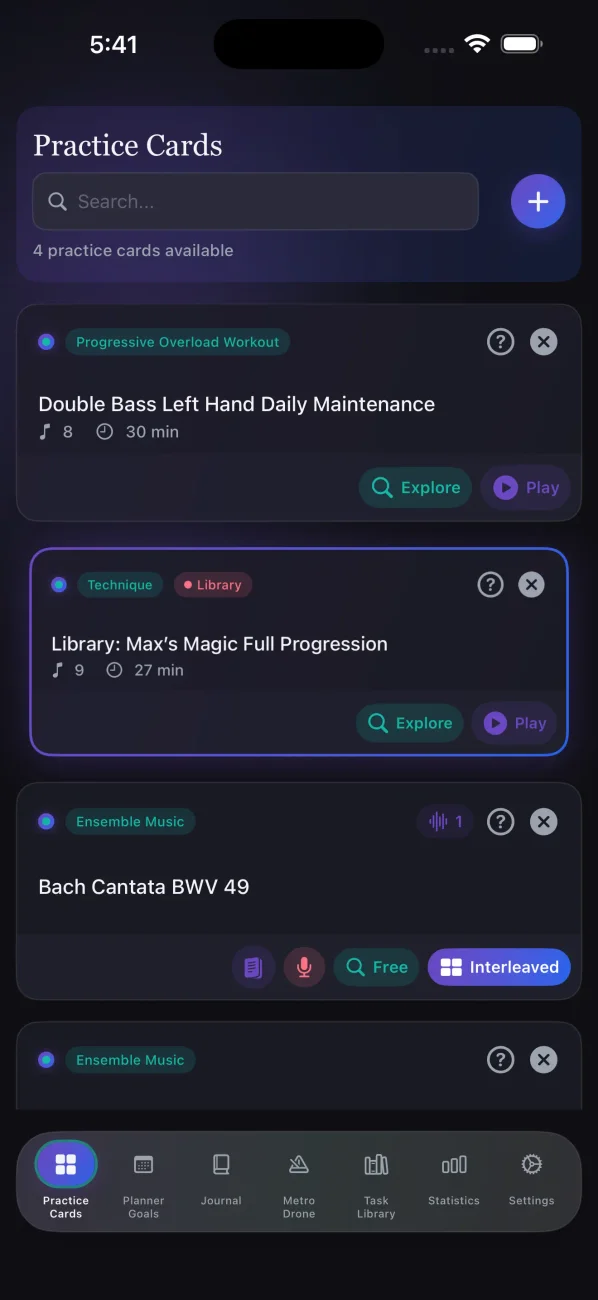
PLAN WITH INTENTION
Build timed fitness and technique routines with individual exercises, each with its own metronome, drone, and accompaniment settings. Organize your week with the Daily Planner. Set goals and track your progress over time. Separate modes for exploring and deliberate practice, implementing science-based cognitive models that optimize skill acquisition and retention.
- Create custom routines with prep, count-in, and recovery phases
- Daily and weekly planning with drag-and-drop card scheduling
- Import practice content from teachers or the BrioMoto community
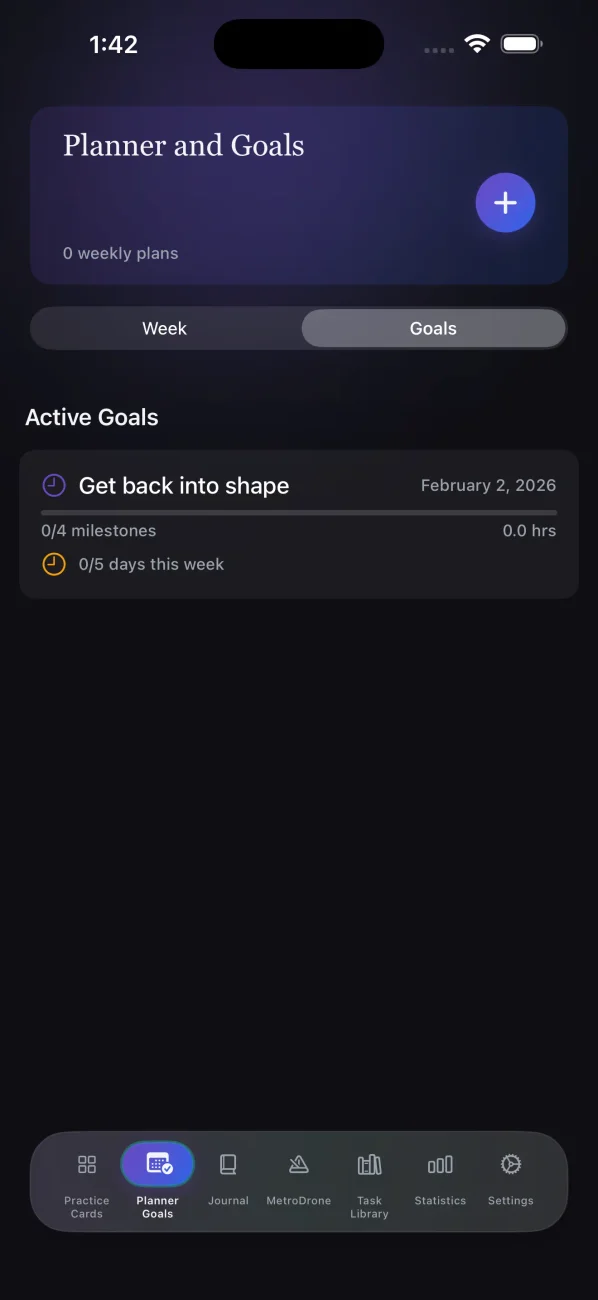
- Goal setting with milestones and progress tracking
PRACTICE WITH PRESENCE
BrioMoto keeps you focused during practice with professional-grade tools that stay out of your way until you need them.
- Advanced metronome: 40-200 BPM, compound time signatures, subdivisions, accent patterns, tap tempo
- Drone tones: 24 sampled string drones with fundamental + overtone mixing for intonation work
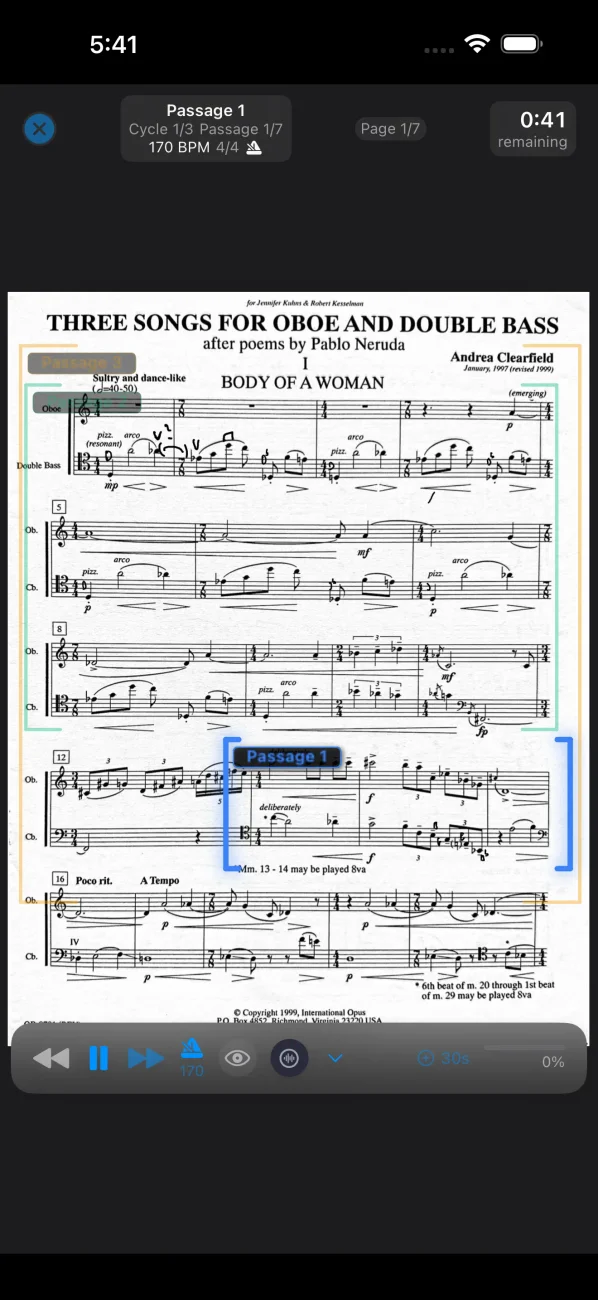
- PDF sheet music: Import/export and annotate your scores
- Accompaniment tracks: Play along with audio files at adjustable volume
- Score Study mode: YouTube, Spotify, and Apple Music integration for reference recordings
- Interleaved practice: Sophisticated bracket-based passage rotation with per passage drone and metronome settings for deliberate practice
REFLECT AND GROW
Track what matters. BrioMoto follows your practice sessions automatically and helps you understand your habits.
- Practice journal with rich text, attachments, and tags
- Statistics dashboard with streaks, trends, and historical data
- AI-powered insights that summarize your practice patterns
- Record your practice and reflect with timeline annotations and journaling
FOR TEACHERS
BrioMoto includes a teacher-student system. Teachers can push practice routines and full schedules to students, review shared recordings, and track progress — all from a dedicated web dashboard at teachers.briomoto.com.
ACCESSIBILITY
- Dyslexia-friendly font options (OpenDyslexic, Atkinson Hyperlegible)
- Reduce visual effects mode
- Multiple color schemes including high contrast
Built by a music professor and active performer. Designed for musicians who take practice seriously.
THE CORE APP IS FREE
Practice cards, MetroDrone, PDF sheet music, recording, journaling, statistics, and the daily planner — all free, with no time limits and no feature locks. Use BrioMoto on a single device for as long as you want.
BRIOMOTO PREMIUM
Upgrade to unlock the features that make BrioMoto a complete practice ecosystem:
- Cloud sync across iPhone and iPad
- AI-powered practice insights that summarize your sessions and surface patterns
- Teacher-student system: connect with a teacher who can push routines, review your recordings, and track your progress from a dedicated web dashboard
Premium is $7.99/month or $79.99/year (save 17%) with a 1-month free trial. No commitment — cancel anytime.
Built by a music professor and active performer. Designed for musicians who take practice seriously.
Terms of Use (EULA): https://www.apple.com/legal/internet-services/itunes/dev/stdeula/
Có gì mới
Phiên bản 1.9.1 · 17/11/2026
This update fixes how scores look and behave on iPadOS 27 and iOS 27, and fixes the metronome in compound and odd meters.
FIXES FOR iOS 27 AND iPadOS 27
• Annotations are sharp again. Pen strokes, stamps and shapes were blurry at every zoom.
• Barlines, stems and staff lines are no longer drawn too thick in some scores.
• Turning the page no longer shrinks the page or loses your zoom. Half-page turns keep their split.
• The line follows your Apple Pencil or finger while you draw, without lag.
• Writing quickly no longer makes the page jump or flicker, and no stroke is lost.
ZOOMING AND MOVING AROUND
• Pinch to zoom and drag to pan now work everywhere in Free Practice, Explore, Score Study and the recording viewers, on iPad and iPhone.
• Pinching with three fingers works on the first try.
• A pinch in annotation mode zooms the page and never leaves a mark.
• The zoom stays between half size and three times size, so a page can't shrink to a speck.
• Tap the left or right side of the score to turn pages, even while zoomed in.
• iPhone: one tap shows or hides the controls, also on single-page scores and while zoomed in.
LANDSCAPE
• With your iPad or iPhone turned sideways, a tap or pedal press scrolls down the page first and turns the page once you've reached the bottom. Going back works the same way in reverse.
CONTROLS
• The pencil, share button and title are in the same place in Free Practice, Explore and Score Study.
• Score Study's metronome and zoom controls sit on a card, so you can read them over a white page.
• The control bars are easier to drag: a short drag from anywhere on them, including a button, moves them.
METRONOME
• Tempo now always means beats per minute of the beat unit you chose. In 6/8, 9/8 and 12/8, counting in eighths or quarters used to play at the dotted-quarter speed, so 6/8 in eighths could not go slower than eighth = 120.
• Accents are what you set: the accent editor on practice cards and MetroDrone's Custom tab show one cell for every click you will hear, and play them exactly. In 4/4 counted in eighths you get eight cells.
• Accent groupings such as 3+2+2 are kept when you count in a finer beat unit.
• The metronome keeps clicking while you scroll or drag a score.
• MetroDrone no longer drifts slowly behind over a long session.
• A muted click in MetroDrone is silent.
• The beat unit you chose is remembered when you reopen a practice card's metronome or relaunch MetroDrone.
• Changing a card's time signature updates its advanced metronome settings instead of being overwritten by them.
• Tempo ramps: the tempo stays where the ramp ended, and the controls are locked while a ramp is running.
• The two-bar count-in is two bars long whatever the subdivision.
• The accent editor shows every click on its own row and scrolls, so long bars such as 12/8 are no longer cut off.
Quyền riêng tư của ứng dụng
Những gì Sentient Music Technologies, LLC khai báo trên App Store về cách ứng dụng này xử lý dữ liệu.
-
Dữ liệu liên kết với bạn
Có thể được thu thập và liên kết với danh tính của bạn.
- Thông tin liên hệ
- Nội dung của người dùng
- Mã định danh
Phương thức đảm bảo quyền riêng tư có thể khác nhau, chẳng hạn như tuỳ theo các tính năng bạn sử dụng hoặc độ tuổi của bạn.
Thông tin
- Người bán
- Sentient Music Technologies, LLC
- Danh mục
- Giáo Dục
- Phiên bản
- 1.9.1
- Cập nhật
- 17/11/2026
- Phát hành
- 11/05/2026
- Kích thước
- 40,5 MB
- Yêu cầu
- iOS 18.5 trở lên
- Độ tuổi
- 4+
- Giá
- Miễn phí
- Mua hàng trong ứng dụng
- Có
- Ngôn ngữ
- Tiếng Anh
- Bản quyền
- © 2026 Sentient Music Technologies, LLC
Có thể bạn cũng thích
-
 Functional ListeningGiáo Dục
-
 Antioch Fort Collins COGiáo Dục
-
 Presidents - Flashcards & QuizGiáo Dục
-
 Following Directions by TSAppsGiáo Dục
-
 Practice FlashcardsGiáo Dục
-
 Géza Anda FoundationGiáo Dục
-
 SightReader: Read Piano MusicGiáo Dục
-
 Piano Tree: Sight ReadingGiáo Dục
-
 Score: Cornelius ComposerGiáo Dục
-
 Practice Space Teacher AppGiáo Dục