
- Độ tuổi4+
- Danh mụcTham Khảo
- Nhà phát triểnGyronimo, LLC
- Ngôn ngữTiếng Anh
- Kích thước20,3 MB
Liên kết đến trang App Store chính thức
Download.org không lưu trữ tệp nào của C182T. Nút này mở trang ứng dụng trên App Store, nơi Gyronimo, LLC phát hành ứng dụng. Trang được kiểm tra lần cuối: 17/11/2026.
Ảnh chụp màn hình



Giới thiệu
Nhà phát triển chưa cung cấp nội dung này bằng ngôn ngữ của bạn.
Gyronimo Performance Pad -Cessna 182T-
The ultimate computer for Mass & Balance and Performance.
Compatibility: requires iPad 3 or newer, or iPad Mini Retina
This app does not run on iPad 1, iPad 2 or the iPad Mini (non Retina)
Calculate and interpolate performance data using the actual values
from the Cessna 182T Pilot's Operating Handbook (POH).
Finish your complete fight planning in just a few seconds.
Performance planning has never been easier and quicker.
Results are updated immediately and displayed in high resolution graphics,
enhanced for the iPad 2 and higher and iPad Mini.
Change all important values using sliders.
Experiment with the results and create "what if" scenarios in no time.
Find your optimal cruise altitude, takeoff ground roll, landing distance,
climb data and stall speeds.
The Performance Pad C182T has seven main pages:
1. The Mass & Balance (or Weight & Balance) Page
Calculates Center of Gravity, Moments, Takeoff and Zero Fuel Mass as well as Percent MAC (% MAC).
Set person and baggage weights in seconds using the convenient sliders.
Check if the CG is within limits using three graphical displays
- Moment Envelope
- CG envelope
- Aircraft axis
or see a complete load manifest that you can send to your email address
to quickly prove that you have completed the Weight & Balance for you flight.
2. The Takeoff Page
Using the actual data from the C182T Operating Handbook
the Performance Pad calculates and displays Ground Roll and Landing Distance
based on:
- Aircraft Mass
- Takeoff Elevation in MSL (Pressure Altitude and Density Altitude will be computed)
- Outside Air Temperature (OAT)
- Altimeter Setting
- Runway Conditions (i.e. paved dry to long grass or snow)
- Runway Slope
- Wind Conditions
Wind Components Computer
- Use the Wind Components page to determine your headwind or tailwind component.
Rotate the wind dial to set wind direction, set windspeed and the results will be
transferred to your takeoff computations automatically!
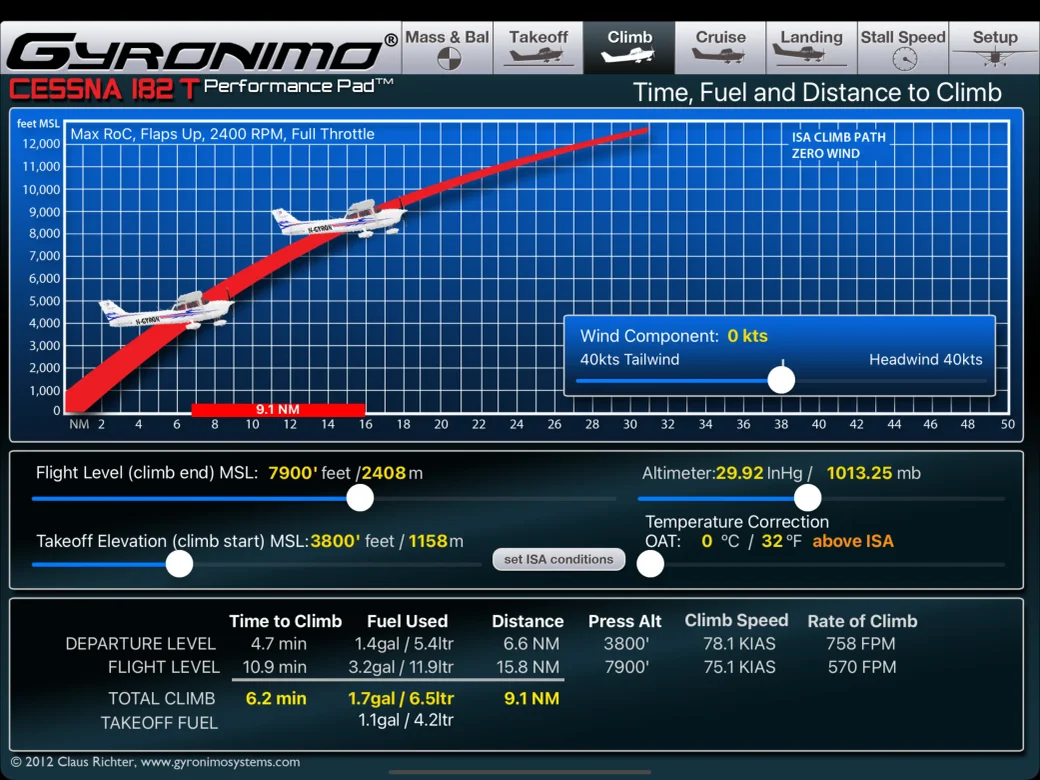
3. The Climb page
Calculates time, fuel and distance based on
- Difference between Takeoff Elevation and intended Flight Level
- Altimeter Setting
- Outside Air Temperature (OAT)
- Altimeter Setting
- Headwind or Tailwind Component
Also the Rate of Climb and Climb Speed will be displayed.
4. The Cruise Page
Using the actual data from the Pilot's Operating Handbook you can
determine the optimal cruise altitude based on
- Trip Distance
- Flight Level
- Engine RPM
- Temperature
- Wind and Altimeter Setting
and calculate Break Horse Power (% BHP), Fuel Flow and True Airspeed
The Max Range and Range including Reserve will be displayed graphically.
The Fuel Management allows to enter Reserve Time for Contingency, Alternate and Final Reserve.
The Fuel Usage is displayed graphically.
Fuel Efficiency is computed in Miles per Gallon and Liter per 100km to set set results in a perspective.
5. Landing Page
Calculates Ground Roll and Landing Distance based on wind, elevation, altimeter setting etc.
Like on the Takeoff Page you can use the Wind Components Computer to quickly determine head- or tailwind components
6. Stall Speed Page.
Calculates The Stall Speed based on Bank Angle and Flap Settings.
Stall Speed will be computed as KIAS and KCAS using the actual values from the Cessna POH.
7. Setup
- Load and Save up to five Aircraft Settings and Scenarios.
- Send a Mass & Balance Summary to your email address.
- Visit our video channel and watch tutorials and video manuals.
For iPad 2, iPad 3 (iOS6 recommended)
DISCLAIMER:
The author disclaims any liability for any direct, indirect, incidental, or consequential losses or damages in connection with your access to or use of this software. The information contained in this software is for general information purposes only.
Có gì mới
Phiên bản 2.2 · 21/01/2025
Update to latest iOS version,, general bug fixes and performance improvements
Quyền riêng tư của ứng dụng
Những gì Gyronimo, LLC khai báo trên App Store về cách ứng dụng này xử lý dữ liệu.
-
Dữ liệu không được thu thập
Nhà phát triển không thu thập bất kỳ dữ liệu nào từ ứng dụng này.
Phương thức đảm bảo quyền riêng tư có thể khác nhau, chẳng hạn như tuỳ theo các tính năng bạn sử dụng hoặc độ tuổi của bạn.
Thông tin
- Người bán
- Gyronimo, LLC
- Danh mục
- Tham Khảo
- Phiên bản
- 2.2
- Cập nhật
- 21/01/2025
- Phát hành
- 11/09/2013
- Kích thước
- 20,3 MB
- Yêu cầu
- iOS 9.1 trở lên
- Độ tuổi
- 4+
- Giá
- 399.000đ
- Ngôn ngữ
- Tiếng Anh
- Bản quyền
- © Claus Richter
Có thể bạn cũng thích
-
 PocketCFI-Airspace ReviewGiáo Dục
-
 UAT e-LearningGiáo Dục
-
 DeutschSpeak: Learn GermanGiáo Dục
-
 Học Tiếng Đức: Từ Vựng & NóiCơ bản: der die das, giao tiếp
-
 Acron B747-400 Cockpit Fam.Giáo Dục
-
 B747 FMS Trainer PROGiáo Dục
-
 iCITATION Type Rating PrepGiáo Dục
-
 iDIAMOND Aircraft AppsGiáo Dục
-
 FMS Trainer: B747Giáo Dục
-
 iPILATUS PC-12 Aircraft AppsGiáo Dục