
CellNotes App
Markdown, code & math notes
Được thiết kế cho iPhone, iPad, Mac
Miễn phí
- Độ tuổi4+
- Danh mụcHiệu Suất
- Nhà phát triểnStephen Wolfe
- Ngôn ngữTiếng Anh
- Kích thước8,5 MB
Liên kết đến trang App Store chính thức
Download.org không lưu trữ tệp nào của CellNotes App. Nút này mở trang ứng dụng trên App Store, nơi Stephen Wolfe phát hành ứng dụng. Trang được kiểm tra lần cuối: 23/11/2026.
Ảnh chụp màn hình
Giới thiệu
Nhà phát triển chưa cung cấp nội dung này bằng ngôn ngữ của bạn.
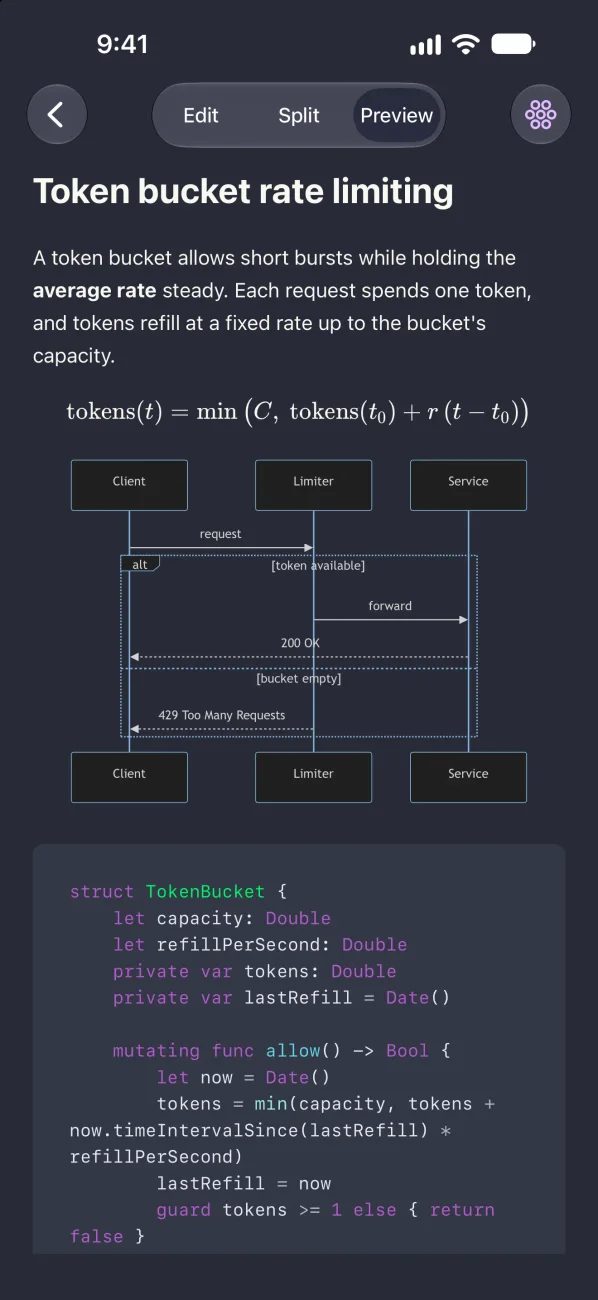
CellNotes is a note app built from cells. Each note is a stack of blocks, and every block has its own type: write a paragraph in Markdown, add a snippet of code, follow it with an equation and a diagram, and each part is edited and displayed the way it should be.
CELLS FOR EVERY KIND OF NOTE
• Text and Markdown
• Code with syntax highlighting for over 20 languages
• LaTeX math, beautifully typeset
• Diagrams written in Mermaid: flowcharts, sequence diagrams and more
• Images, from your photos or the clipboard
• Checklists you can tick off in the editor or the preview
• Optional tables, callouts, links and file attachments, switched on in Settings
WRITE AND SEE IT RENDERED
Switch between Edit, Split and Preview. On iPad, Split view shows your source beside the finished note; on iPhone it stacks them.
CONNECT YOUR NOTES
• Link notes with [[Note title]]
• See every note that links back to the one you're reading
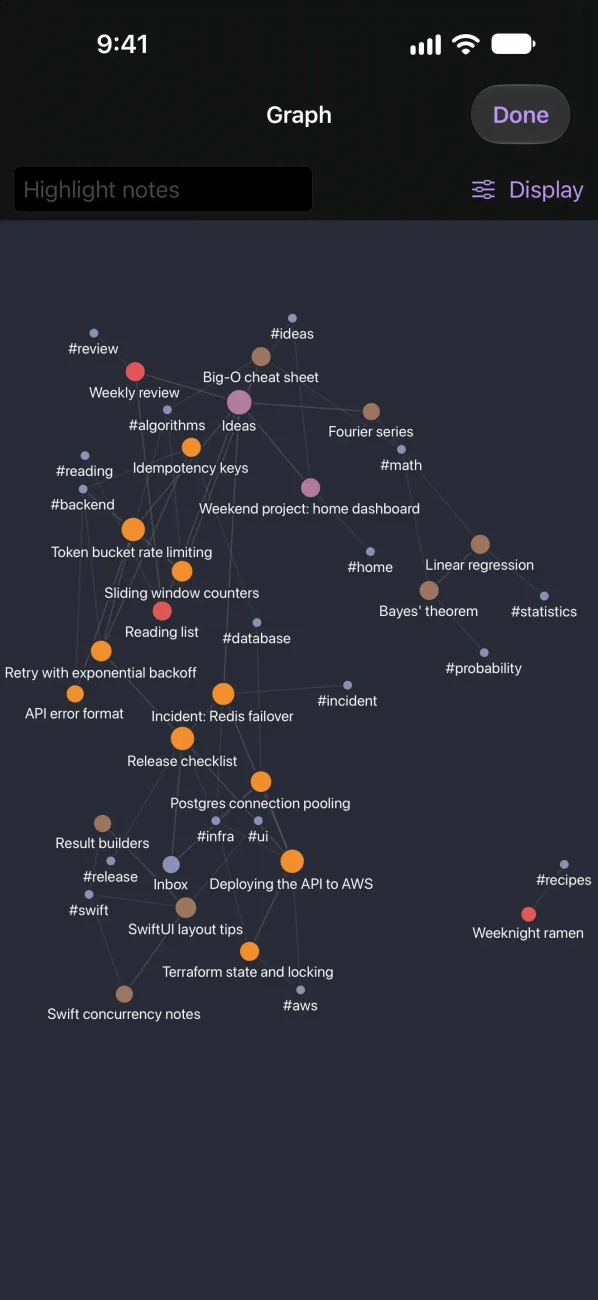
• Explore a graph of your notes, their links and tags, for the whole library or around the note you're in
ORGANIZE YOUR WAY
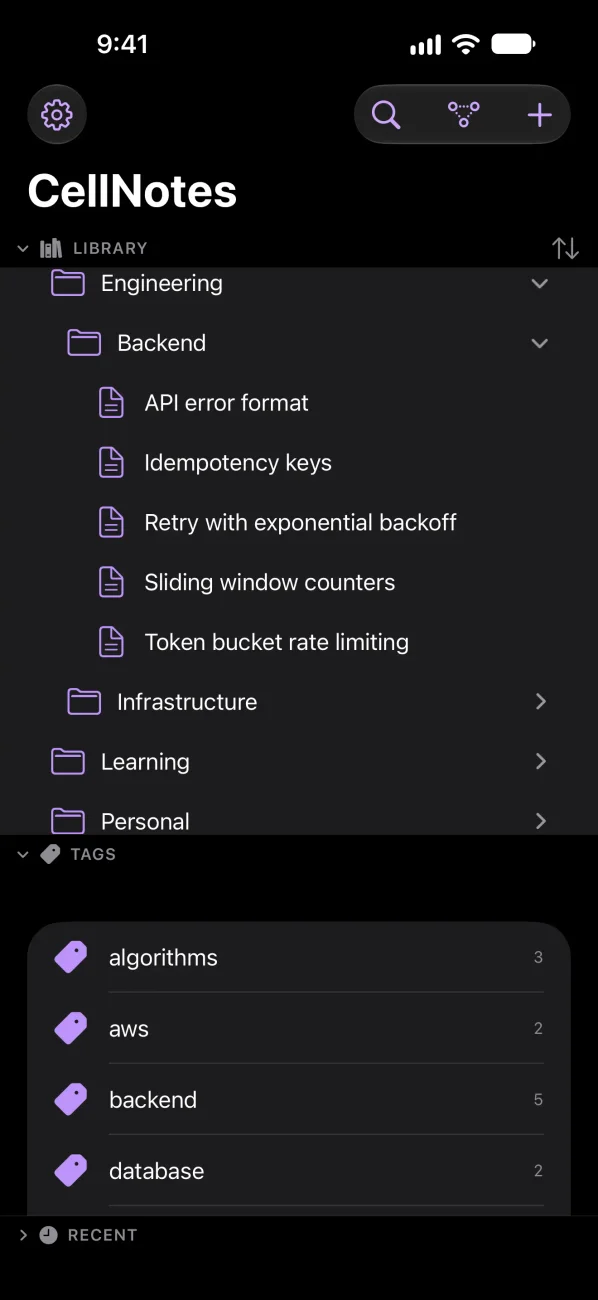
• Folders inside folders, which are real folders you can see in the Files app
• Tags that work across folders, each with its own color
• Sort by name or date, or keep your own order
FIND ANYTHING
Search titles, text and #tags. Notes also appear in Spotlight, and Shortcuts and Siri can create, search, open and add to them.
YOUR NOTES ARE YOUR FILES
Notes are saved as plain files (JSON plus ordinary image files) in a CellNotes folder in iCloud Drive. You can browse them in the Files app and Finder, back them up, and read them with other tools. Nothing is locked inside the app.
SYNC ACROSS YOUR DEVICES
CellNotes uses your own iCloud Drive to keep your iPhone, iPad and Mac in step. If the same note is edited on two devices while offline, both versions are kept so nothing is lost. Prefer to keep things local? Store notes on the device or in any folder you choose.
MAKE IT YOURS
Pick from themes including Light, Dark, Solarized, Dracula, Nord and One Dark. Choose your default cell type and hide the cell types you don't use.
PRIVATE BY DESIGN
No account, no tracking, no ads. CellNotes collects no data; your notes stay in your files and your iCloud.
COMING FROM ANOTHER CELL-BASED NOTE APP?
CellNotes can import existing libraries in the common .qvlibrary format, including their images.
Có gì mới
Phiên bản 1.3.1 · 18/11/2026
Link your notes
• Link to another note with [[Note title]] in Markdown and text cells. Links work with folders too: [[Work/Plan]].
• Each note shows the notes that link to it, under "Linked from" in the preview.
• Renaming a note updates every link to it.
See how your notes connect
• A graph of your whole library: notes, links and tags, coloured by folder or tag.
• A local graph beside any note shows what it links to and what links to it.
Shortcuts, Siri and Spotlight
• Create a note, add to a note, search, and open a note from Shortcuts or Siri.
• Notes appear in Spotlight search (iOS 18 and later).
Library
• Folders can keep a manual order, arranged on your Mac, and stay above notes.
Fixes
• Typing in the middle of a cell no longer moves the cursor to the end.
• Graphs zoom to fit, and labels no longer overlap.
• Choosing a big folder for the library no longer freezes the app; a folder without notes asks first.
Quyền riêng tư của ứng dụng
Những gì Stephen Wolfe khai báo trên App Store về cách ứng dụng này xử lý dữ liệu.
-
Dữ liệu không được thu thập
Nhà phát triển không thu thập bất kỳ dữ liệu nào từ ứng dụng này.
Phương thức đảm bảo quyền riêng tư có thể khác nhau, chẳng hạn như tuỳ theo các tính năng bạn sử dụng hoặc độ tuổi của bạn.
Thông tin
- Người bán
- Stephen Wolfe
- Danh mục
- Hiệu Suất
- Phiên bản
- 1.3.1
- Cập nhật
- 18/11/2026
- Phát hành
- 14/10/2026
- Kích thước
- 8,5 MB
- Yêu cầu
- iOS 17.0 trở lên
- Độ tuổi
- 4+
- Giá
- Miễn phí
- Ngôn ngữ
- Tiếng Anh
- Bản quyền
- © 2026 Stephen Wolfe