Class Notes: Handwritten Notes
Lecture notebook. Share pages
Được thiết kế cho iPhone, iPad
Miễn phí · Mua hàng trong ứng dụng
- Độ tuổi4+
- Danh mụcGiáo Dục
- Nhà phát triểnTAKASHI KOJIMA
- Ngôn ngữTiếng Anh+ 13 ngôn ngữ khác
- Kích thước14,9 MB
Liên kết đến trang App Store chính thức
Download.org không lưu trữ tệp nào của Class Notes: Handwritten Notes. Nút này mở trang ứng dụng trên App Store, nơi TAKASHI KOJIMA phát hành ứng dụng. Trang được kiểm tra lần cuối: 23/11/2026.
Ảnh chụp màn hình
Giới thiệu
Nhà phát triển chưa cung cấp nội dung này bằng ngôn ngữ của bạn.
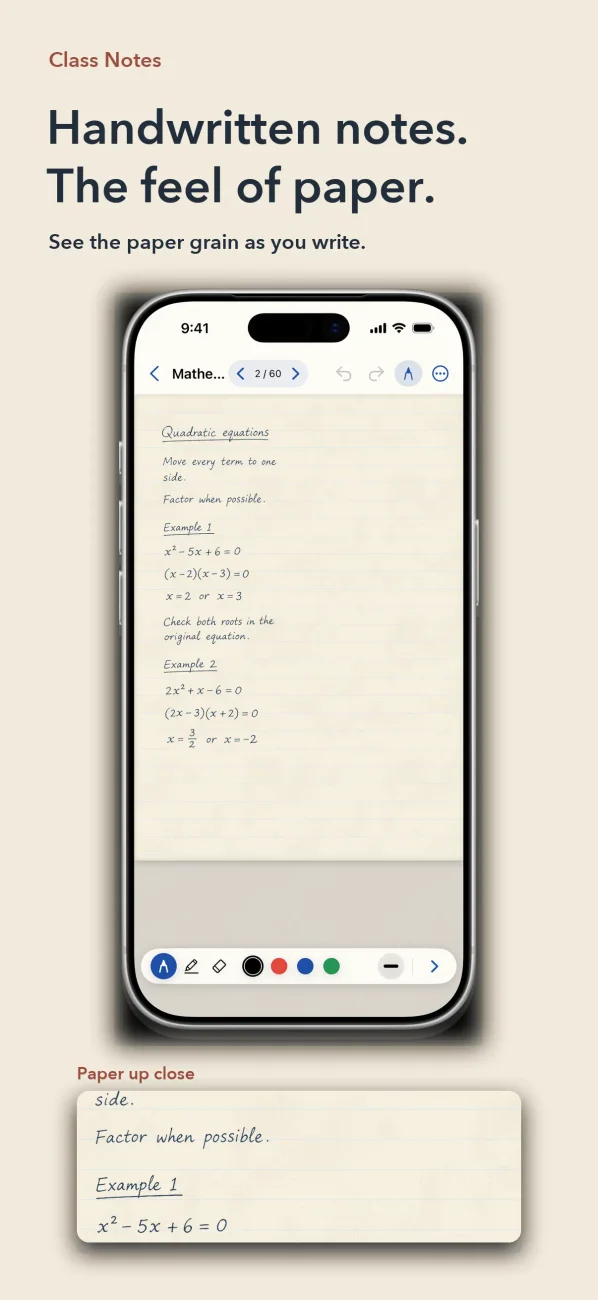
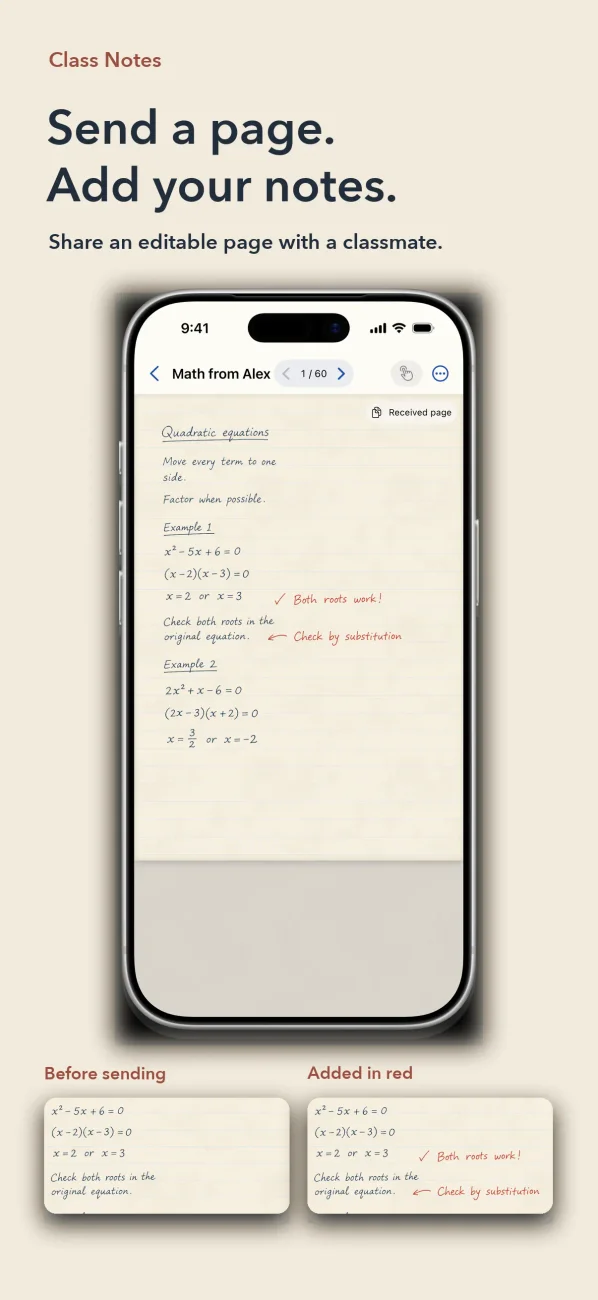
Class Notes is a handwriting notebook app designed for students. Just like a 60-page paper notebook, you can organize your notes by subject or theme. You can share your handwritten pages with friends or teachers, and the recipient can directly add their own handwriting to the shared page.
■ Device Compatibility (Recommended)
This app is designed for handwriting with Apple Pencil. Due to screen size, we highly recommend using an iPad. While you can handwrite with your finger or a stylus on an iPhone, an iPad provides a much more comfortable experience for writing across a full notebook page.
■ Manage Notes on a Bookshelf
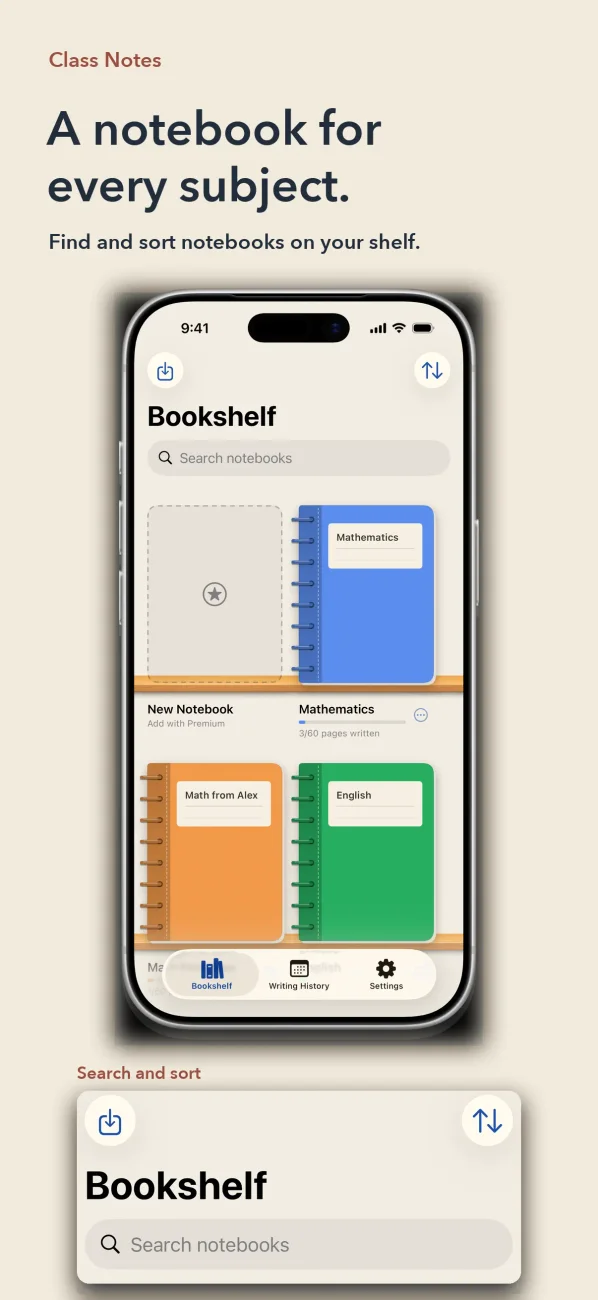
Find and open your class notes instantly from a wooden bookshelf design. When creating a notebook, you can choose the name, cover color (12 colors), and paper type. You can also rename it or set a photo as the cover later. The cover also displays your page progress.
■ Premium Handwriting Experience
・ On iPad, use standard Apple pen tools (Pen, Marker, Eraser, etc.).
・ On iPad, toggle "Draw with Finger" on or off.
・ On iPhone, choose from Pen, Marker, and Eraser, along with color and line thickness.
・ Undo/Redo and clear entire page (with a confirmation prompt to prevent accidental deletion).
・ Pinch to zoom in for easily writing fine text.
・ On iPad, write seamlessly in the same paper size regardless of screen orientation (portrait or landscape).
■ Paper Styles for Every Class
In addition to Blank, Lined, and Grid paper, the Premium "Paper Pack" unlocks 6 more styles: Dot, Cornell, English 4-Line, Manuscript (Vertical writing), Vertical Lined, and Sheet Music. Paper styles can be set per notebook and are reflected in exported PDFs or images.
■ Share Handwritten Pages
Send written pages via AirDrop or Files. Recipients can check the content, import it into a blank page in their own notebook, and add their notes directly. Perfect for sharing notes with an absent friend or getting corrections from a teacher.
・ Choose whether to include the sender's name.
・ Imported pages are marked with a "Received Page" stamp.
・ A confirmation screen appears when importing onto a page that already contains writing, allowing you to revert to the previous state.
・ Even without an existing notebook, you can create a new one on the spot to receive the page.
■ Review History via Calendar
Features an "Edit History" tab to review pages by the date they were written. See at a glance when and in which class notebook you wrote. You can also check the writing history for each specific notebook.
■ Export Features (Great for Submissions)
・ Export a single page as an image.
・ Select multiple pages and export them as a single PDF.
・ Export an entire notebook as a PDF (choose whether to include blank pages).
If you register your name in the settings, your name and the date will be automatically printed at the bottom of exported pages. At a glance, everyone knows who wrote it and when—perfect for submitting homework or reports.
■ Fully Functional Free Version
Even in the free version, you can use all the following features within one notebook:
・ Handwriting, Eraser, Undo/Redo
・ Blank / Lined / Grid paper
・ Send and import pages
・ Export single pages, multiple pages, or the entire notebook
・ Change cover colors and photos
Try it out with one notebook without any feature restrictions.
■ Premium (One-time Purchase)
Pay once and use it forever. This is not a subscription.
・ Create unlimited notebooks (manage by subjects like English, Math, Science, History, etc.)
・ Unlock the Paper Pack (6 extra styles)
■ Recommended For:
・ Students who want to organize their class notes by subject.
・ Those who want to carry their handwritten notes on an iPad with Apple Pencil.
・ Users who want to easily exchange single note pages with friends or teachers.
・ Students who need to submit handwritten homework or assignments.
Write naturally like on a paper notebook, share pages when needed, and export data digitally. Give it a try for your everyday class notes!
Có gì mới
Phiên bản 2.0.1 · 22/11/2026
Added links to the developer page and related apps in the settings.
Quyền riêng tư của ứng dụng
Những gì TAKASHI KOJIMA khai báo trên App Store về cách ứng dụng này xử lý dữ liệu.
-
Dữ liệu không được thu thập
Nhà phát triển không thu thập bất kỳ dữ liệu nào từ ứng dụng này.
Phương thức đảm bảo quyền riêng tư có thể khác nhau, chẳng hạn như tuỳ theo các tính năng bạn sử dụng hoặc độ tuổi của bạn.
Thông tin
- Người bán
- TAKASHI KOJIMA
- Danh mục
- Giáo Dục
- Phiên bản
- 2.0.1
- Cập nhật
- 22/11/2026
- Phát hành
- 20/09/2026
- Kích thước
- 14,9 MB
- Yêu cầu
- iOS 26.0 trở lên
- Độ tuổi
- 4+
- Giá
- Miễn phí
- Mua hàng trong ứng dụng
- Có
- Ngôn ngữ
- Tiếng Anh, Tiếng Ả Rập, Bengali, Tiếng Pháp, Tiếng Đức, Hindi, Tiếng Ý, Tiếng Nhật, Tiếng Hàn, Tiếng Bồ Đào Nha, Tiếng Trung Giản thể, Tiếng Tây Ban Nha + 2 ngôn ngữ khác
- Bản quyền
- © TAKASHI KOJIMA
Có thể bạn cũng thích
-
 InkCoachGiáo Dục
-
 Memorize Note - FlashcardsGiáo Dục
-
 The Word: Bible StudyTham Khảo
-
 よくわかる算数小学2年(ダンケ)Giáo Dục
-
 ميداس بلسGiáo Dục
-
 FotoMat: Giải toán bằng ảnhLời giải từng bước rõ ràng
-
 A380 FMS Trainer PROGiáo Dục
-
 CoefGiáo Dục
-
 AI Gia sư ToánChụp đề giải bài tập từng bước
-
 Gardien de la Paix : ConcoursGiáo Dục