do over — text permutations
Like Mail Merge, but for text.
Được thiết kế cho iPhone, iPad, Mac
149.000đ
- Độ tuổi4+
- Danh mụcCông Cụ Nhà Phát Triển
- Nhà phát triểnRichard Koopmann
- Ngôn ngữTiếng Anh
- Kích thước5,3 MB
Liên kết đến trang App Store chính thức
Download.org không lưu trữ tệp nào của do over — text permutations. Nút này mở trang ứng dụng trên App Store, nơi Richard Koopmann phát hành ứng dụng. Trang được kiểm tra lần cuối: 12/11/2026.
Ảnh chụp màn hình

Giới thiệu
Nhà phát triển chưa cung cấp nội dung này bằng ngôn ngữ của bạn.
Type it once. Get it every time.
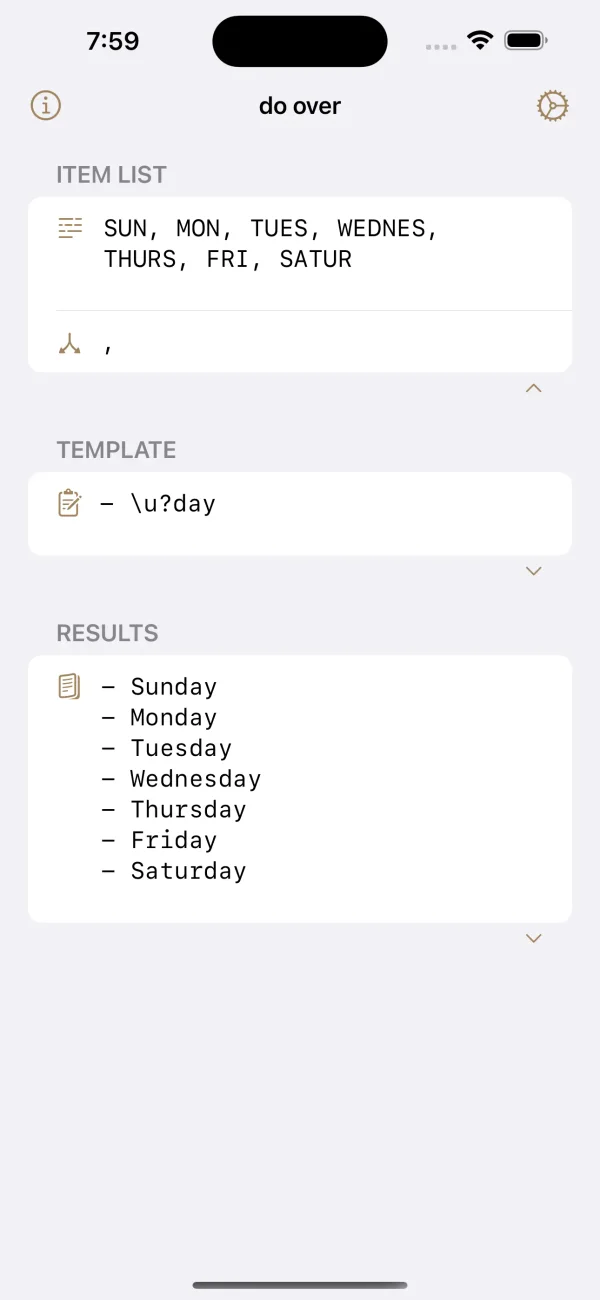
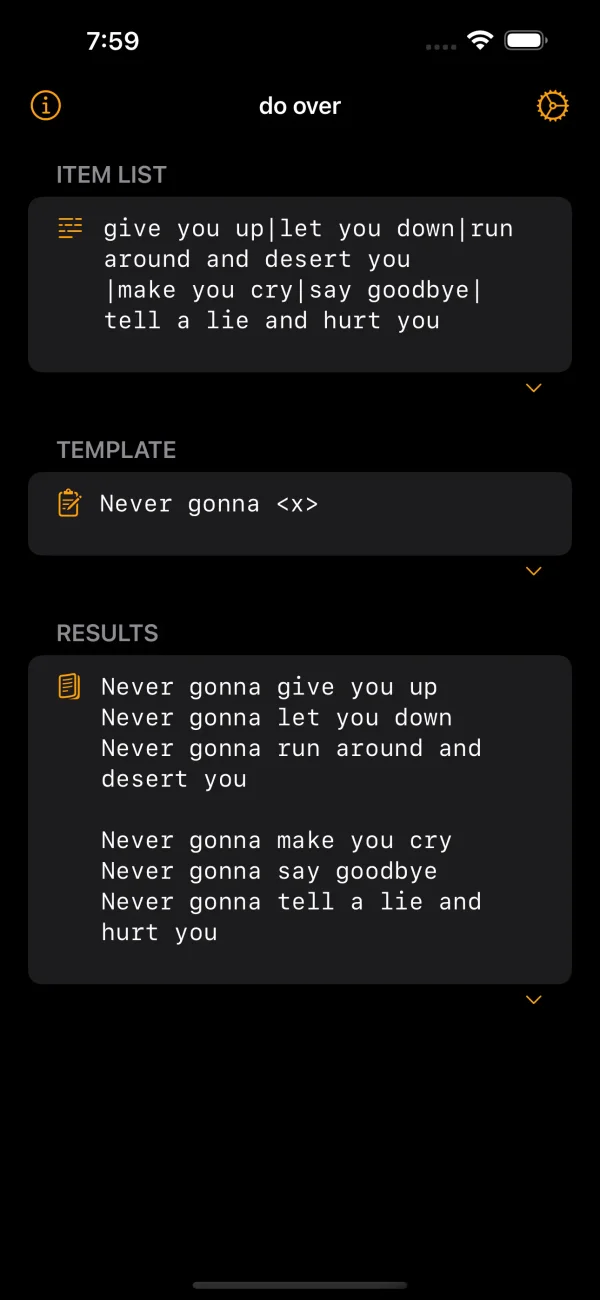
do over takes a list of items and a template, and writes the template out once for every item. It’s like mail merge, but for text. Use it for SQL columns, code, filenames, checklists, labels, or anything else you’d otherwise type over and over with one word changed.
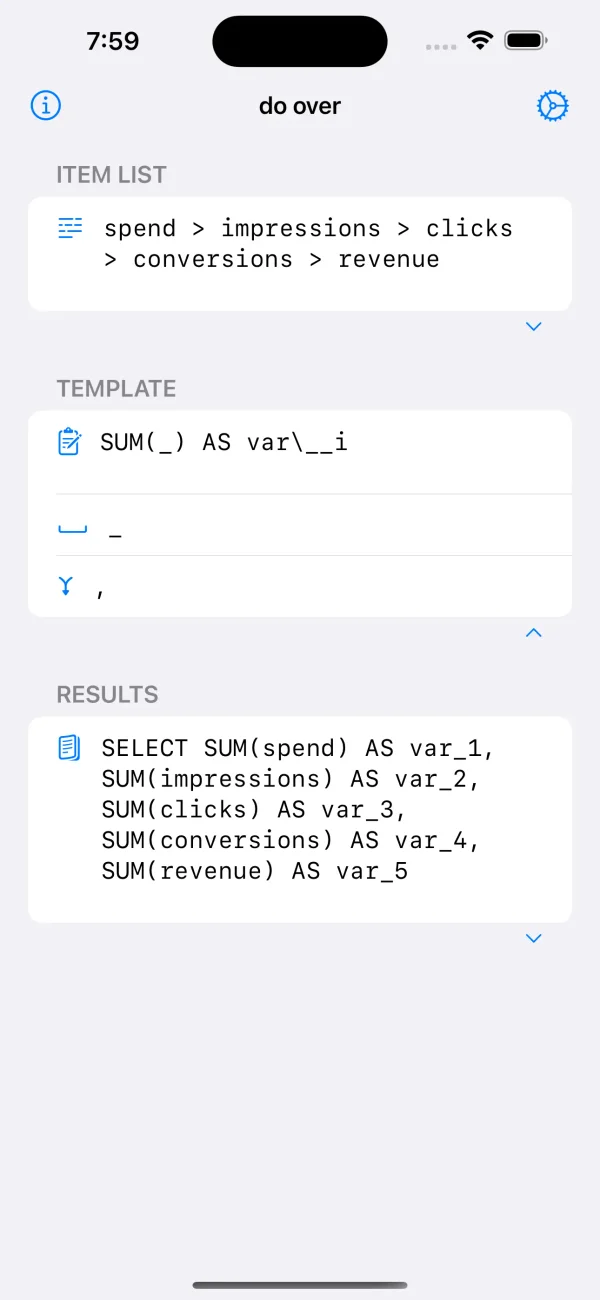
Give it spend, impressions, and clicks, and the template sum(?) as var_?i. With SELECT as the prefix, you get a finished query: SELECT sum(spend) as var_1, sum(impressions) as var_2, sum(clicks) as var_3. Change the list or the template, and the results update as you type.
TEMPLATES
• ? stands for the item. Pick any other token you like.
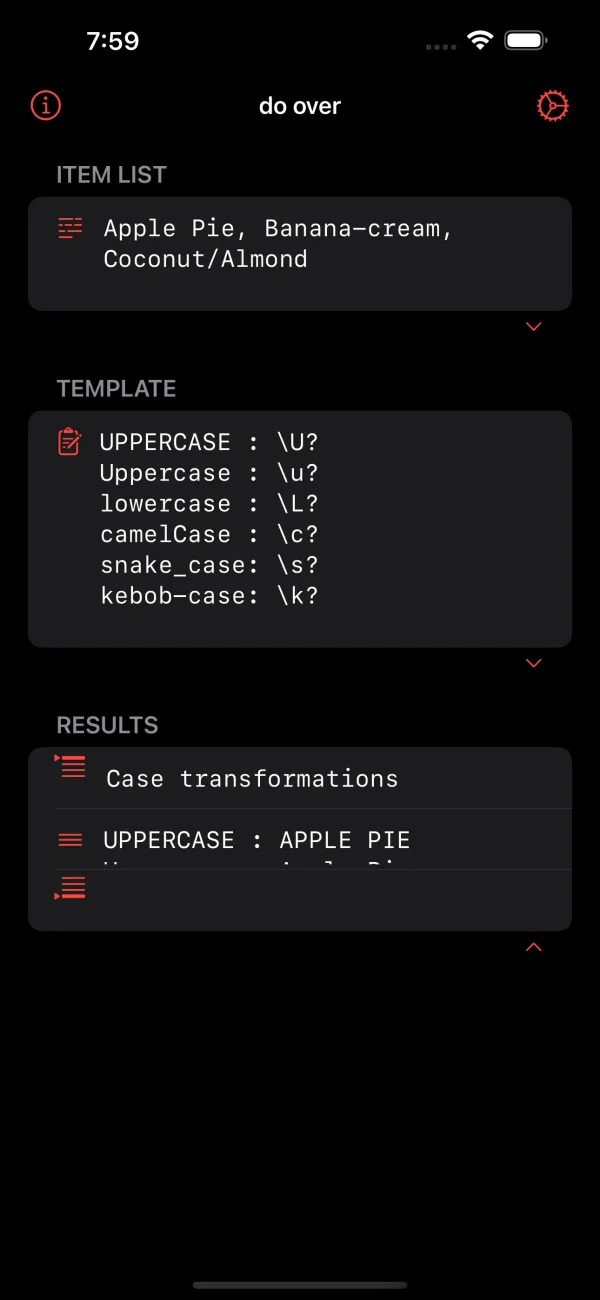
• Six case conversions built in: UPPERCASE, Capitalized, lowercase, camelCase, snake_case, and kebab-case.
• ?i numbers each item and ?n gives the total count. Shift the numbering with \i+n or \i-n.
• Need a literal token in the output? Escape it as \?.
• Join the results with anything: a new line, a comma, or text of your own. Wrap them in a prefix and a suffix.
ITEM LISTS
• Split the list on any delimiter: commas, tabs, pipes, new lines, or text of your own.
• Sort, shuffle, and remove duplicates.
• Shortcuts for common lists. Type \days, \months, or \states and a space for days of the week, months, or US states (\days3, \months3, and \states2 for short forms), or a range like \1–10 and a space for numbers. Type \help and a space for the full list.
• Send the results back to the item list to build on them.
LIBRARY
• Save item lists and templates separately, or both at once, and open any of them with any other.
• Your library syncs through iCloud to your other devices.
• Edit any saved list or template, with a live preview.
• It starts with ready-made lists (Days of the Week, Months, Metrics, Fruit, Emojis, Content Warnings) and templates (Numbered List, Item Number, SQL Sums, Case Transformations, Swift Enum). Delete the ones you don’t need. Restore Defaults brings them back without removing or replacing anything of yours.
BUILT FOR IPHONE AND IPAD
• A keyboard bar puts the next and previous fields, the options, and each field’s actions above the keyboard. Insert tokens and case switches into a template with a tap.
• Copy or share the results.
MADE FOR THE MAC
• Labeled fields across the full width of the window.
• Menus for everything: open and save from the File menu, Sort, Shuffle, Remove Duplicates, and Send Results to Item List in the Items menu, and Template › Insert.
• ⌘S saves the list and template, and ⇧⌘C copies the results.
• Open as many windows as you like. Each keeps its own list and template, and comes back after a relaunch.
SHORTCUTS
• Two actions: Permutate Text, with its own delimiter, token, joiner, prefix, and suffix, and Resolve Range.
• Chain them with the rest of your Shortcuts.
MORE
• Undo and Redo for the app’s own changes too, like Sort, Shuffle, and opening a saved list.
• The app reopens to your last list and template. Turn on Clean slate to start new windows empty.
• Light, dark, or system appearance, and a choice of accent colors.
ONE PURCHASE
do over is a one-time purchase. There’s no subscription, no in-app purchase, and no ads. One purchase covers iPhone, iPad, and Mac.
Có gì mới
Phiên bản 2026.11.11 · 11/11/2026
The biggest do over update yet, and it’s free for everyone who already owns the app. Your color scheme, accent color, and Clean slate settings carry over. The two Shortcuts actions keep their names and parameters. There’s still no subscription.
NEW
• Library: save item lists and templates separately, or both at once, each with its own name. Your library syncs through iCloud.
• Edit saved lists and templates, with a live preview.
• Ready-made lists and templates to start from. Delete any of them, and Restore Defaults brings them back without touching anything of yours.
• Undo and Redo for Sort, Shuffle, Remove Duplicates, Clear, the keyboard bar’s inserts, Send Results to Item List, and opening a saved list or template.
• Mac menus: open and save from the File menu, an Items menu, Template › Insert, View options for each set of options, and Help links.
• Mac keyboard shortcuts: ⌘S saves the list and template together, and ⇧⌘C copies the results. Copy and Share are in the toolbar.
• A new layered Liquid Glass app icon.
CHANGED
• Each window keeps its own list and template, and restores them after a relaunch. New windows start with your last list and template, or empty with Clean slate on.
• The app reopens to your last list and template instead of a random example.
• A new Mac layout, with labeled, bordered fields across the full width of the window.
• The keyboard bar now fits standard-width iPhones.
• Requires iOS 26, iPadOS 26, or macOS 26.
FIXED
• An item that contains the token now comes out exactly as typed.
• An empty delimiter keeps the item list whole instead of splitting it into single characters.
• An empty token no longer replaces every i and n in the template, prefix, and suffix.
• Huge index offsets no longer crash the app, and ranges are capped at 10,000 values so typing one can’t freeze it.
• The Permutate Text Shortcuts action applies its prefix and suffix, and Resolve Range returns input it can’t resolve as typed.
• Switching Color scheme back to System follows the device again.
• \help lists every trigger it supports.
REMOVED
• The App Clip.
• The example picker and Run Demo. Their examples are now in the library.
• The Paste button.
Quyền riêng tư của ứng dụng
Những gì Richard Koopmann khai báo trên App Store về cách ứng dụng này xử lý dữ liệu.
-
Dữ liệu không được thu thập
Nhà phát triển không thu thập bất kỳ dữ liệu nào từ ứng dụng này.
Phương thức đảm bảo quyền riêng tư có thể khác nhau, chẳng hạn như tuỳ theo các tính năng bạn sử dụng hoặc độ tuổi của bạn.
Thông tin
- Người bán
- Richard Koopmann
- Danh mục
- Công Cụ Nhà Phát Triển
- Phiên bản
- 2026.11.11
- Cập nhật
- 11/11/2026
- Phát hành
- 08/04/2022
- Kích thước
- 5,3 MB
- Yêu cầu
- iOS 26.0 trở lên
- Độ tuổi
- 4+
- Giá
- 149.000đ
- Ngôn ngữ
- Tiếng Anh
- Bản quyền
- © 2026 Richard Koopmann
Có thể bạn cũng thích
-
 JSON Tools: Xem & định dạngSửa, kiểm tra, so sánh, chuyển
-
 TinyServerWeb Server
-
 Parquet ViewerCông Cụ Nhà Phát Triển
-
 SF Catalog: SF SymbolsCông Cụ Nhà Phát Triển
-
 Symbols FinderCông Cụ Nhà Phát Triển
-
 Deeplink CheckerCông Cụ Nhà Phát Triển
-
 OpenTermCông Cụ Nhà Phát Triển
-
 JSON Editor MobileCông Cụ Nhà Phát Triển
-
 Vibe SSH TerminalCông Cụ Nhà Phát Triển
-
 Easy CSV Editor MobileCông Cụ Nhà Phát Triển