- Độ tuổi12+
- Danh mụcHiệu Suất
- Nhà phát triểnHealth & Safety Institute
- Ngôn ngữTiếng Anh
- Kích thước43,0 MB
Liên kết đến trang App Store chính thức
Download.org không lưu trữ tệp nào của Donesafe Connect. Nút này mở trang ứng dụng trên App Store, nơi Health & Safety Institute phát hành ứng dụng. Trang được kiểm tra lần cuối: 08/11/2026.
Ảnh chụp màn hình

Giới thiệu
Nhà phát triển chưa cung cấp nội dung này bằng ngôn ngữ của bạn.
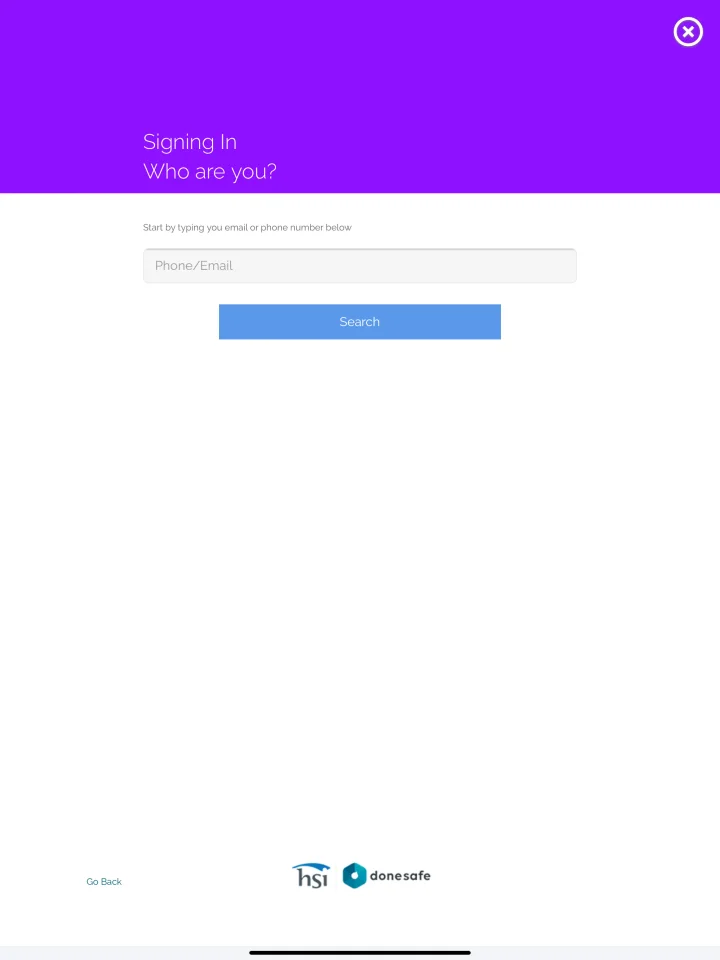
HSI Donesafe Connect transforms your tablet into a secure visitor sign-in kiosk for your workplace. Connect it to your existing Donesafe account by scanning a registration QR code sent to you by your account administrator.
NOTE: This app is not for visitors - it is for use on tablets as a sign in point.
VISITOR MANAGEMENT SOLUTION
Manage your on-site visitors and contractors safely, from the moment they enter to when they leave. HSI Donesafe’s Visitor Registration solution combines HSI Donesafe’s end-to-end safety and compliance system with a touchless visitor/contractor registration solution.
This solution allows your site visitors or contractors to sign in at your company-branded sign-in station by scanning a QR code and completing the registration on their own device using their existing browser – no visitor app download required.
When the visitor scans the QR code on the sign-in kiosk, multiple visitors can sign in simultaneously, with no bottlenecks at the kiosk
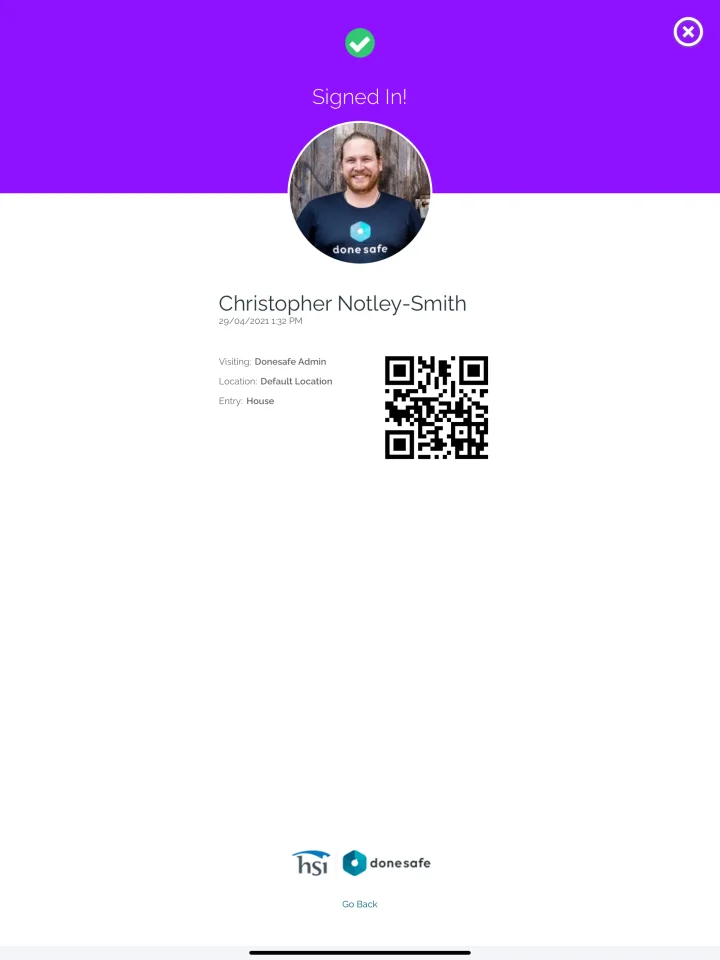
Once they’ve signed in they receive a digital entry pass that they can carry on their own device and have an optional entry pass printed as well.
When they’re ready to leave they simply walk up and scan the kiosk again, or simply tap sign out on their digital entry pass on their way out the door.
Furthermore, thanks to Donesafe’s existing automation and configuration tools, you can also set up the visitor kiosk to work in a more traditional, touch-based manner, for those situations where visitors may not be able to use their own device on site.
VISITOR/CONTRACTOR FEATURES
• Secure, tablet-based sign-in/sign-out stations
• Touchless sign in/sign out with QR code login on personal device through browser - no other apps required.
• Traditional touch screen sign-in/out also supported
• Secure visitor matching with conditional entry controls
• Site Visit Entry forms
• Multiple visitors/contractors can sign in at the same time from the same kiosk
• Photos are taken on entry
• Printed and Digital Entry passes
• Remote sign out through the digital pass.
• QR code on Entry passes that link to their sign-in record for security verification.
INTEGRATIONS
• Integrated with Donesafe’s existing reporting and visitor management systems.
• Fully integrated with an end-to-end safety and compliance platform.
• Fully integrated with Donesafe’s automation engine
MULTI REGION SUPPORT
• Multi language support with language selector
• Personal device saved language preferences.
• Organisations can include their own privacy policy with consent capture.
• International phone number capture and visitor matching
KIOSK CONFIGURATION OPTIONS
• Configurable tablet layout design allowing company logos and colours as well as tailoring to your business use cases.
• Regional Branding options for different sign in points.
• User sign-in process uses existing site colours and logo – no further configuration required.
• Configurable notification messages to visitees and visitors
• Configurable default language, phone per sign in kiosk.
MIGRATING KIOSKS FROM THE CLASSIC APP
• Open the Classic Donesafe Connect app and go to Kiosk Management.
• Select Transfer from the menu for your paired kiosk.
• Email the transfer link or QR code to the new device.
• On the new device, open the email and tap the link (or scan the QR).
• The new app opens and completes the pairing — no downtime.
• The old kiosk remains active until the transfer is confirmed.
_____
REQUIREMENTS
• The visitor registration solution will need to have been installed on your Donesafe account in order to set up a sign-in kiosk.
• To enable Donesafe Connect on your device, scan the QR code from your Donesafe system registration – this may be sent to you by a system administrator.
• Donesafe Connect kiosk app requires iOS 16 or higher.
• To sign in on their own device, Visitors simply require an internet-connected device with a QR code reader and a browser – no other apps required.
Có gì mới
Phiên bản 1.1.0 · 24/06/2026
Fix for stuck workflow when device is active overnight
- No longer forced to close and re-open
Quyền riêng tư của ứng dụng
Những gì Health & Safety Institute khai báo trên App Store về cách ứng dụng này xử lý dữ liệu.
-
Dữ liệu không liên kết với bạn
Có thể được thu thập nhưng không liên kết với danh tính của bạn.
- Mã định danh
- Chẩn đoán
Phương thức đảm bảo quyền riêng tư có thể khác nhau, chẳng hạn như tuỳ theo các tính năng bạn sử dụng hoặc độ tuổi của bạn.
Thông tin
- Người bán
- Medic First Aid International Inc
- Danh mục
- Hiệu Suất
- Phiên bản
- 1.1.0
- Cập nhật
- 24/06/2026
- Phát hành
- 15/08/2025
- Kích thước
- 43,0 MB
- Yêu cầu
- iOS 16.6 trở lên
- Độ tuổi
- 12+
- Giá
- Miễn phí
- Ngôn ngữ
- Tiếng Anh
- Bản quyền
- © HSI