GainX2
Dual Gain Utility AUv3
Được thiết kế cho iPhone, iPad, Mac, iPod touch
59.000đ
- Độ tuổi4+
- Danh mụcNhạc
- Nhà phát triểnRob Jackson
- Kích thước12,2 MB
Liên kết đến trang App Store chính thức
Download.org không lưu trữ tệp nào của GainX2. Nút này mở trang ứng dụng trên App Store, nơi Rob Jackson phát hành ứng dụng. Trang được kiểm tra lần cuối: 18/11/2026.
Ảnh chụp màn hình


Giới thiệu
Nhà phát triển chưa cung cấp nội dung này bằng ngôn ngữ của bạn.
GainX2 Dual Gain Utility Plugin (AUv3)
GainX2 is an audio effect plugin that can run standalone, or in any AU compatible host application such as Logic Pro or GarageBand.
Overview
GainX2 is a gain utility primarily designed for use during live performances within an AU host controlled via MIDI CC (*).
You can use GainX2 as a "helping hand" to mute or unmute channels, smoothly fade between them, or add additional switchable gain before a guitar amp sim. You could even use GainX2 to automate a one minute fade out at the end of a performance!
GainX2 also includes a master volume with variable taper and optional damping. This feature is useful when controlling volume via a MIDI controller in your host, and avoids the "stepping" effect that you sometimes get when mapping MIDI CCs to a volume parameter.
NOTE: If all this talk of MIDI CCs isn't making sense, or you primarily make music in a more traditional DAW such as GarageBand or Logic, then you probably won't find GainX2 very useful. Alternatively, if you like to perform live with an iPad and use something like AUM or Loopy Pro, then you might be glad of a "helping hand" to control gain dynamically and smoothly via MIDI.
(*) Please note that GainX2 does not have a "MIDI learn" function of its own, so your host needs to support the mapping of plugin parameters to incoming MIDI CC messages.
A B Indicators
Above the view selector are indicators to show which gain setting is active, and these will be animated according to the fade time so you can see the transition between the two settings. Please note these are not interactive buttons that you click on.
Controls
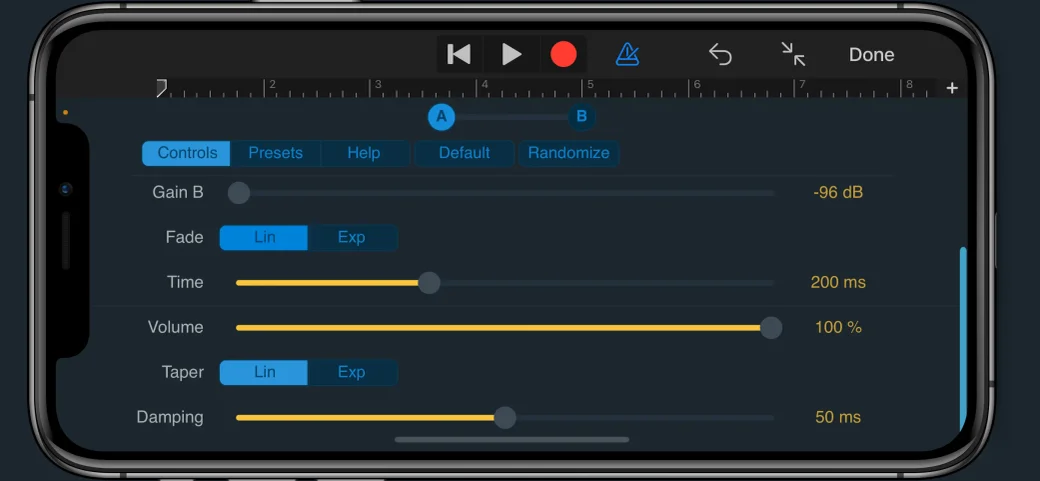
Gain - Switch between Gain A and Gain B. Typically, you would map this parameter in your host to a MIDI CC switch (0 or 127) in your host. Note that at start up, GainX2 will default to the A setting, so you should think of this as the default state that you want.
Gain A/B - Set the level of A or B. At minimum setting, this is essentially silence which is useful for fade or mute type applications. Please note that GainX2 can boost the incoming signal up to 12dB which could result in clipping, so please monitor, and be careful with your levels.
Fade - Sets a linear (Lin) or exponential (Exp) fade between A and B. Exponential typically works best for a more natural sounding attack or decay.
Time - Sets the time to Fade between Gain A and B.
Volume - Sets the master volume. Typically you would map this parameter in your host to a MIDI CC (0 - 127).
Taper - Sets the taper of the volume smoothing to linear (Lin) or exponential (Exp). Sometimes exponential will work better for CCs that are being controlled via MIDI expression pedals.
Damping - Sets a variable damping or smoothing time to the volume control. This is useful if you hear "stepping" or sudden jumps when the Volume parameter is being controlled via MIDI.
For more info and support please visit:
www.waverley-instruments.com/robjackson
Có gì mới
Phiên bản 1.0.1 · 02/12/2025
Maximum fade time increased from 30 to 60 seconds.
Quyền riêng tư của ứng dụng
Những gì Rob Jackson khai báo trên App Store về cách ứng dụng này xử lý dữ liệu.
-
Dữ liệu không được thu thập
Nhà phát triển không thu thập bất kỳ dữ liệu nào từ ứng dụng này.
Phương thức đảm bảo quyền riêng tư có thể khác nhau, chẳng hạn như tuỳ theo các tính năng bạn sử dụng hoặc độ tuổi của bạn.
Thông tin
- Người bán
- Rob Jackson
- Danh mục
- Nhạc
- Phiên bản
- 1.0.1
- Cập nhật
- 02/12/2025
- Phát hành
- 27/11/2025
- Kích thước
- 12,2 MB
- Yêu cầu
- iOS 12.0 trở lên
- Độ tuổi
- 4+
- Giá
- 59.000đ
- Bản quyền
- © 2025 Rob Jackson