
Granum
Shotgun pattern analysis
Được thiết kế cho iPhone
Miễn phí · Mua hàng trong ứng dụng
- Độ tuổi4+
- Danh mụcThể Thao
- Nhà phát triểnSaentisoft
- Ngôn ngữTiếng Anh
- Kích thước80,7 MB
Liên kết đến trang App Store chính thức
Download.org không lưu trữ tệp nào của Granum. Nút này mở trang ứng dụng trên App Store, nơi Saentisoft phát hành ứng dụng. Trang được kiểm tra lần cuối: 14/11/2026.
Ảnh chụp màn hình



Giới thiệu
Nhà phát triển chưa cung cấp nội dung này bằng ngôn ngữ của bạn.
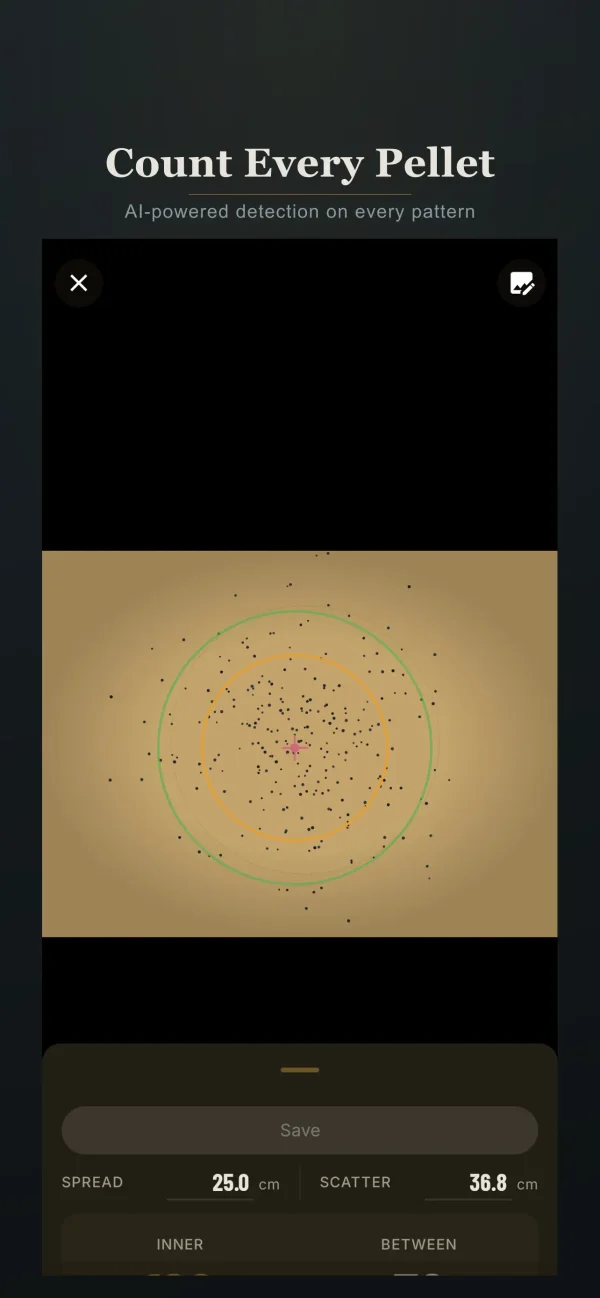
Granum is a shotgun patterning companion for clay and field shooters. Photograph your pattern board after each session and Granum turns it into calibrated, comparable data - pellet counts, spread diameters, equipment records, and choke recommendations.
PATTERN ANALYSIS
Draw two concentric circles on your photo to define the main spread and scatter zones, then calibrate to real-world size by tracing a reference line. Every result is stored against the gun, choke, and load you were using, in millimetres or inches. The enhancement pipeline crops, lifts contrast on faded cardboard, and tunes detection sensitivity first. Pellet detection then finds the impacts automatically.
EQUIPMENT
Log every gun, choke, and ammunition load in full detail - barrel and stock specs, chamber sizes, choke constriction, powder charges, wads, hulls, primers, lot numbers, and cost per box. Reloads get their own section, and any item can carry photos.
CHOKE CALCULATOR (PRO)
Enter a target distance and desired spread, and Granum ranks every choke by predicted match quality. Your own recorded data always takes priority over generic estimates.
CHOKE COMPARISON (PRO)
Compare pattern performance across chokes in one table, filtered by gun and ammunition, to see which delivers the tightest or most consistent spread at your distance.
SPREAD CHART (PRO)
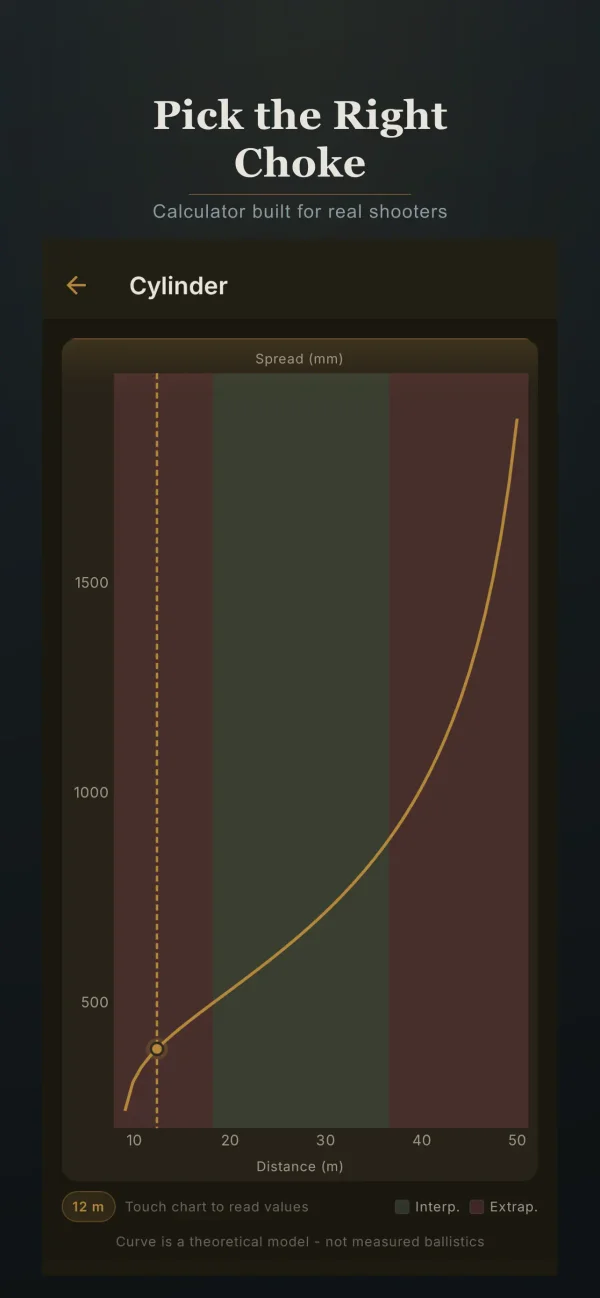
An interactive spread-vs-distance curve with your own data overlaid as scatter points. Drag to read exact values at any distance.
FIELD NOTES
No time for a full analysis? Record choke, distance, and observed spread in seconds. Field notes feed the choke calculator alongside full pattern data.
LIBRARY
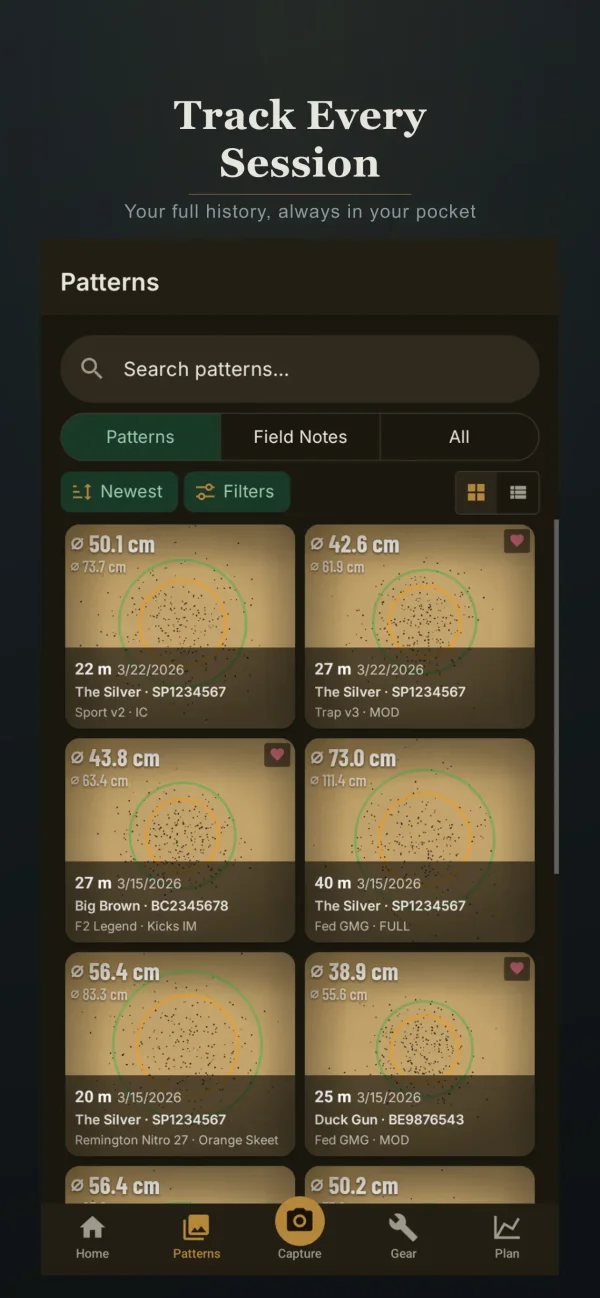
Every pattern and field note in one searchable list, filterable by distance, temperature, location, weather, gun, choke, ammunition, date, and rating, in grid or list view.
SCENARIO PLANNER (PRO)
Lay out IPSC targets at real-world scale and overlay a calibrated pattern - or an averaged pattern group - to see what your spread and scatter zones actually cover at a given distance. Paper targets, plates, and poppers at any custom size.
SHELL PLANS (PRO)
Plan your rig before you shoot. Build a shooting order shell by shell, or let the loading-order calculator work it out from your starting load, reload batches, and any special shells. You get a colour-coded, numbered rig grid you can drag to fine-tune, with an optional overfill warning.
PATTERN GROUPS (PRO)
Group patterns shot with the same setup and compare averaged results instead of single shots.
CLOUD BACKUP (PRO)
Automatic backup to iCloud after every save, one-tap restore to a new device, and local .granum export for offline archiving.
GRANUM PRO
Photographing, analysing, and logging your patterns is free. A Granum Pro subscription unlocks the features marked above. Subscriptions renew automatically and can be cancelled at any time in your store account.
MORE
Share any pattern as a clean image card with rings, a centre-of-impact crosshair, and key metrics. Custom overlay colours throughout. Metric or imperial from a single setting. Crash reporting opt-out - no account required, and no data leaves your device unless you enable cloud backup. Dark and light modes tuned for outdoor readability.
Whether you're testing loads for sporting clays, evaluating chokes for a hunting season, or building a long-term ballistic log, Granum gives every range visit a permanent, measurable record.
Privacy Policy: https://saentisoft.com/granum/privacy-policy/
Terms of Use (EULA): https://saentisoft.com/granum/eula/
Có gì mới
Phiên bản 1.16.0 · 20/10/2026
SCENARIO
• Archive a scenario from its swipe actions - it drops out of the main list but keeps its data; an Archived view lists them with a Restore action and Undo.
• Group scenarios into folders, one per match stage; move scenarios between them, and rename or delete a folder without losing its scenarios.
• Search, sort and filter the scenarios list by name, gun, choke, ammunition, target count, background photo and date created.
• Two new toggles in the More menu label the signed distance from each spread ring's edge to the targets, and draw center-to-center lines from each overlay to the targets; both are remembered across sessions.
• Customization > Overlay Labels: show model names or nicknames, and choose which of gun, ammo and choke appear on the canvas label and info banner; long names now wrap instead of being cut off mid-word.
• The pattern picker now explains an uncalibrated pattern instead of just hiding it, with a Calibrate action, and a saved overlay that loses its calibration shows a "Not calibrated" row instead of silently disappearing.
• Fixed the ruler swallowing taps with no explanation - turning it on now shows a banner with an exit button, and tapping a target or overlay explains how to leave.
• Fixed the rename dialog's caret jumping to the start while typing.
PATTERNS
• Archive a pattern from its detail screen; archived patterns still count in the spread chart, choke calculator and choke history.
• Pattern photos are now framed around their spread and scatter rings everywhere - library, groups, home and detail - the way share cards already were. Customization > Pattern Photos controls how tight the framing is, turns it off, or hides rings on specific screens.
• The library and overlay picker now filter through a chip dialog like the scenarios list, instead of an accordion sheet.
SHELL PLANS
• Save keeps the editor open and remembers your calculator settings (starting state, reloads, ammo and overrides), so reopening an uncalculated plan brings everything back with Calculate ready; changing ammo or a reload after calculating flags the shooting order as out of date.
• Fixed touch freezes and missed taps - dragging a rig slot, tapping the quantity steppers repeatedly, or reordering the shooting order could leave a touch stuck or ignored.
VIDEO
• Moving Target marking now works like calibration: hold to place the scale and marks, drag to adjust, with a magnifier.
• Fullscreen video can rotate to landscape for wide clips, with step, scrub and frame controls floating over the picture.
FIXES
• Fixed hard-to-tell-apart confirm and cancel icons in calibration banners - confirm is now sage green, cancel is rose.
• Fixed the second calibration point being hard to place near the first - the grab radius now scales with zoom, and placing a new point near an existing one no longer grabs it instead.
Quyền riêng tư của ứng dụng
Những gì Saentisoft khai báo trên App Store về cách ứng dụng này xử lý dữ liệu.
-
Dữ liệu không liên kết với bạn
Có thể được thu thập nhưng không liên kết với danh tính của bạn.
- Vị trí
- Nội dung của người dùng
- Chẩn đoán
Phương thức đảm bảo quyền riêng tư có thể khác nhau, chẳng hạn như tuỳ theo các tính năng bạn sử dụng hoặc độ tuổi của bạn.
Thông tin
- Người bán
- Saentisoft
- Danh mục
- Thể Thao
- Phiên bản
- 1.16.0
- Cập nhật
- 20/10/2026
- Phát hành
- 12/08/2026
- Kích thước
- 80,7 MB
- Yêu cầu
- iOS 16.4 trở lên
- Độ tuổi
- 4+
- Giá
- Miễn phí
- Mua hàng trong ứng dụng
- Có
- Ngôn ngữ
- Tiếng Anh
- Bản quyền
- © Saentisoft
Có thể bạn cũng thích
-
 ShootingTrackerThể Thao
-
 Clay ShooterThể Thao
-
 Claycard Pro: Clay ShootingThể Thao
-
 Shooting StatsThể Thao
-
 IPSC Quickscore: USPSA ScoringThể Thao
-
 Clays Scorer: Trap & SkeetThể Thao
-
 Strelok Internal BallisticsThể Thao
-
 College Football News & ScoresThể Thao
-
 GUNR - Shooting and ReloadingThể Thao
-
 Strelok Pro-Ballistic PlatformThể Thao