Horizontal Accelerometer
Automobile measurement tool
Được thiết kế cho iPhone, iPad, iPod touch
Miễn phí · Mua hàng trong ứng dụng
- Độ tuổi4+
- Danh mụcTiện Ích
- Nhà phát triểnTakao Ichimura
- Ngôn ngữTiếng Anh+ 1 ngôn ngữ khác
- Kích thước8,3 MB
Liên kết đến trang App Store chính thức
Download.org không lưu trữ tệp nào của Horizontal Accelerometer. Nút này mở trang ứng dụng trên App Store, nơi Takao Ichimura phát hành ứng dụng. Trang được kiểm tra lần cuối: 14/11/2026.
Ảnh chụp màn hình
Giới thiệu
Nhà phát triển chưa cung cấp nội dung này bằng ngôn ngữ của bạn.
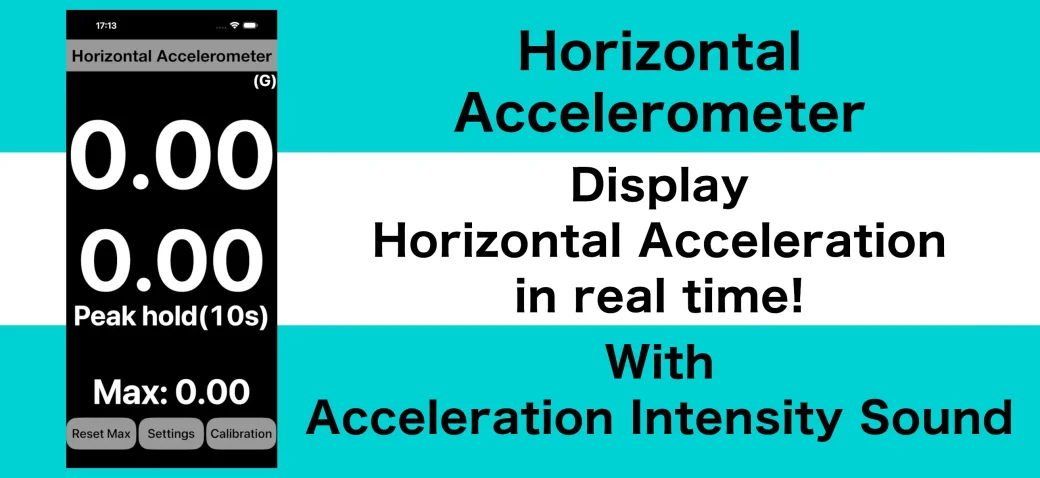
“Horizontal Accelerometer” displays horizontal acceleration in real time and uses sound to indicate changes in acceleration.
(Uses)
• Automotive: Measures vehicle acceleration, deceleration, and lateral G-force. Color zones and sound make changes in acceleration easier to recognize while driving.
• Table leg rigidity testing: Evaluate the rigidity of table legs by measuring acceleration.
• Engineering education: Students can measure and experience acceleration firsthand, helping them understand the equations of motion.
• Children’s toy: The Smooth mode of the Acceleration intensity sound feature, which changes sound according to acceleration, is a big hit with children!
• Musical instrument: You can also use it as a musical instrument. Give it a try!
(How to Use)
1. Secure the Device
Secure your device (iPhone or iPad) to the object being measured. It does not need to be level.
• Measuring vehicle acceleration: Secure the iPhone firmly to the dashboard at an angle that makes the screen easy to see.
• Testing table leg rigidity: Place the iPhone on the tabletop. If it slides when you shake the table, secure it with tape or a similar material.
• Using it as a toy: Hold it in your hand and move it around freely.
2. Calibration
Tap “Calibration" button, then tap "Calibrate". The horizontal acceleration value will begin to appear.
When measuring vehicle acceleration, perform calibration while the vehicle is stationary on a level road.
3. Acceleration intensity sound
When Acceleration intensity sound is enabled, sound begins playing in response to acceleration as soon as the horizontal acceleration value starts being displayed.
(Screen Display)
• The number at the top of the screen shows the real-time horizontal acceleration value.
• Peak Hold shows the peak horizontal acceleration value. It resets after the configured time has elapsed.
• Max shows the maximum horizontal acceleration value. Tap Reset Max to reset it.
• The acceleration value can change color to red or yellow according to the configured thresholds.
(Sound)
• Acceleration intensity sound can be turned on or off. You can choose between Smooth and Step modes for sound variation.
• Sound can be played when the acceleration value changes color.
• Adjust the volume using the iPhone’s volume buttons. Sound also stops when you close the app.
(Calibration Dialog)
Tap “Calibration" button on the main screen to open the Calibration dialog.
• Run Calibration: Calibrates the device in its current mounted position.
• Load Calibration: Loads a previously saved calibration.
• Save Calibration: Saves the current calibration.
(Settings Dialog)
Tap “Settings" or "Settings / Remove Ads” button on the main screen to open the Settings dialog.
• Settings: Opens the Settings screen.
• Remove Ads & Add Features: Opens the in-app purchase screen.
(Settings Screen)
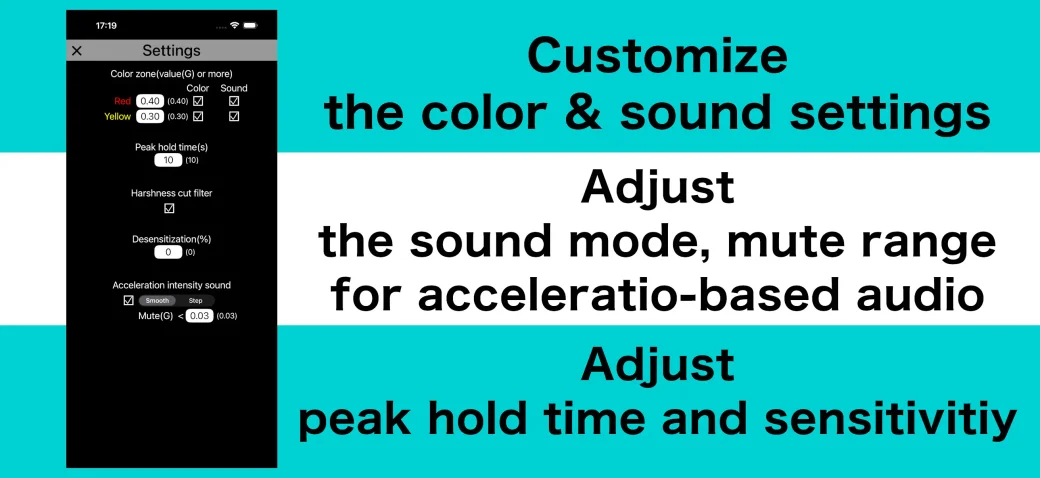
• Color zone (Value G or more): Set the color zone thresholds and turn color changes and sound on or off.
• Peak hold time (s): Set how long the peak value is retained.
• Harshness cut filter: Turn the Harshness Cut Filter on or off. Harshness refers to impact vibrations.
• Desensitization (%): Set the percentage by which sensitivity is reduced.
• Acceleration intensity sound: Turn the feature on or off and select Smooth or Step mode.
• The values in parentheses to the right of each setting indicate the default values.
(Notes)
• Tilting the device also tilts the horizontal plane established during calibration, causing the acceleration value to change.
• Do not look at or operate the device screen while driving. Secure the device and complete all necessary settings in a safe location before driving.
• The developer assumes no responsibility for any loss or claims by third parties which may arise from the use of this app.
Terms of Use:
This application is provided under the Apple Standard End User License Agreement (EULA).
https://www.apple.com/legal/internet-services/itunes/dev/stdeula/
Có gì mới
Phiên bản 2.0.2 · 22/10/2026
Made minor improvements.
Quyền riêng tư của ứng dụng
Những gì Takao Ichimura khai báo trên App Store về cách ứng dụng này xử lý dữ liệu.
-
Dữ liệu được sử dụng để theo dõi bạn
Có thể được sử dụng để theo dõi bạn trên các ứng dụng và trang web do công ty khác sở hữu.
- Vị trí
- Mã định danh
- Dữ liệu sử dụng
-
Dữ liệu không liên kết với bạn
Có thể được thu thập nhưng không liên kết với danh tính của bạn.
- Vị trí
- Mã định danh
- Dữ liệu sử dụng
Phương thức đảm bảo quyền riêng tư có thể khác nhau, chẳng hạn như tuỳ theo các tính năng bạn sử dụng hoặc độ tuổi của bạn.
Thông tin
- Người bán
- Takao Ichimura
- Danh mục
- Tiện Ích
- Phiên bản
- 2.0.2
- Cập nhật
- 22/10/2026
- Phát hành
- 01/11/2022
- Kích thước
- 8,3 MB
- Yêu cầu
- iOS 15.0 trở lên
- Độ tuổi
- 4+
- Giá
- Miễn phí
- Mua hàng trong ứng dụng
- Có
- Ngôn ngữ
- Tiếng Anh, Tiếng Nhật
- Bản quyền
- © 2022 Takao Ichimura