
HTML Opener: Web Code Runner
Paste or Open Real Web Pages
Được thiết kế cho iPhone, iPad
Miễn phí · Mua hàng trong ứng dụng
- Độ tuổi4+
- Danh mụcCông Cụ Nhà Phát Triển
- Nhà phát triểnGASHIMA LAB
- Ngôn ngữTiếng Anh+ 1 ngôn ngữ khác
- Kích thước13,1 MB
Liên kết đến trang App Store chính thức
Download.org không lưu trữ tệp nào của HTML Opener: Web Code Runner. Nút này mở trang ứng dụng trên App Store, nơi GASHIMA LAB phát hành ứng dụng. Trang được kiểm tra lần cuối: 24/11/2026.
Ảnh chụp màn hình

Giới thiệu
Nhà phát triển chưa cung cấp nội dung này bằng ngôn ngữ của bạn.
When you open an HTML file in the iPhone Files app, iOS just dumps lines of raw code on your screen. Buttons do not work, styles break, and Safari cannot open local file links.
HTML Opener fixes that. It runs your HTML in a real WebKit browser directly on your iPhone and iPad. No Mac, no terminal, and no local server required. Version 2.0 gives every screen a new design.
WHAT IT SOLVES
- Files app dumps raw code and text on screen instead of rendering the webpage
- Safari has no address bar option to open local file:// links
- You want to run HTML an AI just wrote without saving it to a file first
- Setting up a local server on your computer just to check mobile layout is tedious
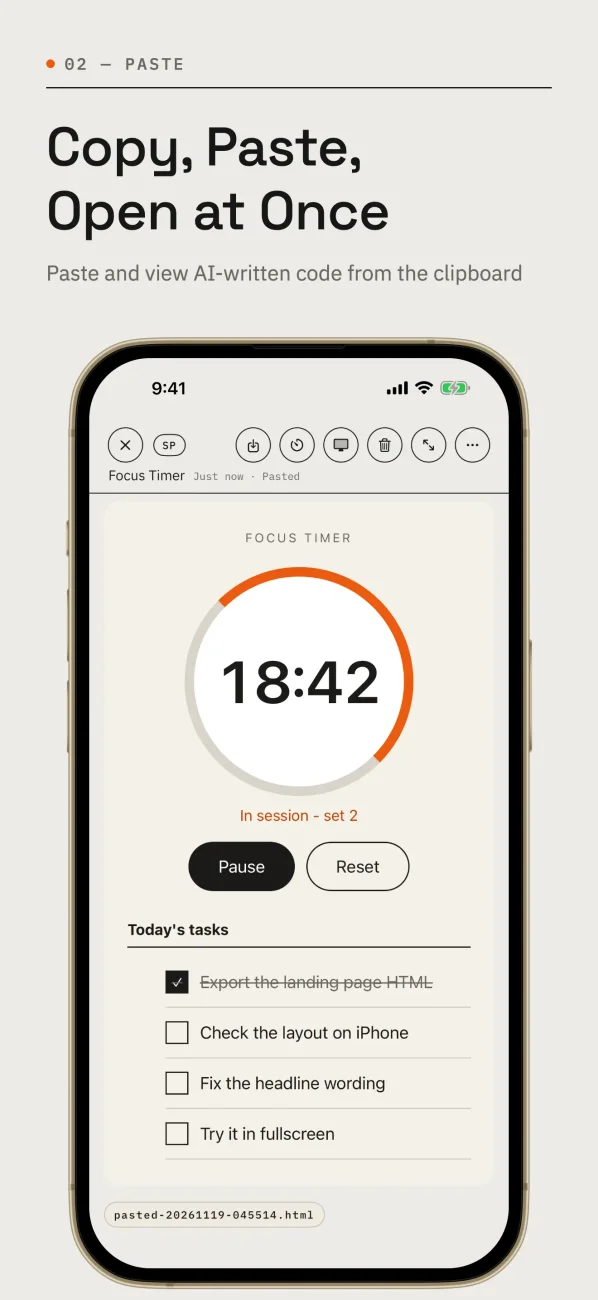
PASTE COPIED HTML, OPEN IT AT ONCE
Copy the HTML from an AI chat app, tap Paste, and the page runs right away. No need to save a file first. You can export the pasted HTML to the Files app to keep it. Export is free.
COMMON ACTIONS ON THE + BUTTON
Call up the actions you use most from the + button on the screen.
REAL WEBKIT BROWSER RENDERING
Built on iOS's native WKWebView engine. Buttons, forms, CSS styling, canvas animations, and modern JavaScript run exactly as they would in Safari.
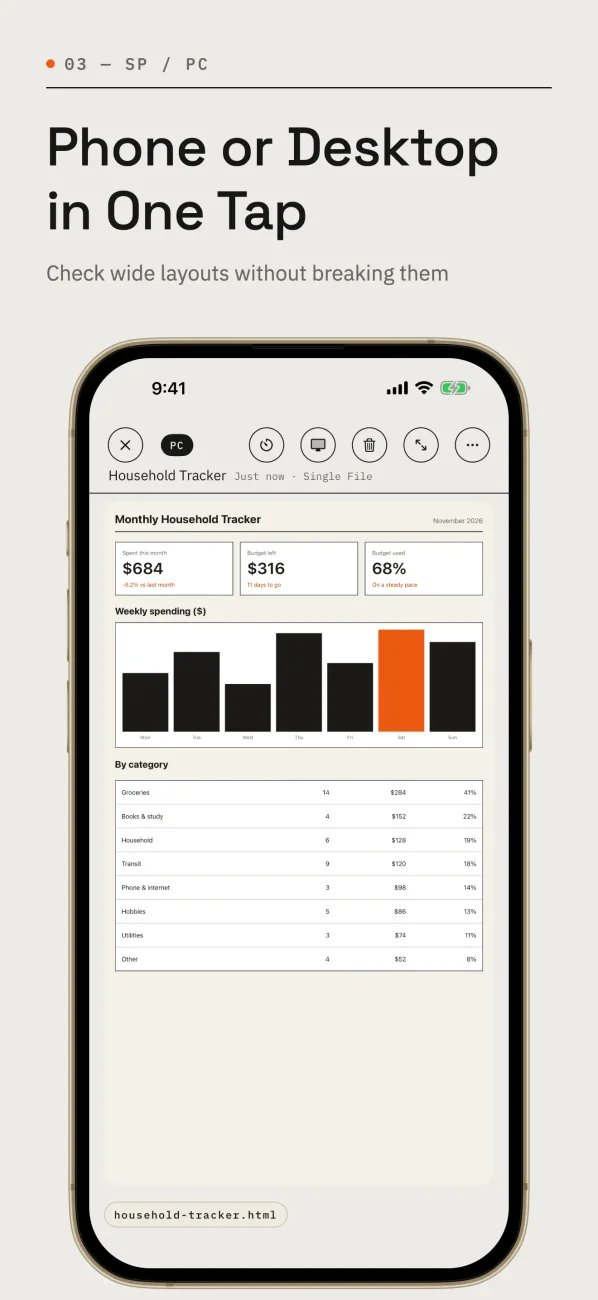
DESKTOP & MOBILE VIEW TOGGLE
Switch between phone layout and 1024px desktop view with a single tap. Review horizontal dashboards, data tables, and desktop web tools without broken layouts.
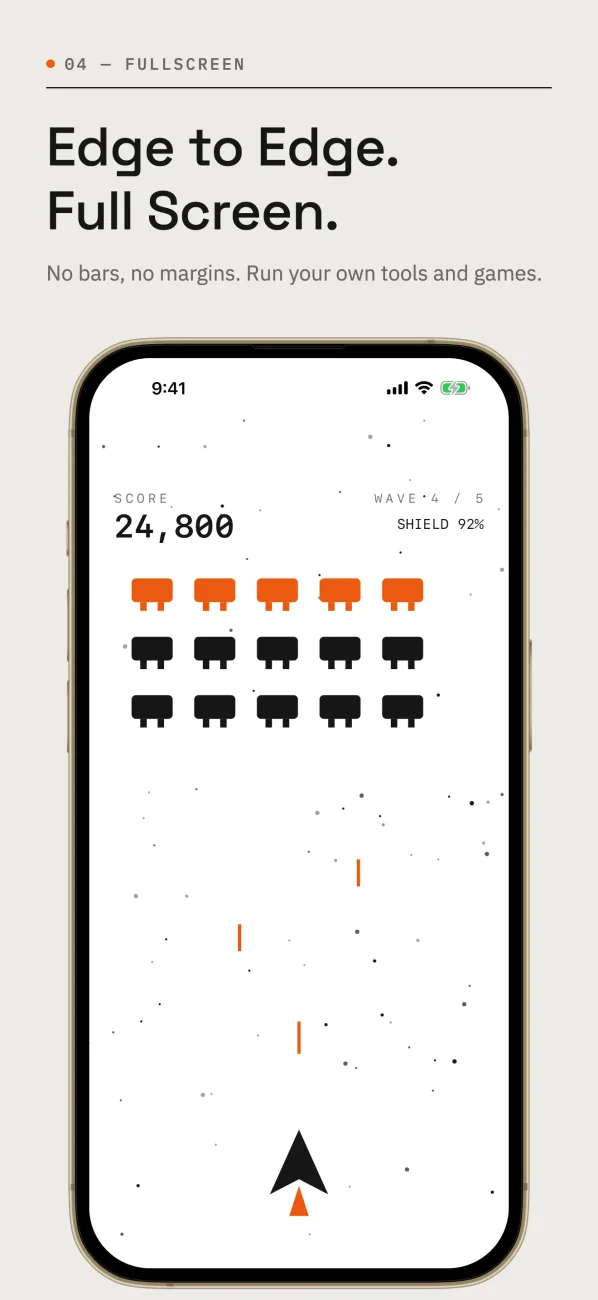
FULLSCREEN MODE
Hide navigation bars and margins to give your web content the entire display. Web apps and tools feel like installed native apps.
FOUR SIMPLE ACTIONS
1. Open a local HTML file with one tap
2. Quick Switcher to jump between recent projects
3. Auto-launch your primary tool as soon as the app starts
4. Clear cache, toggle dark theme, and customize display options
WHO IT IS FOR
- Anyone stuck when iPhone opens HTML as raw code
- Developers and designers testing web prototypes on actual iOS hardware
- Anyone running self-built dashboards, calculators, or tools on the go
- Students learning web development who want instant mobile testing
PRO (ONE-TIME PURCHASE, NEVER A SUBSCRIPTION)
Removes ads completely. Pay once, use forever.
Compatible with iPhone and iPad, iOS 17.0 or later.
Stop dealing with raw code dumps. Open real interactive web pages with HTML Opener.
Có gì mới
Phiên bản 2.0 · 19/11/2026
HTML Opener 2.0
- New look for every screen.
- Open copied HTML right after pasting it.
- Export pasted HTML to the Files app. It's free.
- Call up common actions from the + button.
- Minor improvements and stability fixes.
Quyền riêng tư của ứng dụng
Những gì GASHIMA LAB khai báo trên App Store về cách ứng dụng này xử lý dữ liệu.
-
Dữ liệu không liên kết với bạn
Có thể được thu thập nhưng không liên kết với danh tính của bạn.
- Mã định danh
- Dữ liệu sử dụng
Phương thức đảm bảo quyền riêng tư có thể khác nhau, chẳng hạn như tuỳ theo các tính năng bạn sử dụng hoặc độ tuổi của bạn.
Thông tin
- Người bán
- GASHIMA LAB
- Danh mục
- Công Cụ Nhà Phát Triển
- Phiên bản
- 2.0
- Cập nhật
- 19/11/2026
- Phát hành
- 10/09/2026
- Kích thước
- 13,1 MB
- Yêu cầu
- iOS 17.0 trở lên
- Độ tuổi
- 4+
- Giá
- Miễn phí
- Mua hàng trong ứng dụng
- Có
- Ngôn ngữ
- Tiếng Anh, Tiếng Nhật
- Bản quyền
- © GASHIMA LAB
Có thể bạn cũng thích
-
 dHP: Make Apps with AI & HTMLCông Cụ Nhà Phát Triển
-
 HTML Web Preview: JS CSS JSONMở web từ thư mục của bạn
-
 HTML Local Library for SafariCông Cụ Nhà Phát Triển
-
 JS ShellCông Cụ Nhà Phát Triển
-
 HTML Runner: Live PreviewCông Cụ Nhà Phát Triển
-
 WebliCông Cụ Nhà Phát Triển
-
 Agents At Work: You can Go!Công Cụ Nhà Phát Triển
-
 RendrLabCông Cụ Nhà Phát Triển
-
 Model PulseCông Cụ Nhà Phát Triển
-
 Great Web View TesterCông Cụ Nhà Phát Triển