
Hyperduck
Send links from iOS to a Mac
Được thiết kế cho iPhone, iPad, Mac
149.000đ
- Độ tuổi4+
- Danh mụcHiệu Suất
- Nhà phát triểnSindre Sorhus
- Ngôn ngữTiếng Anh
- Kích thước12,7 MB
Liên kết đến trang App Store chính thức
Download.org không lưu trữ tệp nào của Hyperduck. Nút này mở trang ứng dụng trên App Store, nơi Sindre Sorhus phát hành ứng dụng. Trang được kiểm tra lần cuối: 17/11/2026.
Ảnh chụp màn hình
Giới thiệu
Nhà phát triển chưa cung cấp nội dung này bằng ngôn ngữ của bạn.
Quickly send a link from your iOS device to your Mac.
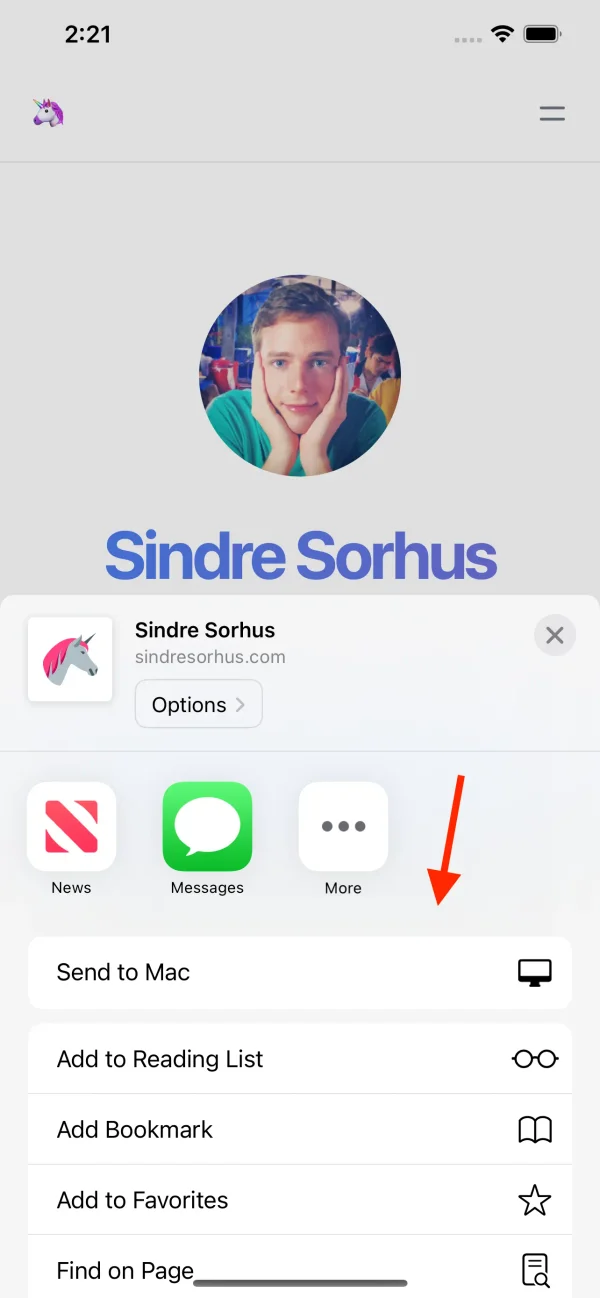
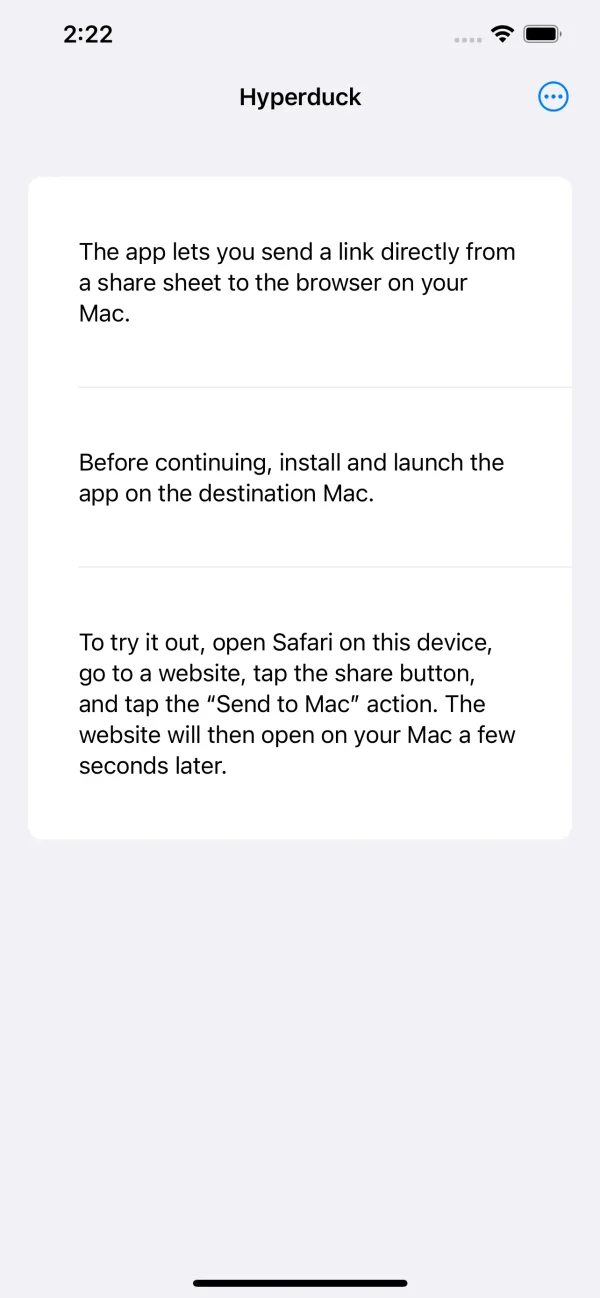
It provides a “Send to Mac” button in the share sheet of any app that provides a URL.
For example, share a link from Safari on your iPhone or iPad and have it open in the default browser on your Mac.
You can send a link even if your iOS device and/or Mac are offline. The link will be sent and received the next time the devices are online. The link will never be lost. The devices do not need to be on the same network.
Your iOS device and Mac must have iCloud enabled and be signed into the same Apple ID account.
My personal use-case is that I often discover cool stuff when I check Twitter on the go and I want to dig deeper into it later on my Mac. I have tried Instapaper, Pocket, Safari Reading List, iCloud Tabs, and more. The problem with them all is that I forget to check them.
You can even use this app to trigger shortcuts on your Mac from your iOS device. See the website for more info.
Sends to one Mac only. Install the macOS app on the single Mac you want to receive links on. If you install it on multiple Macs, iCloud may deliver a link to any of them, unpredictably.
Note: Because of an iOS bug, you have to restart your device for the Shortcuts actions to show up.
Note: Links will not be sent when low power mode is enabled as background syncing is disabled then. They will be sent the next time you open the app.
■ FAQ
‣ How is it better than AirDrop?
- Works when your Mac is offline
- Works when you are not on the same network as your Mac
- Much faster
- Opens links on your Mac in the background
‣ How is it better than iCloud Tabs?
- Works in any app with a share sheet, not just Safari
- Links are opened as tabs in your browser so you cannot miss them
- No need to spend time looking for the link in a long list of links
- Supports any browser on your Mac
- You don't need to keep the tab open on your iOS device for it to be available on your Mac
‣ How is it better than Safari Reading List?
- Links are opened right in your browser so you cannot miss them
- No need to spend time looking for the link in a long list of links
- Supports any browser on your Mac
‣ Can you support multiple Macs?
No. I would like to keep the app simple.
■ Privacy
The app uses iCloud syncing to securely send links from your iOS device to your Mac. The app developer will not see the links you share. The app does not collect any personal data and does not have any tracking.
■ Support
You can contact me through the feedback button in the app.
Có gì mới
Phiên bản 1.5.0 · 07/04/2026
- The app now requires iOS 26.
Quyền riêng tư của ứng dụng
Những gì Sindre Sorhus khai báo trên App Store về cách ứng dụng này xử lý dữ liệu.
-
Dữ liệu không được thu thập
Nhà phát triển không thu thập bất kỳ dữ liệu nào từ ứng dụng này.
Phương thức đảm bảo quyền riêng tư có thể khác nhau, chẳng hạn như tuỳ theo các tính năng bạn sử dụng hoặc độ tuổi của bạn.
Thông tin
- Người bán
- Sindre Sorhus
- Danh mục
- Hiệu Suất
- Phiên bản
- 1.5.0
- Cập nhật
- 07/04/2026
- Phát hành
- 27/01/2023
- Kích thước
- 12,7 MB
- Yêu cầu
- iOS 26.0 trở lên
- Độ tuổi
- 4+
- Giá
- 149.000đ
- Ngôn ngữ
- Tiếng Anh
- Bản quyền
- © Sindre Sorhus
Có thể bạn cũng thích
-
 Rocket TypistHiệu Suất
-
 Anybox - Bookmark & Read LaterHiệu Suất
-
 Tot PocketHiệu Suất
-
 Elephas: Secure AI for FilesHiệu Suất
-
 Funnel - Quick CaptureHiệu Suất
-
 Godspeed – To Do ListHiệu Suất
-
 Remind Me FasterHiệu Suất
-
 Simple Scan • Quick ScannerHiệu Suất
-
 Dropshare - Chia Sẻ TệpTải Lên Mọi Thứ, Mọi Nơi
-
 Secrets - Password ManagerHiệu Suất