Midiboard - MIDI Controller
Bluetooth Pads, Keys & Faders
Được thiết kế cho iPhone, iPad
Miễn phí · Mua hàng trong ứng dụng
- Độ tuổi4+
- Danh mụcNhạc
- Nhà phát triểnMAHMUT SAFA BULAT
- Ngôn ngữTiếng Anh+ 1 ngôn ngữ khác
- Kích thước3,4 MB
Liên kết đến trang App Store chính thức
Download.org không lưu trữ tệp nào của Midiboard - MIDI Controller. Nút này mở trang ứng dụng trên App Store, nơi MAHMUT SAFA BULAT phát hành ứng dụng. Trang được kiểm tra lần cuối: 17/11/2026.
Ảnh chụp màn hình



Giới thiệu
Nhà phát triển chưa cung cấp nội dung này bằng ngôn ngữ của bạn.
Your phone, as the controller you actually wanted.
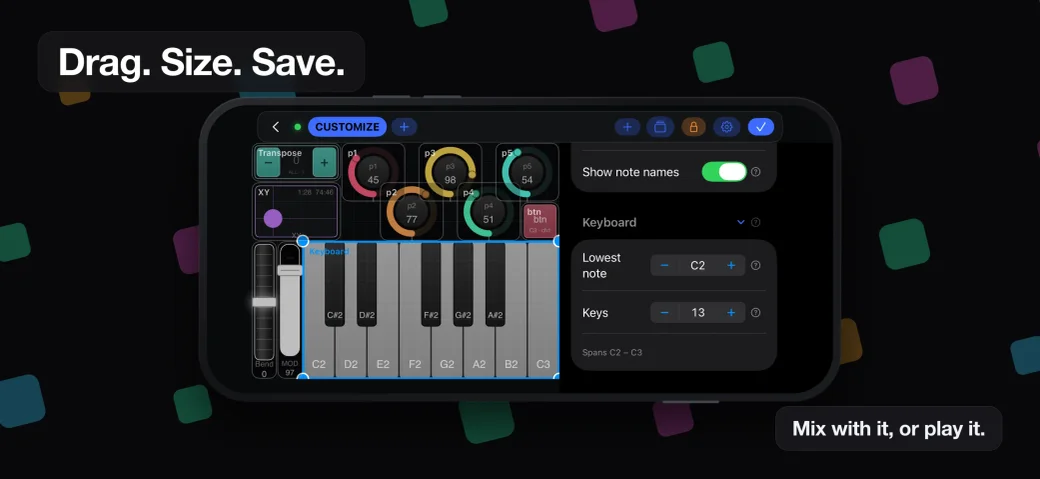
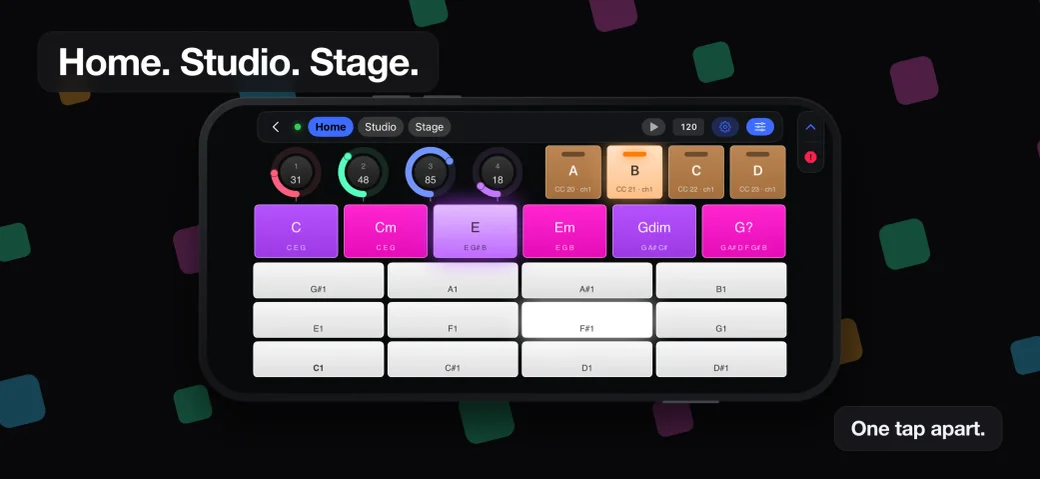
Midiboard turns an iPhone into a Bluetooth MIDI controller you lay out yourself. Drop a widget on the grid, drag it where your hand goes, size it to the reach you actually have. Save the screen, build the next one, and flip between them with one tap while the song is running.
Every other phone controller hands you someone else's idea of a surface. This one hands you the grid.
BUILD THE SURFACE
• Pad grids of any size, tuned chromatically or in fourths, fifths, thirds or octaves — a grid in fourths keeps every chord shape the same wherever you move it
• Keyboards of any span, starting on any note, with glissando between keys
• Chord buttons you write note by note. C, E, G#, D is as valid as a minor triad
• Pitch and mod wheels shaped like the ones beside your keyboard, plus 270° arcs and endless rotaries
• Faders and two-axis XY pads, with relative pickup so grabbing one mid-song does not throw the sound
• Step sequencers where every step names the note it plays, each with its own run button
• Footswitch banks where exactly one lamp is lit — press a switch and the last one goes out, so a glance tells you which preset you are actually on
• Transpose controls that move a group of widgets, so a bass bank and a lead move independently on the same page
PLAY IT
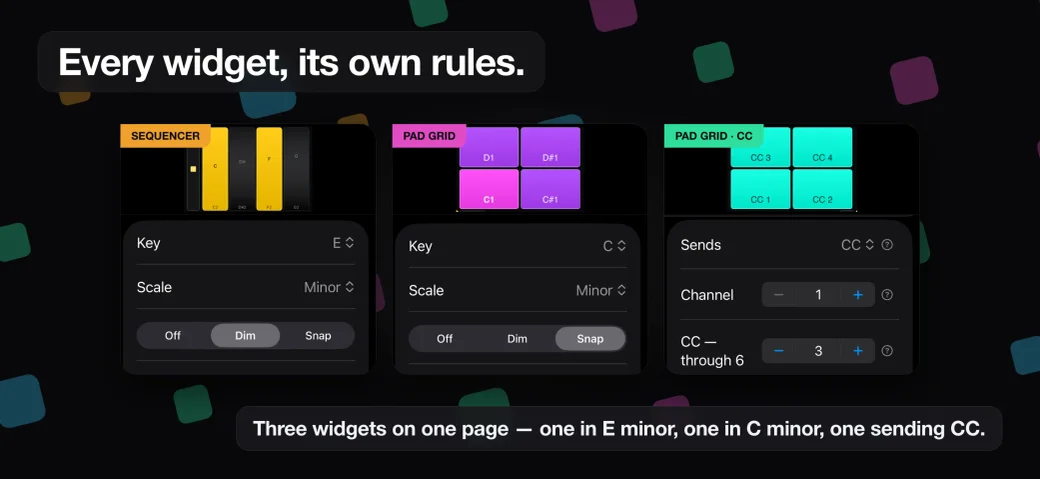
• Set a key per widget: notes outside it either step back but stay playable, or snap into the key
• Poly, mono, legato and glide, per widget
• A clock with tap tempo, MIDI clock out, note repeat and an arpeggiator — or follow your computer's tempo instead
• Set the travel of any control, so a fader only ever moves between two settings that are useful on the other end
• Panic always within reach, and haptics you can tune per control
KEEP IT
• As many saved layouts as you like. Export one to a file, send it to someone, import theirs
• Two colour palettes, and note names that match whatever your software calls them
CONNECTS TO WHATEVER YOU PLAY
Two routes, and you pick the one your rig has. Over Bluetooth LE MIDI, Mac, iPad and iPhone connect directly and Windows pairs through a Bluetooth MIDI bridge. Over Wi-Fi it is an RTP-MIDI session — built into macOS, and on Windows through rtpMIDI — which is the one to reach for when Bluetooth is crowded or the computer has none. It can also open a MIDI port for other apps on this same phone or iPad.
No cable, no dongle, no account, and nothing to sign into.
Midiboard collects nothing: no analytics, no crash reporting, no accounts, no tracking. Over Wi-Fi it uses your local network to reach the computer you chose, and the only thing it ever puts on it is MIDI.
PRO
Midiboard is free, with pad grids, keyboards, faders and labels. Pro adds every other widget, and starts with a free trial; after it, a monthly subscription or a one-time purchase keeps it. The subscription renews monthly unless cancelled at least 24 hours before the end of the period.
Terms of Use: https://www.apple.com/legal/internet-services/itunes/dev/stdeula/
Privacy: https://midiboard.bulatapps.com/privacy.html
Có gì mới
Phiên bản 1.0.6 · 06/11/2026
• Sequencer notes no longer come out chopped: the Gate setting is back, and new sequencers start at a longer 0.8.
• Step record: tap REC under a sequencer's run key and write the line note by note from a keyboard drawer, with Rest, Tie and Undo.
Quyền riêng tư của ứng dụng
Những gì MAHMUT SAFA BULAT khai báo trên App Store về cách ứng dụng này xử lý dữ liệu.
-
Dữ liệu không được thu thập
Nhà phát triển không thu thập bất kỳ dữ liệu nào từ ứng dụng này.
Phương thức đảm bảo quyền riêng tư có thể khác nhau, chẳng hạn như tuỳ theo các tính năng bạn sử dụng hoặc độ tuổi của bạn.
Thông tin
- Người bán
- MAHMUT SAFA BULAT
- Danh mục
- Nhạc
- Phiên bản
- 1.0.6
- Cập nhật
- 06/11/2026
- Phát hành
- 24/08/2026
- Kích thước
- 3,4 MB
- Yêu cầu
- iOS 17.0 trở lên
- Độ tuổi
- 4+
- Giá
- Miễn phí
- Mua hàng trong ứng dụng
- Có
- Ngôn ngữ
- Tiếng Anh, Tiếng Thổ Nhĩ Kỳ
- Bản quyền
- © 2026 Safa Bulat
Có thể bạn cũng thích
-
 Bluetooth Midi PadsNhạc
-
 Bluetooth Midi ControllerNhạc
-
 MIDI Controller PRO WiFi, USBNhạc
-
 MC Pad - Bluetooth MIDINhạc
-
 Midi Controller - Remote & USBNhạc
-
 7III Tap: Live MIDI ControllerNhạc
-
 KeyPad MIDI ControllerNhạc
-
 Bluetooth MIDI Controller ProNhạc
-
 MIDI Designer Pro XNhạc
-
 LK - Ableton & Midi ControllerNhạc