Muliplication table
Learn multiplication tables
Được thiết kế cho iPhone, iPad, iPod touch
Miễn phí
- Độ tuổi4+
- Danh mụcGiáo Dục
- Nhà phát triểnAhmad Sattar
- Ngôn ngữTiếng Anh
- Kích thước17,9 MB
Liên kết đến trang App Store chính thức
Download.org không lưu trữ tệp nào của Muliplication table. Nút này mở trang ứng dụng trên App Store, nơi Ahmad Sattar phát hành ứng dụng. Trang được kiểm tra lần cuối: 12/11/2026.
Ảnh chụp màn hình

Giới thiệu
Nhà phát triển chưa cung cấp nội dung này bằng ngôn ngữ của bạn.
Download this app for generating tables. The multiplication table is used by people of all ages belonging to all areas of life.
Times table is a chart or list of multiples of a number. It normally consists of the first 10 multiples but it can be stretched as long as you want.
Why do you need times tables?
Since it is basic math, every person needs to memorize them for daily use. Students start learning these tables for the first ten numbers from grade 1 and onwards.
These tables are what make multiplication easy. We use them in daily life without even realizing it. Below are a few examples.
• When a person buys two or more packets of snacks, the shopkeeper multiplies the number of snacks with price instead of adding the price of individual packs.
• Finding the number of tiles required to cover a floor during construction.
Prominent features:
The multiplication table is designed by our best developers and it is programmed in Flutter. It has many features worth discussing.
Offline:
The best thing about this app is that you only need an internet connection once, at the time of downloading. From there onwards, it can work offline.
Chart of first 12:
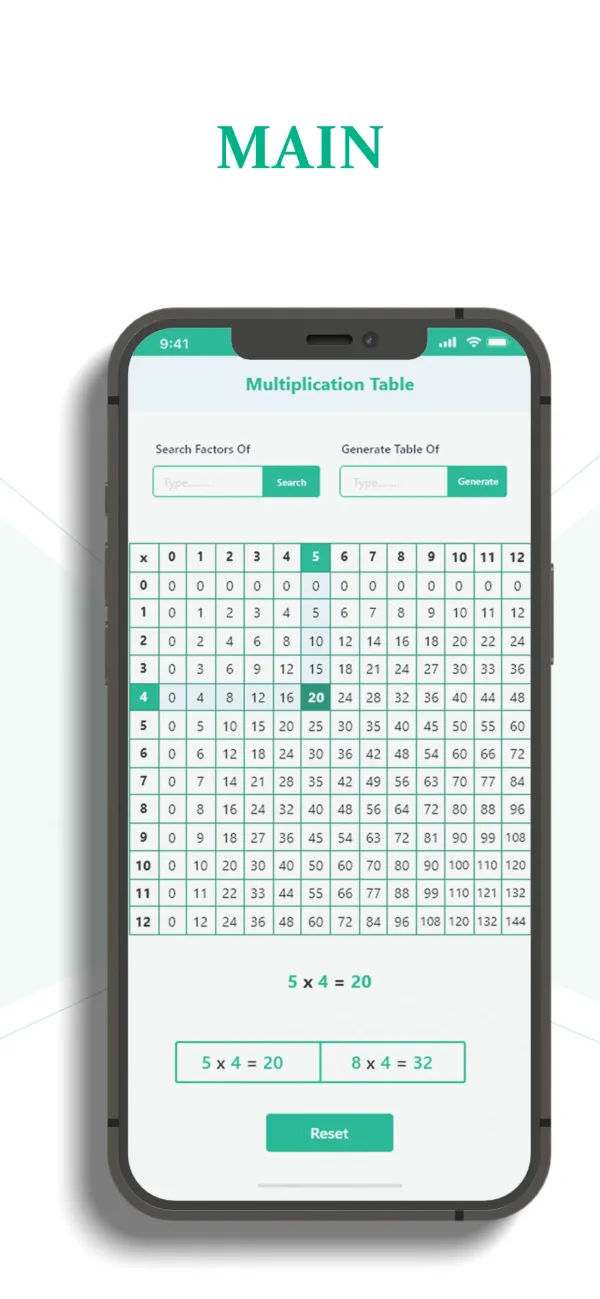
The app opens to a screen page containing a chart of the first 12 times table. It is arranged in a way that when the user clicks on a number on the chart, the app gives the corresponding multiples of that number.
For instance, if you click number 12, the third (3rd) column and fourth (4th) row will be highlighted. The column contains 3’s times table, highlighted up to 12. Similarly, the row contains 4’s times table highlighted up to number 12.
Factors of numbers:
Type in any value and get its factors through this application. Factors are the numerical digits that contain the entered number in their times table.
For example, if you enter the number 18, the application will give you its four possible factors i.e 2 x 9 = 18, 3 x 6 = 18, 6 x 3 = 18, and 9 x 2 = 18.
Generate tables:
The chart only contains 12 tables. But if the user wants a times table for a higher value like 45, 190, 762 e.t.c, all they need to do is just enter that number.
The table appears separately in big font size to make it easy to read and memorize.
Print:
You can print any table you want.
How to use this app?
This app is simple enough to use. You can generate a table by
• Typing the number.
• Clicking generate.
Do the same for finding the factors of any number.
Có gì mới
Phiên bản 1.0.2 · 05/12/2025
bug fixes
Quyền riêng tư của ứng dụng
Những gì Ahmad Sattar khai báo trên App Store về cách ứng dụng này xử lý dữ liệu.
-
Dữ liệu không được thu thập
Nhà phát triển không thu thập bất kỳ dữ liệu nào từ ứng dụng này.
Phương thức đảm bảo quyền riêng tư có thể khác nhau, chẳng hạn như tuỳ theo các tính năng bạn sử dụng hoặc độ tuổi của bạn.
Thông tin
- Người bán
- Ahmad Sattar
- Danh mục
- Giáo Dục
- Phiên bản
- 1.0.2
- Cập nhật
- 05/12/2025
- Phát hành
- 29/11/2021
- Kích thước
- 17,9 MB
- Yêu cầu
- iOS 15.6 trở lên
- Độ tuổi
- 4+
- Giá
- Miễn phí
- Ngôn ngữ
- Tiếng Anh
- Bản quyền
- © 2021 allmath.com
Có thể bạn cũng thích
-
 Multiplication Tables 1-100Giáo Dục
-
 Times Tables • MultiplicationGiáo Dục
-
 Multiplication: Times TablesGiáo Dục
-
 Times Tables - Flash QuizGiáo Dục
-
 Interactive MultiplicationGiáo Dục
-
 Multiplication Flash Cards Giáo Dục
-
 Times Tables MultiplicationGiáo Dục
-
 19x19 multiplication tableGiáo Dục
-
 Multiplication Table GeneratorGiáo Dục
-
 Multiplication Tables!Giáo Dục