my15c
Voyager 15C Microcode Emulator
Được thiết kế cho iPhone, iPad, Mac
Miễn phí · Mua hàng trong ứng dụng
- Độ tuổi4+
- Danh mụcTiện Ích
- Nhà phát triểnMiroslav Perovic
- Ngôn ngữTiếng Anh
- Kích thước55,8 MB
Liên kết đến trang App Store chính thức
Download.org không lưu trữ tệp nào của my15c. Nút này mở trang ứng dụng trên App Store, nơi Miroslav Perovic phát hành ứng dụng. Trang được kiểm tra lần cuối: 28/11/2026.
Ảnh chụp màn hình
Giới thiệu
Nhà phát triển chưa cung cấp nội dung này bằng ngôn ngữ của bạn.
my15C is a faithful emulation of the classic 15C — the legendary RPN scientific programmable calculator, running the original Voyager-series microcode ROM, cycle-accurate.
Built for engineers, scientists, and RPN enthusiasts who want the real thing in their pocket — not just a look-alike.
FEATURES
• Authentic 15C ROM emulation — same logic, same quirks as the original 1982 hardware
• Full RPN entry with a 4-level stack
• Complex number arithmetic
• Matrix operations
• Numerical integration (∫f(x))
• Root solving (SOLVE)
• Full programmability — write, edit, and run your own programs
• Continuous memory with iCloud sync across your devices
• Authentic 7-segment LCD display and keyboard layout
• Landscape-optimized for iPhone, iPad, and Mac
Có gì mới
Phiên bản 2.0.0 · 27/11/2026
What's New in 2.0.0
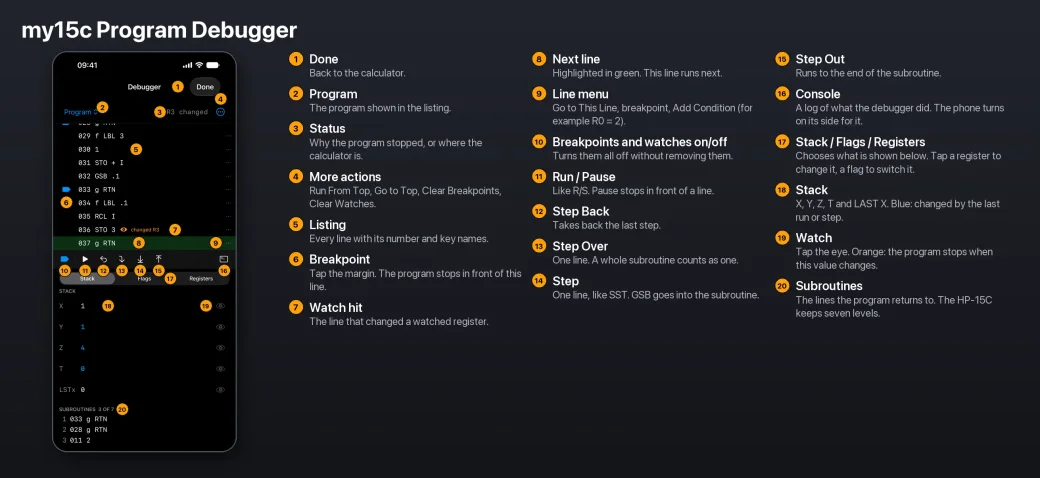
Program debugger
- Tap the debugger button at the top right of the display to follow your program line by line.
- Set breakpoints and give them a condition, such as R0 = 2. One switch turns all breakpoints and watches off.
- Step, Step Over, Step Out, Step Back and Run From Top. Go to This Line moves the program to any line.
- See the pending subroutine returns, up to seven levels.
- Watch a register or a flag: the program stops right after the line that changes it.
- See the stack, LAST X, the registers R0 to R.9 and I, and the flags. Change a register or switch a flag directly.
- On iPhone the debugger opens upright, and Done turns the calculator back on its side. On iPad it fills the screen, with the listing beside the registers.
Also new
- Import from Clipboard: copy a program listing from a web page or a document, then import it from the program menu.
- Settings > Self-Tests > Reset restarts a calculator that no longer responds to keys, with memory kept. This is what ON + y^x does on the original.
- Fixed: a program imported right after an error message or a self-test no longer leaves the calculator in Program mode.
Also since 1.0.4
- Settings > Self-Tests runs the self-test, the keyboard test and the other ON key tests, which need two keys held at once.
- The keyboard test now shows the same display as a real HP-15C.
- The calculator stays inside the safe area, so a camera cut-out cannot cover a key.
- Unlit annunciators are invisible, as on the real display.
Quyền riêng tư của ứng dụng
Những gì Miroslav Perovic khai báo trên App Store về cách ứng dụng này xử lý dữ liệu.
-
Dữ liệu không được thu thập
Nhà phát triển không thu thập bất kỳ dữ liệu nào từ ứng dụng này.
Phương thức đảm bảo quyền riêng tư có thể khác nhau, chẳng hạn như tuỳ theo các tính năng bạn sử dụng hoặc độ tuổi của bạn.
Thông tin
- Người bán
- Miroslav Perovic
- Danh mục
- Tiện Ích
- Phiên bản
- 2.0.0
- Cập nhật
- 27/11/2026
- Phát hành
- 14/08/2026
- Kích thước
- 55,8 MB
- Yêu cầu
- iOS 26.0 trở lên
- Độ tuổi
- 4+
- Giá
- Miễn phí
- Mua hàng trong ứng dụng
- Có
- Ngôn ngữ
- Tiếng Anh
- Bản quyền
- © Miroslav Perovic 2026