
OneStep Reader Multi
Instant access to print
Được thiết kế cho iPhone, iPad, iPod touch
Miễn phí
- Độ tuổi4+
- Danh mụcHiệu Suất
- Nhà phát triểnSensotec nv
- Ngôn ngữTiếng Anh+ 14 ngôn ngữ khác
- Kích thước170,9 MB
Liên kết đến trang App Store chính thức
Download.org không lưu trữ tệp nào của OneStep Reader Multi. Nút này mở trang ứng dụng trên App Store, nơi Sensotec nv phát hành ứng dụng. Trang được kiểm tra lần cuối: 14/11/2026.
Ảnh chụp màn hình
Giới thiệu
Nhà phát triển chưa cung cấp nội dung này bằng ngôn ngữ của bạn.
To activate and use OneStep Reader Multi you need a license with a valid username and password. If you do not yet have these, please contact your OneStep Reader Multi distributor or site administrator.
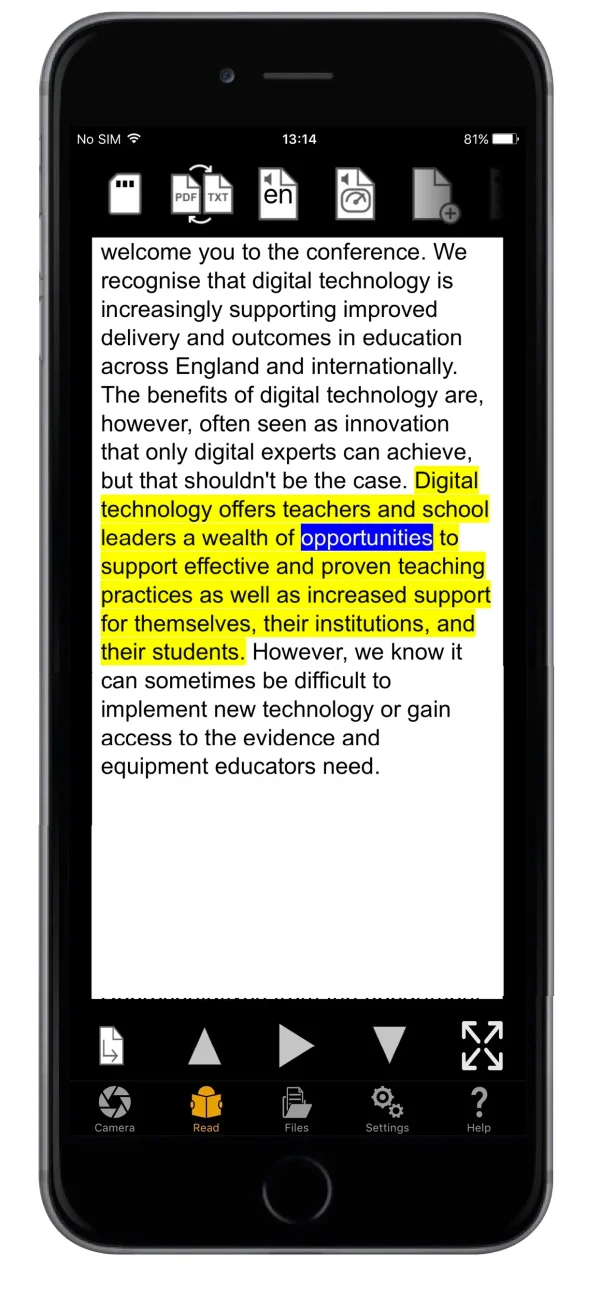
OneStep Reader gives you instant access to print anytime and anywhere.
OneStep Reader 3.0 is a rapid and efficient text recognition app. Its text-to-speech, text-to-Braille, and text highlighting tools make it valuable for blind, low-vision, dyslexic, and others with reading differences.
Use it to import or take a photo of anything containing text. Take a photo and the app reads text out loud or displays it on a connected refreshable Braille display. Read with more ease thanks to the simultaneous highlighting of the sentence and word that is being read on the picture or in the plain text document. The app helps you get a good photo with special alignment tools, including spoken and vibration guidance. Snap multiple pages, such as a book, for later reading.
Winner of the 2014, 2015, and 2016 AppleVis Golden Apple Award for Best Assistive Technology App.
• Reads image-based PDF and JPEG files, and now tagged PDF and EPub files too!
• Exports OneStep Reader files as HTML or TXT files.
• Navigates by line, sentence, word, or character.
• Crop, rotate, and edit the pictures you take before performing text recognition.
• View documents in PDF presentation mode with double highlighting while reading.
• View reading order and language-tagged PDF documents.
• Add and remove bookmarks in PDF documents.
• Switch between PDF view and reflowable text view.
• Read documents in the increasingly popular EPub format.
The app also has synchronized text highlighting to help you read along with the spoken text, a benefit for people with dyslexia and other reading difficulties.
Need nutritional information from your breakfast cereal? OneStep Reader can read labels. Out shopping and need a price? OneStep Reader can read price tags. Want to know what came in the mail? OneStep Reader captures it all.
OneStep Reader captures print from your computer or tablet screen. Photograph the screen and know exactly what that error message says.
Little details abound. We got rid of the fifty-page limit for batch recognition. Everything gets turned on its side with landscape support. Add subfolders to the local folder structure. Use Microsoft OneDrive, Dropbox, or Google Drive to store and retrieve your documents. You can now make calls, send emails, and open hyperlinks directly from documents; call or email your new contacts directly from the text of their business cards!
Fully localized versions (user interface, recognition, and speech) are available in: English, German, Italian, French, Spanish, Norwegian (Bokmål), Swedish, Portuguese, Dutch, Turkish, Danish, Polish, Russian, Japanese, and Czech.
Other languages available for speech and recognition only: Afrikaans, Albanian, Bulgarian, Chinese (Simplified), Chinese (Traditional), Croatian, Estonian, Finnish, Greek, Hungarian, Icelandic, Indonesian, Romanian, Serbian (Cyrillic), Serbian (Latin), Slovak, and Ukrainian.
Có gì mới
Phiên bản 3.7.1 · 18/02/2026
Minor bug fixes
Quyền riêng tư của ứng dụng
Những gì Sensotec nv khai báo trên App Store về cách ứng dụng này xử lý dữ liệu.
-
Dữ liệu không được thu thập
Nhà phát triển không thu thập bất kỳ dữ liệu nào từ ứng dụng này.
Phương thức đảm bảo quyền riêng tư có thể khác nhau, chẳng hạn như tuỳ theo các tính năng bạn sử dụng hoặc độ tuổi của bạn.
Thông tin
- Người bán
- Sensotec NV
- Danh mục
- Hiệu Suất
- Phiên bản
- 3.7.1
- Cập nhật
- 18/02/2026
- Phát hành
- 14/11/2016
- Kích thước
- 170,9 MB
- Yêu cầu
- iOS 13.0 trở lên
- Độ tuổi
- 4+
- Giá
- Miễn phí
- Ngôn ngữ
- Tiếng Anh, Tiếng Séc, Tiếng Đan Mạch, Tiếng Hà Lan, Tiếng Pháp, Tiếng Đức, Tiếng Ý, Tiếng Nhật, Tiếng Bokmål Na Uy, Tiếng Ba Lan, Tiếng Bồ Đào Nha, Tiếng Nga + 3 ngôn ngữ khác
- Bản quyền
- © Sensotec NV
Có thể bạn cũng thích
-
 VDScanHiệu Suất
-
 Supersense - AI for BlindHiệu Suất
-
 Vision: cho người khiếm thịĐối với người khiếm thị
-
 Total Reader - Text to SpeechHiệu Suất
-
 Talkie OCR - Chuyển đổi hìnQuét, Chỉnh sửa & Đọc to
-
 WayAround - Tag and ScanHiệu Suất
-
 Emvi.aiHiệu Suất
-
 OrCamHiệu Suất
-
 Envision AIread text, docs & find objects
-
 PiccyBotHiệu Suất