
OnlyT Remote
Remote for OnlyT on Windows
Được thiết kế cho iPhone, iPad, iPod touch
Miễn phí
- Độ tuổi4+
- Danh mụcHiệu Suất
- Nhà phát triểniMatt Solutions
- Ngôn ngữTiếng Anh+ 1 ngôn ngữ khác
- Kích thước5,1 MB
Liên kết đến trang App Store chính thức
Download.org không lưu trữ tệp nào của OnlyT Remote. Nút này mở trang ứng dụng trên App Store, nơi iMatt Solutions phát hành ứng dụng. Trang được kiểm tra lần cuối: 18/11/2026.
Ảnh chụp màn hình


Giới thiệu
Nhà phát triển chưa cung cấp nội dung này bằng ngôn ngữ của bạn.
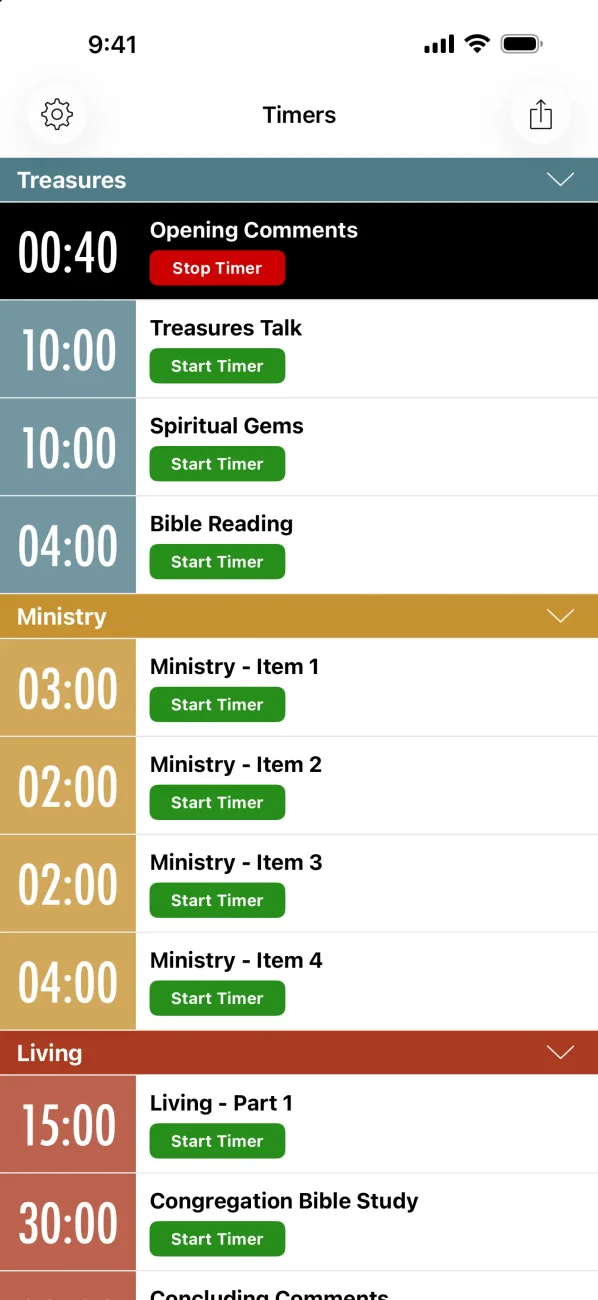
This app is a remote control for the OnlyT Windows software, used to control a series of timers for a meeting or conference.
You MUST have the OnlyT Windows software installed on a computer to use this app.
REMOTE APP FEATURES
---------------------------------
Timers for each Meeting Part:
- independent control of the timers away from the sound desk
- start/stop/reset timers
- the timer runs on your device and stays in sync with OnlyT every 5 seconds, for a smoother countdown
- collapse meeting sections
- timer changes from white > yellow (30 secs) > red (overtime)
- sound bell for talks that go overtime
- optionally hide the start/stop buttons in settings for "read-only" mode
- email a summary of timers
Fullscreen Timer in Landscape:
- optimised for use on the speaker's podium
- tap the clock to hide the timer if it is distracting
The app can be run on multiple devices at the same time. For example, the meeting chairman can view the timers and could decide to ring the bell for a talk if it is running overtime. Another user could be sitting in his seat in the audience starting/stopping the timers for each talk. And of course the fullscreen timer could be running on a device on the speaker's podium.
While the app is running, it will prevent the device from turning off. This can be disabled in settings.
The bell can be played from the local device or from the main Windows computer, which is typically connected to the sound system. If it is played from the local device the app will detect the current volume setting, switch it to 100% to play the bell, and then set the volume back to its previous setting. This prevents the device from playing unwanted sounds from other apps and notifications. And of course you are always asked to confirm before the bell is played - just in case you hit the button by mistake.
This app is optimised for iPhone and iPad. Split Screen mode is supported on iPad.
For setup instructions please see the website:
https://onlyt.app/#setup
RESOURCES
--------------------
Download OnlyT for Windows:
https://github.com/AntonyCorbett/OnlyT
Remote App Website:
https://onlyt.app
Remote App on Facebook:
https://facebook.com/RemoteForOnlyT
Remote App on X:
https://x.com/RemoteForOnlyT
OTHER APPS BY IMATT SOLUTIONS
-----------------------------------------
If you enjoy OnlyT Remote, you might also enjoy...
*** ServicePlanner ***
Field Service and Ministry App with automated Dropbox Sync, full Call and Return Visit Management, Reporting, Time Scheduling, integration with Territory Helper and much more.
https://www.serviceplanner.me
*** Equipd Bible ***
Multiple Bibles side-by-side, Verse Notes, Bible Reading Schedules, Bookmarks grouped by Topic, and optional support for Chinese Pinyin, Yale, Bopomofo (Zhuyin), and Sidney Lau.
https://www.equipd.me
Có gì mới
Phiên bản 1.7.0 · 20/10/2026
• Support for the latest versions of iOS
• Smoother, more efficient timers: the countdown now runs on your device and syncs with OnlyT every 5 seconds
• The "Throttled" option no longer needs to be disabled in OnlyT's settings
• Meeting part colours now match the Life and Ministry Meeting Workbook
• Faster detection when the connection to OnlyT is lost, with automatic reconnection
• Start and Stop respond more quickly
• More reliable switching to the full-screen timer when you rotate to landscape
• Improved layout of the settings screen
Quyền riêng tư của ứng dụng
Những gì iMatt Solutions khai báo trên App Store về cách ứng dụng này xử lý dữ liệu.
-
Dữ liệu không được thu thập
Nhà phát triển không thu thập bất kỳ dữ liệu nào từ ứng dụng này.
Phương thức đảm bảo quyền riêng tư có thể khác nhau, chẳng hạn như tuỳ theo các tính năng bạn sử dụng hoặc độ tuổi của bạn.
Thông tin
- Người bán
- iMatt Solutions Limited
- Danh mục
- Hiệu Suất
- Phiên bản
- 1.7.0
- Cập nhật
- 20/10/2026
- Phát hành
- 30/07/2018
- Kích thước
- 5,1 MB
- Yêu cầu
- iOS 15.0 trở lên
- Độ tuổi
- 4+
- Giá
- Miễn phí
- Ngôn ngữ
- Tiếng Anh, Tiếng Ý
- Bản quyền
- © iMatt Solutions Limited
Có thể bạn cũng thích
-
 CLM Timer – Meeting StopwatchHiệu Suất
-
 Life and Ministry ChairmanHiệu Suất
-
 JW Notes Ghi chú TheocraticGhi chú với Kinh Thánh
-
 NWS MobileHiệu Suất
-
 WitnessWorkĐối với Nhân Chứng Giê-hô-va
-
 Pioneer App - Ministry PlannerHiệu Suất
-
 Territory HelperHiệu Suất
-
 MyTime – Jehovah's WitnessesHiệu Suất
-
 MyMinistryAppHiệu Suất
-
 Hourglass TimeHiệu Suất