- Độ tuổi4+
- Danh mụcHiệu Suất
- Nhà phát triểnPiotr Krawczyk
- Ngôn ngữTiếng Anh+ 5 ngôn ngữ khác
- Kích thước43,7 MB
Liên kết đến trang App Store chính thức
Download.org không lưu trữ tệp nào của Posato. Nút này mở trang ứng dụng trên App Store, nơi Piotr Krawczyk phát hành ứng dụng. Trang được kiểm tra lần cuối: 20/11/2026.
Ảnh chụp màn hình


Giới thiệu
Nhà phát triển chưa cung cấp nội dung này bằng ngôn ngữ của bạn.
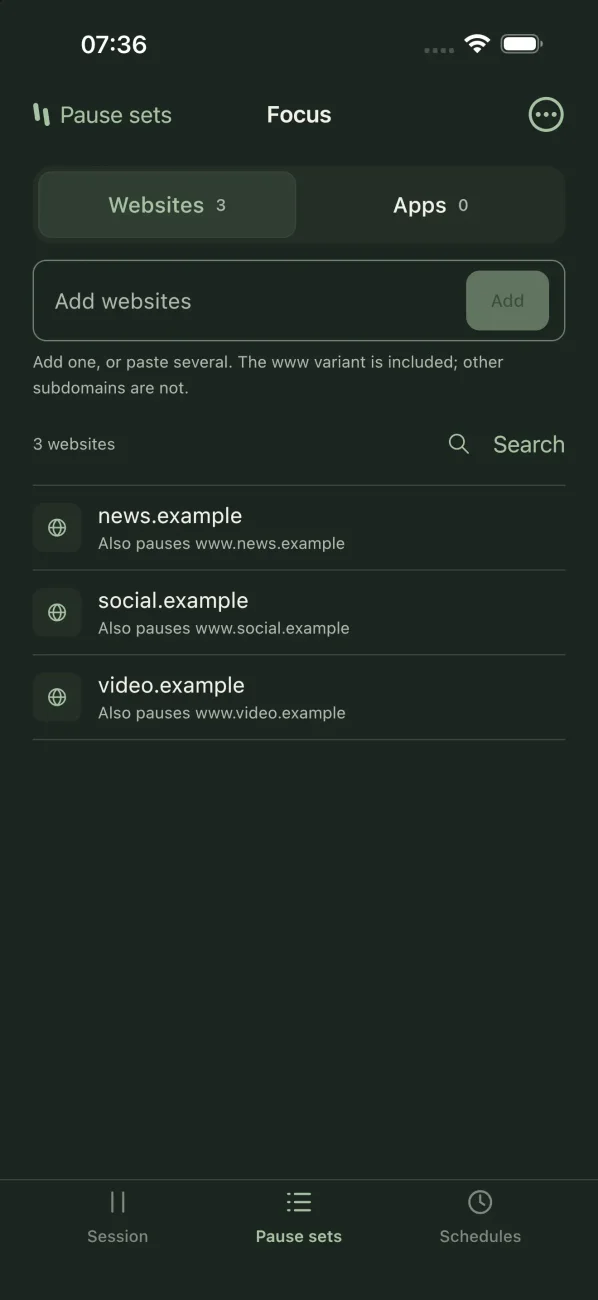
Choose the websites and apps you want to step away from, keep them in pause sets, then start a pause on your iPhone or plan pauses ahead with a schedule. Give yourself time to read, work, or be somewhere else.
PAUSE ON YOUR TERMS
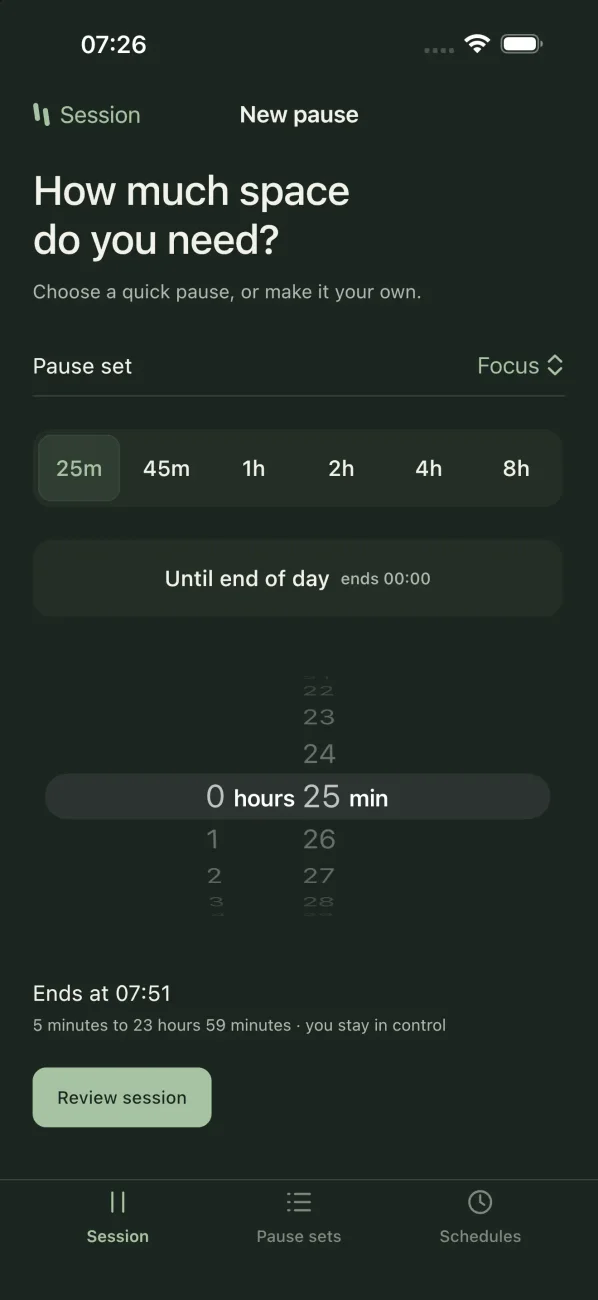
Pick a pause set and a duration: a quick choice from 25 minutes to 8 hours, Until end of day, or your own length on the timer. Posato uses Apple's Screen Time controls to pause that set for the session. You can deliberately end it early or remove Posato at any time. The pause gives you a moment to reconsider before opening something out of habit.
PAUSE SETS
Keep a set for each kind of pause, such as one for work and one for evenings. Each set has its own websites and apps, and one is the default. When pauses overlap, Posato pauses everything in their sets, within each device's limits, until the last one that includes an item ends.
SCHEDULES
Plan recurring pauses by weekday and time, each with its own pause set, such as weekday mornings or every evening. A schedule starts and ends on its own, even when Posato is closed. Skip the next one or end one early when plans change. Posato can tell you when a pause ends or when one starts on another device.
BREAKS AND BRIEF VISITS
During a scheduled pause, take one break of 5, 10, or 15 minutes; restrictions return on their own. For a website you want to check now and then, such as the news, let it open briefly during a pause: every 30 minutes, hour, or 2 hours, for 5, 10, or 15 minutes. Session shows when it opens next.
OPTIONAL ICLOUD SYNC
Link your iPhone and Mac through your Apple Account to sync pause sets with their websites, sessions, and schedules. App choices stay on each device. Changes are encrypted on your device before they reach your private iCloud database.
FOLDER SYNC AND OTHER DEVICES
Instead of iCloud, you can keep your workspace in a folder that iCloud Drive, Dropbox, OneDrive, or another service keeps in sync. Posato writes only encrypted files there and syncs the folder when you open the app. Folder sync also links Posato on Windows and Linux computers; posato.app has the downloads. Add a device by choosing the same folder and scanning a QR code.
Sync can be delayed or fail to arrive, and Posato cannot wake a sleeping device. The Mac app is a separate download for Apple silicon and Intel Macs. After a one-time setup there, pauses and schedules start without asking for your password each time.
EXPORT AND IMPORT
Save your pause sets, their websites, and your schedules to a file, optionally protected by a code, and import it on another device, such as a Mac on another Apple Account. App choices stay on each device.
NO POSATO ACCOUNT
No analytics, usage scores, streaks, or Posato-operated server. Posato follows your iPhone's language in English, Polish, German, French, Spanish, and Portuguese. Your choices stay on your devices unless you turn on sync. Posato is open source under the Apache License 2.0.
BEFORE YOU START
Screen Time permission is required on iPhone. The system may keep restrictions in place after a pause ends. For sessions shorter than 15 minutes, keep Posato open at the end or open it again to clear them. If you use Posato on more than one device, update all of them: devices on an earlier version stop syncing until they update.
Có gì mới
Phiên bản 1.6.0 · 06/11/2026
- Take a break during a scheduled pause: 5, 10, or 15 minutes, once per scheduled pause. Restrictions return on their own, and End break brings them back at once.
- Let a website open briefly during a pause: choose Open briefly in its menu, then every 30 minutes, hour, or 2 hours, for 5, 10, or 15 minutes. Session shows when it opens next.
- Posato now follows your iPhone's language in Polish, German, French, Spanish, and Portuguese, as well as English.
- Folder sync now also links Posato on Windows computers.
- Update Posato on your other devices to keep them in sync.
Quyền riêng tư của ứng dụng
Những gì Piotr Krawczyk khai báo trên App Store về cách ứng dụng này xử lý dữ liệu.
-
Dữ liệu không được thu thập
Nhà phát triển không thu thập bất kỳ dữ liệu nào từ ứng dụng này.
Phương thức đảm bảo quyền riêng tư có thể khác nhau, chẳng hạn như tuỳ theo các tính năng bạn sử dụng hoặc độ tuổi của bạn.
Thông tin
- Người bán
- Piotr Krawczyk
- Danh mục
- Hiệu Suất
- Phiên bản
- 1.6.0
- Cập nhật
- 06/11/2026
- Phát hành
- 23/09/2026
- Kích thước
- 43,7 MB
- Yêu cầu
- iOS 18.0 trở lên
- Độ tuổi
- 4+
- Giá
- Miễn phí
- Ngôn ngữ
- Tiếng Anh, Tiếng Pháp, Tiếng Đức, Tiếng Ba Lan, Tiếng Bồ Đào Nha, Tiếng Tây Ban Nha
- Bản quyền
- © 2026 Piotr Krawczyk